Using XEvents in SSAS 2012

One of the few new features in SSAS 2012 Multidimensional is the ability to use Extended Events (XEvents) for monitoring purposes. I was, naturally, curious about how to use them but quickly found that the documentation in Books Online was completely useless – the code example given just doesn’t work. This started a number of discussions with people like Akshai Mirchandani, Nick Medveditskov, Rob Kerr, Greg Galloway, Francesco De Chirico who all helped me get to the point where I had something working, and I’m very grateful to them. This is a short summary of what I’ve learned so far; hopefully some working XMLA samples will be useful to anyone else who is researching this subject.

First of all, here’s a working XMLA command that creates an XEvent trace:

<Create xmlns=http://schemas.microsoft.com/analysisservices/2003/engine 
xmlns:xsi=http://www.w3.org/2001/XMLSchema-instance
xmlns:ddl2=http://schemas.microsoft.com/analysisservices/2003/engine/2
xmlns:ddl2_2=http://schemas.microsoft.com/analysisservices/2003/engine/2/2
xmlns:ddl100_100=http://schemas.microsoft.com/analysisservices/2008/engine/100/100
xmlns:ddl200_200=http://schemas.microsoft.com/analysisservices/2010/engine/200/200
xmlns:ddl300_300="http://schemas.microsoft.com/analysisservices/2011/engine/300/300"> <ObjectDefinition> <Trace> <ID>XEvent Demo Trace</ID> <Name>XEvent Demo Trace</Name> <ddl300_300:XEvent> <event_session name="xeas" dispatchLatency="1" maxEventSize="4" maxMemory="4"
memoryPartitionMode="none" eventRetentionMode="allowSingleEventLoss"
trackCausality="true"> <event package="AS" name="DiscoverBegin" /> <event package="AS" name="DiscoverEnd" /> <event package="AS" name="QueryBegin" /> <event package="AS" name="QueryEnd" /> <event package="AS" name="CommandBegin" /> <event package="AS" name="CommandEnd" /> <event package="AS" name="LockAcquired"> <action package="Package0" name="callstack"></action> </event> <event package="AS" name="LockReleased"> <action package="Package0" name="callstack"></action> </event> <event package="AS" name="LockWaiting"> <action package="Package0" name="callstack"></action> </event> <target package="Package0" name="event_file"> <parameter name="filename" value="c:\demo.xel" /> </target> </event_session> </ddl300_300:XEvent> </Trace> </ObjectDefinition> </Create>

.csharpcode, .csharpcode pre
{
font-size: small;
color: black;
font-family: consolas, “Courier New”, courier, monospace;
background-color: #ffffff;
/*white-space: pre;*/
}
.csharpcode pre { margin: 0em; }
.csharpcode .rem { color: #008000; }
.csharpcode .kwrd { color: #0000ff; }
.csharpcode .str { color: #006080; }
.csharpcode .op { color: #0000c0; }
.csharpcode .preproc { color: #cc6633; }
.csharpcode .asp { background-color: #ffff00; }
.csharpcode .html { color: #800000; }
.csharpcode .attr { color: #ff0000; }
.csharpcode .alt
{
background-color: #f4f4f4;
width: 100%;
margin: 0em;
}
.csharpcode .lnum { color: #606060; }


The important parts are the list of events, which are the same as the events that can be seen in Profiler (for a full list see here), and the target node which specifies the .xel file to output to.

Once this has been executed in SQL Server Management Studio, you can verify that the trace is running by using the following DMV:

select * from

$system.discover_traces

Here’s what the output is on my machine:

image

There are three traces shown running here on my SSAS instance and the last in the list is the XEvent trace I’ve just created.

Having run a few queries to make sure there is something in the .xel file, the trace can be stopped by executing the following XMLA:

<Delete xmlns="http://schemas.microsoft.com/analysisservices/2003/engine">
    <Object>
        <TraceID>XEvent Demo Trace</TraceID>
    </Object>
</Delete>

.csharpcode, .csharpcode pre
{
font-size: small;
color: black;
font-family: consolas, “Courier New”, courier, monospace;
background-color: #ffffff;
/*white-space: pre;*/
}
.csharpcode pre { margin: 0em; }
.csharpcode .rem { color: #008000; }
.csharpcode .kwrd { color: #0000ff; }
.csharpcode .str { color: #006080; }
.csharpcode .op { color: #0000c0; }
.csharpcode .preproc { color: #cc6633; }
.csharpcode .asp { background-color: #ffff00; }
.csharpcode .html { color: #800000; }
.csharpcode .attr { color: #ff0000; }
.csharpcode .alt
{
background-color: #f4f4f4;
width: 100%;
margin: 0em;
}
.csharpcode .lnum { color: #606060; }


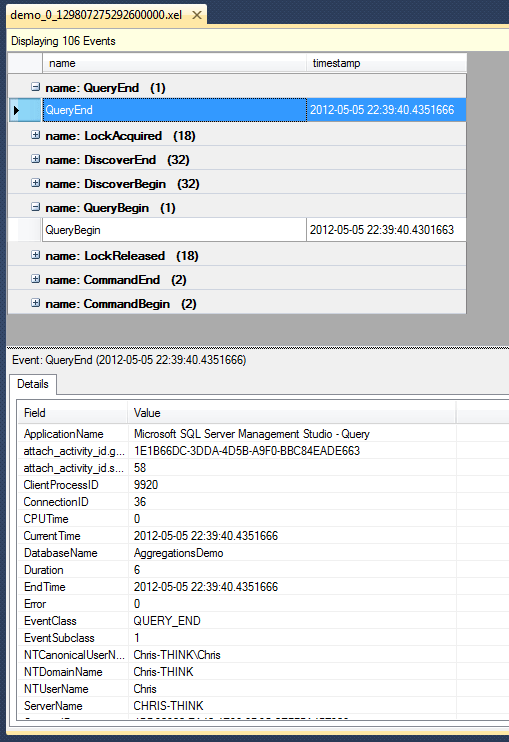
You can now open the .xel file specified in the original trace definition in SQL Server Management Studio, browse through it, sort, group events and so on:
image

Instead of outputting to a .xel file, it’s also possible to output to a .etl file by changing the target. Here’s an XMLA command that does this:

<Create xmlns=http://schemas.microsoft.com/analysisservices/2003/engine 
xmlns:xsi=http://www.w3.org/2001/XMLSchema-instance
xmlns:ddl2=http://schemas.microsoft.com/analysisservices/2003/engine/2
xmlns:ddl2_2=http://schemas.microsoft.com/analysisservices/2003/engine/2/2
xmlns:ddl100_100=http://schemas.microsoft.com/analysisservices/2008/engine/100/100
xmlns:ddl200_200=http://schemas.microsoft.com/analysisservices/2010/engine/200/200
xmlns:ddl300_300="http://schemas.microsoft.com/analysisservices/2011/engine/300/300"> <ObjectDefinition> <Trace> <ID>XEvent Demo Trace</ID> <Name>XEvent Demo Trace</Name> <ddl300_300:XEvent> <event_session name="xeas" dispatchLatency="1" maxEventSize="4" maxMemory="4"
memoryPartitionMode="none" eventRetentionMode="allowSingleEventLoss"
trackCausality="true"> <event package="AS" name="DiscoverBegin" /> <event package="AS" name="DiscoverEnd" /> <event package="AS" name="QueryBegin" /> <event package="AS" name="QueryEnd" /> <event package="AS" name="CommandBegin" /> <event package="AS" name="CommandEnd" /> <event package="AS" name="LockAcquired"> <action package="Package0" name="callstack"></action> </event> <event package="AS" name="LockReleased"> <action package="Package0" name="callstack"></action> </event> <event package="AS" name="LockWaiting"> <action package="Package0" name="callstack"></action> </event> <target package="Package0" name="etw_classic_sync_target"> <parameter name="default_etw_session_logfile_path" value="c:\demo.etl" /> </target> </event_session> </ddl300_300:XEvent> </Trace> </ObjectDefinition> </Create>

.csharpcode, .csharpcode pre
{
font-size: small;
color: black;
font-family: consolas, “Courier New”, courier, monospace;
background-color: #ffffff;
/*white-space: pre;*/
}
.csharpcode pre { margin: 0em; }
.csharpcode .rem { color: #008000; }
.csharpcode .kwrd { color: #0000ff; }
.csharpcode .str { color: #006080; }
.csharpcode .op { color: #0000c0; }
.csharpcode .preproc { color: #cc6633; }
.csharpcode .asp { background-color: #ffff00; }
.csharpcode .html { color: #800000; }
.csharpcode .attr { color: #ff0000; }
.csharpcode .alt
{
background-color: #f4f4f4;
width: 100%;
margin: 0em;
}
.csharpcode .lnum { color: #606060; }


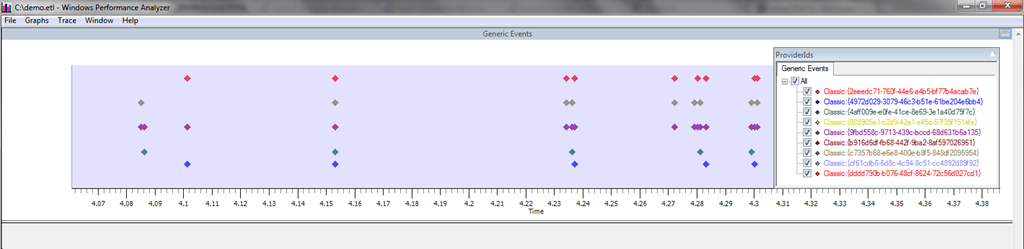
This gives you something that can opened in Windows Performance Analyzer:
image

BI Survey 11

I’ve just had the email that it’s time to participate in the BI Survey yet again. Here’s the link to use:

https://digiumenterprise.com/answer?link=981-EVF8ZE8Z

As a participant, you will:
•    Receive a summary of the results from the full survey
•    Be entered into a draw to win one of ten $50 Amazon vouchers
•    Ensure that your experiences are included in the final analyses

Getting this invite reminded me I didn’t get around to blogging about the findings of the BI Survey 10, even though I got sent a copy late last year. This is a bit of an oversight on my part because there are always plenty of interesting facts to be found in there, for example:

  • Out of all the BI tools looked at, SSAS is the joint least likely to be subjected to a competitive evaluation; even so when it is part of a competitive evaluation with other products it has an above-average win-rate.
  • When looking at reasons why SSAS wins competitive evaluations, its performance comes out top; ‘vendor did a better sales job’ is at the bottom of the list.
  • Proclarity is still used as a front-end for SSAS by almost 20% of the customers surveyed, which explains why this is still one of the most popular posts on my blog…

Hopefully PowerPivot will be included in the survey this year because I’d be very interested to see how it scores.

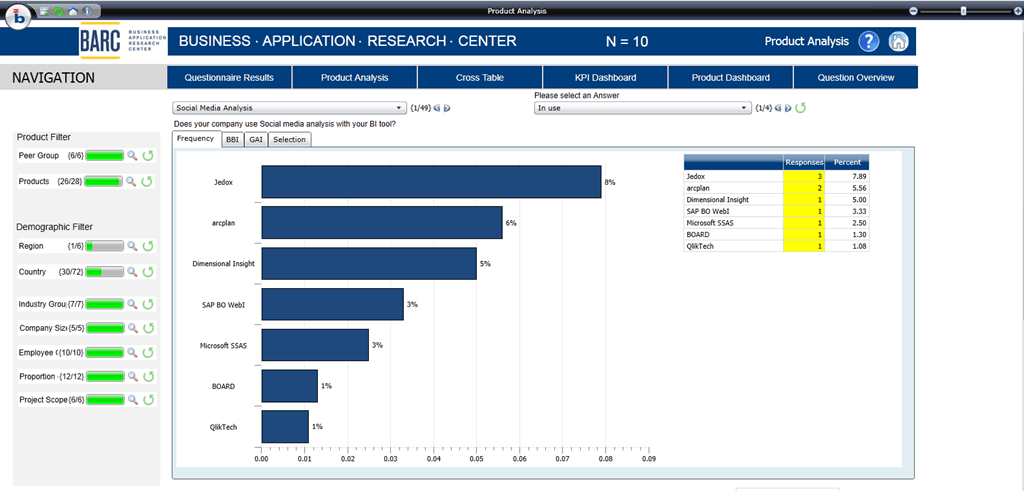
Last of all, one cool thing that you get with the BI Survey (which is highly appropriate given the subject matter) is an online BI tool called the BI Survey Analyzer to help you explore the data:

image

It would be nice to be able to download all the survey results in, say, csv format so you could import them into your BI tool of choice but I suppose that might be pushing things a little bit – it would make it too easy to steal the data!

New Cache-Related Counters in the Query Subcube Verbose Event

I was studying a Profiler trace run on a SSAS 2012 Multidimensional instance today, and I noticed some new information was being returned in the Query Subcube Verbose event relating to caching. The Query Subcube Verbose event is fired every time the Formula Engine requests data from the Storage Engine, specifically when the Formula Engine requests a subcube of data from a single measure group, and one of these requests may or may not be answered using the cache associated with that measure group. If the request is answered from cache then performance is likely to be very good; however in some (but by no means all) cases, if the Storage Engine has to go to disk to answer the request then performance could be poor.

It has always been possible to tell whether the subcube request associated with a Query Subcube Verbose event is answered from cache or not. Let’s take as an example a query that returns a single cell of data from a super-simple cube. Here’s what I see in Profiler when I run my query on a cold cache:

image

Out of the three red boxes in this screenshot, in the top box you can see the Progress Report Begin/End events associated with the Query Subcube Verbose event that’s in the middle red box – these show the Storage Engine is reading data from disk. The Event Subclass column for the Query Subcube Verbose event shows that it is requesting non-cache data, and the Resource Usage event shows the number of rows scanned and returned. If I run the query a second time without clearing the cache – ie on a warm cache – then I see the following:

image

The Event Subclass column for the Query Subcube Verbose event shows the data it is requesting is being retrieved from cache, there are no Progress Report Begin/End events (as you would expect) and the Resource Usage event shows no rows read.

Looking at the Query Subcube Verbose event itself, there are now two groups of information returned:

image

The top red box shows information on the granularity of the request, as has been the case since SSAS 2005. The bottom red box contains the new stuff. These four values are reported at the point in time after the Query Subcube Verbose event has executed and are:

  • CacheEntries: the number of entries in the measure group cache after the subcube request has been executed. This value will continue to increment and only be reset back to zero after the measure group cache has been cleared (either as a result of an XMLA clear cache or some other event, like processing, that clears the cache). The execution of the subcube request will itself usually result in an entry being made into the cache, so it’s unlikely you’ll see this value showing as zero. If you don’t see this value incrementing you might be running into this issue.
  • CacheHits: the number of times that a subcube request has been answered from this particular measure group cache since the last time this measure group was processed (note, not the last time the cache was cleared).
  • CacheSearches: the number of times that the measure group cache has been searched since the last time this measure group was processed. This value may increment by more than one for each subcube request.
  • CacheEvictions: the number of times that an entry has been evicted from the measure group cache since the last time the measure group was processed. You’ll see this value go up, for instance, if you run an XMLA clear cache; if you see it go up at other times then Bad Things are likely to be happening – you may be running out of memory on the server for example, and SSAS might be evicting data from the cache as a result.

Together these values give us a much more detailed view of what’s going on in the individual storage engine caches than we’ve ever had before, and will prove to be very useful for performance tuning and also when building cache warmers. That said it’s not going to be easy to use this information when you’ve got complex queries that generate a lot of subcube requests, but it’s better than not having the information at all.

[Thanks once again to Akshai Mirchandani for answering my questions on this!]

New SSAS 2012 Tabular book available for pre-order

At long last, the SSAS 2012 Tabular book that Marco Russo, Alberto Ferrari and I have been working hard on for the last few months is now available for pre-order!

You can get it from Amazon UK, Amazon US, oreilly.com and all good bookstores…

What’s new in Analysis Services 2012 Multidimensional?

Now that SQL Server 2012 has been released, I’ve just realised I’ve not seen a definitive list of what’s new in SSAS 2012 Multidimensional. In fact I’m surprised I haven’t got round to writing a blog post about this… after all, despite the fuss over Tabular, Power View and all the other cool new stuff I guess most existing SSAS users are going to be more interested in staying with the Multidimensional model when they upgrade.

So what is new? Here’s a list of everything I know about plus some relevant links:

Have I forgotten anything? Have you found anything changed that isn’t documented? If so, please leave a comment. I’ll update this post as and when I find/remember new stuff.

SSAS Maestros Training: July 9-13 2012, Milan, Italy

After all the activity last year, you may have been wondering what’s happened with the SSAS Maestro Programthe premier certification for Analysis Services professionals (for some more background information see here). Well, wonder no more: my fellow SSAS Maestro Marco Russo and I will be running the course again in Milan this summer on the 9th-13th July.

There are a few things that are going to be different with this run of the course which I need to point out:

  • It’s no longer invitation-only so anyone can apply to attend. However we’ll only have 20 spaces in the training room and this, plus the fact that this is a very demanding course, means we’ll only be accepting people who have a lot of previous SSAS experience.
  • It’s no longer free either. The cost will be €7000 plus taxes for five days of training plus the exam/coursework/labs, although people who have previously attended the Maestros course will only have to pay €5000 plus taxes. That’s fairly expensive I know, but there’s a lot of work involved in organising a one-off course like this, a lot of marking to be done afterwards and there are also a lot of overheads as well as two trainers to pay.
  • The marking process will be a lot faster this time!

If you’re interested in attending please send Marco and me an email at ssasmaestro@sqlbi.com, along with a copy of your CV/resume and a few paragraphs detailing your level of SSAS knowledge. We’ll be opening registrations in mid-April and we’ll be able to let you know whether you’ve been accepted then.

Don’t say Vertipaq, say xVelocity!

Something that got a bit of attention last week on Twitter, but which may not have filtered through into the wider SSAS community yet, is the fact that Microsoft has renamed the Vertipaq engine that’s inside PowerPivot and Analysis Services 2012 Tabular. It’s now called “the xVelocity in-memory analytics engine”, and the term “xVelocity” is also going to be used to refer to the column store index feature in the SQL Server 2012 relational database. For more details see the official announcements:

http://blogs.technet.com/b/dataplatforminsider/archive/2012/03/08/introducing-xvelocity-in-memory-technologies-in-sql-server-2012-for-10-100x-performance.aspx

http://blogs.msdn.com/b/analysisservices/archive/2012/03/09/xvelocity-and-analysis-services.aspx

Personally I liked the old Vertipaq name and as I said recently, I think these umbrella marketing terms that refer to lots of different things cause confusion. But it’s only a name so there’s nothing much to get upset about – just don’t say Vertipaq any more, say xVelocity.

SQL Server 2012 RTM–and a new SSAS Tabular training course

By now you’ve probably already heard that SQL Server 2012 has been released (you can download the eval here), along with the Feature Pack (which contains some interesting stuff, including a 64-bit version of the Excel Data Mining Addin at last) and PowerPivot V2.0. I know I’m almost 24 hours late on this news but I thought I’d mention it nonetheless…

If you’re a BI professional wondering how you’re going to learn Analysis Services 2012 Tabular, then you might want to check out a new series of training courses on it that I’m teaching with my friends Marco and Alberto at various places around Europe:
http://www.ssasworkshop.com/

It’s based on the book we’ve been co-writing on the Tabular model which will hopefully be available very soon, and since we’ve been living Tabular and DAX for the last few months you can be sure that it’s the very best way to get up to speed on it. We hope to see you at one of the classes!

Natural and Unnatural Hierarchies in the SSAS 2012 Tabular Model

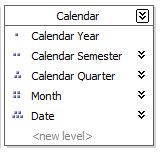
I’m sure you’re all aware of the difference between natural and unnatural user hierarchies in the Analysis Services Multidimensional model (if you’re confused as to what I mean when I say ‘Multidimensional model’, have a quick read of this post from a few weeks ago which explains the terminology). To recap, natural user hierarchies in Multidimensional look like this in BIDS:

image

There is a one-to-many set of attribute relationships between each level, so each Calendar Year has multiple Calendar Semesters but one Calendar Semester has only one Calendar Year, and they are a Good Thing as far as query performance is concerned. Unnatural user hierarchies look like this:

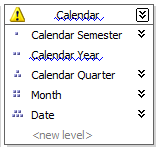
image

They work, but there aren’t one-to-many relationships between every level and query performance may be worse than with a natural user hierarchy.

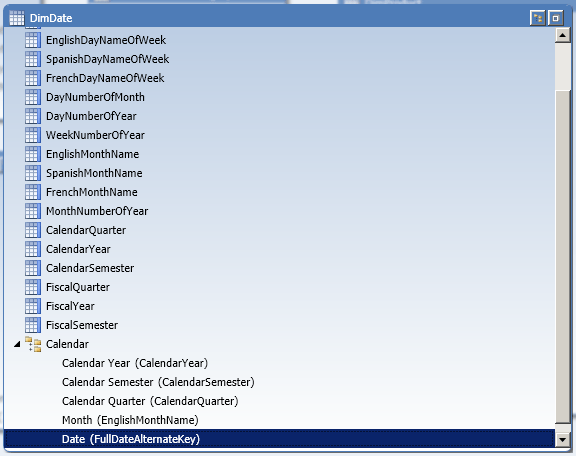
But what does all this have to do with the Tabular model? In SSDT when you create a hierarchy there’s no indication as to whether it’s natural or unnatural:

image

…and up to recently I assumed that this was an issue that simply wasn’t relevant to Tabular. However, after a recent conversation with Marius Dumitru from the dev team and Greg Galloway I now know this isn’t the case!

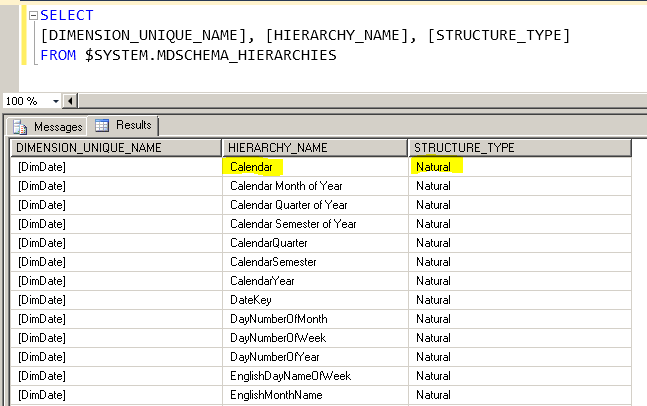
If you query the MDSCHEMA_HIERARCHIES DMV as follows:

SELECT
[DIMENSION_UNIQUE_NAME], [HIERARCHY_NAME], [STRUCTURE_TYPE]
FROM $SYSTEM.MDSCHEMA_HIERARCHIES

You can see whether a hierarchy in a Tabular model is natural or unnatural:

image

In this case you can see that the Calendar hierarchy that I created on the DimDate table is unnatural; SSAS has determined this during processing (specifically during the Process ReCalc stage) by examining the data itself automatically.

It turns out that natural hierarchies in Tabular can result in faster query performance because certain MDX and Formula Engine code paths in the SSAS engine are still not optimised for unnatural hierarchies. I don’t have any specific examples of when this occurs at the moment but if I do find them I’ll be sure to update this post. And if anyone else using Tabular, or even PowerPivot (and I assume this is relevant to PowerPivot too) finds a good example of how changing to a natural user hierarchy improves performance please leave a comment.

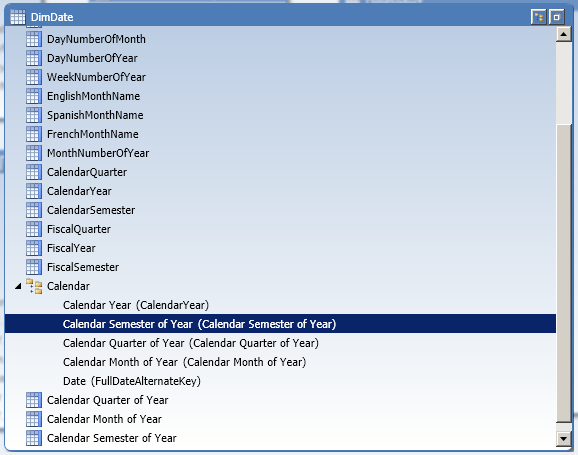
In the example above, I created the Calendar hierarchy in the Tabular model by simply dragging the CalendarYear, CalendarSemester, CalendarQuarter, EnglishMonthName and FullDateAlternateKey columns underneath each other in the new hierarchy. It’s unnatural because there are only two distinct values in Calendar Semester (the semester numbers 1 and 2), four distinct values in Calendar Quarter (the quarter numbers 1 to 4) and there are only twelve distinct values in EnglishMonthName (the names of the months), so there is a many-to-many relationship between the values in all these columns. I can make it natural by creating three calculated columns that concatenate CalendarYear and CalendarSemester, CalendarYear and CalendarQuarter, and CalendarYear and EnglishMonthName as follows:

DimDate[Calendar Semester of Year] =DimDate[CalendarYear] & " " & DimDate[CalendarSemester]

DimDate[Calendar Quarter of Year] = DimDate[CalendarYear] & " Q" & DimDate[CalendarQuarter]

DimDate[Calendar Month of Year] = DimDate[CalendarYear] & " " & DimDate[EnglishMonthName]

Using these calculated columns for the Semester, Quarter and Month levels of the hierarchy as follows:

image

…will make the Calendar hierarchy natural:

image

So, what is the BI Semantic Model?

Over six years ago now I wrote what proved to be a very popular post here on my blog called “So, what is the UDM?”. It was written in response to the widespread confusion around the time of the release of Analysis Services 2005 about what the term “UDM” actually meant. In a sense “UDM” was just another name for an Analysis Services cube, but it also represented the nebulous concept of Analysis Services being a semantic layer suitable for all your reporting needs; however people often thought it was a new product that somehow replaced Analysis Services cubes and got themselves tied in all sorts of knots as a result. Thankfully, use of the term died out pretty quickly as everyone started referring to Analysis Services as, well, Analysis Services.

Fast forward to the present day and I can see a similar amount of confusion about the term “BI Semantic Model” or BISM for many of the same reasons. What is the BI Semantic Model exactly? It is… Analysis Services 2012 plus PowerPivot. Let’s be clear though: it is not just the new Analysis Services Tabular Model, although the term BISM is all too often used as if it did mean that. It’s not even a specific bit of software. Analysis Services 2012 consists of two parts, the Multidimensional Model which is the Analysis Services of cubes and dimensions that we already had in 2008 R2 and earlier versions, and the new Tabular model which is the Analysis Services of tables, relationships, in-memory storage and column store. BISM refers to both models plus PowerPivot, or rather it refers to the way that Analysis Services and PowerPivot can be used as a semantic layer on top of other data for reporting purposes.

So what’s the point of a term like BISM then if it doesn’t refer to something tangible? Why not just call Analysis Services “Analysis Services” and PowerPivot “PowerPivot”? Well there’s certainly some conceptual stuff going on here (as outlined in the Vision and Roadmap blog post) but just as we had with the term UDM I’d say there’s also some marketing-led obfuscation here as well, for three reasons:

  • A single term like BISM suggests that Analysis Services 2012 and PowerPivot are a single, cohesive product, whereas the Tabular and Multidimensional models are actually very different beasts. If you’re going to be working with Analysis Services 2012 on a project the first decision you’ll have to make is which type of model to use, and if you change your mind later you’ll have to start development again from scratch and learn a lot of new skills. I hope one day that the two models will merge again but it won’t happen soon.
  • Microsoft has correctly identified that many people want to do BI but were put off by the complexity of building Multidimensional models in previous versions of Analysis Services. The simplicity of the Tabular model goes a long way to solving this problem; Tabular also replaces Report Builder models which were really a just a simple semantic layer for people who didn’t like SSAS or had valid reasons to stay with relational reporting. In order not to scare off this market a new name is necessary to avoid the negative connotations that come with “Analysis Services” and “cubes”.
  • Calling something a “semantic model” suggests that it’s a nice, light, thin, easy-to implement layer on top of your relational data warehouse, with no data duplication (which is often seen as a Bad Thing) involved. In actual fact anyone who has used the Multidimensional model will know you almost always use MOLAP storage which involves all the data being copied in Analysis Services; and I suspect when people start using the Tabular model they will be using it in Vertipaq mode (where again all the data gets copied into Analysis Services) rather than in DirectQuery mode (where all queries are translated to SQL which is then run against SQL Server).

Now I’m not going to suggest that there’s anything wrong with these marketing objectives – anything that sells more Analysis Services is good for me – or that the Tabular model is bad, or anything like that. All I want to do is suggest that in the SQL Server technical community we stop using the term BISM and instead refer to Analysis Services Multidimensional, Analysis Services Tabular and PowerPivot so we’re always clear about what we’re talking about in blog posts, articles, books and so on. I don’t think using the term BISM is useful in any technical context, just as the term UDM wasn’t in the past, because it is a blanket term for several different things. I also think that so many people are confused about what the term BISM actually means that it is becoming counter-productive to use it: people will not buy into the MS BI stack if they’re not really sure what it consists of.

What does everyone think about this?