Returning Selected Items in an Excel Slicer Using MDX in PowerPivot and SSAS

One problem I came up against recently is how to find out what has been selected on an Excel slicer connected to SSAS or a PowerPivot model. There are a number of blog posts showing solutions to this problem, both for scenarios where only one item has been selected and when multiple items have been selected, for example (look at the comments as well as the posts themselves):
http://www.powerpivotpro.com/2010/12/another-way-to-get-and-use-slicer-values-in-formulas/
http://www.powerpivotpro.com/2011/09/catching-multiple-slicer-selections-in-a-formula/

…but I’ve come up with a new, MDX-based approach that handles the multiple selection scenario no matter how many items there are in the slicer, and which I thought was worth blogging about. I was tempted to include this in my series on MDX for PowerPivot but since it’s equally relevant for SSAS users, and the MDX is a bit complicated for an introductory series, I thought I’d make it into a standalone post.

To describe this technique I’m going to use same PowerPivot model I describe here, which is based on the AdventureWorks DW sample database. First of all, create a new PivotTable with CalendarYear in a slicer and CalendarYear on rows and any relevant measure on columns:

image

Selecting a Year in the slicer means that that Year appears on rows in the PivotTable, and selecting multiple years means multiple rows are displayed, as you would expect. Next you need to add a new MDX calculated measure to the PivotTable. If you’re using SSAS you can simply add the calculation onto your cube or you can use the OLAP PivotTable Extensions addin; for PowerPivot users the OLAP PivotTable Extensions approach is the only option, so that’s what I’ll demonstrate. Right-click inside the PivotTable and choose OLAP PivotTable Extensions from the right-click menu, and then in the Calculations tab create a new calculation called SelectedYears with the following definition:

Generate(
Except(
  Axis(1)
  , {[DimDate].[CalendarYear].Defaultmember}
)
, [DimDate].[CalendarYear].Currentmember.Name
, ", "
)

image

…and click Add to PivotTable. The result will be a new measure that returns a comma-delimited list of the names of everything selected on the rows axis of the query, and therefore everything selected in the slicer:

image

How does this work? Well, first of all Axis(1) is used to return the set used on the rows axis of the query used to populate the PivotTable (incidentally, this is why it’s important to have another measure in the PivotTable – if it’s not there, the structure of the query generated by Excel will be different and while the MDX can be altered to handle this, some of the items in the slicer will be partially greyed-out). The set returned by Axis(1) will include the All Member of the CalendarYear hierarchy, so the Except() function is used to remove it; finally, the Generate() function is used to iterate over this set and return the comma-delimited list of member names. In this example the CalendarYear field on the DimDate table in my PowerPivot model has become the MDX hierarchy with the unique name [DimDate].[CalendarYear]; please read this post for some background on how PowerPivot objects map to MDX objects.

Now you have the PivotTable you can refer to the top-right cell in it (in this example it’s cell F3)  in it to return the list of years and hide the PivotTable itself; this allows you to create dynamic titles like the following:

="Sales For Years: " & F3

You can then also create other, new PivotTables and hook them up to the original slicer and they will all work as normal:

 image

Bissantz Deltamaster and some thoughts on guided data analysis

It’s been a while since I’ve written about any third-party SSAS client tools here, isn’t it? This is partly because there aren’t as many of them around as there used to be; if I’m honest, it’s also because I find writing product reviews pretty dull as well. That said, I’m always interested to see demos of these tools, and my customers are always asking me about what’s available so I need to keep my knowledge up-to-date.

I’d like to point out before we go any further that his post is NOT a product review, but some thoughts that occurred to me after seeing one of these client tool demos.

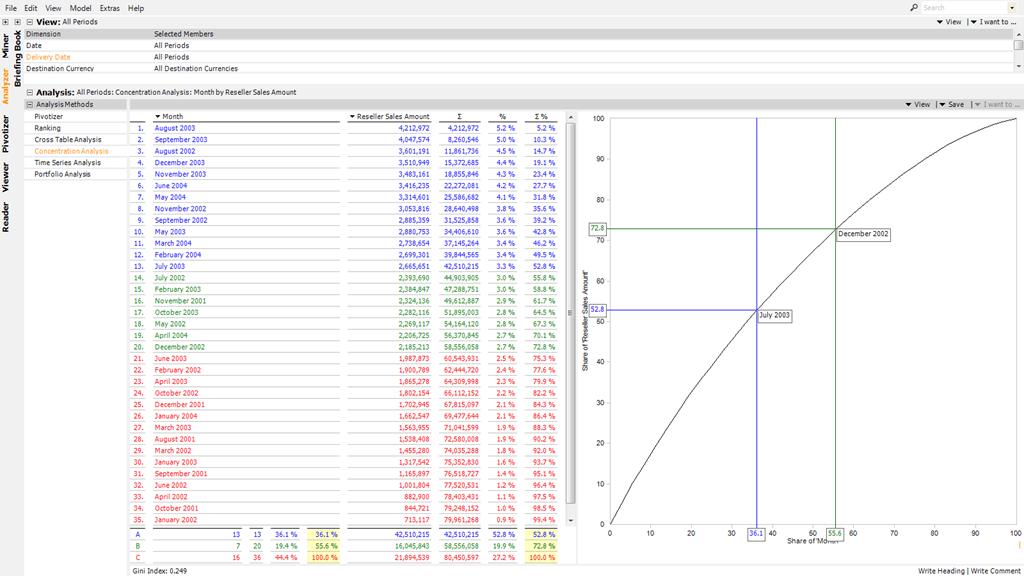
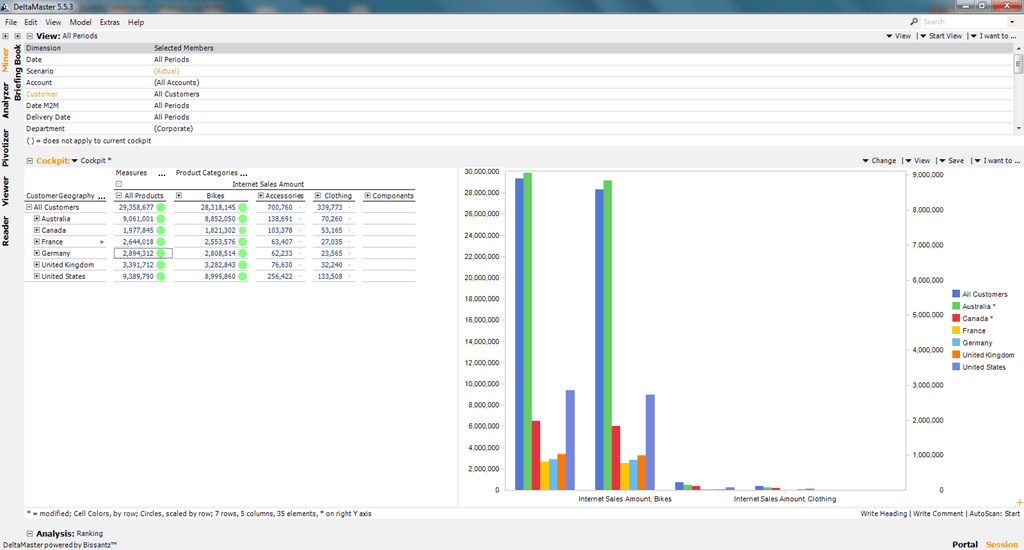
Anyway, few months ago I was given a demo of a tool called Deltamaster, sold by a German company called Bissantz. Now if you’re reading this in Germany (or Austria, or Switzerland), you’re probably wondering why I’m writing about something that’s been around almost as long as SSAS itself – I’ve certainly known about it for years although I’ve never properly played with it. If you’re reading this elsewhere, though, you probably won’t have heard of Deltamaster because it isn’t widely sold outside its home market. It’s a traditional, full-featured desktop SSAS client tool tool that does all the things you’d expect a traditional, full-featured desktop SSAS client tool to do. It does PivotTable-like things. It does charts and sparklines. It allows you to save multiple views in briefing books. It has menus coming out of its ears and hundreds of different options for doing things. The UI is, if anything, a bit too busy and slightly old-fashioned looking, but it does everything you’d want it to.

image

What really caught my attention, though – and I’m sure this is a feature its had for ages – was the range of guided analyses it has built-in. With just a few clicks and the selection of a few parameters, you can do some very sophisticated stuff. Here’s the Concentration Analysis (aka ABC analysis) report that it produced for months on the Adventure Works cube, complete with colour coding, chart and all the working:

image

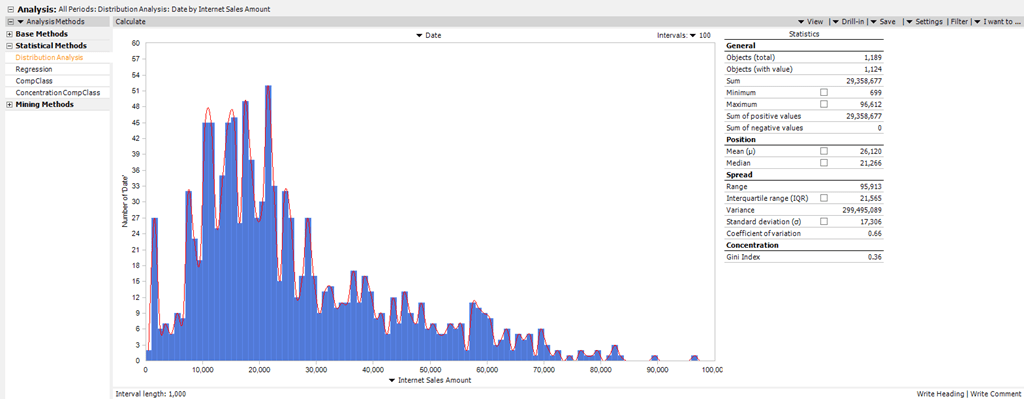
A distribution analysis (again, notice the stats in the box on the right hand side):

image

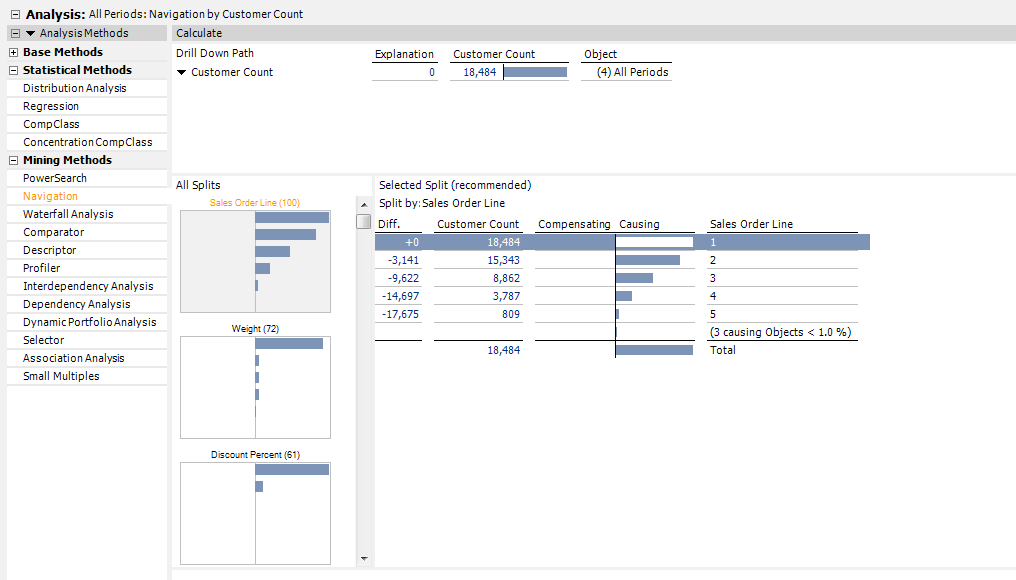
Even some impressive-looking data mining stuff that I don’t quite understand (I should RTFM):

image

I’ve seen this kind of thing before, but Deltamaster does this well and has by far the largest number of different types of analysis available. And all this made me think, why don’t more tools do this? Why doesn’t Excel feature this kind of functionality?

Data visualisation tools like Tableau have done well by making something that’s difficult and easy to get wrong – data visualisation – much easier, by pointing you in the right direction and stopping you doing things you shouldn’t be doing. You think you want a pie chart? You don’t get it, because pie charts are a Bad Idea. You get what’s good for you, not what you want. What Deltamaster is doing (and I think it’s an idea that could be taken a lot further) is the same thing but for data analysis, statistics and data mining. Now I know next to nothing about statistics and while I’m not proud of that fact, I’ve only managed to survive as long as I have in the BI world because my customers know less about statistics and data analysis techniques than I do. So far, the big struggle in BI has been to present the correct figures in a table with reasonable performance. The next problem in BI, once the data has been delivered, is to make sure business people interpret it properly. This is what good data visualisation tools do, and I think this is what guided analysis functionality could do as well. Are sales really going up, or is this seasonal variation? Is there a correlation between running promotions and increased sales? Does a customer’s gender, age, occupation or education level tell us anything about their likelihood of buying from us? At the moment there are plenty of BI tools that give us the ability to answer these questions if we know what we’re doing, but most of us don’t.

So, the key thing though is not to provide lots of types of guided analyses, but to make them easy to use and difficult to make mistakes with. If I was to criticise Deltamaster it would be because it provides a whole bunch of analyses that spit out graphs and stats, but it doesn’t go far enough to help you choose which type of analysis is right for your business problem, to help you choose the right parameters to pass in, and to help you make sense of the results which are returned; it’s still well ahead of most of the competition though. Would some level of user education always be necessary? Would the tool need to know about the data it’s working with, and the business problems associated with that data? To some extent maybe. I still think there’s a lot of room for improvement on what we’ve got today though.

Microsoft SQL Server 2012: The BISM Tabular Model is now available to buy!

I decided to wait until I had a real, physical, made-of-dead-tree copy of it in my hands before blogging, but I’m pleased to announced that the new book that Marco, Alberto and I wrote on SSAS 2012 Tabular models is now available to purchase (even though, as Marco says here it was actually officially released a few weeks ago).

A sample chapter can be found here:
http://cdn.oreilly.com/oreilly/booksamplers/msp/9780735658189_sampler.pdf

You can buy it all all good bookshops, including Amazon UK. It has two five-star reviews on Amazon already, and Javier Guillén wrote a very detailed review here. Why not buy several copies so you can share it with your colleagues, friends, significant others, children, neighbours etc? It also makes ideal beach reading if you are currently on your holidays.

You may also have noticed there’s another SSAS Tabular book out, by Teo Lachev. Teo is an author I have the utmost respect for and I’m a big fan of everything he’s written; this book lives up to the high standards of his previous work. While it’s true there’s some overlap between his book and ours, the focus of his book is broader, covering topics such as Sharepoint, whereas ours has a narrower focus and goes into much greater detail on subjects such as DAX; so (again, as Marco says) you should probably consider buying both.

Storage and the NameColumn and KeyColumns Properties

Those of you who have worked with SSAS Multidimensional for a reasonable amount time will, no doubt, be very familiar with the NameColumn and KeyColumns properties of an attribute (if you’re not, see here and here) and how they should be used. You will probably also know that when the KeyColumns property has been set to only one column, then the NameColumn property can be left unset and the key will be used as the name of the attribute’s members.

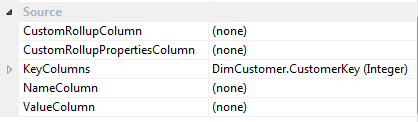
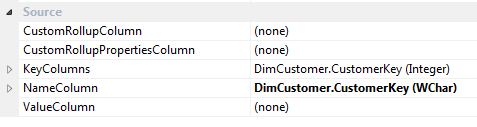
However, while onsite with a customer recently I noticed something strange. Here’s an illustration: if you create a simple dimension based on the DimCustomer table in Adventure Works and create a single attribute based on the CustomerKey column, this is what you see in the Properties for that attribute:

image

However, if you deploy the database then import it into a new project in SSDT/BIDS, then you see that the NameColumn property has been set:

image

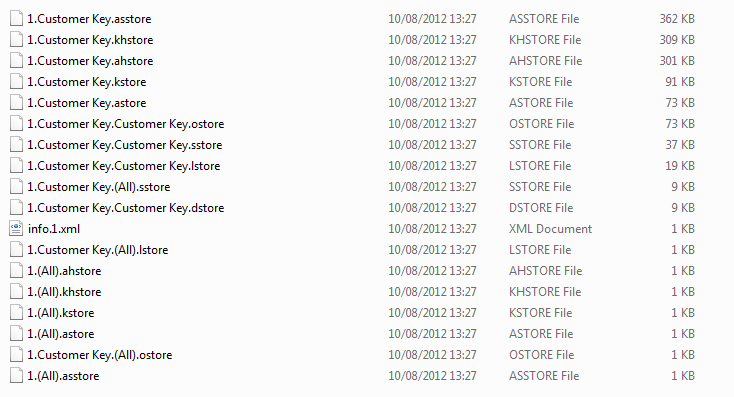
My first thought was that this was a bit dangerous, because it might mean that the imported version of the database would start storing extra strings for the names. But this was incorrect because a look at the data directories for the two versions of the dimensions showed they contained the same files and were using the same amount of storage:

image

I’m very grateful to Akshai Mirchandani of the dev team for confirming that in this situation, it is irrelevant whether you set the NameColumn or not – data duplication will always happen, and the key values will be stored again as strings. The only time it doesn’t happen is when the key and the name of the attribute are both the same column and that column is a string.

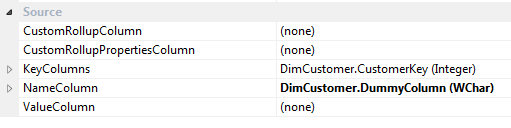
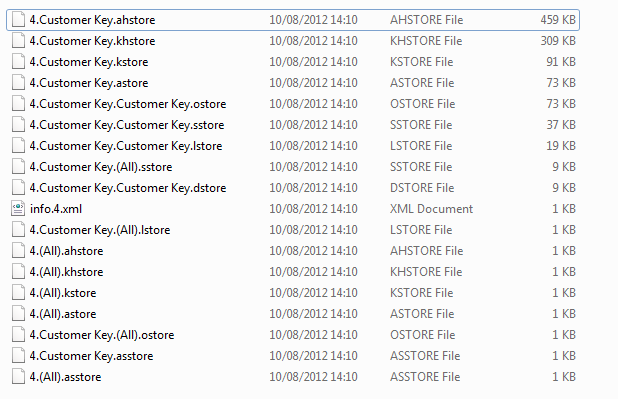
This means that if you have a very large attribute that is in danger of exceeding the infamous 4GB limit (although this is of course fixed in SSAS 2012) and which never needs to be visible, you can use the trick that Greg Galloway describes here to reduce the size of the string store. This involves creating a dummy column in your DSV (or underlying view or table) that contains only an empty string and then setting this as the NameColumn of your attribute. For the example above, this is the result:

image

image

For this example, the overall amount of storage used for the dimension has gone down from 1.24MB to 1.04MB, and although you can see the .ahstore file (the hash store) for the Customer Key attribute have grown, the size of the string store, Customer Key.asstore (note: don’t get confused between .asstore and .astore files), has reduced from 362KB to 1KB.

Storage Engine Cache Aggregation and its Implications for Dimension Design

SSAS Multidimensional does caching in a number of places, but the most important type of caching for most cubes happens in the Storage Engine (SE) – the part of SSAS that reads data from disk and aggregates it up to a given granularity. After the SE has answered a single request for data it stores the resulting subcube in cache so that if the same request is made in the future then it can be answered from there very quickly. In addition, in some cases the SE is also able to answer requests at a higher granularity from data that is currently in its cache, and increasing the likelihood of this happening can have a significant positive impact on the performance of large cubes.

Let’s see an example of how SE caching works using a very simple cube built on the Adventure Works database, with one Sum measure and just one dimension, a Date dimension with the following attribute relationships:

image

Running the following query on a cold cache:

select {[Measures].[Sales Amount]} on 0,
[Date].[Year].[Year].members
on 1
from [SECacheDemo]

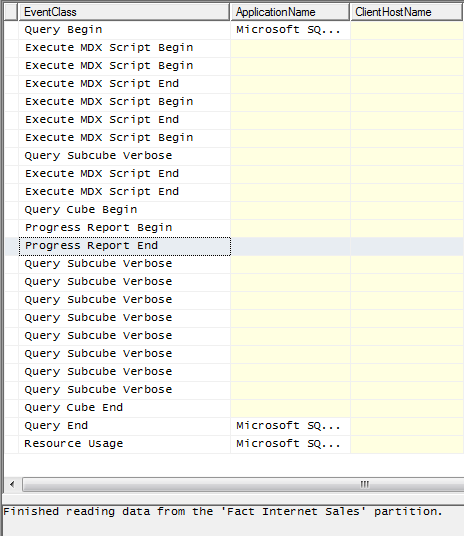
…and then looking in Profiler shows that the SE has to go to disk to get the data it needs (as shown by the Progress Report Begin/End events):

image

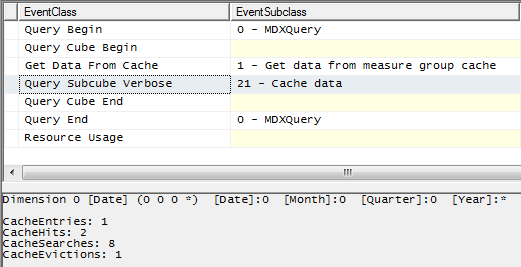
Running the same query immediately afterwards shows the SE can get the data it needs from cache:

image

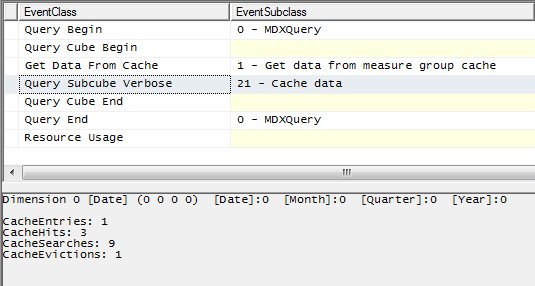
Running the following query, where I’m getting the All Member from the Year hierarchy, shows that the SE is also able to answer this request from cache:

select {[Measures].[Sales Amount]} on 0,
{[Date].[Year].[All]}
on 1
from [SECacheDemo]

image

This is as you’d expect because, of course, the All Member on the Years hierarchy represents the aggregated total of all the years returned in the first query.

There are several limits on the ability of the SE to derive aggregated totals from data it already has in cache. For a start, the SE cannot aggregate multiple cache entries to derive a single figure. So, for example, if I run the following three queries:

select {[Measures].[Sales Amount]} on 0,
{[Date].[Year].&[2001],[Date].[Year].&[2002]}
on 1
from [SECacheDemo]

select {[Measures].[Sales Amount]} on 0,
{[Date].[Year].&[2003],[Date].[Year].&[2004]}
on 1
from [SECacheDemo]

select {[Measures].[Sales Amount]} on 0,
{[Date].[Year].&[2006]}
on 1
from [SECacheDemo]

…which together return all the years, when I run the query to get the All Member that will not be answered from the SE cache. Each of the three queries above create separate entries in the SE cache; this is one of the reasons why, when cache warming, it’s better to use a few very large queries rather than lots of small, filtered queries.

Furthermore (and this is something that surprised me a little when I found out about it recently), despite the presence of attribute relationships, the SE cannot always work out how to derive higher-level values from lower-level cached data. Running the following query on a cold cache:

select {[Measures].[Sales Amount]} on 0,
[Date].[Date].[Date].members
on 1
from [SECacheDemo]

image

…populates the SE cache with data at the Date granularity, but the following query to get the values for all years:

select {[Measures].[Sales Amount]} on 0,
[Date].[Year].[Year].members
on 1
from [SECacheDemo]

…is not answered from cache, even though the year values could be derived from the date values already in cache.

image

Why is this happening? Well, the SE does not (at least at the time of writing) decode the attribute relationships when working out which granularities can be aggregated from cache. If you look at the granularities as represented in the Query Subcube Verbose events shown in the previous two screenshots, the granularity for the request at Date is
* 0 0 0
…and the granularity for the request at Year is
0 0 0 *
The four characters in this representation of the granularity stands for the four attributes on the dimension: Date, Month, Quarter and Year. The 0 character shows that a request is not at the granularity of that attribute, any other value shows that it is, and the asterisk character shows the request returns all the values at the specified granularity (this white paper gives more detail on how to interpret these values). So, without knowing anything about attribute relationships, the SE can say that the granularity
0 0 0 0
can be aggregated from
* 0 0 0
but it cannot say that
0 0 0 *
can be aggregated from
* 0 0 0

Luckily these limitations on what can be aggregated do not apply to aggregations: if I was to build an aggregation at the Date granularity, my query at the Year granularity would be able to make use of that aggregation.

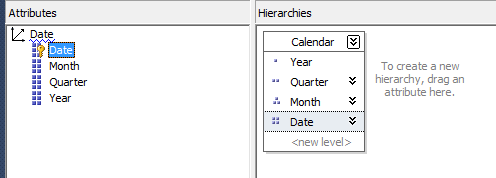
Also, the use of natural user hierarchies can work around this limitation. Consider the following user hierarchy built on the dimension:

image

Querying at the Date level of this user hierarchy, like so:

select {[Measures].[Sales Amount]} on 0,
[Date].[Calendar].[Date].members
on 1
from [SECacheDemo]

image

…results in a request at the granularity
* * * *
which can then be aggregated up to many more granularities – querying at a level in a natural user hierarchy automatically includes the granularities of all the attributes used for the levels above in the user hierarchy.

Therefore, both the following queries:

select {[Measures].[Sales Amount]} on 0,
[Date].[Calendar].[Year].members
on 1
from [SECacheDemo]

select {[Measures].[Sales Amount]} on 0,
[Date].[Year].[Year].members
on 1
from [SECacheDemo]

…can be answered from the cache created by the query at the [Date].[Calendar].[Date] level.

The conclusion must be, then, that using natural user hierarchies will allow for much better SE cache reuse than using the attribute hierarchies on their own. Also, if you have a natural user hierarchy, it might be a good idea to hide the underlying attribute hierarchies so users and other developers do not reference them in their queries and calculations. You may not notice the performance difference that better SE cache reuse gives you on most cubes, but on very large cubes or cubes that are very SE-intensive (for example, because they are reprocessed frequently) this could make a noticeable difference to your overall query performance.

Thanks to Akshai Mirchandani and Hrvoje Piasevoli for their help in understanding this.

Tuning Queries with the WITH CACHE Statement

One of the side-effects of the irritating limitations that SSRS places on the MDX you can use in your reports is the widespread use of calculated measures to get the columns you want. For example, a query like this (note, this query isn’t on the Adventure Works cube but on a simpler cube built on the Adventure Works DW database):

SELECT
{[Measures].[Sales Amount]}
*
[Date].[Day Number Of Week].[Day Number Of Week].MEMBERS
ON 0,
[Product].[Product].[Product].MEMBERS ON 1
FROM [Adventure Works DW]

image

…which wouldn’t be allowed in SSRS, could be rewritten like so:

WITH
MEMBER MEASURES.D1 AS
([Measures].[Sales Amount], [Date].[Day Number Of Week].&[1])
MEMBER MEASURES.D2 AS
([Measures].[Sales Amount], [Date].[Day Number Of Week].&[2])
MEMBER MEASURES.D3 AS
([Measures].[Sales Amount], [Date].[Day Number Of Week].&[3])
MEMBER MEASURES.D4 AS
([Measures].[Sales Amount], [Date].[Day Number Of Week].&[4])
MEMBER MEASURES.D5 AS
([Measures].[Sales Amount], [Date].[Day Number Of Week].&[5])
MEMBER MEASURES.D6 AS
([Measures].[Sales Amount], [Date].[Day Number Of Week].&[6])
MEMBER MEASURES.D7 AS
([Measures].[Sales Amount], [Date].[Day Number Of Week].&[7])
SELECT
{MEASURES.D1,MEASURES.D2,MEASURES.D3,MEASURES.D4,MEASURES.D5,MEASURES.D6,MEASURES.D7}
ON 0,
[Product].[Product].[Product].MEMBERS ON 1
FROM [Adventure Works DW]

…to get it in an SSRS-friendly format with only measures on columns.

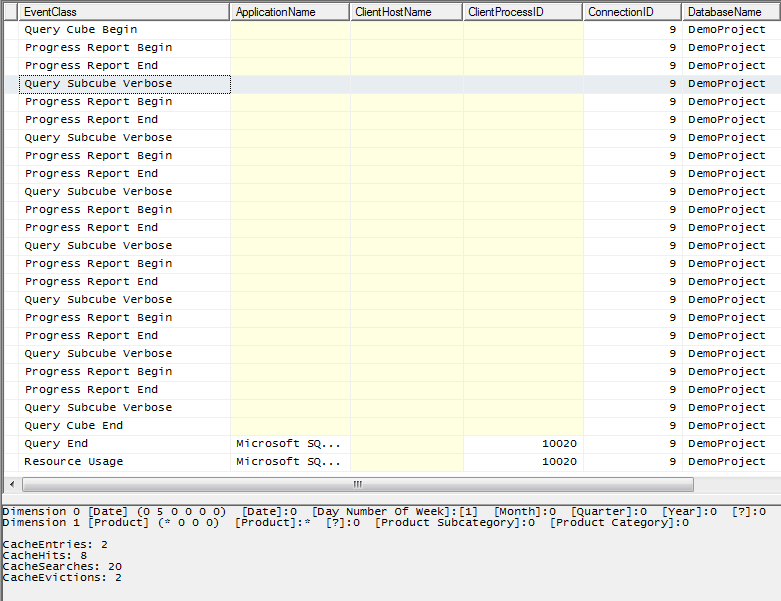
For the last few days I’ve had the pleasure of working with Bob Duffy (a man so frighteningly intelligent he’s not only an SSAS Maestro but a SQL Server MCM as well) on tuning a SSRS report like this on a fairly large cube. As Bob found, the problem with this style of query is that it isn’t all that efficient: if you look in Profiler at what happens on a cold cache, you can see there are seven separate Query Subcube events and seven separate partition scans (indicated by the Progress Report Begin/End events) for each calculated measure on columns.

image

The first thing that Bob tried to tune this was to rewrite the query something like this:

SELECT
{[Measures].[Sales Amount]}
ON 0,
NON EMPTY
[Product].[Product].[Product].MEMBERS
*
[Date].[Day Number Of Week].[Day Number Of Week].MEMBERS
ON 1
FROM [Adventure Works DW]

…and pivot the data in the SSRS tablix to get the desired layout with the Day Numbers on columns. The interesting thing, though, is that for this particular report while rewriting the query in this way made it run faster (there is only one Query Subcube event and partition scan now) it actually made the SSRS report run slower overall, simply because SSRS was taking a long time to pivot the values.

Instead, together we came up with a way to tune the original query using the WITH CACHE statement like so:

WITH
CACHE AS
‘([Measures].[Sales Amount]
, [Product].[Product].[Product].MEMBERS
, [Date].[Day Number Of Week].[Day Number Of Week].MEMBERS)’

MEMBER MEASURES.D1 AS
([Measures].[Sales Amount], [Date].[Day Number Of Week].&[1])
MEMBER MEASURES.D2 AS
([Measures].[Sales Amount], [Date].[Day Number Of Week].&[2])
MEMBER MEASURES.D3 AS
([Measures].[Sales Amount], [Date].[Day Number Of Week].&[3])
MEMBER MEASURES.D4 AS
([Measures].[Sales Amount], [Date].[Day Number Of Week].&[4])
MEMBER MEASURES.D5 AS
([Measures].[Sales Amount], [Date].[Day Number Of Week].&[5])
MEMBER MEASURES.D6 AS
([Measures].[Sales Amount], [Date].[Day Number Of Week].&[6])
MEMBER MEASURES.D7 AS
([Measures].[Sales Amount], [Date].[Day Number Of Week].&[7])
SELECT
{MEASURES.D1,MEASURES.D2,MEASURES.D3,MEASURES.D4,MEASURES.D5,MEASURES.D6,MEASURES.D7}
ON 0,
[Product].[Product].[Product].MEMBERS ON 1
FROM [Adventure Works DW]

What WITH CACHE statement does here is load all the data needed for the query into the Storage Engine cache before anything else happens. So even though there are still seven different Query Subcube events for each column, there’s now only one partition scan and each of the seven Query Subcube events now hits cache:

image

There’s no guarantee that this approach will result in the best performance even when you have a query in this form, but it’s worth testing if you have. It’s certainly the first time in a long while that I’ve used the WITH CACHE statement in the real world – so it’s interesting from an MDX point of view too.

“Unable to Establish Server Mode” Error in SSMS

This morning when I tried to connect to my local SSAS 2012 (RTM) Tabular instance in the Object Explorer in SQL Server Management Studio I got the following error message:

TITLE: Microsoft SQL Server Management Studio
——————————

Error connecting to ‘localhost\tabular’.

——————————
ADDITIONAL INFORMATION:

Unable to establish server mode. (ObjectExplorer)

image

This was an error I’d seen before several times (as had Alberto – see here – and a few other people), and had previously associated it with memory issues and/or corrupted databases. However in this case I was confused because I was still able to query the SSAS Tabular instance in question from Excel and deploy to it from SQL Server Data Tools, so I was pretty sure there wasn’t anything wrong with the instance.

After a bit of looking around I found what the problem was. A few days ago I had been using SQL Server Management Studio to write queries against a workspace database and I had set the name of the database in the ‘Connect to database’ dropdown on the Connection Properties of the Connect to Server dialog, as shown below:

SNAGHTML23b0336

Now the SSDT project associated with this workspace database had its Workspace Retention property set to ‘Unload from Memory’, so when I closed the project the workspace database disappeared from the server. However in SQL Management Studio the Connection Properties dialog was still trying to connect to the database even though it was no longer there, and instead of giving a sensible error message it was giving me the “Unable to establish server mode” error. Fixing the problem was simple: I just went to the Connect to database dropdown and selected “<default>” instead of the name of the workspace database.

I would imagine that a lot of people will run into this issue, not only when they have been connecting to workspace databases but also if they connect to regular databases that are subsequently deleted. Hopefully this blog post will save them a lot of time spent wondering what’s gone wrong!

SSAS Compare

When I was at SQL Saturday in Dublin a few weeks ago I sat in on a sponsor session given by red-gate and heard that they were working on their first tool for Analysis Services: SSAS Compare. Today it appeared on their labs site and you can download it to check it out yourself:
http://www.red-gate.com/labs/ssas-compare/index

Here’s what they have to say about it:

Red Gate SSAS Compare is a tool for Microsoft Business Intelligence professionals that generates XMLA scripts for partial or complete SSAS cube deployment.

Easily deliver updates from development through test and production, minimizing the time spent processing and validating changes.

It’s a very early release and therefore a bit buggy; in fact I haven’t been able to get it to work at all on my laptop (I suspect it doesn’t work with SSAS 2012). However I’m still very excited by the possibilities of this tool: quite a few of my customers have several versions of the same database, and need to find out how they differ and deploy the same changes to all of them. Definitely something to keep an eye on.

Named Sets and Block Computation in SSAS 2012

Greg Galloway (who really should blog more often!) recently came across an otherwise undocumented query performance optimisation in SSAS 2012: using named sets inside aggregate functions in MDX no longer prevents the use of block computation/bulk mode. This was something that was explicitly called out as a Bad Thing To Do in Books Online (the link to the page in question is now dead though, possibly because it’s being updated), but here’s an example of a query that will now run much faster in SSAS 2012 Multidimensional than it used to in R2:

with
set myset as {[Customer].[Customer].[Customer].members}
member measures.demo as
sum(myset,[Measures].[Internet Sales Amount])
select measures.demo on 0,
[Date].[Calendar Year].members on 1
from [Adventure Works]

There are still situations where block computation can’t be used however, namely when the Current() function is used (which are going to be very rare I think):

with
set myset as {[Customer].[Customer].[Customer].members}
member measures.demo as
sum(myset
, iif(myset.current is [Customer].[Customer].&[20075]
, 0, [Measures].[Internet Sales Amount])
)
select measures.demo on 0,
[Date].[Calendar Year].members on 1
from [Adventure Works]

Thanks also to Jeffrey Wang for the background on this.

Registration Open for SSAS Maestros Course, July 9-13, Milan, Italy

For those of you who haven’t seen Marco’s post from a few days ago, registration is now open for the SSAS Maestros course that he and I will be teaching this July in Milan. A few things to point out:

  • We’ve listened to feedback, trimmed some of the costs and content, and reduced the price to €4500 (€3500 for attendees of previous Maestros courses).
  • We’re going to be joined by Thomas Kejser for some of the course, who’ll be sharing his experience of working on some of the largest cubes in the world.

So, to sum up, this is the ultimate in SSAS training and if you want to take your SSAS knowledge to the next level you should come along.

For more details on what the SSAS Maestros program is, see:

http://www.microsoft.com/learning/en/us/certification/ssas-maestros.aspx

To find out more about this course and to register, go to:

http://www.sqlbi.com/training/ssas-maestro