DependsOnDimension

There are lots of properties in SSAS that have no useful purpose, or whose purpose is somewhat obscure, and one property I’ve always wondered about is the DependsOnDimension property of a dimension. You can find it in the Dimension Editor in BIDS but there’s no indication in the description as to what it does, so in a moment of idle curiosity I Googled Binged it; the best information I found was this forums answer from 2007 from Matt Carroll:

http://social.msdn.microsoft.com/forums/en-US/sqlanalysisservices/thread/bd289ca5-0cb0-4279-8947-ffa2690bcd1e/

DependsOnDimension is really just a hint for use when designing aggregations using the Aggregation Design Wizard or the Usage Based Optimization Wizard.  Normally the aggregation design algorithm estimates the size of aggregations assuming dimesions are independent, but this property lets it know that one dimension is strongly determined by another dimension.  This should not affect your browsing experience in any way.

In Analysis Services 2000, DependsOnDimension was also used as part of the definition of virtual dimensions as a way of specifying the source for virtual dimension’s levels.

I did some quick experiments in BIDS and couldn’t see any evidence that setting this property affected what aggregations were designed by the Aggregation Design Wizard, but they weren’t exhaustive tests by any means. If you’re taking the trouble to enter row counts and set the AggregationUsage property you should probably try setting it if you have any dimensions that are very closely linked, just in case it does have an impact.

Many-to-Many Relationships and Partition Slices

As you’re probably aware one of the benefits of partitioning a measure group is that it can improve query performance: for example, if you have partitioned your measure group by year and you run a query that only requests data for a particular year, then SSAS should only query the partition that holds the data for the year you’ve requested. There are however several scenarios where SSAS will scan partitions you would not expect it to scan – the ones I knew about up to now are all listed in the “Unexpected Partition Scans” section in this excerpt from “Expert Cube Development” – and I’ve just come across another scenario where this happens.

I was working with a customer the other week that had implemented Dave Fackler’s approach to handling multiple calendars using many-to-many relationships, as detailed in these two blog posts:
http://davefackler.blogspot.com/2008/05/handling-multiple-calendars-with-m2m.html
http://davefackler.blogspot.com/2008/06/handling-multiple-calendars-with-m2m.html

Now there’s absolutely nothing wrong with the design that Dave describes here – it’s a classic application for many-to-many relationships – and there aren’t any better ways of meeting this requirement. However, what I noticed when looking in Profiler at the customer’s cube was that all of the queries I was writing were resulting in reads on all of the partitions in the main measure group, even when I expected only one partition should be hit, and this was slowing the queries down a lot.

You can recreate the same problem in the version of the Adventure Works that Dave posts on his blog. Take the following query that uses the regular Adventure Works Date dimension and does not use the m2m relationship:

select {[Measures].[Reseller Sales Amount]} on 0,
{[Date].[Calendar].[Month].&[2004]&[3]}
on 1
from [Adventure Works]

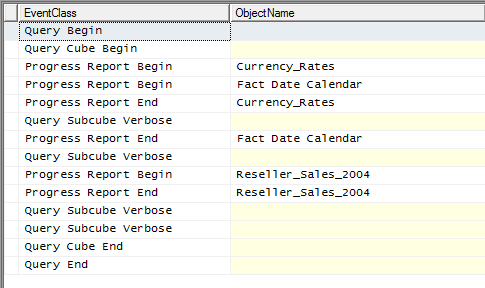
When run on a cold cache, in Profiler you can see that it only results in the Reseller Sales 2004 partition being hit in the Reseller Sales measure group:

image

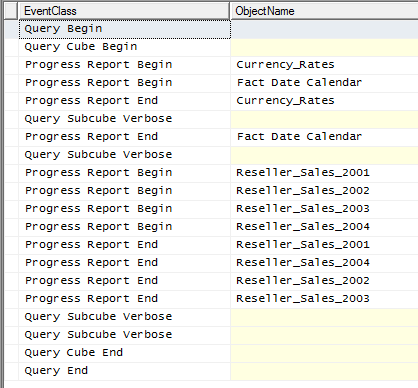
This is exactly as you’d expect. However if you request the same month (March 2004) via the Calendar dimension, which is connected to the Reseller Sales measure group via a m2m relationship and the Date dimension, you see all the partitions on Reseller Sales are hit:

select {[Measures].[Reseller Sales Amount]} on 0,
{[Calendar].[Year-Quarter-Month].[Month].&[2000200409]}
on 1
from [Adventure Works]

image

Not so good. But it turns out that this is an unavoidable side-effect of using many-to-many relationships: a filter on a many-to-many dimension (in this case the Calendar dimension) does not result in a filter being applied on the intermediate dimension (the Date dimension) to the measure group (Reseller Sales). Greg Galloway came across this some time ago and filed an issue on Connect which confirms that this is by design.

Given that I doubt this behaviour will be changed any time soon, the takeaway is that when you’re planning your partitioning strategy you should think twice about partitioning using a dimension that is used as an intermediate dimension in a many-to-many relationship. Otherwise you will lose all of the performance benefits of partitioning when your queries use that many-to-many relationship…

BISM Normalizer

I’ve just come across a new, free utility for SSAS 2012 Tabular called BISM Normalizer:

http://visualstudiogallery.msdn.microsoft.com/5be8704f-3412-4048-bfb9-01a78f475c64

Basically it’s a tool that allows you to compare the metadata of two Tabular models and optionally copy parts of one model over to another. It’s very interesting because it addresses what I think is one of the big challenges encountered when bridging the gap between self-service and corporate BI: how can you take a bunch of independently-produced PowerPivot models and merge them into a single, coherent, Analysis Services Tabular model? Ultimately this is a problem that Microsoft is going to have to deal with itself in future versions of SSAS, along with the related problem of how parts of a ‘corporate’ Tabular model can be reused inside PowerPivot models (I’d like some form of object inheritance or ‘linked tables’, rather than have to copy data and rebuild metadata from scratch as we have to today).

Replacing Cell Security with Dimension Security

Cell security, as you probably know, is best avoided because of the impact it can have on query performance; dimension security is much easier to work with and its performance impact is much less. Luckily even when it seems as though cell security is the only option, in at least some scenarios with a bit of extra cube modelling work dimension security can still do the job. Here’s how…

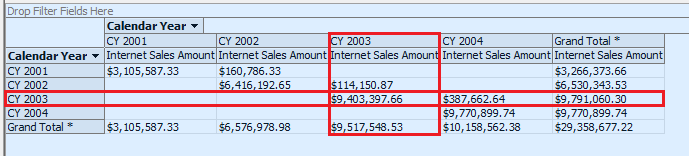
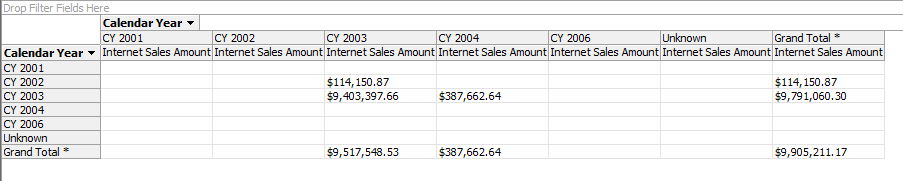
Let me give you an example that I worked on with a customer recently, translated to Adventure Works. The Internet Sales measure group in the Adventure Works cube contains three role-playing dimensions based on the Date dimension: Date (which represents the Order Date), Ship Date and Delivery Date. Let’s imagine that we want to implement dynamic security so that a user can only see data if either the Date or the Ship Date is in one particular year. For example if a user has access to the year 2003 they should be able to see data if the year on the Date dimension was 2003 or if the year on the Ship Date dimension was 2003, as shown in the cells highlighted in the following screenshot (note that the grand totals should also reflect only values from the two 2003 years as well, so on the last row below we should see a grand total of $387662.64 for the CY 2004 column):

image

How can dimension security be used to implement this? The trick is that it can’t without creating a new, hidden dimension to apply security to. To create this dimension, go to the DSV and create a new named query called DimSecurity with the following SQL:

select distinct OrderDateKey, ShipDateKey
, d.CalendarYear as OrderDateYear, s.CalendarYear as ShipDateYear
from
dbo.FactInternetSales inner join DimDate d
on OrderDateKey = d.DateKey
inner join DimDate s
on ShipDateKey = s.DateKey

This gets all the distinct combinations of order date and ship date from the fact table plus their related calendar years. Obviously this exact query might not be practical on a large fact table, but you get the idea – in order to apply dimension security to the range of cells we want, we need to create a new dimension designed so that its members can be mapped onto those cells.

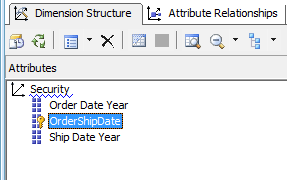
Next, create an SSAS dimension from this table as follows, with three attributes:

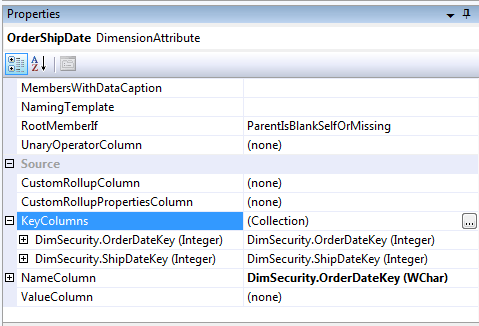
  • A key attribute called OrderShipDate that has a composite key based on the OrderDateKey and ShipDateKey columns. I used the OrderDateKey column as the name column, but that’s not too important because this dimension will be hidden anyway. This attribute represents the distinct combination of order date and ship date.

image

  • Two other attributes, Order Date Year and Ship Date Year, based on the OrderDateYear and ShipDateYear columns.

image

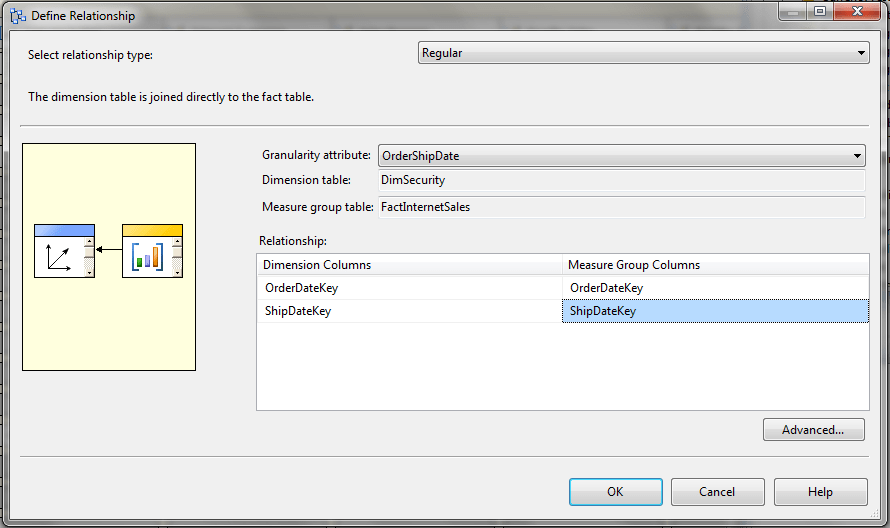
This new dimension should now be added to the Adventure Works cube and a relationship added with the Internet Sales measure group as follows:

image

You can now set this dimension’s Visible property to False in the Cube Structure tab of the Cube Editor.

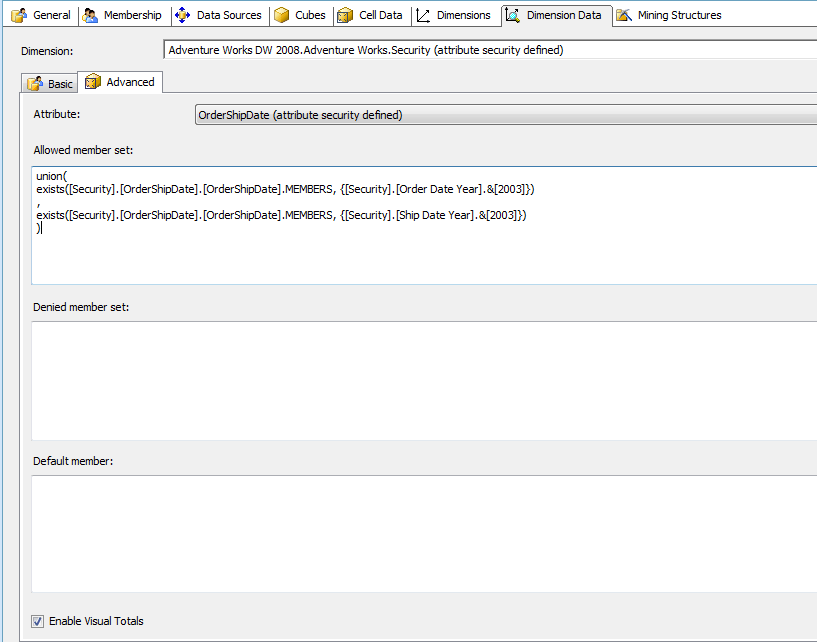
Then create a new role, grant it access to the Adventure Works cube, go to the Dimension Data tab, select the Security dimension and the OrderShipDate attribute and go to the Advanced tab. Then enter the following MDX in the Allowed Member Set box:

union(
exists([Security].[OrderShipDate].[OrderShipDate].MEMBERS, {[Security].[Order Date Year].&[2003]})
,
exists([Security].[OrderShipDate].[OrderShipDate].MEMBERS, {[Security].[Ship Date Year].&[2003]})
)

This grants access to all combinations of Order Date and Ship Date – all the members on the OrderShipDate hierarchy – that are either in the Order Date year 2003 or the Ship Date year 2003. Don’t forget to check the Enable Visual Totals box too.

image

Deploy then go to the cube browser and test the role. You should see the following results:

image

So we have the basic role working, but how can we make it dynamic? We don’t want to create a factless fact table that contains rows for every combination of Order Date and Ship Date because that could get very large very quickly; we only want to grant access at the year level.

Going back to the DSV, create a new named query called FactSecurity using the following SQL (inserting your own username as appropriate):

SELECT        ‘Mydomain\Myusername’ AS UName, 2003 AS CalendarYear

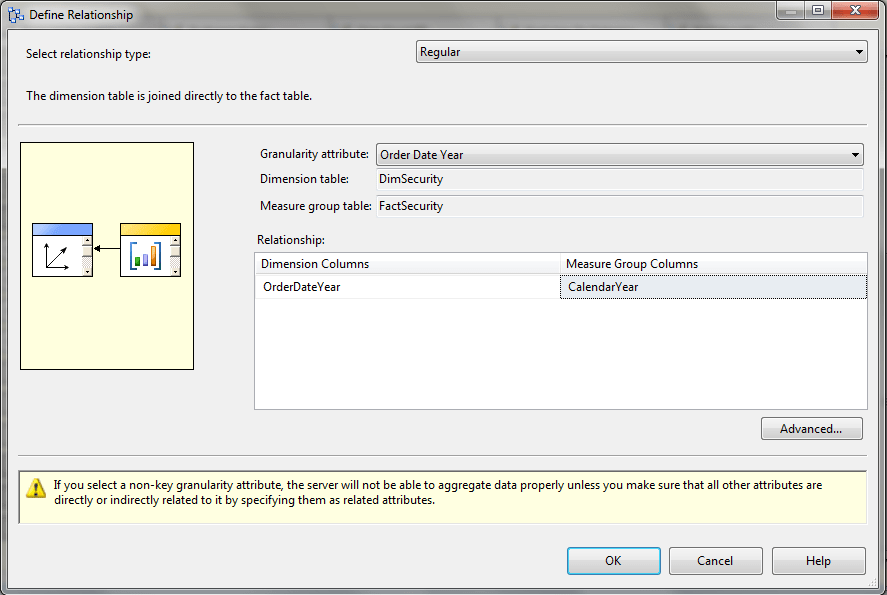
This will be our factless fact table that grants a user access to the year 2003. Then build a new dimension called User from the UName column to give you a dimension containing all your users, as you would in any normal dynamic security implementation; also build a new measure group in the Adventure Works cube from this table and give it a regular relationship with the User dimension and a regular relationship with the Security dimension at the OrderDateYear granularity:

image

Process, then go back to the role and change the MDX as follows:

union(
exists([Security].[OrderShipDate].[OrderShipDate].MEMBERS
, {nonempty([Security].[Order Date Year].[Order Date Year].MEMBERS
, (strtomember("[User].[Security User Name].&[" + Username() + "]", constrained)
, [Measures].[Fact Security Count]) )})
,
exists([Security].[OrderShipDate].[OrderShipDate].MEMBERS
, generate({nonempty([Security].[Order Date Year].[Order Date Year].MEMBERS
, (strtomember("[User].[Security User Name].&[" + Username() + "]", constrained)
, [Measures].[Fact Security Count]) )}
, {linkmember([Security].[Order Date Year].currentmember, [Security].[Ship Date Year])}
)
)
)

This is basically the same as the previous expression but it’s now dynamic and it now supports securing more than one year in the FactSecurity measure group for a single user. Let’s look at parts of this expression:

The following expression returns the set of members on the Order Date Year attribute of the Security dimension that the current user has access to:

nonempty([Security].[Order Date Year].[Order Date Year].MEMBERS
, (strtomember("[User].[Security User Name].&[" + Username() + "]", constrained)
, [Measures].[Fact Security Count]) )

We can use this directly in the first set passed into the Union function, but to find the equivalent Ship Date Years for each Order Date Year we need to use a combination of the Generate and LinkMember functions, as follows:

generate({nonempty([Security].[Order Date Year].[Order Date Year].MEMBERS
, (strtomember("[User].[Security User Name].&[" + Username() + "]", constrained)
, [Measures].[Fact Security Count]) )}
, {linkmember([Security].[Order Date Year].currentmember, [Security].[Ship Date Year])})

This takes the set returned by the previous expression and then loops over it using Generate; for each member in the set we then find the equivalent Ship Date Year by using LinkMember.

In summary, while this might seem quite complicated the MDX used for the equivalent cell security implementation would be equally bad and the performance overhead much worse, so this is a very useful technique to have in your toolkit. Thanks are due to Peter Holzner, Ramon Mueller, Beat Stuenzi, Chris Fleming and Adam Widi for working through all this with me the other week.

Investigating the Resource Usage Profiler Event

As I mentioned a few months back, some new functionality snuck into SSAS with SQL 2008 R2 SP1, the most interesting of which is a new Profiler event called Resource Usage (Thomas Ivarsson recently blogged about some other new events too). I’ve been doing some investigations on it recently, and asking the SSAS dev team what the information it returns actually means (Akshai Mirchandani is the source for much of the content of this post and I’m very grateful for his help), so I thought I’d blog my findings.

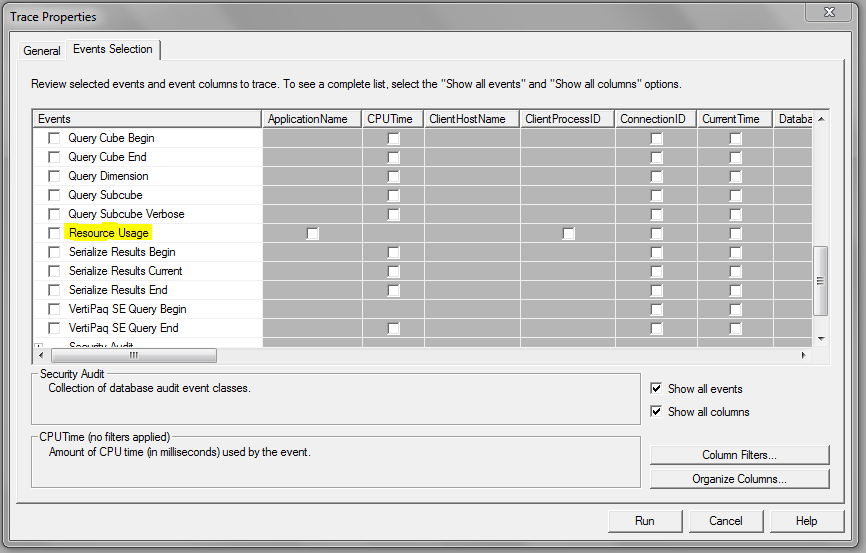
When you’re defining a new trace, you can find the Resource Usage event in the Query Processing section as shown below:

image

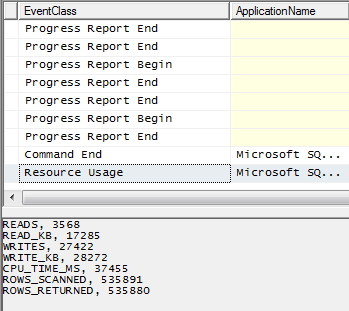
It is raised immediately after a query has finished executing (in which case it follows the Query End event):

image

It is also raised after any XMLA command has finished executing, and this means you’re also able to use it to monitor the resource usage of a processing operation:

image

Essentially, it gives you information that is very similar to what’s already available in Perfmon but specific to a particular query or command. The problem with Perfmon is that it’s easy to spot strange things happening in the data it gives you, but there’s no sure-fire way of linking what you see in Perfmon back to individual events such as queries executing; the Resource Usage event solves this problem.

Here’s a breakdown of the data returned by the event:

  • READS: The number of disk read operations tracked for this query
  • READ_KB: The size of disk reads in KB
  • WRITES: The number of disk write operations tracked for this query
  • WRITE_KB: The size of disk writes in KB
  • CPU_TIME_MS: The CPU time as measured in milliseconds for this query (although this seems to bear very little relation to the CPU time shown elsewhere in Profiler – perhaps it is only the CPU time for the Storage Engine?)
  • ROWS_SCANNED: The number of rows scanned (decoded/filtered/aggregated) by the Storage Engine for this query
  • ROWS_RETURNED: The number of rows resulting from the scans after decoding/filtering/aggregation by the Storage Engine for this query

The data returned relates purely to Storage Engine operations as far as I can see and does not relate to the Formula Engine – I get no values back for queries that hit the Storage Engine cache but are nonetheless slow because they are Formula Engine bound.

To investigate things further, I took a look at three queries (slightly modified to run on my antique version of Adventure Works) from Jeffrey Wang’s recent post on prefetching, which illustrate scenarios where the Storage Engine does radically different amounts of work; they’re particularly interesting because Jeffrey describes in detail what goes on in the Storage Engine when each of them run. First of all, the first test query from Jeffrey’s post where prefetching does not take place gives me the following values for Resource Usage on a cold cache:

READS, 8
READ_KB, 361
WRITES, 0
WRITE_KB, 0
CPU_TIME_MS, 15
ROWS_SCANNED, 18210
ROWS_RETURNED, 337

On a warm cache (ie in a situation where the Storage Engine does not need to go to disk because it can get the values it needs from cache) I get the following values:

READS, 0
READ_KB, 0
WRITES, 0
WRITE_KB, 0
CPU_TIME_MS, 0
ROWS_SCANNED, 0
ROWS_RETURNED, 0

Here’s Jeffrey’s second query, where an acceptable amount of prefetching is taking place:

select [Internet Sales Amount] on 0,
head(descendants([Date].[Calendar].[Calendar Year].&[2003],[Date].[Calendar].[Date]), 32) on 1
from [Adventure Works]

On a cold cache this is what I get from Resource Usage, showing slightly more activity going on:

READS, 16
READ_KB, 738
WRITES, 0
WRITE_KB, 0
CPU_TIME_MS, 15
ROWS_SCANNED, 36932
ROWS_RETURNED, 693

If we now look at Jeffrey’s third query, where he shows a scenario where excessive prefetching is taking place:

select [Internet Sales Amount] on 0,
head(descendants([Date].[Calendar].[Calendar Year].&[2003],[Date].[Calendar].[Date]), 33) on 1
from [Adventure Works]

Here’s what I get on a cold cache from Resource Usage:

READS, 32
READ_KB, 1889
WRITES, 0
WRITE_KB, 0
CPU_TIME_MS, 46
ROWS_SCANNED, 74655
ROWS_RETURNED, 63831

It’s clear from these numbers that a lot more work is going on in the Storage Engine compared to the previous two queries, although I’m not sure it’s worth trying to read too much into what the exact values themselves actually represent (unless of course you happen to be Jeffrey). I think it’s also going to be dangerous to make simplistic general recommendations about these values: while in some cases trying to keep the values returned as low as possible will be a good idea, I’m pretty sure there are going to be other situations where a more efficient query would involve more reads from disk, or scanning or returning more rows, than a less efficient version of the same query would. That said, this is useful and interesting information and another weapon in the arsenal of the SSAS consultant out in the field trying to diagnose why a query is slow and what can be done to tune it.

Why has all the data in my cube disappeared?

Here’s an issue that I’ve encountered many, many times over the years on the newsgroup and the SSAS MSDN Forum but which, for some reason, I’ve never blogged about until now. It happens from time to time that when people are developing a cube they find, mysteriously, that all the data has disappeared from it; however, there is data present in the source database and there are no key errors while processing (see here for a recent example). What’s going on?

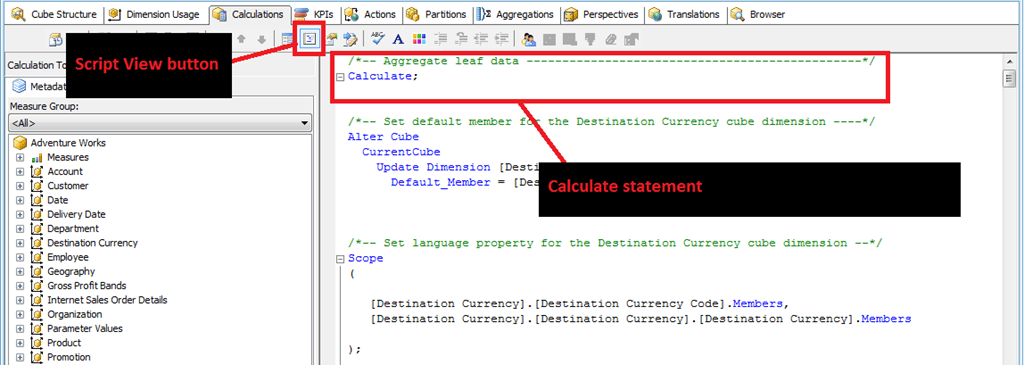
In almost all cases the cause is that the Calculate statement at the beginning of the cube’s MDX Script has been deleted or commented out by accident when editing other calculations. To simulate this problem, open up the Adventure Works project and check to see that you can browse the cube and see data in there. Assuming you can, then go to the Calculations tab in the Cube Editor, make sure you’re in Script View and you’ll see something like the following:

image

The first statement in the MDX Script of every cube should be the Calculate statement, shown above. It’s a bit of a hangover from functionality that I remember from beta versions of SSAS 2005 – you could do some interesting things with a Calculate statement back then but the functionality in question got dropped before RTM. It nonetheless still has to be present though, because when SSAS encounters it when the MDX Script is evaluated it triggers the aggregation of data in all the real measures of the cube up from the very lowest level of detail up to the highest.

If you delete it or comment it out, like so:

image

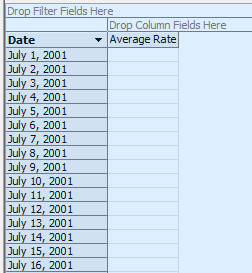
…then, when you deploy and browse the cube, no aggregation will take place for the measures in the cube. It will look as if there’s no data in the cube at all but that’s not true: if you browse down to the very lowest level of every dimension in a given measure group, you’ll find that there’s data present. For example in the Adventure Works cube the Exchange Rates measure group is dimensioned by the Date and Destination Currency dimensions and if you browse the cube after commenting out the Calculate statement and look at the Average Rate measure you’ll see no values at first (I’ve got the Show Empty Cells option turned on here):

image

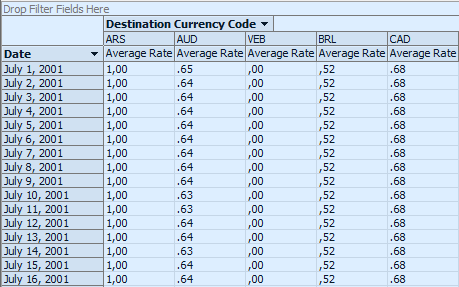
…but if you make sure you’re looking at data from the Date hierarchy of the Date dimension, and the Destination Currency Code hierarchy of the Destination Currency dimension, the two key attributes of the dimensions, you’ll see values are in fact present:

image

So the moral of this tale is: be careful not to delete or comment out your Calculate statement! After all there’s a good reason why the following warning is put before it on every new cube:

/*
The CALCULATE command controls the aggregation of leaf cells in the cube.
If the CALCULATE command is deleted or modified, the data within the cube is affected.
You should edit this command only if you manually specify how the cube is aggregated.
*/

[Incidentally, I would argue that the last line here is dangerous – I’ve never found a good reason to edit or delete the Calculate statement or even put MDX Script statements before it]

Analysis Services 2008 R2 Performance Guide Published

Not much to say, really, apart from what’s in the title and the fact that if you are serious about SSAS you need to read it! You can get it here:
http://sqlcat.com/sqlcat/b/whitepapers/archive/2011/10/10/analysis-services-2008-r2-performance-guide.aspx

Reporting Key Errors can be time-consuming

I’ve spent the last week working with a fairly large cube – several fact tables have hundreds of millions of rows in – and, as always on an SSAS project, there are occasions when you have no choice but to reprocess the whole cube. Sitting round waiting for processing to complete can be pretty tedious and, while I’m sure we’ve all worked out how to plan our work so that processing can take place overnight, during lunch or a meeting, it’s always good to know some tricks to make processing faster.

There’s a good set of tips on how to optimise processing in the SSAS Operations Guide, but this post is about something not mentioned in that white paper because it’s a scenario that shouldn’t happen in production – although it’s very common in development. In my case I’ve been building a cube on top of a half-finished data warehouse where the data is still quite dirty. That means that during processing there are lots of key errors, and while they get fixed I’m handling them in my processing by selecting the ‘Convert to Unknown’ option. What I’ve half-known for a long time and only properly investigated this week, though, is the impact that reporting these key errors can have on processing times.

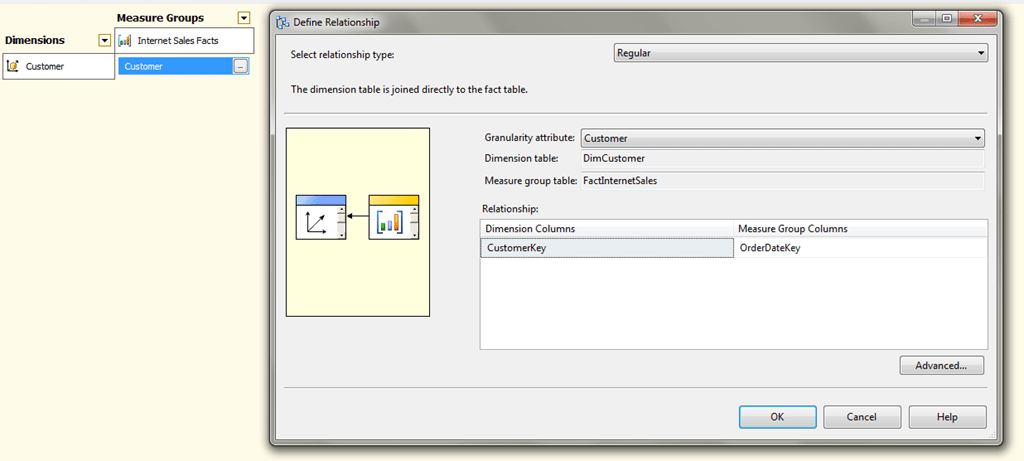
Here’s an extreme example using Adventure Works. I’ve created a new cube based on the FactInternetSales table and added the Customer dimension to it, but deliberately joined the Customer dimension on to the Order Date column in FactInternetSales to simulate a lot of key errors.

image

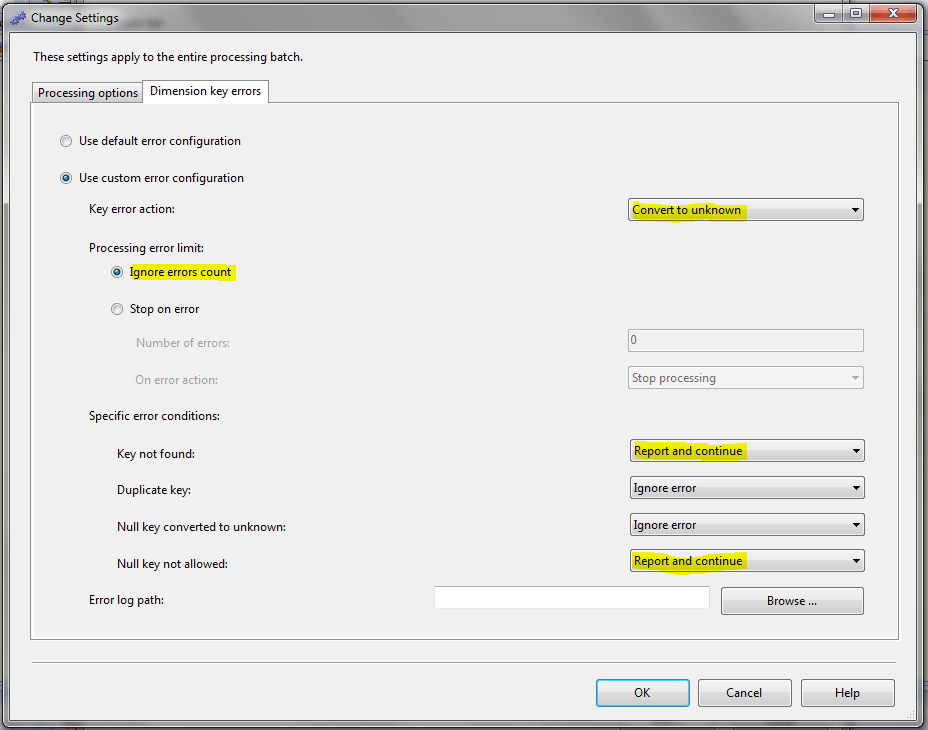
If I then do a ProcessFull with the following error configuration:

image

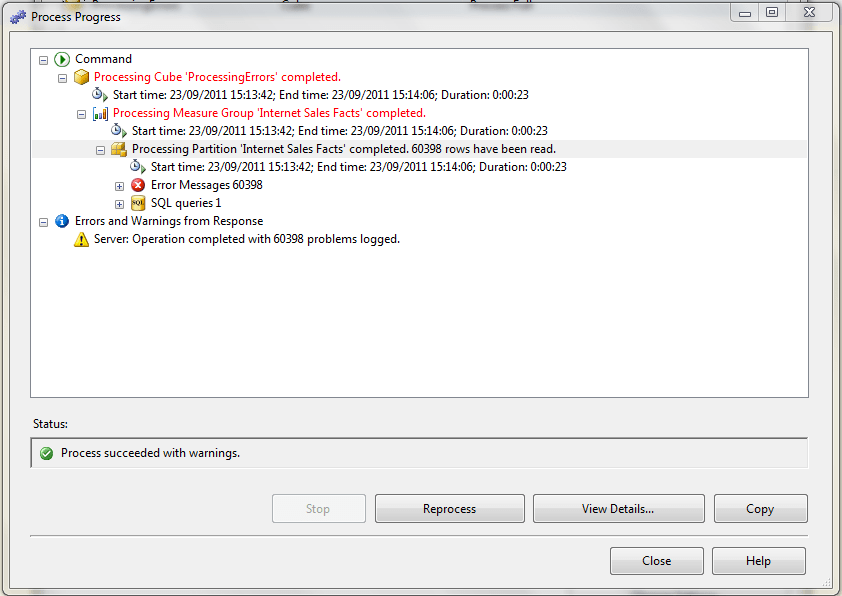
ie with Key Error Action set to Convert To Unknown, Ignore Errors Count selected, and Key Not Found and Null Key Not Allowed both set to Report And Continue, when I do a full process all the errors are logged in the UI and it takes around 23 seconds to finish:

image

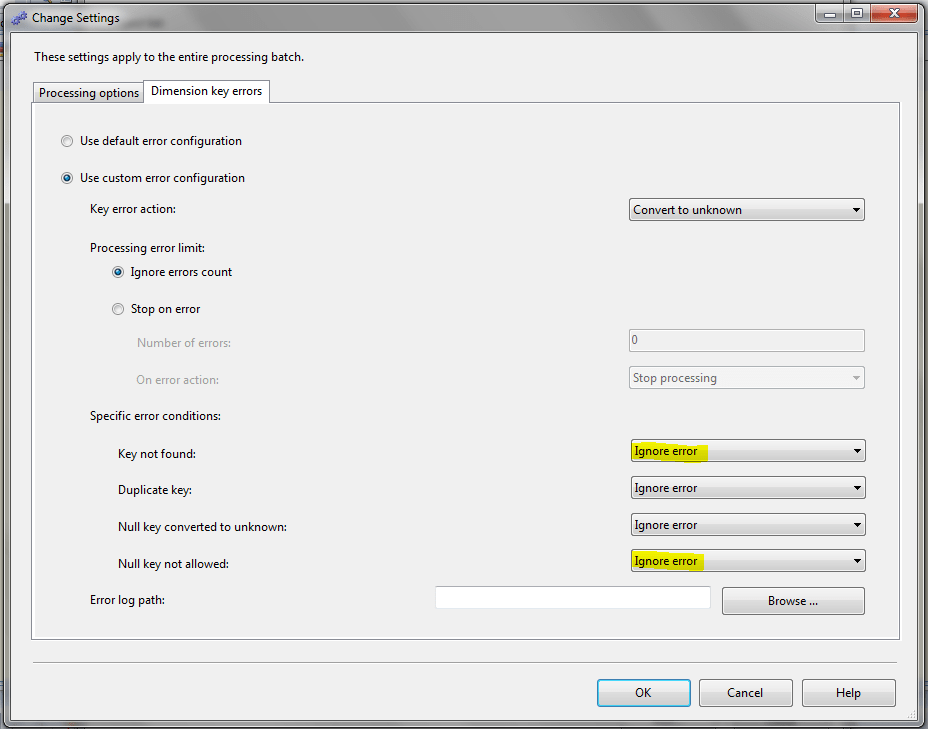
If, on the other hand, you set Key Not Found and Null Key Not Allowed to Ignore Error, as follows:

image

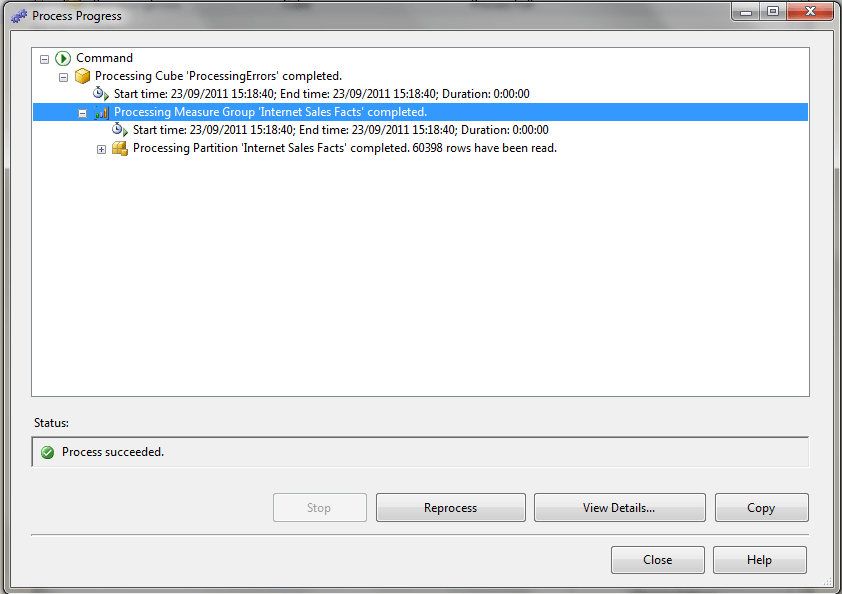
…a full process takes under a second:

image

Now this is an extreme example, of course, and in a production system you should not have any key errors anyway, and if you do you definitely do not want to ignore these key errors. But if you’re developing a cube and you know that key errors exist but you don’t care about them (for the moment), you can save a massive amount of time by not reporting these errors. In my case cube processing went down from around 3 hours to 45 minutes. Which is a good thing if you want to get on with your work faster, but I suppose is a bad thing if it interrupts your web browsing/coffee drinking/chatting or whatever you do to pass the time while processing’s taking place.

I’m an Analysis Services Maestro!

I’m very proud to say that I’ve been made an Analysis Services Maestro! You can read the official announcement here:
http://sqlcat.com/sqlcat/b/technicalnotes/archive/2011/09/19/announcing-the-first-wave-of-ssas-maestros.aspx

If you’re wondering what this actually means, you can find out more here; in a nutshell, it’s something like a MCM for Analysis Services. The course itself was pretty tough and there was a lot of work involved in doing the labs, exam and case study, but I learned a lot (especially from Thomas Kejser) and it was definitely a worthwhile thing to do.

Congratulations also go to the other ten awardees: Ulf, Alberto, Greg, Darren, Dirk, Mick, Vidas, Marco, Harlan and John.

New trace events in 2008R2 SP1

You may have seen that SP1 for SQL 2008R2 got released last week; however (as usual) looking at the master KB article listing all the fixes and changes you’d think there were no significant changes for SSAS. That’s not the case though: SP1 adds several important new trace events that can make monitoring SSAS much easier. They are documented in some detail here:

http://support.microsoft.com/kb/2458438

Highlights include the ability to see how long each command in your MDX Script takes to execute (useful when you’re trying to work out why your MDX Script takes a long time to execute – usually expensive named sets are the problem); more detail on SSAS locks; and the new Resource Usage class.