Tuning the Currency Conversion Calculations created by the Add Business Intelligence Wizard

I see the ‘Add Business Intelligence’ wizard in BIDS as a bit of a missed opportunity on Microsoft’s part: it was a great idea to have functionality that would automate difficult stuff like adding MDX calculations to a cube, and it’s a shame that most of the MDX code it generates is so rubbish. Take, for example, the MDX currency conversion calculations that it creates. If you’re using Enterprise Edition the best way to do currency conversion is not to use MDX at all but to use measure expressions, but if you have Standard Edition you have no choice but to use MDX to do your currency conversion and if you use the calculations the wizard produces you’d probably think that this type of calculation has to be painfully slow. That’s not true, though – and in this post I’ll show you how to replace the currency conversion calculations created by the wizard with some that are not only much simpler but also much, much faster.

Let’s use a simple cube to illustrate this. In the Adventure Works database I created a cube with two measure groups: one based on the Internet Sales fact table, the other based on the Currency Rates fact table. I then added the Currency dimension and the Date dimension (joining on OrderDateKey in the Internet Sales table), and ran the ‘Add Business Intelligence’ wizard to add many-to-many currency conversion to the cube. Here’s what my Dimension Usage tab looked like after I’d run the wizard (note that it added a new Reporting Currency dimension to the cube):

image

And here’s the MDX that it adds to the MDX Script:

// <Currency conversion>
       
        // Currency conversion wizard generated script.
        // Currency conversion generated on: 11 January 2011 21:05:19   
        // by user: Chris   
        // Currency conversion type: ManyToMany   
        // Selected members to be converted: Sales Amount   
        // Please be aware that any changes that you decide to make to it may be
        // overridden the next time you run the Currency Conversion wizard again.   
   
        // This is the Many to One section   
        // All currency conversion formulas are calculated for the pivot currency and at leaf of the time dimension   
        Scope ( { Measures.[Sales Amount]} );
            Scope( Leaves([Date]) ,
                [Reporting Currency].[USD],   
                Leaves([Source Currency]));


              // Convert Local value into Pivot currency for selected Measures that must be
              //converted with Measure rate [Average Rate]
              Scope( { Measures.[Sales Amount]} );
                    
               This = [Reporting Currency].[Local] / Measures.[Average Rate];
   
              End Scope;
   

            End Scope;   
       
            // This is the One to Many section
            // All currency conversion formulas are calculated for
            //the non pivot currency and at leaf of the time dimension   
            Scope( Leaves([Date]) ,    
                Except([Reporting Currency].[Source Currency Code].[Source Currency Code].Members,
                {[Reporting Currency].[Source Currency Code].[Source Currency Code].[USD],
                [Reporting Currency].[Source Currency Code].[Source Currency Code].[Local]}));


            // This section overrides the local values with the Converted
            // value for each selected measures needing to be converted with Measure rate [Average Rate]…   
            // LinkMember is used to reference the currency from the
            // source currency dimension in the rate cube.
            Scope( { Measures.[Sales Amount]} );
                   This = [Reporting Currency].[Source Currency Code].[USD] * (Measures.[Average Rate], LinkMember([Reporting Currency].[Source Currency Code].CurrentMember, [Source Currency].[Source Currency Code])) ;
            End Scope;   
   
       
            End Scope; // Leaves of time, all reporting currencies but local and pivot currency   
        End Scope; // Measures

        // End of the currency conversion wizard generated script
    // </Currency conversion>

Scary, eh? I won’t explain what it does in detail, but basically it does the following:

  1. Converts the various local currency values held in the Internet Sales fact table into US Dollars
  2. Converts these US Dollar amounts into whatever Reporting Currency the user has selected

It’s a lot of code for something so straightforward, and the reason why so complex is because it needs to use the Currency Rates measure group for both sets of currency rates: from local currency to US Dollars, and from US Dollars to reporting currency. As we all know overly-complex code is usually poorly-performing code, and in this case the use of LinkMember in particular is a killer; also there are no checks for situations where exchange rate values don’t exist, which is a fairly basic mistake.

Take the following query:

SELECT [Date].[Calendar Year].MEMBERS ON 0,
NON EMPTY
[Reporting Currency].[Source Currency Code].MEMBERS ON 1
FROM [CurrencyTestWizard]
WHERE([Measures].[Sales Amount])

It displays all Years on columns and all Reporting Currencies on rows for the Sales Amount measure, so it’s doing quite a lot of work. On my quite beefy laptop, using the cube I’d just created, it ran in just under 9 seconds on a cold cache to give me this:
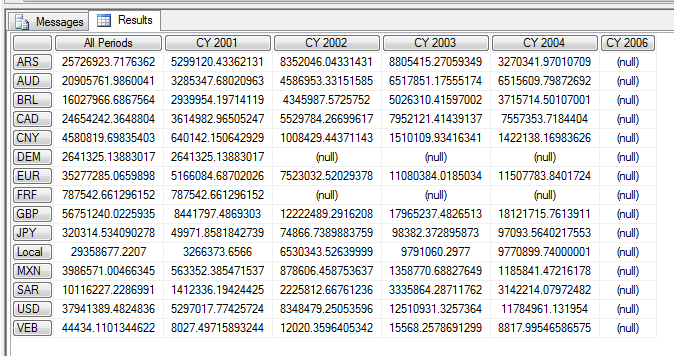
image

We can do a lot better than 9 seconds though. The first step to optimising this is, as always, to push complexity out of the MDX and back into the cube design. Given that a fact table containing exchange rate values is usually pretty small relative to other fact tables, what I decided to do was to add a second measure group to my cube based on exactly the same Exchange Rate fact table, use the original measure group for the conversion from local currency to US Dollars and then the new one for the conversion from US Dollars to reporting currency. This did increase both the size of the cube and the amount of time taken to process it, but only by a tiny amount.

BIDS didn’t let me create a second measure group from a fact table that was already in use, so I had to create a new named query in BIDS that did a SELECT * from the Exchange Rate fact table and then use that. Having done this, I was able to set up my Dimension Usage as follows, with Reporting Currency joining to this new measure group:
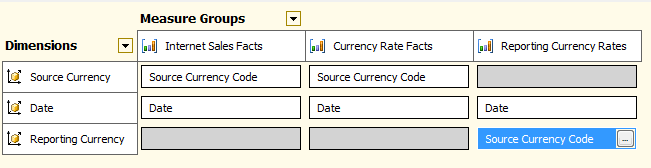
image

Now, I could replace the code above with the following MDX:

SCOPE({[Measures].[Sales Amount]});
    SCOPE([Date].[Date].[Date].MEMBERS);
        SCOPE([Source Currency].[Source Currency Code].[Source Currency Code].MEMBERS);
            SCOPE(EXCEPT([Reporting Currency].[Source Currency Code].[Source Currency Code].MEMBERS
                        ,{{[Reporting Currency].[Source Currency Code].&[2147483647]}}));

                THIS =  IIF([Measures].[Average Rate – Reporting Currency Rates]=0
                            , NULL
                            ,IIF([Measures].[Average Rate]=0
                                , NULL
                                ,([Measures].[Sales Amount] / [Measures].[Average Rate]))
                                * [Measures].[Average Rate – Reporting Currency Rates]);
            END SCOPE;
        END SCOPE;
    END SCOPE;
END SCOPE;

What I’m doing here is using a single set of nested scoped assignments to perform the calculation at the leaf level of the Date, Source Currency and Reporting Currency dimensions. With two different measure groups containing exchange rates there’s no need for the use of LinkMember – I just use two different measures for each step in the conversion – and I make sure I don’t bother doing any conversions where exchange rate values don’t exist.

When I ran my test query, I got exactly the same results but the query ran in around 0.5 seconds on a cold cache – 18 times faster than on the original version of the cube! It just shows you what a few tweaks to your cube design and MDX can achieve, doesn’t it? It’s a shame that MS didn’t invest a bit more time on the ‘Add Business Intelligence’ wizard to improve it – it would probably have improved the quality of many implementations no end. In the future, with PowerPivot and BISM being focused so much on ‘self-service’ BI, I think something similar to the wizard is a ‘must have’ to help users create complex DAX calculations, and I hope MS realise that functionality like this can be key to the overall success of a product.

PowerPivot Training in London (and elsewhere)

As you’re probably aware by now, PowerPivot and DAX are important parts of the Microsoft BI story going forward – self-service BI is the big new thing, while on the corporate side BISM will use DAX as its calculation language and BISM models will essentially be PowerPivot models. So it makes sense to learn PowerPivot and DAX as soon as possible to get a head start, right?

While that thought’s in your head, I’m pleased to mention that I’m helping Marco Russo and Alberto Ferrari (authors of the excellent book “PowerPivot for Excel 2010”) organise the London leg of their European PowerPivot training tour. Marco has more details on the course on his blog here, and you can find the course website here:
http://www.powerpivotworkshop.com/

Whether you’re a BI professional or an Excel power user, I think this represents an excellent opportunity to get training from acknowledged PowerPivot gurus. I’ll be there in the audience!

Report Portal

As I say whenever I talk about third party products here, I don’t do reviews on my blog, I just highlight products that look interesting and probably deserve closer inspection. So here is a non-review of a client tool I had a demo of today, Report Portal, a thin client, pure-html solution that includes both ad-hoc browsing capabilities and dashboarding/reporting. Although the UI looks a little dated, the fact that nothing needs to be installed on the desktop, that there are no requirements that might fall foul of corporate IT policies (which might, for example, rule out a Silverlight solution), and that it is licensed on a per-server basis do remove a lot of potential deployment headaches. 

Rather conveniently, Igor, the guy who gave me the demo, realised that I’ve seen hundreds of client tools for SSAS and just showed me the features that make this particular product stand out from the pack, so that’s what I’ll talk about. Here are the main points:

  • It automatically creates a number of date calculations and relative time selections (such as ‘current month’, ‘previous month’) for you, meaning you don’t have to develop them yourself.
  • On time dimensions you can set up selection by a date picker, and also do date range selections by selecting a start and end date.
  • It can also do cascading parameters rather like what’s possible in SSRS or with Excel 2010’s slicers.
  • For drillthrough it allows you to build your own drillthrough query, select which measures you want, which attributes/columns you want and the order you want the columns to appear
  • There are a wide range of charts and visualisations to choose from, including an interesting (although possibly not Stephen-Few-approved) pie-chart tree report.
  • There’s also a load of other features, such as the ability to embed SSRS, OWC, SQL-based and other report types in dashboards; it supports writeback; it allows you to save comments in cells; and there’s also a blog and a wiki inside the portal.

Overall, it’s a solid, mature product that’s been around for six years and does pretty much everything you’ll want. Definitely looks like one to add to the shortlist if you’re looking for a zero-footprint SSAS client tool.

Sixth Blog Birthday

Every year on December 30th (or thereabouts) I write a blog post summarising what I’ve been up to this year, to mark this blog’s birthday. Today is my blog’s sixth birthday which, to be honest, I find pretty amazing – but then every year I’m amazed at how long I’ve kept at this! I only wish I could apply the same kind of willpower to making cash (I’d be a billionaire by now) or dieting, exercise or anything else…

From a blog point of view, the big change this year was moving away from Windows Live Spaces, where I’d started out, to WordPress. I’d been wanting to make the move for ages but had been too lazy to do so, and also unwilling to lose all my old posts and traffic; luckily when MS made the decision to retire Live Spaces they made sure it was very easy to migrate all my old content to WordPress and for that I’m very grateful – it almost makes up for the shabby treatment Live Spaces users had been getting in the preceding years.

I also got one of my biggest ever days from a blog traffic point of view during the controversy over the future of SSAS at PASS; I’m not even going to link to that particular post because it still gets plenty of hits and it’s something I’d prefer to move on from. It’s better to look forward to the undoubtedly cool stuff that will be coming with Denali rather than brood over any disappointment about what has happened, and one thing I’m certainly relieved about is that in 2011 there will be lots of cool stuff to blog about – at some points in the last year I’ve struggled to find anything new or interesting to blog about for SSAS (although as Greg Galloway has just shown, there’s still lots of interesting SSAS topics to blog about if you look). Bring on BISM!

Professionally things go from strength to strength and I’m going to be busier in the first half of 2011 than I’ve ever been in January/February, which are usually relatively quiet times for me. Again, with significant new technology arriving in the BI stack in Denali I would expect a lot of consultancy and training work to follow; I’m going to be expanding my training activities in other ways next year too, and I’ll be making a separate announcement about that here any day soon. SQLBits also continues to grow and grown, and I’m really excited about the plans for SQLBits 8 in Brighton this April. Since it doesn’t look like there’s going to be a PASS Europe this year I would say that anyone who’s serious about SQL Server in Europe should plan to come to what’s going to be the biggest and best SQL conference in Europe bar none; and even if you live outside Europe, but fancy a vacation, why not come too? We have an ever increasing number of US attendees and speakers!

Anyway, it’s time for me to go and do some real work and stop being self-indulgent. I hope everyone reading this has a great 2011. Thanks for reading!

New Trace Events in SSAS2008 R2 CU5

Greg Galloway has just pointed out to me a new KB article outlining some major improvements/changes to trace events that are coming in CU5 for SSAS 2008 R2:
http://support.microsoft.com/kb/2458438/

This represents part of the new monitoring functionality that will be coming to SSAS in Denali. These changes will allow us to:

  • Monitor what happens during the execution of the MDX Script in more detail
  • Track resource usage for individual commands (this alone is very interesting)
  • Track locks more effectively

These changes are going to be very useful to anyone running a high-end SSAS implementation.

SQLBits 8–Beside the Sea!

The dates for the next SQLBits have been announced: it’s going to be on April 7th-9th at the Grand Hotel in Brighton (for those of you outside the UK, Brighton is a very cool town on the south coast of England, very easy to reach from London and Gatwick Airport). More details, as always, are to be found at http://www.sqlbits.com/

We’ve also posted most of the videos from SQLBits 7, which are available to view for free from the SQLBits site at the link above. Stay tuned for more announcements about the exciting stuff we have planned for Brighton!

Google Books Ngram Viewer

This has been blogged about quite a bit over the last few days, but if you’re looking to kill some time at work with something vaguely BI-related then take a look at Books Ngram Viewer, the latest thing on Google Labs:

http://ngrams.googlelabs.com/

It’s pretty simple: it allows you to visualise the number of occurrences of words in books held in Google books by year of publication, and therefore track the popularity of ideas and concepts over time (well, that’s the theory). You can even download the source data – if I’ve got some spare time it might be interesting to see this data in PowerPivot…!

There are already some interesting examples of things you can see with this data out there, for example on the Information Is Beautiful site, and on the Google Blog post announcing it. I can’t resist adding one more, though: Microsoft vs Oracle vs IBM vs Google – notice how IBM peaks in about 1988 then declines; Oracle and Microsoft have a similar peak in 2004 and then decline; while Google is still on the up…

Dryad and DryadLINQ in Beta

I’ve just seen the news on the Windows HPC blog that Dryad and DryadLINQ are now in beta:
http://blogs.technet.com/b/windowshpc/archive/2010/12/17/dryad-beta-program-starting.aspx

If you’re wondering what Dryad is, Daniel Moth has blogged a great collection of introductory links; and Jamie and I have been following Dryad for some time too. Although it seems like its integration with SSIS has fallen by the wayside its relevance for very large-scale ETL problems remains: it will allow you to crunch terabytes or petabytes of data in a highly parallel way. And given that you can now join Windows Azure nodes to your HPC cluster, it sounds like it’s a solution that can scale out via the cloud, making it even more exciting. I hope the people working on Microsoft’s regular and cloud BI solutions are talking to the HPC/Dryad teams.

Raising your own Errors in Dynamic Security

Last week I was working with a customer that is going to implement dynamic security using the CustomData function: they have their own web-based reporting app and want to use the CustomData connection string property to pass information about the user from the app back to a role in SSAS, which then dynamically generates an allowed set for dimension security based on that information. You can do something similar in the Adventure Works cube by doing the following:

  • Create a new role, called “Role”, and give it access to the Adventure Works cube
  • Go to the Dimension Data tab and select the Country attribute on the Customer cube dimension and select the ‘Deselect all members’ radio button
  • Go to the Advanced tab and enter the following MDX in the Allowed Member Set textbox:
    {STRTOMEMBER("[Customer].[Country].&[" + CUSTOMDATA() + "]", CONSTRAINED)}
  • Deploy the solution
  • Go to SQL Management Studio and click the MDX button to open a new MDX query window
  • In the connection dialog that appears, click the Options button, go to the Additional Connection Parameters tab, and then enter:
    Roles=Role;Customdata=Australia
  • Ignore what you see in the metadata pane (it’s a different connection), watch out for this bug, and note that when you run the following query, only the country Australia is returned:

    SELECT {} ON 0,
    [Customer].[Country].[Country].MEMBERS ON 1
    FROM [Adventure Works]

Once this was working, the next question the customer had was what happens if you forget to pass in the CustomData connection string property, or you pass an invalid value in (in this case, a country that doesn’t exist on the hierarchy). Well, the good thing is that after you connect you can’t run any queries, but you do get an unhelpful error message like this:

The ‘Country’ attribute in the ‘Customer’ dimension has a generated dimension security expression that is not valid.
DimensionPermission (1, 2) The restrictions imposed by the CONSTRAINED flag in the STRTOMEMBER function were violated.

Not good for debugging, and a bit confusing for your users if they see it. Also, in some implementations of dynamic security (for example if you’re not using the Constrained flag or using a Filter) instead of getting an error you’ll be able to query the cube but just see no data in it, which is even more confusing.

So what we want to be able to do is display our own error messages in these situations as well as forcing a lock-out, and we can do this by using the MDX Error() function (I always knew I’d find a use for it someday!). In our example if we want to trap situations where the developer has forgotten to pass in the Customdata connection string property we can use the following MDX in our role:

IIF(
CUSTOMDATA()=NULL,
ERROR("You forgot to pass in the Customdata connection string property!"),
{STRTOMEMBER("[Customer].[Country].&[" + CUSTOMDATA() + "]")})

Now, when you connect you’ll see a slightly more helpful error message. Here’s what Excel shows when you open a connection using the role but don’t supply anything in Customdata:

image

Of course you’d probably want to handle more complex scenarios than this, so here’s a more complex example that handles missing and invalid Customdata values:

IIF(
CUSTOMDATA()=NULL,
ERROR("You forgot to pass in the Customdata connection string property!"),
IIF(
COUNT(
INTERSECT({STRTOMEMBER("[Customer].[Country].&[" + CUSTOMDATA() + "]")}
  ,[Customer].[Country].[Country].MEMBERS)
)=0,
ERROR("The country " + CUSTOMDATA() + " doesn’t exist on the Country hierarchy of the Customer dimension"),
{STRTOMEMBER("[Customer].[Country].&[" + CUSTOMDATA() + "]",CONSTRAINED)}))

And here’s what you get in Excel with this if you pass the value “Norway” using Customdata:

image

This may all seem like window dressing, but it can save you time later on when you’re trying to debug security problems over the phone with users or other developers.

Subscribing to Traces

There’s a few blog posts out there that describe how to define and run server-side traces for SSAS (such as this one) but recently I was looking into how to subscribe to a server-side trace that’s already running, and while there’s a good thread on the forum I didn’t find much other information out there on the subject. Time for a blog post, then.

First of all, you need a trace running on the server before you can subscribe to one. Luckily, you can find out what traces are running by querying the discover_traces DMV as follows:

select * from $system.discover_traces

Unless you’ve specifically turned it off, you’ll see at least one trace running on each SSAS instance: the flight recorder trace, which has the ID FlightRecorder. You can then subscribe to a trace by executing an XMLA command like this:

<Envelope xmlns="http://schemas.xmlsoap.org/soap/envelope/">
  <Header>
  </Header>
  <Body>
    <Execute xmlns="urn:schemas-microsoft-com:xml-analysis">
      <Command>
        <Subscribe xmlns="http://schemas.microsoft.com/analysisservices/2003/engine">
          <Object xmlns="http://schemas.microsoft.com/analysisservices/2003/engine">
            <TraceID>FlightRecorder</TraceID>
          </Object>
        </Subscribe>
      </Command>
      <Properties>
        <PropertyList>
        </PropertyList>
      </Properties>
    </Execute>
  </Body>
</Envelope>

Or, alternatively, anywhere you can run an MDX query (for example from an MDX query window in SQL Management Studio) you can run just the Subscribe:

<Subscribe xmlns="http://schemas.microsoft.com/analysisservices/2003/engine">
 <Object xmlns="http://schemas.microsoft.com/analysisservices/2003/engine">
  <TraceID>FlightRecorder</TraceID>
 </Object>
</Subscribe>


Once you’ve executed either of the above, the command will run indefinitely until you cancel the session it’s running on (it may look like it’s hanging, but it isn’t). To cancel the session you’ll need to find its SPID, which again you can find by querying the discover_commands DMV:

select * from $system.discover_commands order by command_start_time

You can then take the SPID and execute an XMLA Cancel command like this one:

<Cancel xmlns="http://schemas.microsoft.com/analysisservices/2003/engine">
  <SPID>1887</SPID>
</Cancel>


Once you’ve done this you’ll see the data from your trace returned at last:

image

I had thought this might be an easy-ish way of getting trace data into PowerPivot for analysis, but unfortunately as soon as you kill the session the subscribe is running on you see an error in the PowerPivot window. But it will work in SSRS if you use an OLEDB connection and can find an easy way of killing a session from inside an SSRS report – I’m sure it’s possible, using this technique, but it won’t be elegant. To be honest, though, in most cases saving the trace to a table in SQL Server, or to a file, will be more convenient if you want to use trace data for analysis.