User Group Dates and Online PowerPivot Courses

It’s a bit short notice, but I thought I’d mention I’m doing an SSAS session at the Maidenhead SQL Server User Group (in the UK) tomorrow night, so if you’re in the area please come along! More details and registration here:

http://sqlserverfaq.com/events/340/Maidenhead-UG-meeting-with-Chris-Webb-and-David-Morrison.aspx

I’m also speaking at the Southampton SQL Server User Group on January 11th next year, although I don’t think registration is open for that yet, and hopefully I’ll get down to Exeter  some time early next year too.

Also, if you’re looking for PowerPivot training then I can highly recommend my friends Marco and Alberto’s course which is going to be run online (at times convenient for those of you living in the Americas) on December 19th-20th. More details can be found on Marco’s blog, and on the PowerPivot Workshop site

Sparklines for Excel

While the introduction of native support for sparklines and other microcharts in Excel 2010 was welcome, Excel is still lacking more advanced visualisation features. I came across Sparklines for Excel – a free Excel addin that gives you a lot of extra charting options, not just sparklines – a while ago but I’ve only just got round to playing with it and I have to say it’s a lot of fun. I’m not much of a data visualisation expert (I’ll leave that to the likes of Jen) but it’s a subject that every BI professional needs a passing knowledge of and in any case it’s a shiny new toy to play with, so it’s worth a blog post.

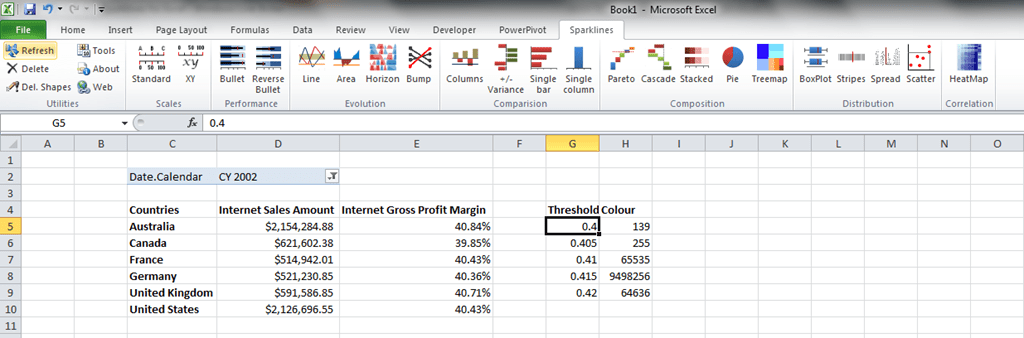
What I like most of all about Sparklines for Excel is that everything is driven from Excel formulas, and no VBA is required. That means you can make every aspect of the charts you create data-driven, and this holds a fundamental appeal for the data geek in me.  Let’s take creating a treemap as an example, and start with an Excel 2010 worksheet hooked up to the Adventure Works cube using some Excel cube functions plus some thresholds telling us whether the values for Gross Profit Margin are good or bad:

image

We can then simply click on an empty cell and then click on the Treemap button in the ribbon, fill in some ranges, and we get the following formula:

=Treemap(D5:D10,C15:I29,,,E5:E10,G5:H9,C5:C10)

And this treemap in the worksheet (I won’t even try to apologies for the colour scheme):

image

Cool, eh? And of course, as soon as you change the dropdown filter to select another year, or change any of the threshold values, the treemap updates too. Even the position, length and width of the treemap itself can be parameterised.

You can see the full list of chart types – including heat maps, cascade charts and Pareto charts – in the manual here. It’s definitely worth checking out if you’re an SSAS or PowerPivot user who’s into data visualisation and on a tight budget.

Announcing Technitrain – Expert SQL Server Training in the UK

Over the last few years I’ve been doing more and more training – my MDX, SSAS cube design and performance tuning courses continue to be extremely popular – and I’ve also seen how successful preconference seminars at conferences like SQLBits have become. It’s my opinion that there’s significant demand for SQL Server training that is either at a more advanced level than the big training companies can offer, or that covers niche topics that the big training companies would never bother with such as MDX. Equally, I believe that more experienced developers would rather be taught by people like them, who have used a technology in the field, written books and blog posts, and have real-world knowledge, rather than professional trainers who (by definition) spend most of their time training.

That’s why I have decided to launch a new training company to offer expert-level SQL Server training in the UK: Technitrain. Not only will I be running all my public training courses through it, but I’ll also be offering training courses by other respected SQL Server MVPs, authors, bloggers and speakers. Here’s my initial course schedule:

Advanced SQL Server Internals and Troubleshooting, with Christian Bolton. 6th-7th December 2011

Introduction to Master Data Services, with Jeremy Kashel. 17th February 2012

Real World Analysis Services Cube Design and Performance Tuning, with Chris Webb. 9th-10th February 2012

From Zero to SSIS, with Andy Leonard. 5th-9th March 2012

Introduction to MDX, with Chris Webb. 21st-23rd March 2012

I’m really excited to be working with the likes of Christian, Jeremy and Andy for this first group of courses – they really are the acknowledged experts in their particular areas. All the courses will be run in central London, so they will not only be convenient for anyone in the UK but also easily accessible for attendees from Europe or further away.

Finally, I’d like your help in making my new company a success. But don’t worry, I’m going to pay you for it! If you run a user group, a small consultancy, a training company or are a contractor or a blogger, you may be interested in my affiliate programme. You can find more details on the site, but basically I will pay 20% of the price of the course for each registration that an affiliate sends my way. For example, for Andy Leonard’s SSIS course that means I’ll pay £399 per registration in commission – which hopefully is enough motivation for you to mention these courses to your friends, colleagues, customers, blog readers, Twitter followers and so on.

Investigating the Resource Usage Profiler Event

As I mentioned a few months back, some new functionality snuck into SSAS with SQL 2008 R2 SP1, the most interesting of which is a new Profiler event called Resource Usage (Thomas Ivarsson recently blogged about some other new events too). I’ve been doing some investigations on it recently, and asking the SSAS dev team what the information it returns actually means (Akshai Mirchandani is the source for much of the content of this post and I’m very grateful for his help), so I thought I’d blog my findings.

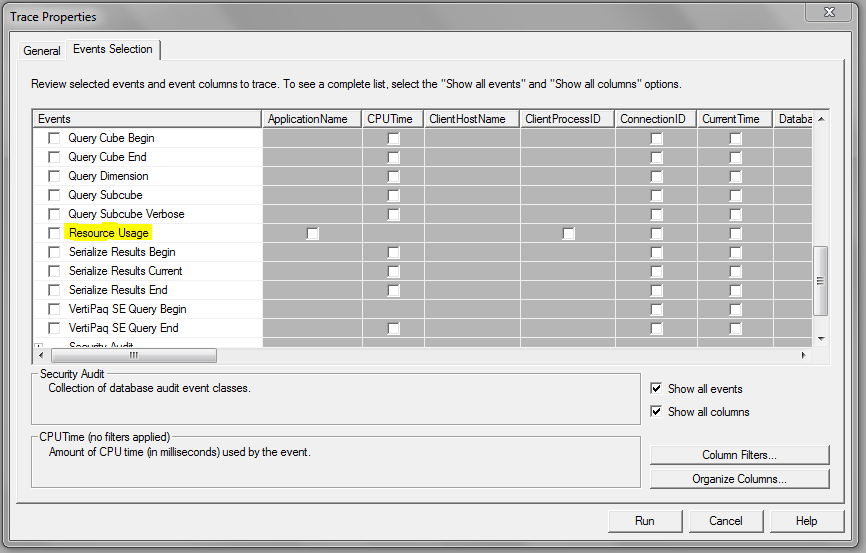
When you’re defining a new trace, you can find the Resource Usage event in the Query Processing section as shown below:

image

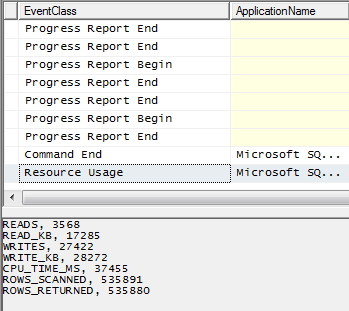
It is raised immediately after a query has finished executing (in which case it follows the Query End event):

image

It is also raised after any XMLA command has finished executing, and this means you’re also able to use it to monitor the resource usage of a processing operation:

image

Essentially, it gives you information that is very similar to what’s already available in Perfmon but specific to a particular query or command. The problem with Perfmon is that it’s easy to spot strange things happening in the data it gives you, but there’s no sure-fire way of linking what you see in Perfmon back to individual events such as queries executing; the Resource Usage event solves this problem.

Here’s a breakdown of the data returned by the event:

  • READS: The number of disk read operations tracked for this query
  • READ_KB: The size of disk reads in KB
  • WRITES: The number of disk write operations tracked for this query
  • WRITE_KB: The size of disk writes in KB
  • CPU_TIME_MS: The CPU time as measured in milliseconds for this query (although this seems to bear very little relation to the CPU time shown elsewhere in Profiler – perhaps it is only the CPU time for the Storage Engine?)
  • ROWS_SCANNED: The number of rows scanned (decoded/filtered/aggregated) by the Storage Engine for this query
  • ROWS_RETURNED: The number of rows resulting from the scans after decoding/filtering/aggregation by the Storage Engine for this query

The data returned relates purely to Storage Engine operations as far as I can see and does not relate to the Formula Engine – I get no values back for queries that hit the Storage Engine cache but are nonetheless slow because they are Formula Engine bound.

To investigate things further, I took a look at three queries (slightly modified to run on my antique version of Adventure Works) from Jeffrey Wang’s recent post on prefetching, which illustrate scenarios where the Storage Engine does radically different amounts of work; they’re particularly interesting because Jeffrey describes in detail what goes on in the Storage Engine when each of them run. First of all, the first test query from Jeffrey’s post where prefetching does not take place gives me the following values for Resource Usage on a cold cache:

READS, 8
READ_KB, 361
WRITES, 0
WRITE_KB, 0
CPU_TIME_MS, 15
ROWS_SCANNED, 18210
ROWS_RETURNED, 337

On a warm cache (ie in a situation where the Storage Engine does not need to go to disk because it can get the values it needs from cache) I get the following values:

READS, 0
READ_KB, 0
WRITES, 0
WRITE_KB, 0
CPU_TIME_MS, 0
ROWS_SCANNED, 0
ROWS_RETURNED, 0

Here’s Jeffrey’s second query, where an acceptable amount of prefetching is taking place:

select [Internet Sales Amount] on 0,
head(descendants([Date].[Calendar].[Calendar Year].&[2003],[Date].[Calendar].[Date]), 32) on 1
from [Adventure Works]

On a cold cache this is what I get from Resource Usage, showing slightly more activity going on:

READS, 16
READ_KB, 738
WRITES, 0
WRITE_KB, 0
CPU_TIME_MS, 15
ROWS_SCANNED, 36932
ROWS_RETURNED, 693

If we now look at Jeffrey’s third query, where he shows a scenario where excessive prefetching is taking place:

select [Internet Sales Amount] on 0,
head(descendants([Date].[Calendar].[Calendar Year].&[2003],[Date].[Calendar].[Date]), 33) on 1
from [Adventure Works]

Here’s what I get on a cold cache from Resource Usage:

READS, 32
READ_KB, 1889
WRITES, 0
WRITE_KB, 0
CPU_TIME_MS, 46
ROWS_SCANNED, 74655
ROWS_RETURNED, 63831

It’s clear from these numbers that a lot more work is going on in the Storage Engine compared to the previous two queries, although I’m not sure it’s worth trying to read too much into what the exact values themselves actually represent (unless of course you happen to be Jeffrey). I think it’s also going to be dangerous to make simplistic general recommendations about these values: while in some cases trying to keep the values returned as low as possible will be a good idea, I’m pretty sure there are going to be other situations where a more efficient query would involve more reads from disk, or scanning or returning more rows, than a less efficient version of the same query would. That said, this is useful and interesting information and another weapon in the arsenal of the SSAS consultant out in the field trying to diagnose why a query is slow and what can be done to tune it.

Solving the Events-In-Progress Problem in DAX V2.0

This is probably the 5th or 6th post I’ve written on this problem (most deal with MDX, but I did blog about solving it in DAX early last year) but what can I say – it’s an interesting problem! I came across it at work today while working with the 2012 CTP3 version of PowerPivot and found yet another solution to the problem that used some of the new DAX functionality, so I thought I’d crank out one more blog post.

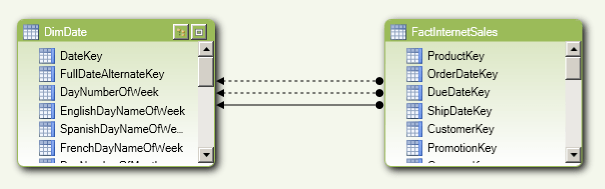
The basic approach is similar to the one I describe here. Using the same Adventure Works data, I can load the DimDate and FactInternetSales tables into PowerPivot V2.0 and I’ll get the following model:

image

Note that we have three relationships between the two tables: one active one, which is the relationship from OrderDateKey to DateKey, and two inactive ones from DueDateKey and ShipDateKey. If we want to find the number of orders up to the current date using the Order Date we can simply use the following DAX in a measure definition:

SalesToDate:=CALCULATE(
COUNTROWS(FactInternetSales)
, DATESBETWEEN(DimDate[FullDateAlternateKey], Blank(), LASTDATE(DimDate[FullDateAlternateKey])))

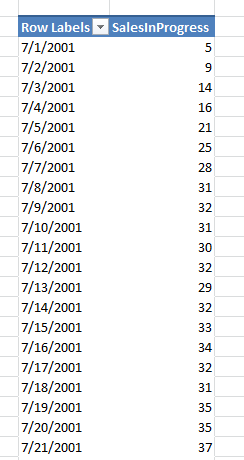
Now, if we want to find the number of orders that have shipped up until yesterday we don’t need any special modelling, we can use the new UseRelationship function to force a calculation to follow the relationship going from ShipDateKey to DateKey. Therefore, if we want to find the number of orders that have been placed but not shipped, we just need to take the measure above and subtract the vale returned by the same measure when use this different relationship and change the filter context to be the day before the current day:

SalesInProgress:=[SalesToDate]-
IF(ISBLANK(DATEADD(LASTDATE(DimDate[FullDateAlternateKey]), -1, DAY))
, BLANK()
,CALCULATE(
[SalesToDate]
, USERELATIONSHIP(FactInternetSales[ShipDateKey], DimDate[DateKey])
, DATEADD(LASTDATE(DimDate[FullDateAlternateKey]), -1, DAY)))

image

Quite an elegant solution, I think.

SQL Server 2012 Licensing Announced

Although I’m pretty late to the news (almost a whole day!) I thought it would still be worth mentioning here that the details for SQL Server 2012 licensing have been announced:

http://www.microsoft.com/sqlserver/en/us/future-editions/sql2012-licensing.aspx

Numerous people have already blogged about this in detail (Denny Cherry has a very good overview here); the big news from my point of view is the new BI Edition. Some people have been asking for a separate BI Edition for some time (although I was in two minds on the subject) and it will certainly have a lot of advantages: ok, it doesn’t support per-core licensing, only the server+CAL model, but in every other respect it’s the same as Enterprise Edition feature-wise so it will be a cheaper option for many BI projects. I’m a bit surprised to see Tabular didn’t make it into Standard Edition, though, which is unchanged in terms of features from SE in 2008R2 – I would have thought if Tabular was meant to bring SSAS to a wider audience then it should be positioned as the starting point for those who are new to BI; as it is only Multidimensional will be available in Standard Edition.

Microsoft Codename “Social Analytics”

I’ve just seen there’s a new release on the SQL Azure Labs site – Codename “Social Analytics” (that’s a bad codename by the way – did MS finally run out of place names in Washington state?). Full details are here:

http://www.microsoft.com/en-us/sqlazurelabs/labs/socialanalytics.aspx

It’s a service that allows you to collect social web data and then either use it for business analysis or automate responses; it has an OData endpoint so the obvious tool for doing the analysis is PowerPivot, and I guess it could also be a data source for Data Explorer when that comes along. At the moment it’s very limited in that you can only analyse the results of one of two feeds that aggregate data about either Bill Gates or Windows 8, which is a shame, but it should still be fun to play with.

Scoped Assignments and Multiselect

Something interesting to note regarding how scoped assignments behave with multiselect…

On the Adventure Works cube, add the following code to the MDX Script:

CREATE MEMBER CURRENTCUBE.MEASURES.TESTCALC AS 1;

SCOPE(MEASURES.TESTCALC, [Date].[Calendar Year].[Calendar Year].MEMBERS);
THIS = 2;
END SCOPE;

SCOPE(MEASURES.TESTCALC, [Date].[Calendar Year].[All Periods]);
THIS = 3;
END SCOPE;

Then run the following query:

SELECT [Measures].[TESTCALC] ON 0

FROM [Adventure Works]

WHERE([Date].[Calendar Year].&[2001])

It returns the value 2 as you would expect. Now run the following query where there is a set in the Where clause, giving a multiselect on 2001 and 2002:

SELECT [Measures].[TESTCALC] ON 0

FROM [Adventure Works]

WHERE({[Date].[Calendar Year].&[2001],[Date].[Calendar Year].&[2002]})

It returns the value 1 – which, strangely, is the value of the original TESTCALC calculated measure before any of the scoped assignments were applied, even though it would seem that the two scoped assignments between them should cover the cells returned by this query.

Now delete the code you added to the MDX Script and add the following:

CREATE MEMBER CURRENTCUBE.MEASURES.TESTCALC AS 1;

SCOPE(MEASURES.TESTCALC, [Date].[Calendar Year].MEMBERS);

THIS = 4;

END SCOPE;

When you try to run the two queries above you get the value 4 returned in both cases. When I first saw this I thought the results returned by two scenarios were inconsistent and that there was something buggy going on in the first one, but Jeffrey told me there is a specific rule in the engine that dictates this behaviour, so it’s how it’s intended to work – as a result, it’s something that needs to be understood and allowed for in any scoped assignments you write.

Self-service ETL with Data Explorer

One of the most interesting things I saw last week at the PASS Summit was Data Explorer, the cloud-based data transformation and publishing tool that was demoed in the keynote on day 1. While it was roundly dismissed as ‘yet more Excel’ by the disgruntled DBA faction I thought it showed some potential (you can see a walkthrough of what was shown here) – even if the fact that it was a SQL Azure Labs project suggested it was not destined to be a real product.

Today, however, I came across this post on Tim Mallalieu’s blog with a 10 minute video demo of an Excel addin version of Data Explorer, made earlier this year. Tim notes in his blog that:

We still have both the client and the cloud service but we only showed the cloud bits at PASS last week.

I would urge you to go and watch the video, because what’s shown is a very substantial, capable tool: an Excel addin for doing self-service ETL. Tellingly the name of the tool in the demo is “PowerImport” – and although Tim suggests in his blog that “some names and concepts have evolved quite a bit since March”, the choice of name speaks volumes. It looks like this could be to SSIS what PowerPivot is to SSAS, and a big selling point for Microsoft’s self-service BI story if it does get released.

Why has all the data in my cube disappeared?

Here’s an issue that I’ve encountered many, many times over the years on the newsgroup and the SSAS MSDN Forum but which, for some reason, I’ve never blogged about until now. It happens from time to time that when people are developing a cube they find, mysteriously, that all the data has disappeared from it; however, there is data present in the source database and there are no key errors while processing (see here for a recent example). What’s going on?

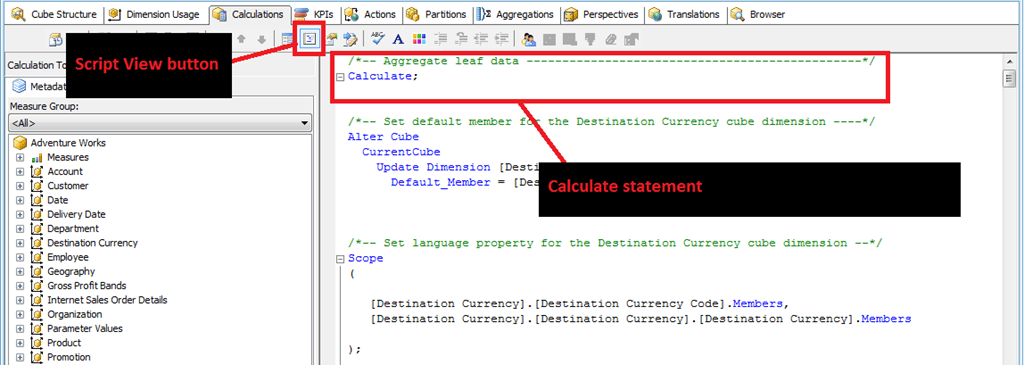
In almost all cases the cause is that the Calculate statement at the beginning of the cube’s MDX Script has been deleted or commented out by accident when editing other calculations. To simulate this problem, open up the Adventure Works project and check to see that you can browse the cube and see data in there. Assuming you can, then go to the Calculations tab in the Cube Editor, make sure you’re in Script View and you’ll see something like the following:

image

The first statement in the MDX Script of every cube should be the Calculate statement, shown above. It’s a bit of a hangover from functionality that I remember from beta versions of SSAS 2005 – you could do some interesting things with a Calculate statement back then but the functionality in question got dropped before RTM. It nonetheless still has to be present though, because when SSAS encounters it when the MDX Script is evaluated it triggers the aggregation of data in all the real measures of the cube up from the very lowest level of detail up to the highest.

If you delete it or comment it out, like so:

image

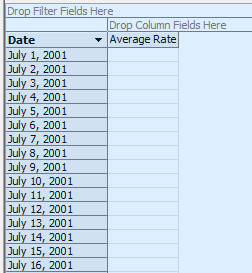
…then, when you deploy and browse the cube, no aggregation will take place for the measures in the cube. It will look as if there’s no data in the cube at all but that’s not true: if you browse down to the very lowest level of every dimension in a given measure group, you’ll find that there’s data present. For example in the Adventure Works cube the Exchange Rates measure group is dimensioned by the Date and Destination Currency dimensions and if you browse the cube after commenting out the Calculate statement and look at the Average Rate measure you’ll see no values at first (I’ve got the Show Empty Cells option turned on here):

image

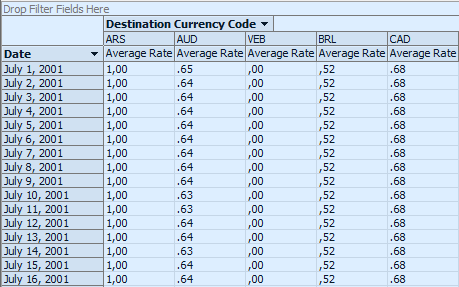
…but if you make sure you’re looking at data from the Date hierarchy of the Date dimension, and the Destination Currency Code hierarchy of the Destination Currency dimension, the two key attributes of the dimensions, you’ll see values are in fact present:

image

So the moral of this tale is: be careful not to delete or comment out your Calculate statement! After all there’s a good reason why the following warning is put before it on every new cube:

/*
The CALCULATE command controls the aggregation of leaf cells in the cube.
If the CALCULATE command is deleted or modified, the data within the cube is affected.
You should edit this command only if you manually specify how the cube is aggregated.
*/

[Incidentally, I would argue that the last line here is dangerous – I’ve never found a good reason to edit or delete the Calculate statement or even put MDX Script statements before it]