SQLBits Insight

This week, the SQLBits committee (which I’m a member of) announced our new event: SQLBits Insight. It’s aimed at CIOs, architects and other senior technical decision makers who are interested in finding out what’s new in SQL Server and how it can help their business. Although it will be taking place on the first day of SQLBits, on April 7th at the Grand Hotel in Brighton, it’s a separate event and very different to anything we’ve done before since it’s aimed at a completely new audience for us.

We have got an amazing line-up of speakers for it:

  • Steve Wozniak, co-founder of Apple and Chief Scientist of Fusion-io.
  • Guy Lucchi, CTO of CSC
  • Mark Souza, head of the SQLCat team at Microsoft
  • Ross Mistry, an Enterprise Architect for Microsoft in the Silicon Valley
  • Richard Tkachuk, ex of the SSAS team, now a program manager on the Parallel Data Warehouse team

Topics covered during the day will include private clouds, handling big data with PDW, new storage technologies and more; there will also be a reception afterwards where attendees get to mingle with the speakers, including ‘the Woz’ (as apparently we should refer to him). For full details on the speakers, the agenda and how to register, go to http://insight.sqlbits.com

We’d also really like to get your help to make it a success. If you’re a fan of SQLBits it would be great if you could forward details of SQLBits Insight on to any senior IT people that you know who might be interested in attending. After all, if they come back to the office enthused about what they’ve seen it might mean some juicy new projects being started which you’ll get to work on…

Steve Wozniak will of course be sticking around for the evening to dole out the prizes at the Crappy Code Games, so if you want some free food and booze and a picture of yourself with the great man to make all those Apple fanboy friends of yours weep, then don’t forget to register for it. You don’t need to take part in the games if you’re feeling shy – you can just watch – but of course if you do that you won’t win anything!

Querying PowerPivot DMVs from Excel

One of the more popular posts on my blog is one I wrote just over a year ago on binding the results of an MDX query to a table inside Excel. I was thinking about it again recently when I was looking at the list of DMVs (=Dynamic Management Views – views that can be queried using SQL in SSAS and which contain all kinds of useful admin data) available in Analysis Services and noticed several new ones in 2008 R2 that are PowerPivot-related; I assume these are the DMVs that the Sharepoint management dashboard uses to track usage of PowerPivot models after they’ve been uploaded, but it struck me that it would also be cool to have this information available for PowerPivot models while they’re still in Excel. Wouldn’t it be good to query a DMV from Excel? Well, here’s how.

First of all, take an Excel workbook with a PowerPivot model in it. Go to the Data tab and click on Connections, and you’ll see the connection that is created automatically to the PowerPivot model:

image

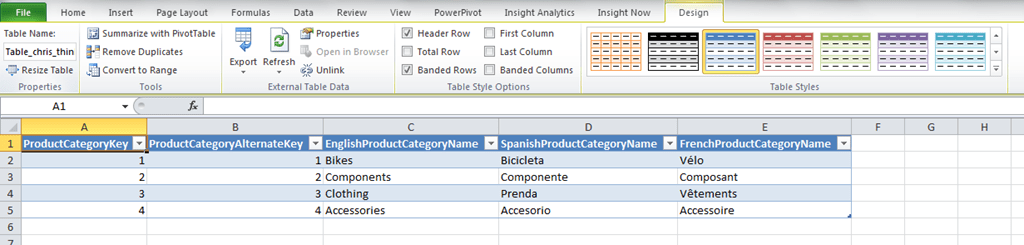
This is the connection we want to use to run our DMVs. We now need to be able to use a table to show the results of our query, and this requires something similar to the method Greg Galloway described after I published the above post. First, on a new sheet open a connection to any relational data source you have handy such as SQL Server and import a table from that data source into a table in Excel. I used the DimProductCategory table from Adventure Works, and did this by going to the Data tab, clicking on From Other Data Sources and then From SQL Server, and running the wizard. The result is this:

image

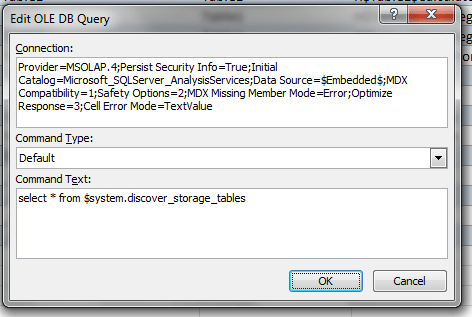
Then go to the Connections dialog and copy the connection string from the PowerPivot connection shown in the first screenshot above (found when you click Properties and go to the Definition tab), then go to the SQL table you’ve just created, right-click and select Table and Edit Query, then paste the PowerPivot connection string into the Connection textbox, change the Command Type to Default, and then put your query into the Command Text box. I also had to add an extra connection string property setting Locale Identifier=1033 to get things working on my machine (and re-add it every time I edited the query), but I suspect this might not be necessary if you have a US English machine. Anyway, here’s what my connection string looked like:

Provider=MSOLAP.4;Persist Security Info=True;Initial Catalog=Microsoft_SQLServer_AnalysisServices;Data Source=$Embedded$;MDX Compatibility=1;Safety Options=2;MDX Missing Member Mode=Error;Optimize Response=3;Cell Error Mode=TextValue; locale identifier=1033

And here’s the dialog:

image

Having done this, when you click ok you’ll see the table update with the contents of the query.

Of course you can enter any MDX query here but I’m going to stick to talking about DMVs. So what useful information can you get from a DMV then? Vincent Rainardi has a great post on SSAS DMVs here which covers all the useful ones and has plenty of syntax examples, but here are some things you might want to do with PowerPivot.

First of all, to get a list of all the DMVs supported you can run the query:

select * from $system.discover_schema_rowsets

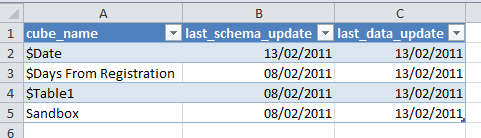
To get a list of tables in your model along with the dates they were last edited and when the data was last updated, use the following query:

select cube_name, last_schema_update, last_data_update from $system.mdschema_cubes

image

…although I’ve noticed some weird behaviour with the dates for some tables, so be careful using it.

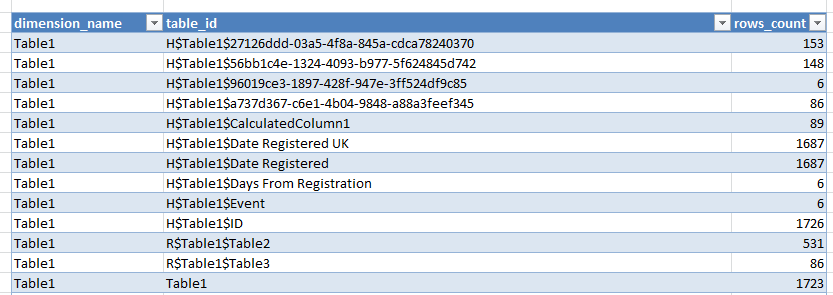
To get a list of the number of distinct values in each column, use:

select dimension_name, table_id, rows_count from $system.discover_storage_tables

image

The query:
select * from $system.discover_storage_table_columns

gives more metadata on table columns; however:
select * from $system.discover_storage_table_column_segments

…although it gives some information on the amount of memory allocated to different columns, does not give the complete picture on memory usage. For that you need to use:
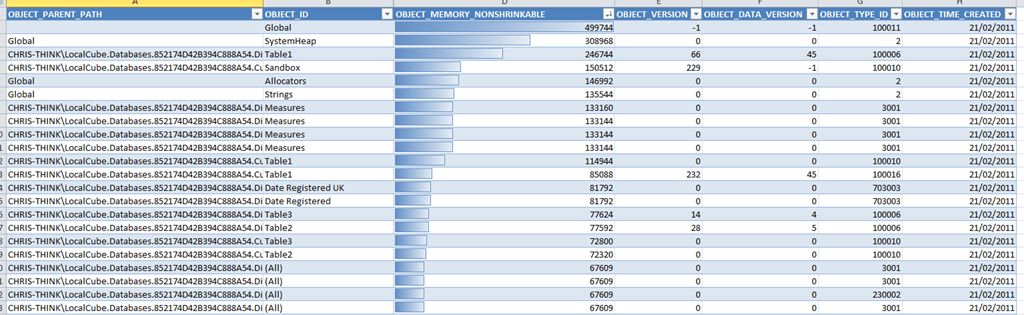
select * from $system.discover_object_memory_usage

image

This gives a full breakdown of memory usage (in the OBJECT_MEMORY_NONSHRINKABLE column) by each object in the PowerPivot model. It’s not all that easy to interpret this information though, because it only gives the memory used directly by each object and you also need to take into account the memory used by all the objects ‘owned’ by a given object too. It’s also worth pointing out that this is not the same view of memory usage that is given by looking at the temp folder created by Vertipaq, which Vidas has blogged about here and here; it shows the size of the database when it has been loaded into memory as opposed to the size of the database when it is persisted to disk, and there can be a big disparity between the two.

How can we make sense of the data returned by discover_object_memory_usage? We load it back into PowerPivot of course! I created a linked table and then a calculated column called OBJECT_PATH concatenating OBJECT_PARENT_PATH and OBJECT_ID using the following expression:
=[OBJECT_PARENT_PATH]&"."&[OBJECT_ID]
This gave me the full path of each object in a format that’s directly comparable with the object’s parent as stored in OBJECT_PARENT_PATH.

I then created a calculated measure with the following expression to return the amount of memory used by each object, including the objects it owns, in KB:

=(SUM(Memory[OBJECT_MEMORY_NONSHRINKABLE]) + CALCULATE(SUM(Memory[OBJECT_MEMORY_NONSHRINKABLE]),FILTER(ALL(Memory), COUNTROWS(FILTER(VALUES(Memory[OBJECT_PATH]), IFERROR(SEARCH(Memory[OBJECT_PATH],EARLIER(Memory[OBJECT_PARENT_PATH])), 0)=1))>0)))/1024

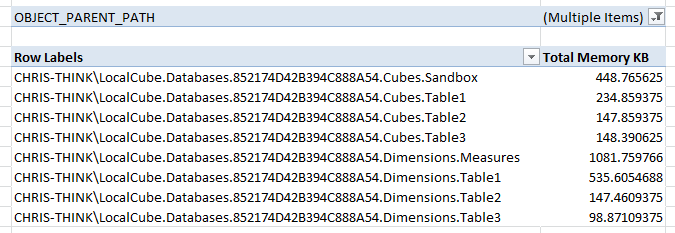
It’s then easy to see the memory used by the cubes and dimensions that make up the PowerPivot model:

image

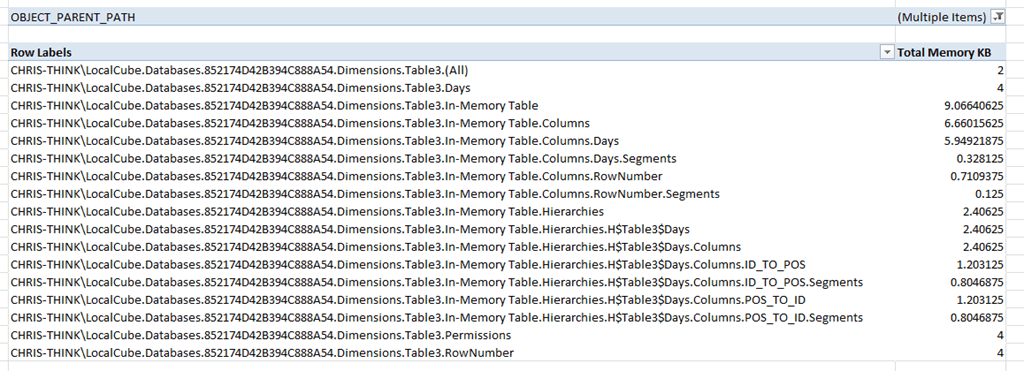
And the memory used by objects associated with the columns in a particular table:

image

All of which is very useful if you’re trying to work out what’s eating memory in your PowerPivot model. If anyone comes across any other interesting thing to do with DMVs for PowerPivot then please let me know…

Google Public Data Explorer

Over the last few years I’ve been tracking Google’s slow progress towards offering a cloud-based BI solution. Here’s a new development: I see from the Official Google Blog that you can now upload your own data to the Google Public Data Explorer (which I blogged about last year):

http://googleblog.blogspot.com/2011/02/visualize-your-own-data-in-google.html

There’s more background here:

http://www.niemanlab.org/2011/02/dataviz-democratized-google-opens-public-data-explorer/

How long will it be before it can access data from BigQuery, and is integrated into Google Docs I wonder?

Kognitio Pablo

I see on Amyn Rajan’s blog there’s another platform supporting MDX: Kognitio WX2 with its new Pablo (a pun on ‘Picasso’, which was an old code name for SSAS?) product. More details here:

http://blogs.simba.com/simba_technologies_ceo_co/2011/02/kognitio-pablo-olap-without-an-actual-cube-mdx-query-language-access-from-excel-pivot-tables.html

It’s interesting that tight integration with Excel, which in theory should be Microsoft BI’s trump card, is being so widely copied by its competitors. After all this product, which sounds similar to what Teradata released last year and what’s possible with Oracle Exadata – all possible through the efforts of Simba – is what SSAS in ROLAP mode delivers on top of PDW and what BISM in passthrough mode will also deliver on PDW. Looking at it from another angle, however, it’s beneficial for Microsoft because all of these solutions provide more reasons for users to stick with Excel instead of moving to web-based or open source competitors, and they help cement Excel’s position as the BI client tool of choice; I suspect this is the more important consideration for Microsoft.

I wonder if other companies will be allowed to implement DAX as a query interface for their products, or be interested in doing so if it is possible?

Steve Wozniak comes to SQLBits 8!

Today, the SQLBits committee made a really big announcements about SQLBits 8: we’ve got Steve Wozniak coming! Yes, Steve Wozniak, co-founder of Apple and tech industry legend will be coming by virtue of his current job as Chief Scientist of our platinum sponsor Fusion-io. If you want to meet him and have the chance to win some seriously cool prizes, you’ll need to come to one of a series of events we’re running in conjunction with Fusion-io called “The Crappy Code Games”, a competition where DBAs and SSIS developers will compete to write the worst-performing code possible. There will be qualifying events in Manchester on March 17th and London on March 31st, and the third qualifier as well as the grand finale will be in the evening of April 7th at SQLBits in Brighton. Prizes include:

  • Gold: A hands-on, high performance flying day for two at Ultimate High plus Fusion-io flight jackets
  • Silver: One day racing experience at Palmer Sports where you will drive seven different high performance cars
  • Bronze: Pure Tech Racing 10 person package at PTR’s F1 racing facility includes FI tees, food and drinks.

…plus iPods, Windows Mobile phones, X-box 360s, t-shirts and much more.

If you want to take part you’ll need to register, and since places are limited we suggest you do so fast; it’s also worth bearing in mind that you’ll have a better chance of reaching the final if you go to the London or Manchester qualifier. For registration for the games and more details (and to kill some time playing a cool retro game) go to: http://www.crappycodegames.com/. Note that registration for the games is separate from the main SQLBits registration.

UPDATE Simon has a lot more information on the event here: http://sqlblogcasts.com/blogs/simons/archive/2011/02/08/what-are-the-crappy-code-games-the-background.aspx

Prompts for Reporting Services

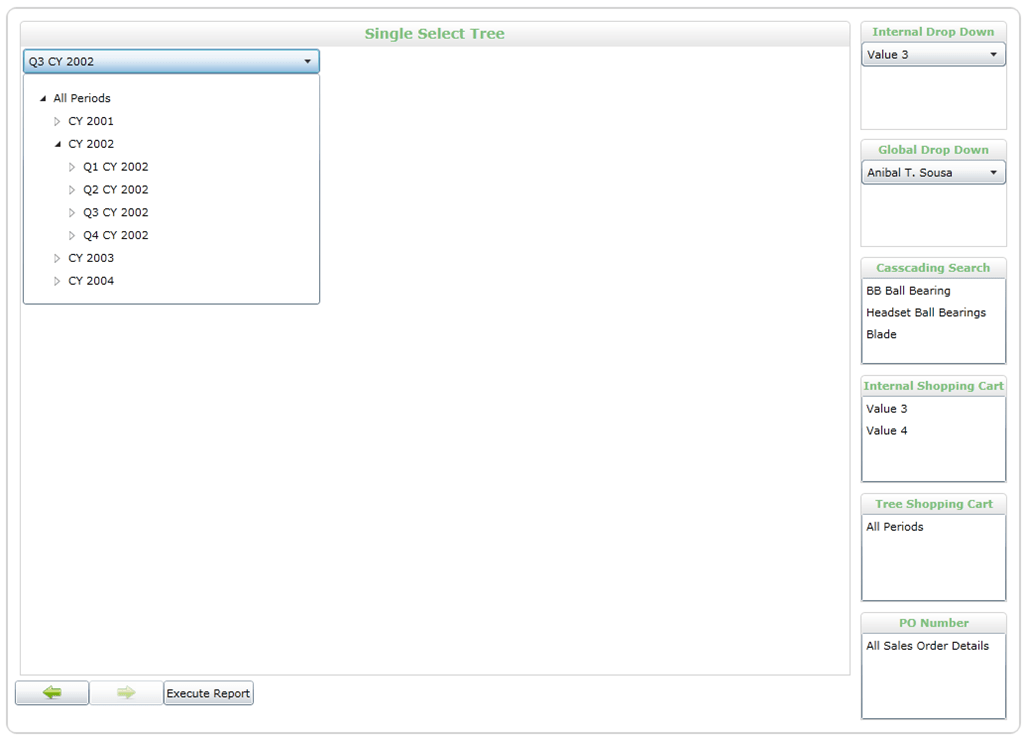
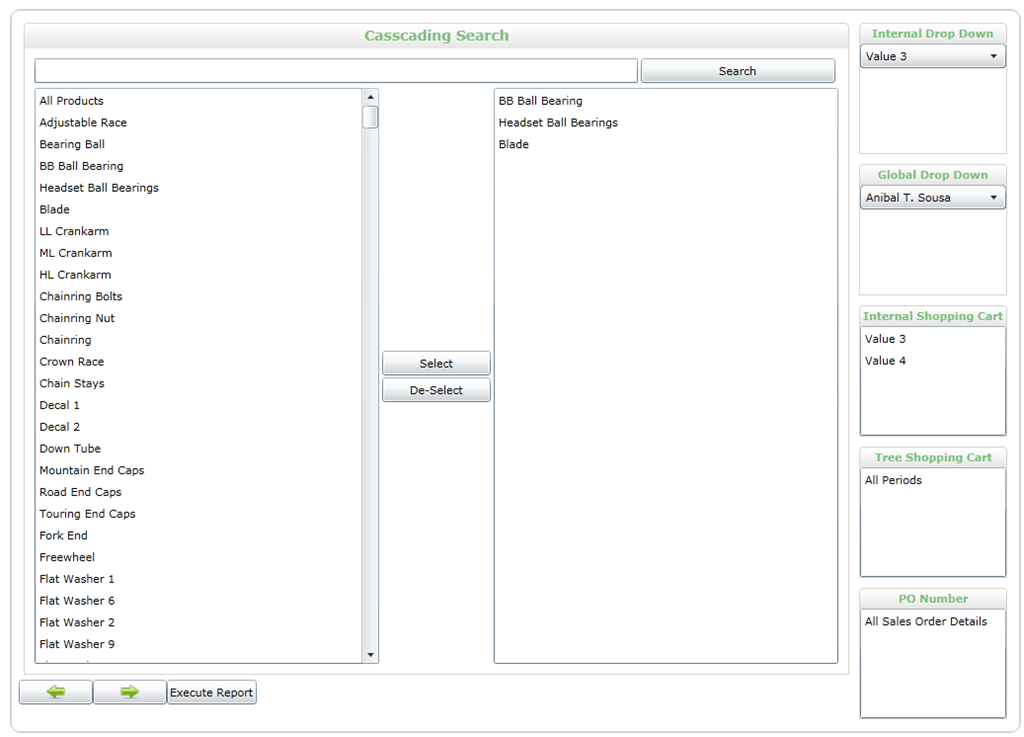
I got an email earlier this week from Eric Nelson telling me about a new Silverlight parameter prompting application for Reporting Services called “Prompts for Reporting Services” that he’s developed and open-sourced, and since it’s got some features that look useful for anyone building SSRS reports on SSAS I thought I’d share it here.

Some of the features Eric highlighted in his mail are:

Internal/Global Prompts:  An internal prompt is just a regular parameter.  A Global prompt is a report that’s parameters are used as a report (you can create the prompt once and reference it from multiple reports).

Tree Prompt:  This prompt uses cascading parameters for fetching its data which makes it perform really well compared to an indented hierarchy parameter.

Cascading Search Prompt:  This prompt fetches no data to begin with and only queries the cube when a search is executed.  I have found this really useful when I parameter is required that has 1,000+ members that tend to lock up the web browser when rendering and are really hard for the user to navigate.

A few screenshots:

SingleSelectTree (2)

MultiSelect (3)

It’s available for download here:

http://code.google.com/p/prompts/

Analysing SQLBits 7 Data, Part 1: Session Selections

As I’ve said before, I’m involved with the organisation of the SQLBits conferences here in the UK and at the moment the SQLBits committee is busy preparing for SQLBits 8 in April (make sure you come – it’s going to be great!). This eats up a lot of my spare time – spare time that I usually spend blogging – so I thought I’d kill two birds with one stone and blog about some of the BI-related stuff I’m doing for SQLBits (I’ve done this before but there’s plenty more mileage in this subject). It turns out a lot of the things SQLBits needs to do requires classic ‘self-service BI’: solve a business problem as best you can with whatever data and tools are to hand. It’s good to see things from the end user’s point of view for a change!

First of all, let’s take a look at scheduling: how can we make sure that we don’t run two sessions in the same time slot that are interesting to the same type of attendee? If attendees are put in a situation where they are forced to choose between two sessions they want to see they won’t be happy – we want to be able to create a schedule where there are as few difficult choices as possible. Unfortunately we don’t collect data about which sessions attendees actually go to, and even if we did it would be no use because of course by the time the session runs it’s too late to fix the agenda. However, well before the conference we allow people to vote for the ten sessions out of all those that have been submitted that they’d like to see (voting has just opened for SQLBits 8, incidentally), and we use this data to help us decide which ones make it onto the agenda; we can therefore use this data to help avoid overlaps.

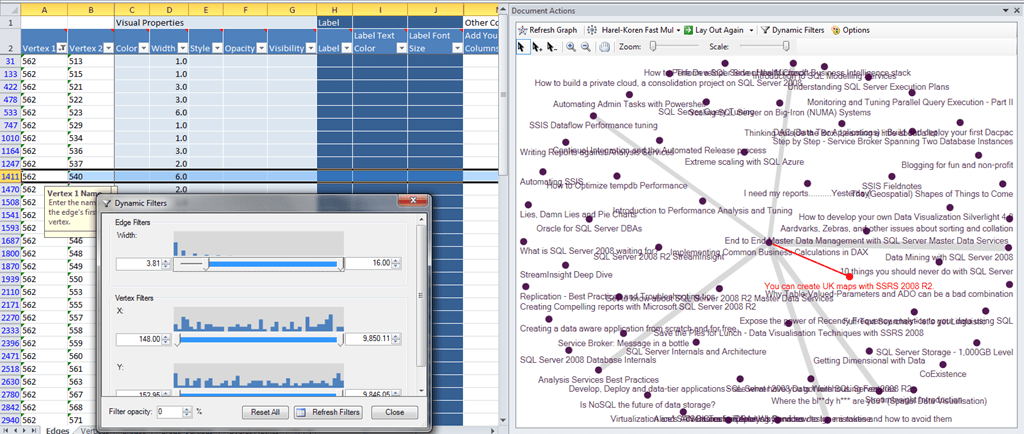
This data can be visualised very effectively using NodeXL. To do this, I ran a SQL query on the SQLBits database that gave me every combination of two sessions that had been picked by the same user, so for example if a user had selected sessions A, B and C my query returned the pairs A-B, A-C and B-C. This gave me my list of edges for the graph and for the size of the edges I used the number of times the combination of sessions occurred, so I could see the most popular combinations. Unfortunately with 107 sessions on the list and thousands of edges, I got something that looked like one of my four-year-old daughter’s scribbles rather than a useful visualisation, so I decided to filter the data and look at one session at a time. Here’s what I got for my session ‘Implementing Common Business Calculations in DAX’:

nodexl1

Still not great, but at least with the thicker lines you can see where the strongest relationships are and when you select these relationships it highlights them and the nodes on either end, so you can read the names of the sessions. I then realised you could use the ‘dynamic filters’ functionality to filter out the weaker relationships, making it even easier to pick out the strongest ones:

image

So we can now see that the strongest relationships were with the sessions “You can create UK maps with SSRS 2008 R2” and “Data Mining with SQL Server 2008”. I’m still getting to grips with NodeXL which, I have to say, I like more and more and which deserves more visibility in the MS BI world.

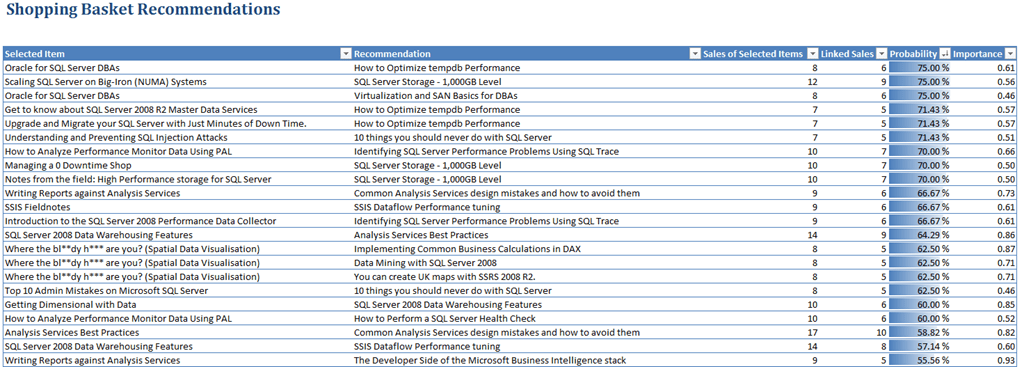
Anyway, since this is a basket analysis problem I also thought of using the Data Mining Addin for Excel, but since I have Office 2010 64-bit I couldn’t. Luckily though the nice people at Predixion do have a version of their addin that works on 64-bit, and they gave me another eval license to use on my data. Getting useful results out of Predixion turned out to be ridiculously easy: I just copied the raw data into Excel, clicked the ‘Shopping Basket Analysis’ button on the ribbon and it spat out a pair of nicely-formatted reports. The first shows ‘Shopping Basket Recommendations’, ie if you select one session it recommends another one you might like:

image

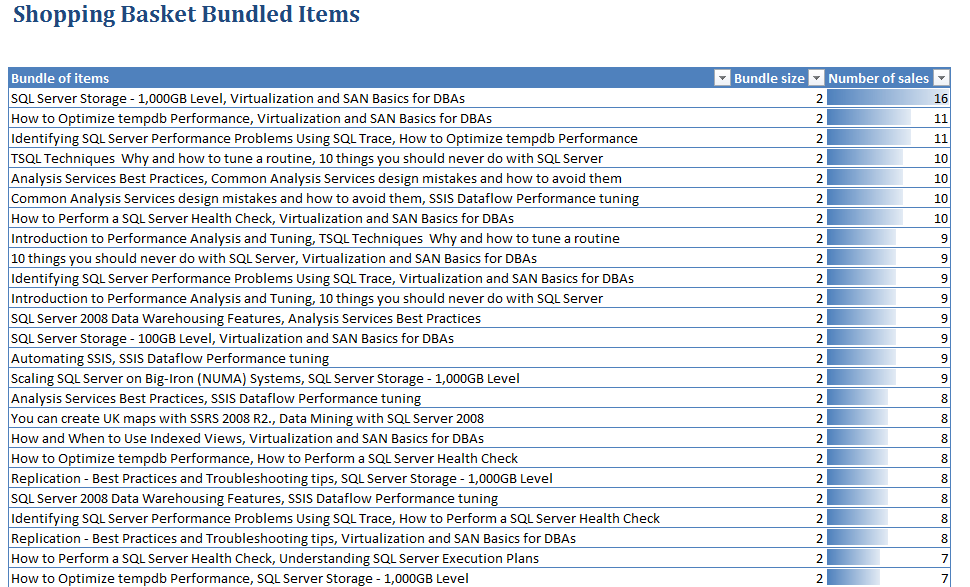
And the second shows the most commonly-occurring ‘bundles’ of sessions that were picked together:

image

It almost feels too easy… but I think you can see that the results look correct and to be honest it’s much easier to do something useful with this than the NodeXL graph. When we close the voting for SQLBits 8 I’ll repeat the exercise and hand the results over to Allan, who’s in charge of speakers, and he’ll be able to use them to put together our agenda for Saturday April 9th.

Solving the ‘Events in Progress’ problem in MDX, Part 2–Role Playing Measure Groups

In my last post I described a simple solution to the ‘events in progress’ problem in SSAS and MDX, which nonetheless had one drawback: it involved loading all the data from the same fact table into two different measure groups in the same cube, which of course potentially doubles the amount of time taken to process the cube and its size on disk. I used the same technique in my recent post on improving the performance of currency conversion, and indeed it’s a technique that I have used in the past with several customers successfully; but it seems rather inelegant, so is there a way we can avoid doing it and only have one measure group? It doesn’t seem to be possible at first glance and I actually opened a Connect a while ago asking for this functionality (‘role playing measure groups’) to be implemented. I was having a good week last week, though, and at the same time as solving the ‘events in progress’ problem I also came up with a solution to this problem too…

Here’s what I did, using the ‘events in progress’ problem as an illustration:

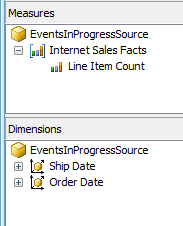
First of all, I created and processed a simple cube called ‘EventsInProgressSource’ with a single measure group, a single Count measure, and two dimensions, Order Date and Ship Date having regular relationships joining on the OrderDateKey and ShipDateKey columns on the fact table:

image

image

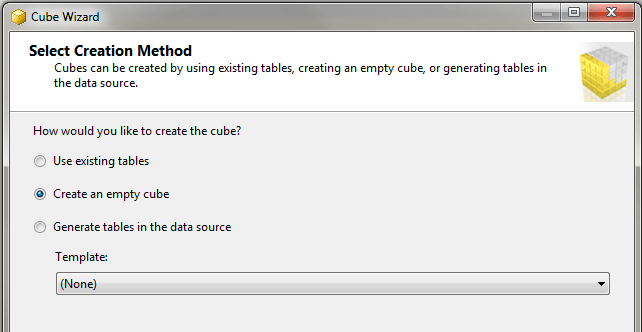
I then created a second cube, ‘EventsInProgress2’, using the ‘Create Empty Cube’ option in the Cube Wizard.

image

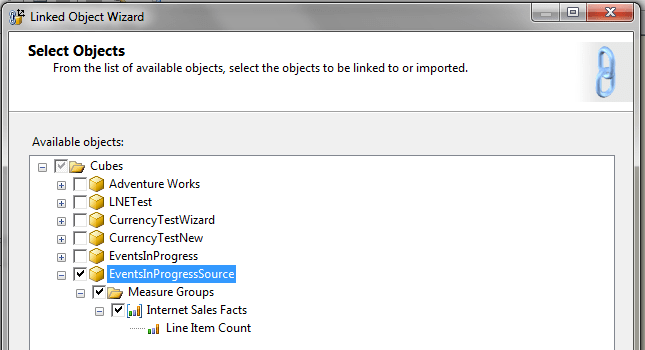
I then started the New Linked Object wizard and copied everything from the ‘EventsInProgressSource’ cube to the EventsInProgress2 cube:

image

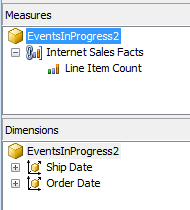
This resulted in a cube with one linked measure group and two linked dimensions:

image

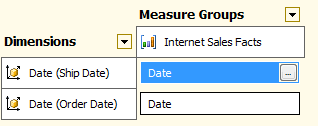
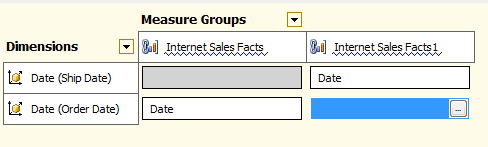
Now here’s the fun bit. I then deployed and processed the cube, closed BIDS and went to SQL Management Studio. There I scripted the Internet Sales Facts linked measure group in ‘EventsInProgress2’ to an XMLA Create statement, then manually updated the XMLA by adding a 1 to the end of the name and ID of the object itself and the Line Item Count measure, then executed the script against the ‘EventsInProgess2’ cube. This created a second, identical linked measure group – something that again BIDS doesn’t let you do. I then reopened BIDS and connected direct to the cube in online mode (I could also have reimported the project back into BIDS) and went to the Dimension Usage tab, then deleted the relationship between Ship Date and the first linked measure group and Order Date and the second linked measure group, leaving the relationships like this:

image

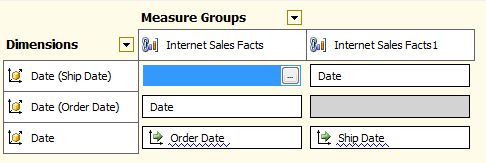
I then added another Date dimension and set up referenced relationships (which had to be non-materialised) with each measure group via the Date attributes of the Ship Date and Order Date dimensions:

image

With this done we have achieved out goal: we have the same fact table appearing twice in the same cube as two different measure groups with different dimensionality, but we are only processing the data once. The last step to solve the ‘events in progress’ problem is to add what is essentially the same MDX as last time to the cube:

CREATE MEMBER CURRENTCUBE.MEASURES.OrderedToDate AS
    SUM(NULL: [Date].[Calendar].CURRENTMEMBER,
        ([Measures].[Line Item Count]));

CREATE MEMBER CURRENTCUBE.MEASURES.ShippedToPrevDate AS
    SUM(NULL: [Date].[Calendar].CURRENTMEMBER.PREVMEMBER,
        ([Measures].[Line Item Count1]));

CREATE MEMBER CURRENTCUBE.MEASURES.OrderedNotShipped AS
MEASURES.OrderedToDate – MEASURES.ShippedToPrevDate;

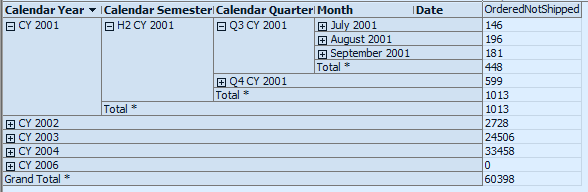
And we get the results we want out of the cube:

image

Now I haven’t tested this with anything other than the Adventure Works data, and there are some areas where I’d like to do more testing:

  • Non-materialised reference relationships don’t always perform that well. Materialised reference relationships aren’t allowed with linked measure groups though, so possibly using a m2m relationship to join the Date and Order Date/Ship Date dimensions might be an alternative
  • There are various ways of calculating a total-to-date in MDX and I’ve not spent any time working out if the version I’ve shown above is the most efficient.
  • There is going to be an overhead from querying a linked measure group rather than a regular measure group, and also probably an overhead from trying to query the same source measure group twice rather than two different measure groups, but I don’t know how significant it is.

If anyone out there does decide to try this at scale with their own data, please leave a comment and tell me about your experiences.

Solving the ‘Events in Progress’ problem in MDX, Part 1

I wouldn’t admit to this in public (at least to an audience of normal people, rather than the Microsoft BI geeks reading here), but over the last few years I’ve been obsessed with solving the ‘events in progress’ problem in SSAS and MDX. I’ve tackled it successfully in PowerPivot and DAX (see here and here) but I always thought there was no good solution in SSAS, and certainly other people such as Richard Tkachuk who have written about the same issue have come to a similar conclusion. But… last week I found one! So in this blog post I’ll outline the basic approach, and in my next post I’ll detail an even better, if more complex to implement, solution.

The two blog posts linked to above describe the problem in detail, but here’s a quick overview. In the Internet Sales fact table in Adventure Works each row represents a line item on an invoice, and each line item has an Order Date (ie the date the order was received) and a Ship Date (ie the date the order was shipped to the customer). We would like to know, on any given date, how many invoice line items are part of orders that have been received but not yet shipped and so have an Order Date before that date and a Ship Date after that date.

The key to being able to solve this problem in SSAS and MDX is how you model the data – my previous difficulties were down to the fact that I had the obvious way of modelling it, with one measure group having regular relationships with an Order Date and a Ship Date dimension, fixed in my head. However if you take a completely different approach the problem becomes easy, and here’s my worked solution using the Adventure Works data:

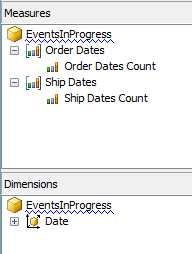
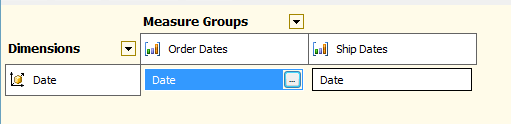
First of all I created my cube with one Date dimension and two measure groups, both based on the Internet Sales fact table:

image

image

Since BIDS won’t let you build two measure groups from the same table in the DSV, I created a named query that duplicated the Internet Sales fact table and used that as the basis of the Ship Dates measure group. Both the Order Dates Count and Ship Dates Count have AggregateFunction set to Count, and the Date dimension joins to Order Dates on OrderDateKey and Ship Dates on ShipDateKey.

I then created the following calculated measures:

CREATE MEMBER CURRENTCUBE.MEASURES.OrderedToDate AS
    SUM(NULL: [Date].[Calendar].CURRENTMEMBER,
        ([Measures].[Order Dates Count]));

CREATE MEMBER CURRENTCUBE.MEASURES.ShippedToPrevDate AS
    SUM(NULL: [Date].[Calendar].CURRENTMEMBER.PREVMEMBER,
        ([Measures].[Ship Dates Count]));

CREATE MEMBER CURRENTCUBE.MEASURES.OrderedNotShipped AS
MEASURES.OrderedToDate – MEASURES.ShippedToPrevDate;

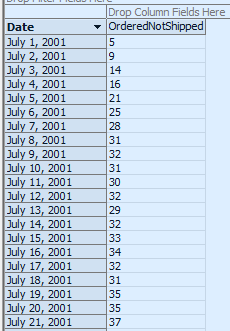
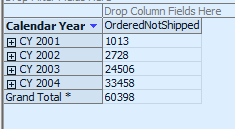
The first, OrderedToDate, gives the total number of line items ordered from the beginning of time up to the current date. The second, ShippedToPrevDate, gives the number of line items shipped from the beginning of time up to the date before the current date. If we subtract the second value from the first, as we do in the OrderedNotShipped measure, we can therefore find the number of line items have been ordered but not yet shipped on any given date:

image

image

And it’s pretty fast, too – certainly much faster than any other solution I’ve tried before in SSAS. There’s one obvious catch here though, and that is that you have to load the data from your fact table into your cube twice. What if you have a really large fact table, and doubling your processing time and storage in this way is not an option? Well, stay tuned for part two when I’ll show you a trick to avoid doing this and only use one measure group.

SQLBits 8 Registration Now Open

We’ve just opened registration for SQLBits 8, which will be taking place in Brighton (in the UK) on the 7th-9th April. Full details can, of course, be found on the SQLBits website at http://www.sqlbits.com/ and you can register here.

It’s going to be a full three-dayer, and we’ve got loads of amazing stuff planned for it that we can’t talk about just yet, but there’s still plenty we can say publicly. For example, for anyone interested in Microsoft BI on the pre-conference seminar day we’ve got Marco and Alberto on their SQLBI methodology and Thomas Kejser on optimising the MS BI stack amongst other things (though not me this time). Also, take a look at the list of sessions that have been submitted – there’s some great stuff there too. It’s the SQL Server event of 2011 in Europe, without a doubt (especially since it doesn’t look like there will be a PASS European Conference this year).

Hope to see you there!