Sorry for the relative quiet on here recently, I’ve been caught up with helping to organise SQLBits and other stuff… But anyway, this week I’m working with a company who asked me to tackle what must be a very common business problem: they have a fact table where one row represents an invoice they have generated, and they need to know at any point in time what the average age of all their unpaid invoices is, and monitor whether this value goes up or down. The point of this is, of course, is that if the average age of outstanding invoices starts to go up over time then it means that their customers are getting slower to pay them and they may potentially have a cashflow problem.
The solution is a variation on the ‘events in progress’ model that I blogged about recently but with an interesting twist that I thought was worth describing. First of all, we need to prepare some data so we can reproduce the scenario in Adventure Works – let’s pretend that the FactInternetSales table actually contains invoice data. We’ll need to massage the data a bit for two reasons:
- In Adventure Works if you look at the OrderDate, ShipDate and DueDate columns there’s always exactly the same number of days between the dates, which doesn’t make for a great demo
- In the real world some invoices will be unpaid when the fact table is loaded, others will be paid. We need to be able to handle both scenarios properly.
Once again, we need two fact tables. The first of these will contain all of our invoices, and for this I used the following named query in the Adventure Works DSV:
SELECT CustomerKey, OrderDateKey
FROM dbo.FactInternetSales
The second will be a fact table that contains information on invoices that have been paid:
SELECT
CustomerKey,
OrderDateKey,
CASE WHEN SalesTerritoryKey > 5 THEN ShipDateKey ELSE DueDateKey END AS PaidDateKey,
CASE WHEN SalesTerritoryKey > 5 THEN 7 ELSE 12 END AS DaysToPayment
FROM dbo.FactInternetSales
WHERE (PromotionKey < 3)
A few things to notice in this second query:
- I’ve filtered the fact table to remove a very small number of rows where PromotionKey is less than 3 – this will give us a few unpaid invoices to make the numbers more interesting.
- I’ve created a new date key called PaidDateKey to make the invoices have different payment lengths.
- Because these are paid invoices, we know how long they took to be paid and we can precalculate this and put it in the fact table in the DaysToPayment column.
We can now build the cube. It needs two measure groups, one based on each fact table, and we can add the Customer dimension too. Three measures need to be built: one count measure on each measure group and a sum measure on the DaysToPayment column. The Date dimension joins to the OrderDateKey on the All Invoices measure group, and to the PaidDateKey on the Paid Invoices measure group.
Now for the MDX. The first thing we need to do is find the total number of invoices generated to date and the total number of invoices that have been paid to date (and also to make sure that these totals aggregate up properly through the time dimension); we can then subtract the second from the first to find the total number of unpaid invoices:
CREATE MEMBER CURRENTCUBE.MEASURES.[Total Invoices To Date] AS NULL;

SCOPE(MEASURES.[Total Invoices To Date]);

    SCOPE([Date].[Date].[Date].MEMBERS);
        THIS = SUM(NULL:[Date].[Date].CURRENTMEMBER, [Measures].[All Invoices Count]);
    END SCOPE;

    SCOPE([Date].[Date].[All Periods]);
        THIS = (TAIL(EXISTING [Date].[Date].[Date].MEMBERS, 1).ITEM(0).ITEM(0)
                , MEASURES.[Total Invoices To Date]);
    END SCOPE;

END SCOPE;


CREATE MEMBER CURRENTCUBE.MEASURES.[Total Paid Invoices To Date] AS NULL;

SCOPE(MEASURES.[Total Paid Invoices To Date]);

    SCOPE([Date].[Date].[Date].MEMBERS);
        THIS = SUM(NULL:[Date].[Date].CURRENTMEMBER, [Measures].[Paid Invoices Count]);
    END SCOPE;

    SCOPE([Date].[Date].[All Periods]);
        THIS = (TAIL(EXISTING [Date].[Date].[Date].MEMBERS, 1).ITEM(0).ITEM(0)
                , MEASURES.[Total Paid Invoices To Date]);
    END SCOPE;

END SCOPE;

CREATE MEMBER CURRENTCUBE.MEASURES.[Unpaid Invoices Count] AS
MEASURES.[Total Invoices To Date] - MEASURES.[Total Paid Invoices To Date];
This is the easy bit. In order to find out what the average of the number of days the unpaid invoices have actually been unpaid, we need to find the number of days that each unpaid invoice has been open for, sum that up, and divide it by the total number of unpaid invoices. And to find this sum of the number of days that all unpaid invoices are open, we need to do the following:
- Find the total up to yesterday of the [Unpaid Invoices Count] measure. This gives the total number of days that every invoice has ever been open.
- Then sum the total to date of the Days to Payment measure we created on the Paid Invoices fact table, to find the total number of days that all paid invoices were ever open
- Then subtract this second figure from the first, which will give us the sum of the number of days all currently unpaid invoices have been open
Here’s the code:
CREATE MEMBER CURRENTCUBE.MEASURES.[Sum of Ages of Invoices To Date] AS NULL;

SCOPE(MEASURES.[Sum of Ages of Invoices To Date]);

    SCOPE([Date].[Date].[Date].MEMBERS);
        THIS = SUM(NULL:[Date].[Date].CURRENTMEMBER.PREVMEMBER
                , MEASURES.[Unpaid Invoices Count]);
    END SCOPE;

    SCOPE([Date].[Date].[All Periods]);
        THIS = (TAIL(EXISTING [Date].[Date].[Date].MEMBERS, 1).ITEM(0).ITEM(0)
                , MEASURES.[Sum of Ages of Invoices To Date]);
    END SCOPE;

END SCOPE;

CREATE MEMBER CURRENTCUBE.MEASURES.[Sum of Ages of Paid Invoices To Date] AS NULL;

SCOPE(MEASURES.[Sum of Ages of Paid Invoices To Date]);

    SCOPE([Date].[Date].[Date].MEMBERS);
        THIS = SUM(NULL:[Date].[Date].CURRENTMEMBER, [Measures].[Days To Payment]);
    END SCOPE;

    SCOPE([Date].[Date].[All Periods]);
        THIS = (TAIL(EXISTING [Date].[Date].[Date].MEMBERS, 1).ITEM(0).ITEM(0)
                , MEASURES.[Sum of Ages of Paid Invoices To Date]);
    END SCOPE;

END SCOPE;

CREATE MEMBER CURRENTCUBE.MEASURES.[Difference of Sum of Ages] AS
MEASURES.[Sum of Ages of Invoices To Date] - MEASURES.[Sum of Ages of Paid Invoices To Date];
Finally, we can calculate the average like so:
CREATE MEMBER CURRENTCUBE.MEASURES.[Average Age of Unpaid Invoices] AS
IIF(MEASURES.[Unpaid Invoices Count]=0, NULL,
MEASURES.[Difference of Sum of Ages]/MEASURES.[Unpaid Invoices Count])
, FORMAT_STRING='#,#.00';
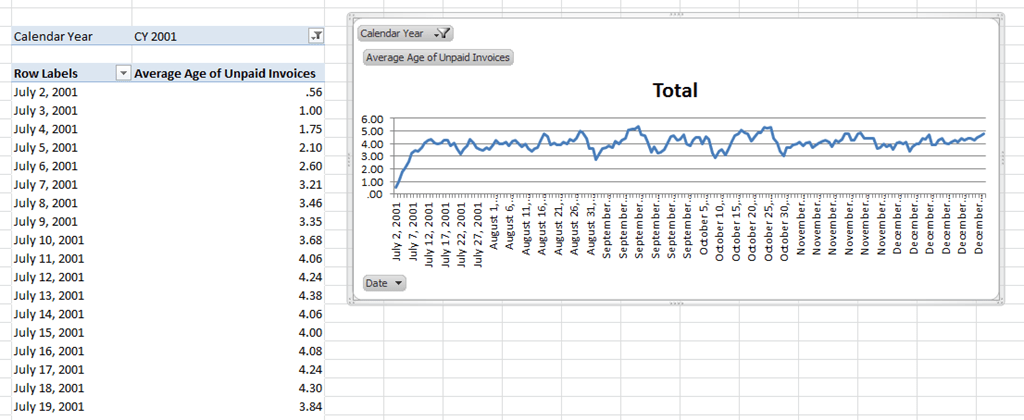
It’s pretty complex I’ll admit, but it does perform well. Here’s what the results look like in Excel:

I only wish I could come up with a way of getting some of my customers to pay this quickly…!
Like this:
Like Loading...