20th Blog Birthday

Every year on this date I write a post reflecting on the previous year but, as you’ve probably guessed from the title, this is a special year: it’s twenty years since I started writing this blog. Twenty years ago today on the 30th of December 2004 I was working at IMS Health in London, I was in the office, it was quiet, and since blogging was the cool new thing – and since the great Mosha Pasumansky had just started blogging – I thought I should start a blog of my own. It turned out to be one of the best decisions I ever made career-wise. As a result I thought it would be good to look back on some of my favourite, or some of the most significant, posts from over the years.

My first ever post did a good job of outlining my intentions: back then I spent a lot of time answering questions on the microsoft.public.sqlserver.olap newsgroup and I wanted somewhere to share solutions to common problems, so I could avoid having to explain the same things over and over again. I’ll be honest, though, the posts from that first year are not great quality: the topics are fairly random, the formatting is all over the place and it was a while before I even started to include screenshots in my posts. But everyone has to start somewhere and if I have any advice to offer for people starting out creating content – blogs, videos or whatever – today then it’s to not be self-conscious about what you put out there. The most important thing is to publish regularly and not to give up; the more you do it, the better your content will get. I’ve always said that starting a blog is like going on a diet: most people give up after a few weeks, the majority have given up after a few months, and the few that continue in the long term realise that it’s not something that you can force yourself to do, it’s something that has to become a habit, something you do without thinking. You only realise the benefits after a couple of years.

For a long time my most popular post was OLAP Jokes, from August 2005. If you work (or worked) with MDX and SSAS Multidimensional it’s possible you may still get them, but even then some of them are very obscure. Who remembers arbitrary-shaped sets and the problems they cause? I barely can. I sometimes miss those early days of blogging when everyone was a lot less professional and content was a lot more eclectic; nowadays my content is a lot more uniform and on-topic. This was from the days before I had a consultancy and training business to promote; I wasn’t an MVP at this point. As you might expect, now I’m a Microsoft employee, I have to be a lot more careful about what I say on social media.

Indeed, the popularity of that last post was swiftly eclipsed by what became the most controversial post of my blogging career: this one on the announcement of SSAS Tabular and what this meant for SSAS Multidimensional. I think I had about fifteen thousand hits on that post within a couple of hours of publishing it and apparently customers were calling up Steve Ballmer to complain based on it. Reading it now I think my analysis of the situation was correct and my emotional reaction was understandable given that I’d based the last eleven years of my career on SSAS MD, but I was also guilty of using the following I’d built up by that point to stir up controversy. The feeling of power that you get from leading an online mob, however righteous the cause, can be intoxicating and is something you need to be wary of. I certainly got into a lot of hot water with Microsoft about this and I’m eternally grateful to Amir Netz for stepping in to resolve the situation.

After that I wrote fewer opinion pieces and discovered new technologies. I never really engaged as much with SSAS Tabular/Power Pivot and DAX as much as I had with SSAS MD and MDX (I left all that to Marco and Alberto, which turned out to be a bad business decision on my part) but I fell in love with Power Query and M. There are a few posts from those early days of Power Query which still get a lot of traffic today, for example my post on creating a date dimension table in M. Many other people have blogged about this subject over the years, many of them better than I did, but I was the first and that’s been my goal in the last few years: write about subjects that no-one else has written about before rather than provide definitive coverage of common problems. It’s not the way to get a really large readership but at that point in my life, when I was running my own consultancy and training business, I found it was a great way to reach the kind of people who were willing to pay for my services.

Sometimes this approach has led to valuable information being spread over multiple posts which makes it a lot harder to find. One example of this is my series of posts on memory errors: the first time I wrote about this, here in January 2020, was unexpectedly popular and detailed enough to be useful; I returned to this topic in June 2023 when Power BI Desktop started showing the same error and gave you settings to simulate different limits that might apply in the Power BI Service; finally, this summer, I wrote a series of in-depth posts (starting here) on all the different types of memory errors you might encounter in Power BI. In the past I might have pulled all this information together in a book; nowadays it’s more likely to turn into a user group presentation (in the way I did here for Power Query data privacy settings). I don’t do this often enough, though, and given the way Google has downgraded blogs in its search results in the last year in favour of forums, I should do it more often so that the information doesn’t get lost.

What about the future? I’ve never had a plan for what I do here so I have no idea what will happen. Part of the reason I have kept blogging is that I do what I enjoy rather than chase traffic, which in turn means writing is never a chore. That said I doubt I’ll be still writing this blog in another twenty years or even ten years; I don’t intend to retire any time soon but life at Microsoft is quite demanding so I hope to be doing something different and less stressful by then. I would like to say that I am extremely grateful to everyone who comes here to read what I write and who leaves me comments. Even more than writing and learning, I enjoy sharing what I have learned about, so when I meet people who’ve been helped by this blog it helps to motivate me to keep going. Thank you for reading!

Nineteenth Blog Birthday: Fabric, The Hedgehog And The Fox

Every year, on the anniversary of the first-ever post on this blog, I write a post reflecting on what has happened to me professionally in the past year and this year the subject is obvious: Fabric. Of course I knew about, and indeed had been playing with, Fabric for a long time before even the private previews but it was only with the public preview and then GA that I felt the real impact on my job. I now work on the Fabric Customer Advisory Team at Microsoft rather than the Power BI Customer Advisory Team, for example, and a lot more than my job title has changed. Instead of helping customers with, and collecting feedback on, just Power BI I now have to know about the whole of Fabric – which is a challenge. But how much can anyone know about the whole of Fabric? Is it all too much for one person?

This is already a problem with Power BI of course. Back when Power BI first appeared I felt reasonably confident that I knew a fair amount about everything to do with it. Soon, though, I gave up on trying to know much about data visualisation and now when I see the amazing things people do with Deneb I’m full of admiration but I accept this is something I’ll never have time to learn. I think I’m better than average at DAX but I’ll never be anywhere near as good as Marco and Alberto. Even with Power Query and M my knowledge of creating custom connectors is limited. And that’s all ok, I know what I need to know to do my job and luckily I’m not the kind of person who feels overwhelmed by the constant flow of updates although I know a lot of people do (see this great article by Kurt Buhler on ways of dealing with this). If I don’t know everything about Power BI today then I can say confidently that I’ll never know everything about Fabric in the future. No-one can. You need a team. The question then is, then, how will job roles evolve within the Fabric community? Who will end up doing what, and how will we organise Fabric development?

There are two ways you can approach Fabric development, and the two ways remind me of Isiah Berlin’s famous essay on “The Hedgehog and the Fox” (who says arts degrees are useless?). Unless you’re a fan of Tolstoy you don’t need to read it all; the essay turns on a line from the Greek poet Archilochus which says: “The fox knows many things, but the hedgehog knows one big thing” and explores how thinkers and writers, indeed all human beings, can be classified as either ‘foxes’ or ‘hedgehogs’. I think this classification can be useful when thinking about Fabric development too.

I’m definitely a hedgehog: I like to go deep rather than wide. Things were easier in the old days when the Microsoft BI stack was made of discrete products (Analysis Services, Integration Services, Reporting Services, SQL Server) and you could specialise in just one or two – the dividing lines were clear and pre-drawn and everyone working in BI had to be a hedgehog. It’s tempting to take the same approach with Fabric and encourage people to specialise in individual workloads, to become Fabric Spark or Fabric Warehouse professionals for example. It’s unsurprising that people from an IT background are natural hedgehogs but I also think this risks repeating the mistakes of the past: going back to the old days again, when I was an Analysis Services consultant I regularly saw teams who were focused on building their data warehouse in SQL Server but who never gave a second thought to what was meant to happen downstream, so the cubes, reports and spreadsheets suffered accordingly and so the solution as a whole was seen as a failure by the business. While it might seem as though a team of hedgehogs will give you a team of experts in all the areas you need, it can often result in a team of people focused on building specific parts of a solution rather than a functioning whole.

The alternative is to be a fox and I think most Power BI users who come from the business or are data analysts are foxes: they have to know a bit about everything in order to build an end-to-end solution because they work on their own and have to get stuff done. Self-service BI is inherently foxy. While a single Fabric fox can build a whole solution, though, and is more likely to deliver value to the business, the quality of the constituent parts may be variable depending on how well the developer knows each workload. A team of foxes won’t solve that problem either: two people who half-understand DAX aren’t equivalent to one person who is a DAX expert. Too much self-service development delivers short-term business value which is cancelled out in the long-term under the weight of the technical debt incurred.

I don’t think you choose to be a fox or a hedgehog; your personality, learning style and job circumstances push you in one direction or the other. In some organisations there will only be foxes or only be hedgehogs with all the attendent consequences. However, the fact that Fabric brings together everything you need for BI development in a single, tighly-integration platform and the fact that its functionality and price means it’s suitable for self-service and enterprise BI development, means that there’s an opportunity to combine hedgehogs and foxes in a new, more effective way.

The magic formula for Fabric must be similar to what the most successful Power BI organisations are already doing today: the hedgehogs in IT build the foundations, provide the core data, model it, and then the foxes in the business take what these components and turn them into solutions. This will require a big change in the way the hedgehogs work and think: no more BI projects, no more building end-to-end. It should be rare for a hedgehog to ever build a report for the business. Instead the aim is to build a platform. Equally the foxes will have to change the way they work too: no more direct access to data sources, no more building end-to-end. It should be rare for a fox to ever bring external data into Fabric. Instead the aim is to build on the platform that has been provided by the hedgehogs. If the hedgehogs have done their job properly then the foxes will be happy – although that’s a big “if”. Finding the right organisational structures to bring hedgehogs and foxes together will be a challenge; it will be even more difficult to overcome the mutual distrust that has always existed between IT and the business.

So, to go back to the original question, who will do what in Fabric? On the hedgehog side there will need to be a platform architect and various specialists: in data ingestion, Spark and/or in Fabric Warehouse, in real-time analytics, in designing core semantic models and DAX. On the fox side the required skills will be basic data transformation using Dataflows, basic semantic modelling/DAX using OneLake, and advanced report design and data visualisation. This seems to me like a division of labour that results in each team member having an area of Fabric they have a chance of learning and mastering and one that will deliver the best outcomes.

Eighteenth Blog Birthday: On The Question Of “Wouldn’t It Be Great If Power BI Did This?”

Every year, on the anniversary of the first-ever post on this blog, I write a post reflecting on what has happened to me professionally in the past year or discussing a non-technical (but still work-related) subject. Two years ago I wrote a post about people who ask the question “Why don’t you add this one simple feature to Power BI?”, something which seems even more relevant now than when I first wrote it. This year I want to discuss a similar topic: people who ask “Wouldn’t it be great if Power BI did this?”, where “this” is some amazing, complicated new piece of functionality they have thought of.

First of all, let me explain why “Wouldn’t it be great if Power BI did this?” is different from “Why don’t you add this one simple feature to Power BI?”. The “one simple feature” question is asked by people who come across the same problem in their day-to-day work so frequently that they can’t understand why Microsoft hasn’t addressed it yet – which is why they are often so frustrated and angry – and where the solution seems obvious and easy. Expanding/collapsing column headers, the top-voted idea on ideas.powerbi.com, is a great example of this type of question: lots of people want it, there are no arguments about how useful it would be, but as Amanda’s comment on the item says it’s actually a lot harder for us to implement than you would think. Hopefully we’ll be able to do it soon.

The “wouldn’t it be great” question is different because it is is prompted by long years of experience of BI tools and projects and is the result of some very creative thinking: the solutions suggested are never obvious, never going to appear on ideas.powerbi.com, and are much more strategic. In the past I’ve been very much the type of person to ask the “wouldn’t it be great” question. For example, about fifteen years ago I remember writing a long email to the Analysis Services team asking for something vaguely like DirectQuery on datasets; more recently I remember trying to convince Chris Finlan that it would be good if paginated reports could render to adaptive cards. Luckily for me the people I sent these emails to were always very polite, even if nothing ever came of my galaxy-brain proposals.

Why does someone like me love asking the “wouldn’t it be great” question so much? It’s the IT equivalent of fantasy football: if you spend way too much time thinking about your favourite football team/BI tool then it’s only natural to imagine how cool it would be to be the coach/program manager of that team/tool and make important decisions about its destiny. Maybe you think you could do a better job than the people who are actually in charge. It’s harmless fun and a great way to while away a few hours with friends over a beer at a conference.

It’s important to understand why the “wouldn’t it be great” question is not a good way of requesting changes to Power BI though. My colleagues Kasper de Jonge and Matthew Roche, both of whom have many years of experience as program managers, helped me with this when I first joined the Power BI CAT team. Now, when I think of a “wouldn’t it be great” idea, I hear Kasper’s voice in my head telling me that it’s the CAT team’s job to collect and curate feedback and it’s the program managers alone whose job it is to design the product. From Matthew I learned the word “solutionize”, which according to the definition I found here means “to come up with a solution for a problem that hasn’t been defined (and might not even exist)” where “common examples are things like developing a feature because you can, iterating and building without research, or selecting a platform or pattern before knowing the required functionality”. Asking the “wouldn’t it be great” question is suggesting a solution when actually the people who design the solutions need to hear the details of the problem you’re trying to solve. If you provide enough details of the problem then it’s possible that the program manager will come to the same conclusion as you about the solution, but even then there are so many other factors to take into account (such as whether it’s even possible to implement your solution) that nothing can be guaranteed.

So, in summary, if you have a problem that you think Power BI needs to solve then you should spend as much time as possible defining that problem rather than imagining what the solution could be – that’s the best way to ensure it gets the attention it deserves from Microsoft. To be clear I’m not saying that you shouldn’t suggest a solution too, I’m just saying that solutions are not what you should be focusing on.

Power BI Dataset Refresh Scheduling Using Outlook And Power Automate

When the new “Refresh a dataset” action for Power Automate (formerly Flow) was released last year I couldn’t help thinking there must be something really cool you could do with it – I just didn’t know what. There are lots of great resources explaining the basics (see Jon Levesque’s video here for example) and Adam Saxton did a nice demo here using the “When an item is modified” trigger to show how to refresh a dataset when a value in a SQL Server table is updated, but that’s it. So I got thinking about the types of problem it could solve and the fun I could have with it…

While Power BI’s scheduled refresh functionality is great, it doesn’t give you as much flexibility as you might need. For example:

  • You might want to schedule your dataset to refresh only on weekdays, not weekends, and you might also want to cancel refresh on certain days like public holidays. You might also only want to refresh a dataset on a monthly basis or at less than the half-hourly granularity that the UI allows. Why? Perhaps because it’s important to minimise the load you put on your source systems; it’s also the case that for many cloud data sources the more data you read, the more you pay.
  • If you have a lot of datasets to refresh you might want to control which datasets are refreshing in parallel, again to reduce the load on your data sources and if you’re using Premium, to reduce the load on your capacity. It’s hard to get an overview of when all your refreshes are scheduled in the Power BI Portal and manage what’s happening when.

The ideal way to view when multiple events are scheduled is a calendar and we’ve got great calendar functionality in Outlook. What if you could schedule refresh of your datasets from a calendar in Outlook? It turns out to be easier than you might think! Here’s how.

The first thing I did was create a new calendar in Outlook called Power BI Refreshes:

Calendar

In this calendar I created appointments (either recurring or one-off) for every dataset refresh:

Cal2

For each appointment, I entered the unique identifier of the dataset in the Title and the unique identifier of the workspace in the Location like so:

Event

You can find these unique identifiers by going to the Settings screen for your dataset in the Power BI Portal and looking at the url:

Settings

Cathrine Wilhelmsen has more details on finding these ids here.

Last of all, I created a very simple Flow in Power Automate:

Flow

The “When an upcoming event is starting soon” trigger is fired when each of the appointments on the Power BI Refreshes calendar is about to start. It then passes the Location and Subject from the event – which of course contain the ids the workspace and dataset to be refreshed – to the Refresh a dataset action, which does the refresh.

This isn’t something I recommend putting into production but I think it’s very interesting as a proof-of-concept. I guess Logic Apps would be a more robust alternative than Power Automate and I would want to be 100% sure that events fired when I was expecting them to fire, so some thorough testing would be needed. I’m not experienced enough with Power Automate/Logic Apps to know if I’m doing the right thing, to be honest. I also feel like using ids in the meeting title and location is a bit hacky and there must be a nicer way of handling this.

On the Power BI side, it’s worth remembering that when a refresh is kicked off in Power BI the actual refreshing only starts when the Power BI Service has the required resources available, and especially in Shared capacity this can involve a wait of several minutes. What’s more the “Refresh a dataset” action does not know whether the refresh it kicks off succeeds or fails; I guess if you wanted to handle retries or notifications on failure then you would need to call the Power BI API get the refresh history of a dataset – there’s no built in action to do it, but it’s possible with a Power Automate custom connector.

If you have any thoughts about this, ideas on how to make this better or if you do put something like this into production, let me know – I would love to hear from you!

Fifteenth Blog Birthday

Every year, on the anniversary of the first-ever post on this blog, I write a post summarising my thoughts on what’s happening in the world of Microsoft BI and what I’m up to professionally.

This year has seen bigger changes than most: in June I closed down my company, gave up being self-employed after thirteen years and took a job at Microsoft. I’m pleased to say that I don’t regret this decision at all and I’m really enjoying my new job. The work is more interesting (as a Power BI fanboy, what could be better than working for the Power BI team?), my colleagues are great, I’m travelling a lot less and as a result I’m feeling a lot more healthy and relaxed and I’m able to spend more time with my family. I am earning a bit less but overall there’s no question that going to Microsoft has been a change for the better. I’m not surprised that so many MVPs are doing the same thing these days: Microsoft is a great place to work right now.

The thing is that even after explaining my reasons I still get asked by people why I moved, as if I’m hiding something, because it seems the opposite of what most people hope to do – it’s a bit like the famously boring British Prime Minister of the 1990s, John Major, who as a child ran away from the circus to become an accountant. I guess there are a lot of people who dream about leaving corporate culture behind to be a freelancer. Now don’t get me wrong, I really enjoyed my previous life, but although freelancing has its benefits it’s not all great and there are many positives about working for a big company as well; I’m particularly happy that I don’t have to chase unpaid invoices any more, for example. One of these days I should really get round to writing about my experiences and how it’s possible to make a living as an independent Power BI consultant and trainer, to help anyone who’s interested in making the the jump to self-employment…

One last thing to reflect on is what I’ve learned in my first six months at Microsoft. I don’t think I know Power BI in any more depth than before I joined – it turns out there is no secret store of inside information that you get access to when you join the team – and all the PMs and devs that I used to bother with my questions before answer my questions with the same level of detail now. It just goes to show how well we treat our MVPs and customers! I do think I have a much broader understanding of how Power BI works and its architecture, though, and I now have a longer list of PMs and devs who I can ask questions. I also have a much better appreciation for how difficult some features are to implement and how tricky it is to prioritise features; next time you get frustrated at the lack of a particular feature in Power BI you can be reassured by the thought that it’s almost certain that someone on the team already knows about the issue and is working on it. Blogging is easier in some ways and more difficult in others: as I said, I now have more access to interesting information but not all of it is bloggable or indeed useful to anyone outside Microsoft, and there are things that I would have blogged about in the past that I won’t write about now (this is a good example) because they aren’t really intended for use by customers or practices that should be encouraged. Finally, getting to work on some of the biggest, most complex Power BI implementations in the world is an eye-opener. Sure, I used to get to work with customers who were doing interesting things before but the customers I work with now are at a different level, and from a technical point of view it’s really exciting.

So yes, life is good and I’m looking forward to 2020 and all the great things that planned for Power BI next year. Thanks for reading!

Fourteenth Blog Birthday

Every year, on the anniversary of the first-ever post on this blog, I write a post summarising my thoughts on what’s happening in the world of Microsoft BI and what I’m up to professionally.

This year, rather than go on about how Power BI is taking over the world (which we all know already), I thought it might be interesting to consider how the focus of this blog – and by implication the focus of my work – has changed over the last few years by looking at the viewing statistics of some of my most popular posts.

As you probably know, for a long time the only product I cared about was Analysis Services Multidimensional and MDX: it was pretty much all I blogged about and the only thing I did consultancy and training on. The following graph shows how the number of hits on four of the most-viewed posts on this subject from 2014 to 2018: Aggregating the result of an MDX calculation using scoped assignments; Joining the results of two MDX queries together; Last Ever Non Empty – a new, fast MDX approach; and One Cube vs Multiple Cubes.

image


None of these posts are, in technical terms, out of date but the downward trend is the same for all of them. The decline in traffic is matched by the decline in demand for consultancy and training on SSAS MD and MDX. While I still spend around 20% of my time doing SSAS MD and MDX consultancy, I do very little training on them at all these days – I guess because no-one is building new solutions using SSAS MD, although there are a still a large number of SSAS MD solutions in production that need maintenance and improvement. I expect the launch SSAS MD in the cloud as part of Power BI Premium will lead to a spike in the amount of work I do on it as I help my customers migrate but that will only be short-lived.

In contrast, look at the trend for four of my most-popular Power Query/M related posts: Referencing individual cell values from tables in Power QueryWorking with web services in Power Query; Creating tables in Power BI/Power Query M code using #table(); and Web.Contents(), M functions and dataset refresh errors in Power BI. These are not necessarily new posts (the earliest dates from 2014) but again they are all still technically relevant and the steep increase in the amount of hits over the last few years that they receive is clear:

image

Power Query and M is a bit of a niche topic, though; right now my most popular posts are on general Power BI data modelling and DAX – a topic I don’t actually blog about all that often, but which I nevertheless spend a lot of consultancy and training time on. The following graph shows the trends for the posts Comments and descriptions in DAX; Creating current day, week, month and year reports in Power BI using bi-directional cross-filtering and M; Dynamic chart titles in Power BI; and (although I’ve never really understood the popularity of this one) Using DateDiff() to calculate time intervals in DAX.

image

Perhaps I should blog about this more? The reason I don’t is twofold: first, there are a lot of people out there such as Marco and Alberto who specialise in DAX, have covered all the obvious angles and do a much better job than I ever could; second, my philosophy has always to blog about what I’m interested in and excited about, and frankly I have always enjoyed Power Query and M more than DAX.

One last graph is needed for context, showing the most popular posts from the three graphs above next to each other. The following graph shows how Aggregating the result of an MDX calculation using scoped assignments, Working with web services in Power Query and Dynamic chart titles in Power BI compare against each other:

image

It goes to show how the “Dynamic chart titles” post is now much more popular that the “Aggregating the result of an MDX calculation” post was, even at the peak of its popularity. I guess Power BI is a safe bet for my future.

Thirteenth Blog Birthday

Every year, on the anniversary of the first-ever post on this blog, I write a post summarising my thoughts on what’s happening in the world of Microsoft BI and what I’m up to professionally. Here I am thirteen years and 1232 posts on from where I started…

First of all, an announcement. For several years now I’ve owned and operated two companies: Crossjoin Consulting, which I use for my own SSAS and Power BI consultancy and private training activities, and from which I make most of my income; and the much smaller Technitrain, which I use for running public training courses in London taught by me and various other notable SQL Server and Microsoft BI trainers. After some deliberation I’ve decided to shut down Technitrain, stop running public courses taught by other people, and focus completely on delivering my own consultancy and training through Crossjoin. There are various reasons for doing this but mostly it’s because organising and marketing public courses is very time-consuming and I’d like to free up that time for other purposes. There’s one final public Power BI course on the Technitrain site and after that all public courses that I teach will appear on the Crossjoin site. I’d like to say thank you to everyone who has taught for Technitrain or who has attended a course over the years.

What do I want to do with the time this frees up? There’s so much Power BI work out there I don’t think I’ll have any trouble keeping myself busy, but I’d really like to build more Power BI custom data connectors. I’ve built a few already for my customers and published another one I built for fun here; when this functionality comes out of preview (which should be soon I hope) and gets added to SSAS and Excel I think there will be a lot of SaaS providers who will want custom data connectors built for their platforms.

One other side-effect of this change is that I have changed my Twitter username to @cwebb_bi. If you already follow me on Twitter then you won’t need to do anything except remember to use the new username when you mention or DM me. If you don’t already follow me, please do so!

Thinking about Microsoft BI as a whole, it’s been another massively successful year for Power BI. Its popularity has now extended beyond small/medium businesses attracted by the price and dyed-in-the-wool Microsoft shops and I have seen several cases where it has replaced Tableau and Qlik based on its features alone. Another few years of this kind of growth and Microsoft will have the kind of domination in BI that it has enjoyed with Windows and Office.

I’ve also been pleased to see how Azure Analysis Services has grown this year too. I particularly like how the dev team have focussed on adding new features that take advantage of the cloud to solve problems easily that are much harder to solve on-premises – the new auto scale-out feature is a great example of this. It will be interesting to see if we get a Multidimensional version of Azure Analysis Services in 2018 – if we do it will be a vote of confidence in a platform whose users are wondering whether it will every see any investment ever again.

Finally, thinking about my other great enthusiasm – Power Query – it seems like things have gone a bit quiet recently. Apart from custom data connectors there hasn’t been much in the way of new functionality added in 2017. I suppose it’s a mature platform now and to be honest I struggle to think how it could be improved; parameters need some work for sure and there are a lot of people complaining about performance in Excel, which can be awful if you’re working with lots of complex queries. Maybe also the web-based interface seen in the CDS preview will appear in other places?

Anyway, time to sign off and get back to enjoying a few more days of holiday before work starts again. Thanks for reading and I hope you all have a great 2018!

PS For those of you looking for video training on Power BI, DAX, SSAS and MDX you can get 12% off all subscriptions at Project Botticelli by clicking here and using the discount code CHRIS12BYE2017

Exploring The New SSRS 2017 API In Power BI

One of the new features in Reporting Services 2017 is the new REST API. The announcement is here:

https://blogs.msdn.microsoft.com/sqlrsteamblog/2017/10/02/sql-server-2017-reporting-services-now-generally-available/

And the online documentation for the API is here:

https://app.swaggerhub.com/apis/microsoft-rs/SSRS/2.0

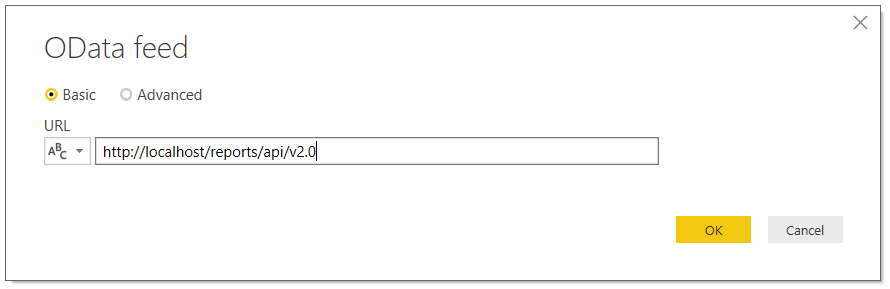
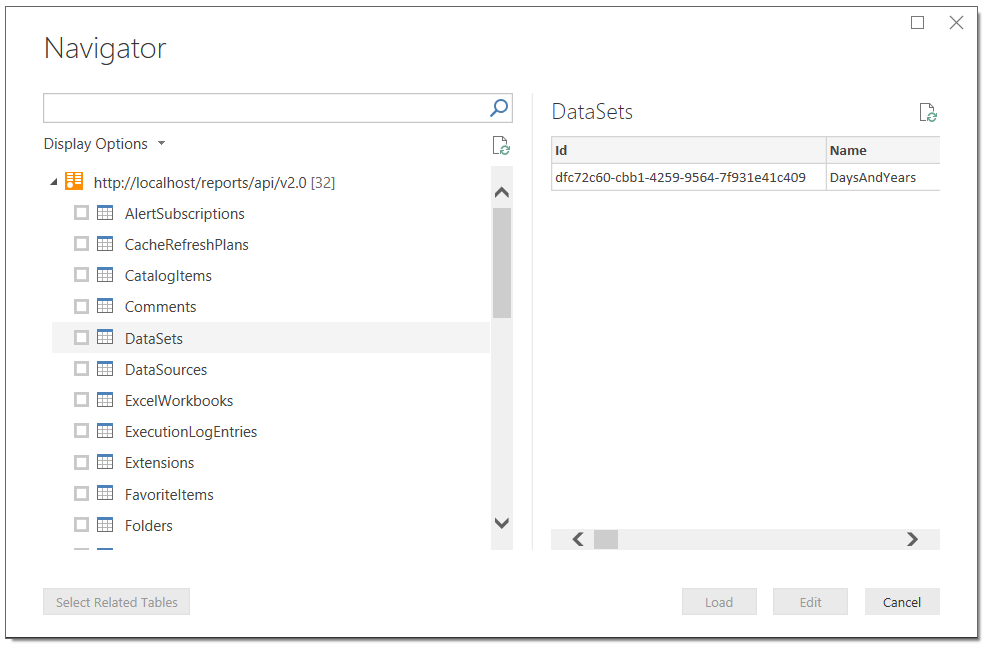
Interestingly, the new API seems to be OData compliant – which means you can browse it in Power BI/Get&Transform/Power Query and build your own reports from it. For example in Power BI Desktop I can browse the API of the SSRS instance installed on my local machine by entering the following URL:

[sourcecode language='text'  padlinenumbers='true']
http://localhost/reports/api/v2.0
[/sourcecode]

…into a new OData feed connection:

image

image

image

This means you can build Power BI reports on all aspects of your SSRS reports (reports on reports – how meta is that?), datasets, data sources, subscriptions and so on. I guess this will be useful for any Power BI fans who also have to maintain and monitor a large number of SSRS reports.

However, the most interesting (to me) function isn’t exposed when you browse the API in this way – it’s the /DataSets({Id})/Model.GetData function. This function returns the data from an SSRS dataset. It isn’t possible to call this function direct from M code in Power BI or Excel because it involves making a POST request to a web service and that’s not something that Power BI or Excel support. However it is possible to call this function from a Power BI custom data extension – I built a quick PoC to prove that it works. This means that it would be possible to build a custom data extension that connects to SSRS and that allows a user to import data from any SSRS dataset. Why do this? Well, it would turn SSRS into a kind of centralised repository for data, with the same data being shared with SSRS reports and Power BI (and eventually Excel, when Excel supports custom data extensions). SSRS dataset caching would also come in handy here, allowing you to do things like run an expensive SQL query once, cache it in SSRS, then share the cached results with multiple reports both in SSRS and Power BI. Would this really be useful? Hmm, I’m not sure, but I thought I’d post the idea here to see what you all think…

12th Blog Birthday

Today is the 12th anniversary of the first post on this blog, and as in previous years I’m going to use this as an opportunity to sum up my thoughts over what’s been going on in my corner of the Microsoft BI world in the last twelve months.

Power BI

I think it’s fair to say that 2016 was the year that Power BI became the big commercial success that many of us hoped it would be. After the achingly slow uptake of Power Pivot and the failure of the original Office 365 Power BI it’s great to see Microsoft BI with a hit on its hands. Many of my existing customers have started using it alongside the rest of the SQL Server BI stack, especially SSAS, because it’s much easier to build reports and share them via the browser or mobile devices than with SSRS or Excel. I’ve also started working with new type of customer, one that I’ve never worked with before: small and medium organisations (including many not-for-profits) who have Office 365 but no existing BI solution, the kind of organisation that does not have the money or resources for a SQL Server BI solution or indeed any other kind of traditional BI solution. This, I believe, is where the real opportunity for Power BI lies and where the majority of the new growth will come from.

Apart from my own customers, there’s plenty of other evidence for the success of Power BI. The energy of the Power BI community, on forums and at user groups, is amazing – and once again, the people that I meet at user groups are completely different to the crowd you get at a normal SQL Server user group. The analysts love it too: for example, Microsoft is now in the Leaders section of the Gartner Magic Quadrant. There’s also the fact that competitors like Tableau have started attacking Power BI in their marketing, so I guess they must consider it a major threat.

Why has it been such a success? The underlying technology is great, but then again the technology was always great. The pace of change is incredible and it’s good to see Microsoft throwing its vast resources behind a product with some potential, rather than another Zune or Windows phone. There’s still some catching up to do but at this rate any existing gaps will have been closed by the end of 2017. The willingness to listen to customer feedback and act on it is refreshing. The Excel/Power Query/Power Pivot and SSAS crossover adds a angle that the competition doesn’t have. Finally, the licensing is almost perfect: it’s simple (compared to the usual thousands of SKUs that Microsoft usually comes up with) and cheap/free, although organisations with thousands of users who all need Pro subscriptions find the costs escalate rapidly; I’d like to see special deals for large numbers of users, and some recognition that many users who need to see Pro-level reports don’t need to create reports using these features. I know Microsoft has already heard this from a lot of people, though, and has taken it on board.

Probably the only criticism that I can make that Microsoft doesn’t seem to be actively addressing is the fact that the data visualisation functionality is relatively weak. If you know what you’re doing and you have the patience, you can create good-looking reports. For people like me who have minimal artistic talent and limited patience the experience of building reports can be frustrating. There are some features like small multiples that I can’t believe are still not implemented in the core product, and nothing to help users to follow good data visualisation practice. R visuals and custom visuals help fill the gap (I was quite impressed by this one by Business Solution Group, for example, which isn’t available in the gallery) but really Microsoft need to put some more thought into this area.

Analysis Services

There’s been a lot of good news in the world of Analysis Services this year too. SSAS Tabular 2016 dealt with a lot of the shortcomings that dogged it in 2012 and 2014: a much faster and less buggy development experience; many-to-many relationships supported using bi-directional cross filtering; and powerful new DAX functions and features like variables. SSAS Tabular v.next promises even more great new features such as the integration of the M language. These changes and the fact it’s now available in Standard Edition mean that Tabular should be the default choice over Multidimensional for almost all new SSAS projects.

Sadly, it looks like the neglect of Multidimensional will continue for the foreseeable future. I stopped being angry about this a long time ago and I understand that Microsoft need to concentrate their resources on SSAS Tabular and Power BI, but a lot of Multidimensional customers are now wondering where they stand. Either Microsoft needs to show some commitment to Multidimensional by adding new features – it wouldn’t take much to make a difference – or add features to Tabular that make it possible for more Multidimensional users to migrate over to it, for example equivalents to Scope statements or calculated members on non-Measures dimensions.

Last of all, Azure SSAS opens up a lot of exciting new possibilities for both on-prem SSAS users as well as Power BI users. Kasper does a great job of summing them up here and I won’t repeat what he has to say; once again I’m seeing a lot of interest from my customers and I’m sure I’ll be helping a few to migrate to the cloud very soon. The pricing seems a bit excessive at the moment, even when you take into account the ability to pause servers, and I hope it changes before RTM. Also it’s SSAS Tabular only at this stage but support for Multidimensional is by far the top-voted request on the feedback forum, with more than five times as many votes as the next highest request, so maybe this will be Microsoft’s opportunity to show some love to the Multidimensional world?

If I Could Have New Features In SSAS Multidimensional, What Would They Be?

Indulge me for a moment, please. Let’s imagine that somewhere in Microsoft, someone is planning for SQL Server v.next and is considering investing in new features for SSAS Multidimensional (don’t laugh – I wouldn’t be writing this post if I didn’t think it was a possibility). What features should they be?

Before I answer that question, it’s worth pointing out that despite what you might think there has been some investment in SSAS Multidimensional over the last few years. This post lists what was new in SSAS 2012 Multidimensional; since then support for DAX queries has been added and, umm, the new Divide() function. This must have been a lot of work for someone – but why does it get overlooked? One reason: none of these changes have made much difference to the ordinary SSAS Multidimensional developer’s life. DAX query support is great if you’re one of the few people that uses the SharePoint version of Power View; shockingly, it still doesn’t work in Excel 2013 Power View yet (though I guess it will be the way the new Power BI connects to on-prem Multidimensional). NUMA support is great if you work for an investment bank and have vast amounts of data and a high-spec server, but that’s only about 0.1% of the installed base.

So from this we can learn that the main consideration when choosing new features to implement should be that they should be relevant to the majority of SSAS Multidimensional developers, otherwise they’ll be ignored and MS may as well have not bothered doing anything. To that we can add these other considerations:

  • These features should provide compelling reasons to upgrade from earlier versions of SSAS to the new version
  • While some features should be available in all editions, there should also be some features that encourage customers to upgrade from Standard Edition to Enterprise Edition
  • There are a limited resources (time and developers) available and Power Pivot/SSAS Tabular will be the priority, so only a few features can be delivered.
  • Features that are only there to support Power BI don’t count

With all of that borne in mind, here’s what I would choose to implement based on what I see as a consultant and from the popularity of particular topics on my blog.

Last-Ever Non Empty

One of the most popular posts I’ve ever written – by a gigantic margin – is this one on the last-ever non-empty problem. Given that so many people seem to come up against this, and that the MDX solution is complex and still doesn’t perform brilliantly, I think it should be built into the engine as a new semi-additive aggregation type. Since semi-additive measures are Enterprise Edition only, this would be my sole Enterprise Edition feature.

MDX Calculation Parallelism

Ever since I’ve been working with SSAS, people have always asked why the Formula Engine has been single-threaded. I understand why the SSAS dev team have ignored this question and instead concentrated on tuning specific scenarios: doing parallelism properly would be extremely difficult given the way MDX calculations can be layered over each other, and in plenty of cases it could lead to worse performance, not better. However I’m not asking for a ‘proper’ implementation of parallelism. I just want something dumb: a boolean property that you can set on a calculation that tells the Formula Engine to do this calculation on a separate thread. If it makes performance better then great; if not, then don’t set it. My guess is that even a crude implementation like this could make a gigantic difference to performance on many calculation-heavy cubes.

Drillthrough

Drillthrough is one of those features that almost everyone wants to use, but for some reason has been left in a semi-broken state ever since 2005. Here’s what needs to change:

  • It should work with calculated members. I don’t expect SSAS to understand magically how to work out which rows to display for any given MDX calculation, but I would like a way of specifying in MDX what those rows should be.
  • Those stupid, ugly column names – SSDT should let us specify readable column names and let us have complete control over the order they appear in.
  • Excel should allow drillthrough on multiselect filters.

‘Between’ Relationships

This might seem a bit of a strange choice, and I suspect it may not be easy to implement, but another problem that I come across a lot in my consultancy is the ‘events-in-progress’ problem. I’ve blogged about solving it in MDX and DAX, as have many others. I would love to see a new ‘between’ dimension/measure group relationship type to solve this. In fact, competing OLAP vendor iccube already implemented this and you can see how it works on that platform here and here. My feeling is that this would open up a massive number of modelling opportunities, almost as many as many-to-many relationships.


And that’s it, four features that I think could make SSAS Multidimensional v.next a must-have upgrade. I’m not so naive to believe that any or all of these will be implemented, or even that we’ll get any new features at all, but who knows? If you have any other suggestions, please leave a comment.