PASS Summit 2011–Day 3 Keynote

The third and final keynote at the PASS Summit, and this morning I’ve been given a space on the official blogger table at the keynote! Actually this just means I’ve got a table to rest my laptop on and access to a power strip, but it’s an honour nonetheless.

There are several things that I saw yesterday that are worth mentioning. Probably the most interesting session was from Cathy Dumas about Tabular: among other things she demoed a DAX Editor plugin for BIDS SQL Server Data Tools that is going to make everyone’s life soooo much easier; it will give us something like an MDX Script editor, intellisense, colour coding and so on. She has blogged about it here and I can’t wait for it to be made available. Also I came across the Data Explorer team site and blog; if you are interested in getting to play with it when it’s ready then you get your email address added to the invite list.

Anyway, back to the keynote and today it’s PASS Summit favourite Dr David DeWitt covering Big Data. It’s not a standard marketing session, more of a lecture, and all the better for it; DeWitt is a very talented speaker and more importantly takes a balanced approach to describing the SQL vs NoSQL debate. Interesting points to note:

  • He thinks that the arrival of NoSQL is not a paradigm shift, in the way that the move from hierarchical databases to relational databases was. The assertion that SQL is not dead, not surprisingly, goes down well with this audience.
  • Hadoop. I’m not even going to try to summarise this section of the talk but it is an excellent introduction to how it works, and if you’re even vaguely interested in Hadoop (which you should be given Thursday’s announcements) then you need to watch this – I believe will be available to view on demand somewhere (the slide deck is here). It is, honestly, the best explanation of all this I’ve ever seen and there are several thousand people here in this room who agree with me…
  • He does a comparison of Hive vs Parallel Data Warehouse v.next on the same queries, same data and same hardware, and shows that PDW can outperform Hive by up to 10x. This demonstrates that a parallel database still has advantages over a NoSQL approach as far as performance goes in many cases, although of course each has its own strengths and weaknesses and performance isn’t the only consideration.

This was not only an enthralling and educational talk, but it was also great marketing from Microsoft’s point of view. You can announce Hadoop for Windows to a room full of SQL Server types and however many whizzy demos you do, and however much woo-hooing goes on, if we don’t really understand the technology we’ll go back to our day jobs and ignore it. On the other hand, teach us what the technology actually does and you’ll get us interested enough to try it out for ourselves and maybe even use it on a project.

Finally, if you’re at the Summit today come and find me at the Birds of a Feather lunch on the SSAS Performance Tuning table, or later on the BI Expert Pod this afternoon.


PASS Summit 2011–Day 2 Keynote

It’s only day 2 of the PASS Summit and I’m already feeling conferenced-out, although that might have something to do with my alcohol consumption over the last few days, the jetlag, and the early starts. I saw a few good sessions yesterday, although for some reason all the BI talks were allotted ridiculously small rooms so I had to stand or sit on the floor for them. Probably the most impressive from my point of view was a talk I saw yesterday afternoon about Power View (Crescent). Now, I’ve seen a lot of Power View demos over the last year or so but it seems to me that over the last few months since CTP3 the product has turned a corner and gone from being something that was kind-of-good-but-I’ll-wait-for-the-next-release to something that is genuinely worth getting excited about. I can’t really put my finger on what has happened – maybe it’s just reached a critical mass in terms of functionality and it doesn’t seem like a typical Microsoft Version 1.0 any more; certainly it was the first time that I’d seen it and thought that I’d be willing to take the pain of installing Sharepoint to use it.

Anyway, back to the stuff I picked up from the keynote…

  • Some nice demos of SSRS, DQS, column store indexes and other non-BI-related stuff, but nothing new and interesting (at least from my point of view)
  • Appliances. There’s now a Dell version of PDW, but in general big boxes with flashing lights don’t get me all that excited.
  • More on PDW and its roadmap. The next update (pre SQL2012) will get various enhancements including a distributed cost-based query optimiser and limited support for stored procedures. I suspect this time next year I’ll be watching a demo of Tabular in DirectQuery mode working on the next full version of PDW and we’ll have a great story for ad-hoc BI on truly large data volumes.
  • Semantic search. Looks very cool; I wonder how this can be integrated into the wider BI stack beyond a few basic SSRS reports? I’ll have to take a closer look at this…
  • An announcement !? It seems like BIDS, ie BI Development Studio, is no longer a separate thing but should be thought of as part of SQL Server Data Tools (aka Juneau). Wonder what this means for the BIDS Helper guys? Somehow “BI bits of SQL Server Data Tools Helper” isn’t such a catchy name.
  • SQL Azure. The Azure Management Portal is getting a Metro UI; there’ll be a new max size for a SQL Azure DB of 150GB.

So nothing massively exciting here from a BI point of view – clearly all the good stuff was announced yesterday. I’ll be back tomorrow; in the meantime, if you’re at PASS make sure you come to my lightning talk this afternoon because I’m doing some MDX and it would be nice to have some people in the audience who have a clue what I’m talking about!

PASS Summit 2011- Day 1 Keynote

So, here we are again in Seattle. I’ve been here for a couple of days already and only just over my jetlag – spending all day inside in the convention centre and meeting rooms is not the best way to adjust to a new time zone. Anyway, there are a lot of cool BI-related announcements coming over the next few days so I thought I’d live blog the keynotes over the next few days; today it’s the turn of Ted Kummert, so let’s see what he’s got to say…

  • The official name of Project Crescent is going to be called “Power View”. I like this name – it has echoes of PowerPivot and (ahem) QlikView.
  • Denali will be known as SQL Server 2012 and will release in the first half of next year
  • Microsoft will be offering its own Hadoop distribution on Windows; MS have forged a partnership with HortonWorks to do this. I guess this means the end for Dryad/LINQ to HPC as a product, but it’s a good decision – the market doesn’t want another MS me-too product, it wants Hadoop. There will also be an ODBC driver and addin for Excel for Apache Hive, so you will be able to get data from Hadoop directly into PowerPivot and SSAS Tabular without having to stage it in a relational database. It’ll be available as an on-premises solution and also there’ll be a CTP of an Azure-based solution by the end of the year. This is today’s first big announcement, clearly. I have a few customers with the kind of data volumes that mean they’ll be interested in this, especially now it’s coming in a friendly, MS-packaged format. Denny Lee has more details on all this here.
  • There’s a new thing coming from SQL Azure Labs called Data Explorer that will be available at the end of this year. This is a web-based data integration tool for working with data from a number of sources: I can see SQL Azure, Excel, Access and the usual sources are supported, and it also generates recommendations of data from the Azure Datamarket that you might be interested in. It allows you to mash up data from various different sources then publish the result as an OData feed – very similar to Yahoo Pipes, as far as I can see, but the cool thing is that there’s only one type of (very PowerPivot friendly) end point. Can’t wait to play with this but, however cool it looks, you have to remember that this is coming from SQL Azure Labs so it’s not going to be a real product any time soon.
  • Amir Netz (just promoted to be a Technical Fellow at MS – a very prestigious role, and great for the profile of BI inside the company I think) is now on stage for a Crescent demo. He confirmed that export to PowerPoint will make it into RTM.
  • …and now Amir moves onto mobile BI. He shows Power View on Windows Mobile and… an IPad and an Android phone! Hurray! It seems like, at last, we might have a credible mobile BI strategy from Microsoft. He spends a lot of time demoing on a Windows tablet as well – I wonder why? The audience wants to see the iPad again; maybe the iPad stuff isn’t quite ready yet, but if you remember that Power View is a Silverlight app then you can imagine that this must have involved quite a lot of hard work to do.

Overall, some very exciting news. The Hadoop and mobile BI announcements fill some glaring gaps in the MS BI story, and I’m certainly a lot happier than I was this time last year..! The DBA crowd here, though, are a bit grumpy because all the announcements have been BI related – my heart bleeds for them, truly.

One last thing: I’ve finally started using Twitter, and if you want more up-to-date news of what’s happening at PASS then I’ll be tweeting throughout the conference. I’m @Technitrain

UPDATE: all references to PowerView changed to “Power View” with a space. That’s the official name.

Analysis Services 2008 R2 Performance Guide Published

Not much to say, really, apart from what’s in the title and the fact that if you are serious about SSAS you need to read it! You can get it here:
http://sqlcat.com/sqlcat/b/whitepapers/archive/2011/10/10/analysis-services-2008-r2-performance-guide.aspx

SQL Server training in London

Over the last few months I’ve been working on setting up a new business to provide advanced SQL Server training courses in London, similar to what’s available at the SQLBits training day but in a more traditional classroom environment, lasting several days and with practical exercises. I’m not quite ready to launch yet (watch this space – the website will be ready soon) but I do have two courses to promote right now. Both are run by guys from COEO, and both cost £990 plus VAT. Here are the details:

SQL Server Developer Workshop with Gavin Payne
1st – 2nd November 2011

A 2-day interactive workshop that drills down into new features, tools and best practices for developers working with SQL Server 2008 or 2008 R2.
More details and registration here.

SQL Server Internals and Troubleshooting Workshop with Christian Bolton
6th – 7th December 2011

The Advanced Troubleshooting Workshop for SQL Server 2005, 2008 and R2 provides attendees with SQL Server internals knowledge, practical troubleshooting skills and a proven methodical approach to problem solving. The workshop will enable attendees to tackle complex SQL Server problems with confidence.
More details and registration here.

I’ll have some more courses, including runs of my MDX and SSAS cube design courses, to announce soon…

Project Trinity

I had an interesting chat with Gary Short at SQLBits last week about social network analysis, and he pointed out that Microsoft Research’s graph database, Project Trinity, was now available to download. You can find out more about it here:
http://research.microsoft.com/en-us/projects/trinity/default.aspx

Gary suggested that Trinity might, at some point in the future, follow F# in being a MS Research project that becomes a commercial project and to be honest I think he might be right. If Analysis Services is a database that is optimised for multidimensional data, why not add Trinity to the SQL Server stack as a specialised database for graph data? After all, social network analysis is only going to become more and more important in corporate BI in the future, and that’s just one use case for a graph database. And if Trinity becomes a product, why not include features of a tool like NodeXL in Project Crescent?

Excel subtotals when querying Multidimensional and Tabular models

As I mentioned briefly in a recent post, the fact that Excel generates some pretty rubbish MDX for detail-level reports has been well documented by Richard Lees and Rui Quintino. The new Excel 2010 named set functionality allows you to work around these problems if you can write your own MDX, but let’s face it most people who are building Excel reports will not be able to do this so this problem can be a major headache and cause severe performance problems. One interesting point to note, however, is that Excel 2010 will generate slightly better MDX when querying a Tabular Model (and I’m including PowerPivot models here) compared to when it’s querying a Multidimensional Model (ie a SSAS cube). Take the following pivot table built using Excel 2010 against the Adventure Works cube running on SQL 2008 R2:

image

I’ve put the Internet Sales Amount measure on columns, the Calendar Year and Day Name hierarchies from the Date dimension on rows, and turned off all subtotals and grand totals. Here’s the MDX that Excel generates for this pivot table:

SELECT
NON EMPTY
CrossJoin(
Hierarchize(
{DrilldownLevel(
{[Date].[Calendar Year].[All Periods]},,,INCLUDE_CALC_MEMBERS)})
, Hierarchize(
{DrilldownLevel({[Date].[Day Name].[All Periods]},,,INCLUDE_CALC_MEMBERS)}))
DIMENSION PROPERTIES PARENT_UNIQUE_NAME,HIERARCHY_UNIQUE_NAME ON COLUMNS 
FROM [Adventure Works]
WHERE ([Measures].[Internet Sales Amount])
CELL PROPERTIES VALUE, FORMAT_STRING, LANGUAGE, BACK_COLOR, FORE_COLOR, FONT_FLAGS

If you run this query you’ll see it returns 40 columns and that the first few columns contain the subtotals and grand totals that we specifically said we didn’t want, which can be the cause of performance problems:

image

However, if you create a PowerPivot model containing DimDate and FactInternetSales and build exactly the same pivot table, you’ll see a different pattern of MDX being produced. To enable easy comparison, I’ve taken the MDX that my PowerPivot model generated and changed the hierarchy names so it will work on the SSAS Adventure Works cube:

SELECT
NON EMPTY
Hierarchize(
DrilldownMember(
CrossJoin(
{[Date].[Calendar Year].[All],[Date].[Calendar Year].[Calendar Year].AllMembers}
, {([Date].[Day Name].[All])})
, [Date].[Calendar Year].[Calendar Year].AllMembers
, [Date].[Day Name]))
DIMENSION PROPERTIES PARENT_UNIQUE_NAME,HIERARCHY_UNIQUE_NAME
ON COLUMNS 
FROM [Adventure Works]
WHERE ([Measures].[Internet Sales Amount])
CELL PROPERTIES VALUE, FORMAT_STRING, LANGUAGE, BACK_COLOR, FORE_COLOR, FONT_FLAGS

If you look at the results, you see that while the grand total is still being returned, the most of the unwanted subtotals are not and we only get 33 columns returned:

image

So if all other things were equal (and they’re not – the Tabular and Multidimensional engines are very different) then this MDX query has a big advantage over the first one because it’s doing much less work. Excel knows to use this new type of query by looking at the PREFERRED_QUERY_PATTERNS value returned by the MDSCHEMA_CUBES rowset; I’m told that the reason it isn’t used with Multidimensional models is that in many cases it could lead to worse, rather than better performance. This is another good reason to prefer Tabular models over Multidimensional models for detail-level reporting if you’re using Excel as a front-end.

An interesting side-note is that this new style of MDX is only possible in SSAS 2008 R2 because the DrillDownMember has got a new parameter called Target_Hierarchy, which allows you to specify which hierarchy you want to drill down on in a tuple (note there were some other changes with this type of function that I blogged about here). You can see the documentation here:
http://msdn.microsoft.com/en-us/library/ms145580(v=SQL.105).aspx

Here’s a quick example on Adventure Works. Consider the following query, where we’re drilling down on a tuple containing the all members from the Day Name and the Calendar Year hierarchies:

SELECT {[Measures].[Internet Sales Amount]} ON 0,
DRILLDOWNMEMBER(
{([Date].[Calendar Year].[All Periods],[Date].[Day Name].[All Periods])}
,{([Date].[Calendar Year].[All Periods],[Date].[Day Name].[All Periods])}
)
ON 1
FROM [Adventure Works]

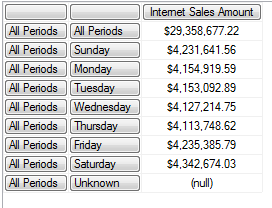
Here are the results:

image

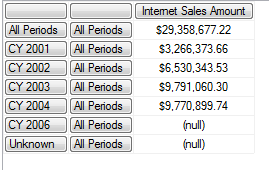
You’ll see that only the Day Name hierarchy has been drilled down on, and this is (as far as I can see) because it’s the last hierarchy that appears in the tuple. However, with the new parameter, we can specify that we want the Calendar Year hierarchy drilled down on instead:

SELECT {[Measures].[Internet Sales Amount]} ON 0,
DRILLDOWNMEMBER(
{([Date].[Calendar Year].[All Periods],[Date].[Day Name].[All Periods])}
,{([Date].[Calendar Year].[All Periods],[Date].[Day Name].[All Periods])}
, [Date].[Calendar Year]
)
ON 1
FROM [Adventure Works]

image

Thanks, as always, to Akshai, Marius, Greg Galloway, Teo Lachev and the usual string of SSAS obsessives for providing the background info for this post…

SQLBits 9 Summary

Well I’ve just recovered from yet another SQLBits, and for some reason (probably the obscene amount of beer consumed – I don’t even want to think what the bar bill will be like) it needed a lot more recovering from than previous events. That only goes to show how much I enjoyed it though…! Everything went well in the end; I think part of what makes SQLBits what it is is the slightly shambolic nature of it and nothing ever goes completely to plan, but we had no major disasters and attendance was comparable with Brighton. In my opinion we had some of the strongest content we’ve  had for a long while: I particularly enjoyed Kasper’s session on Crescent and Alex’s session on comparing PowerPivot and Qlikview, plus the sessions from Jen on mobile BI and Marco on how Tabular will change how we model data. If you weren’t there, we recorded all the sessions as usual and they’ve be available in the content section of the site in a few weeks.

I’d like to thank my fellow organisers, and everyone who helped out during the conference, for making it such a success. One of the questions I always get asked about SQLBits is “Why do you do it?”. It is a lot of effort, but in the end it’s great fun too – not only do you get to learn stuff, but it’s an excuse for everyone in the SQL Server community to get together and have a drink and a chat. I’m looking forward to a few weeks off though before we have to start planning the next one…

In the meantime, don’t forget about SQLRelay this week. I’ll be speaking in Hatfield tomorrow night and there are events taking place all round the country too. And if you’d like to stay in touch with what’s happening in the world of SQLBits, why not join the SQLBits LinkedIn and Facebook groups and see what people are saying on Twitter about us.

Reporting Key Errors can be time-consuming

I’ve spent the last week working with a fairly large cube – several fact tables have hundreds of millions of rows in – and, as always on an SSAS project, there are occasions when you have no choice but to reprocess the whole cube. Sitting round waiting for processing to complete can be pretty tedious and, while I’m sure we’ve all worked out how to plan our work so that processing can take place overnight, during lunch or a meeting, it’s always good to know some tricks to make processing faster.

There’s a good set of tips on how to optimise processing in the SSAS Operations Guide, but this post is about something not mentioned in that white paper because it’s a scenario that shouldn’t happen in production – although it’s very common in development. In my case I’ve been building a cube on top of a half-finished data warehouse where the data is still quite dirty. That means that during processing there are lots of key errors, and while they get fixed I’m handling them in my processing by selecting the ‘Convert to Unknown’ option. What I’ve half-known for a long time and only properly investigated this week, though, is the impact that reporting these key errors can have on processing times.

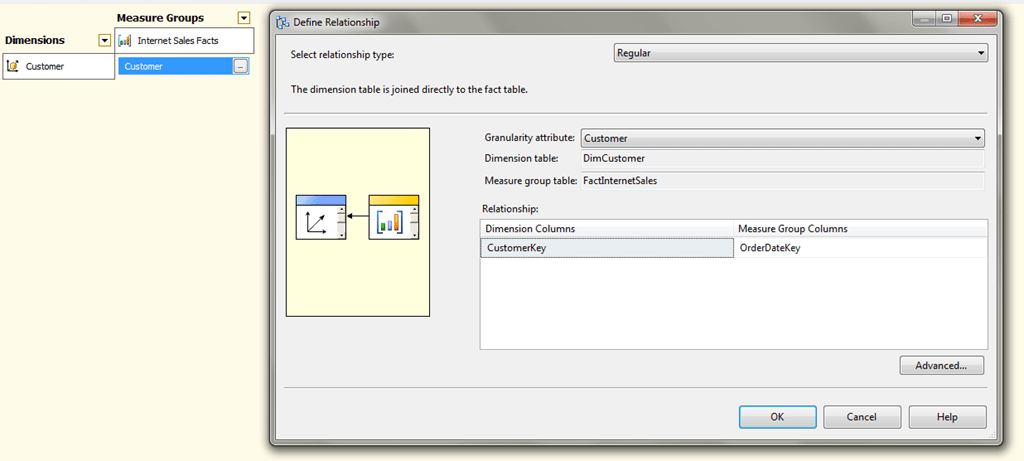
Here’s an extreme example using Adventure Works. I’ve created a new cube based on the FactInternetSales table and added the Customer dimension to it, but deliberately joined the Customer dimension on to the Order Date column in FactInternetSales to simulate a lot of key errors.

image

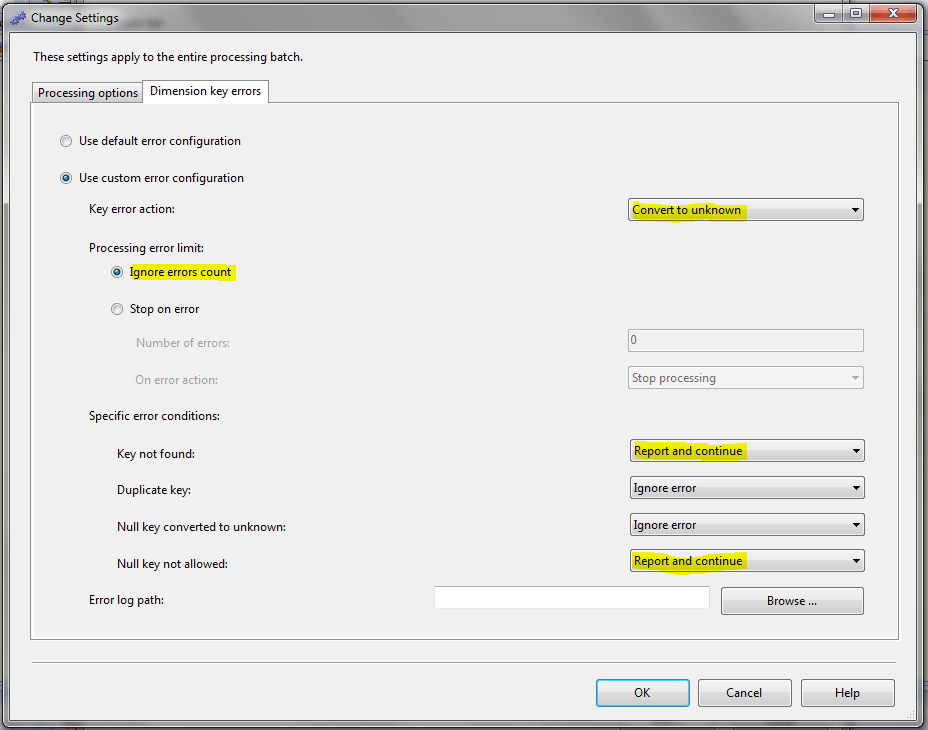
If I then do a ProcessFull with the following error configuration:

image

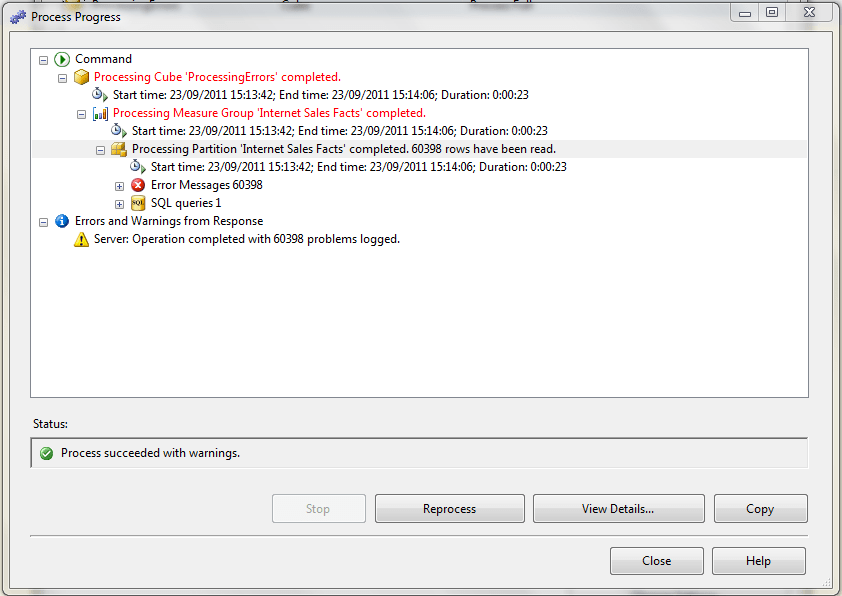
ie with Key Error Action set to Convert To Unknown, Ignore Errors Count selected, and Key Not Found and Null Key Not Allowed both set to Report And Continue, when I do a full process all the errors are logged in the UI and it takes around 23 seconds to finish:

image

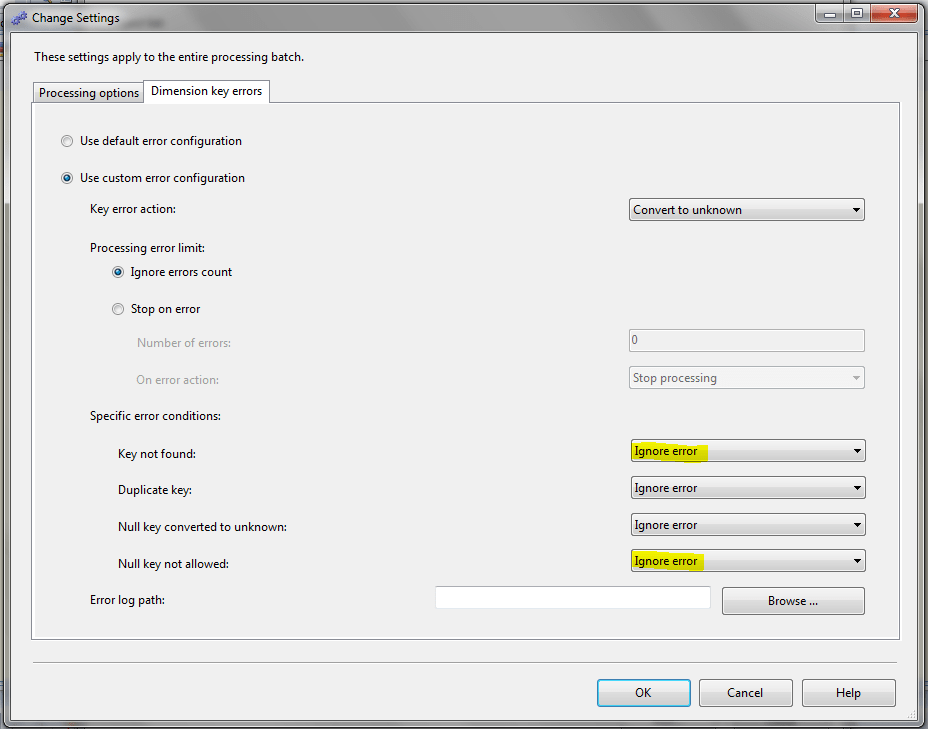
If, on the other hand, you set Key Not Found and Null Key Not Allowed to Ignore Error, as follows:

image

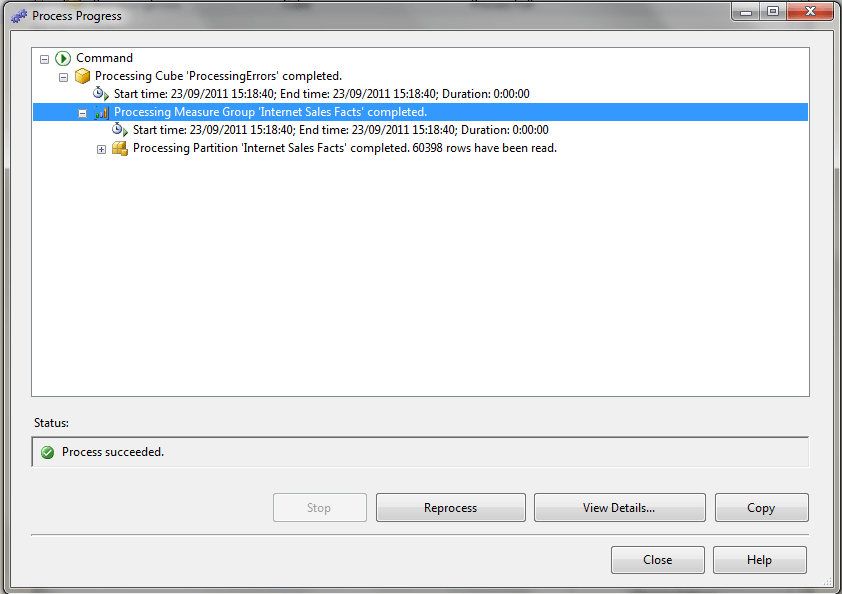
…a full process takes under a second:

image

Now this is an extreme example, of course, and in a production system you should not have any key errors anyway, and if you do you definitely do not want to ignore these key errors. But if you’re developing a cube and you know that key errors exist but you don’t care about them (for the moment), you can save a massive amount of time by not reporting these errors. In my case cube processing went down from around 3 hours to 45 minutes. Which is a good thing if you want to get on with your work faster, but I suppose is a bad thing if it interrupts your web browsing/coffee drinking/chatting or whatever you do to pass the time while processing’s taking place.

I’m an Analysis Services Maestro!

I’m very proud to say that I’ve been made an Analysis Services Maestro! You can read the official announcement here:
http://sqlcat.com/sqlcat/b/technicalnotes/archive/2011/09/19/announcing-the-first-wave-of-ssas-maestros.aspx

If you’re wondering what this actually means, you can find out more here; in a nutshell, it’s something like a MCM for Analysis Services. The course itself was pretty tough and there was a lot of work involved in doing the labs, exam and case study, but I learned a lot (especially from Thomas Kejser) and it was definitely a worthwhile thing to do.

Congratulations also go to the other ten awardees: Ulf, Alberto, Greg, Darren, Dirk, Mick, Vidas, Marco, Harlan and John.