PowerPivot Videos from SQL Server Day 2010

Last month I had the pleasure of speaking at SQL Server Day 2010 in Belgium (I had a nightmare getting there and back because of the snow, but that’s another story). I’ve just seen that all the videos from the event are now available to view online and download here:
http://sqlserverday.be/video/

Both the sessions I gave are up: “Implementing Common Business Calculations in DAX” and “Comparing Analysis Services with PowerPivot”.

On a related note, we’ve aggregated all the content we’ve got for every single SQLBits on a new page on the SQLBits site:
http://sqlbits.com/content/
As far as I can see there are 152 videos on there alone!

Tuning the Currency Conversion Calculations created by the Add Business Intelligence Wizard

I see the ‘Add Business Intelligence’ wizard in BIDS as a bit of a missed opportunity on Microsoft’s part: it was a great idea to have functionality that would automate difficult stuff like adding MDX calculations to a cube, and it’s a shame that most of the MDX code it generates is so rubbish. Take, for example, the MDX currency conversion calculations that it creates. If you’re using Enterprise Edition the best way to do currency conversion is not to use MDX at all but to use measure expressions, but if you have Standard Edition you have no choice but to use MDX to do your currency conversion and if you use the calculations the wizard produces you’d probably think that this type of calculation has to be painfully slow. That’s not true, though – and in this post I’ll show you how to replace the currency conversion calculations created by the wizard with some that are not only much simpler but also much, much faster.

Let’s use a simple cube to illustrate this. In the Adventure Works database I created a cube with two measure groups: one based on the Internet Sales fact table, the other based on the Currency Rates fact table. I then added the Currency dimension and the Date dimension (joining on OrderDateKey in the Internet Sales table), and ran the ‘Add Business Intelligence’ wizard to add many-to-many currency conversion to the cube. Here’s what my Dimension Usage tab looked like after I’d run the wizard (note that it added a new Reporting Currency dimension to the cube):

image

And here’s the MDX that it adds to the MDX Script:

// <Currency conversion>
       
        // Currency conversion wizard generated script.
        // Currency conversion generated on: 11 January 2011 21:05:19   
        // by user: Chris   
        // Currency conversion type: ManyToMany   
        // Selected members to be converted: Sales Amount   
        // Please be aware that any changes that you decide to make to it may be
        // overridden the next time you run the Currency Conversion wizard again.   
   
        // This is the Many to One section   
        // All currency conversion formulas are calculated for the pivot currency and at leaf of the time dimension   
        Scope ( { Measures.[Sales Amount]} );
            Scope( Leaves([Date]) ,
                [Reporting Currency].[USD],   
                Leaves([Source Currency]));


              // Convert Local value into Pivot currency for selected Measures that must be
              //converted with Measure rate [Average Rate]
              Scope( { Measures.[Sales Amount]} );
                    
               This = [Reporting Currency].[Local] / Measures.[Average Rate];
   
              End Scope;
   

            End Scope;   
       
            // This is the One to Many section
            // All currency conversion formulas are calculated for
            //the non pivot currency and at leaf of the time dimension   
            Scope( Leaves([Date]) ,    
                Except([Reporting Currency].[Source Currency Code].[Source Currency Code].Members,
                {[Reporting Currency].[Source Currency Code].[Source Currency Code].[USD],
                [Reporting Currency].[Source Currency Code].[Source Currency Code].[Local]}));


            // This section overrides the local values with the Converted
            // value for each selected measures needing to be converted with Measure rate [Average Rate]…   
            // LinkMember is used to reference the currency from the
            // source currency dimension in the rate cube.
            Scope( { Measures.[Sales Amount]} );
                   This = [Reporting Currency].[Source Currency Code].[USD] * (Measures.[Average Rate], LinkMember([Reporting Currency].[Source Currency Code].CurrentMember, [Source Currency].[Source Currency Code])) ;
            End Scope;   
   
       
            End Scope; // Leaves of time, all reporting currencies but local and pivot currency   
        End Scope; // Measures

        // End of the currency conversion wizard generated script
    // </Currency conversion>

Scary, eh? I won’t explain what it does in detail, but basically it does the following:

  1. Converts the various local currency values held in the Internet Sales fact table into US Dollars
  2. Converts these US Dollar amounts into whatever Reporting Currency the user has selected

It’s a lot of code for something so straightforward, and the reason why so complex is because it needs to use the Currency Rates measure group for both sets of currency rates: from local currency to US Dollars, and from US Dollars to reporting currency. As we all know overly-complex code is usually poorly-performing code, and in this case the use of LinkMember in particular is a killer; also there are no checks for situations where exchange rate values don’t exist, which is a fairly basic mistake.

Take the following query:

SELECT [Date].[Calendar Year].MEMBERS ON 0,
NON EMPTY
[Reporting Currency].[Source Currency Code].MEMBERS ON 1
FROM [CurrencyTestWizard]
WHERE([Measures].[Sales Amount])

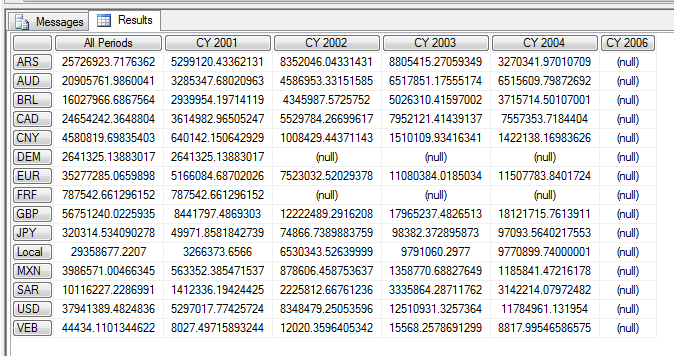
It displays all Years on columns and all Reporting Currencies on rows for the Sales Amount measure, so it’s doing quite a lot of work. On my quite beefy laptop, using the cube I’d just created, it ran in just under 9 seconds on a cold cache to give me this:

image

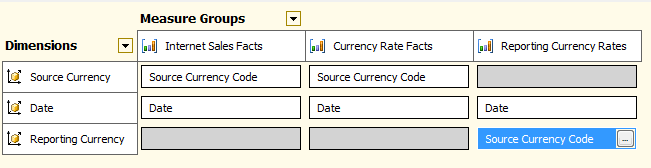
We can do a lot better than 9 seconds though. The first step to optimising this is, as always, to push complexity out of the MDX and back into the cube design. Given that a fact table containing exchange rate values is usually pretty small relative to other fact tables, what I decided to do was to add a second measure group to my cube based on exactly the same Exchange Rate fact table, use the original measure group for the conversion from local currency to US Dollars and then the new one for the conversion from US Dollars to reporting currency. This did increase both the size of the cube and the amount of time taken to process it, but only by a tiny amount.

BIDS didn’t let me create a second measure group from a fact table that was already in use, so I had to create a new named query in BIDS that did a SELECT * from the Exchange Rate fact table and then use that. Having done this, I was able to set up my Dimension Usage as follows, with Reporting Currency joining to this new measure group:

image

Now, I could replace the code above with the following MDX:

SCOPE({[Measures].[Sales Amount]});
    SCOPE([Date].[Date].[Date].MEMBERS);
        SCOPE([Source Currency].[Source Currency Code].[Source Currency Code].MEMBERS);
            SCOPE(EXCEPT([Reporting Currency].[Source Currency Code].[Source Currency Code].MEMBERS
                        ,{{[Reporting Currency].[Source Currency Code].&[2147483647]}}));

                THIS =  IIF([Measures].[Average Rate – Reporting Currency Rates]=0
                            , NULL
                            ,IIF([Measures].[Average Rate]=0
                                , NULL
                                ,([Measures].[Sales Amount] / [Measures].[Average Rate]))
                                * [Measures].[Average Rate – Reporting Currency Rates]);
            END SCOPE;
        END SCOPE;
    END SCOPE;
END SCOPE;

What I’m doing here is using a single set of nested scoped assignments to perform the calculation at the leaf level of the Date, Source Currency and Reporting Currency dimensions. With two different measure groups containing exchange rates there’s no need for the use of LinkMember – I just use two different measures for each step in the conversion – and I make sure I don’t bother doing any conversions where exchange rate values don’t exist.

When I ran my test query, I got exactly the same results but the query ran in around 0.5 seconds on a cold cache – 18 times faster than on the original version of the cube! It just shows you what a few tweaks to your cube design and MDX can achieve, doesn’t it? It’s a shame that MS didn’t invest a bit more time on the ‘Add Business Intelligence’ wizard to improve it – it would probably have improved the quality of many implementations no end. In the future, with PowerPivot and BISM being focused so much on ‘self-service’ BI, I think something similar to the wizard is a ‘must have’ to help users create complex DAX calculations, and I hope MS realise that functionality like this can be key to the overall success of a product.

New Trace Events in SSAS2008 R2 CU5

Greg Galloway has just pointed out to me a new KB article outlining some major improvements/changes to trace events that are coming in CU5 for SSAS 2008 R2:
http://support.microsoft.com/kb/2458438/

This represents part of the new monitoring functionality that will be coming to SSAS in Denali. These changes will allow us to:

  • Monitor what happens during the execution of the MDX Script in more detail
  • Track resource usage for individual commands (this alone is very interesting)
  • Track locks more effectively

These changes are going to be very useful to anyone running a high-end SSAS implementation.

Subscribing to Traces

There’s a few blog posts out there that describe how to define and run server-side traces for SSAS (such as this one) but recently I was looking into how to subscribe to a server-side trace that’s already running, and while there’s a good thread on the forum I didn’t find much other information out there on the subject. Time for a blog post, then.

First of all, you need a trace running on the server before you can subscribe to one. Luckily, you can find out what traces are running by querying the discover_traces DMV as follows:

select * from $system.discover_traces

Unless you’ve specifically turned it off, you’ll see at least one trace running on each SSAS instance: the flight recorder trace, which has the ID FlightRecorder. You can then subscribe to a trace by executing an XMLA command like this:

<Envelope xmlns="http://schemas.xmlsoap.org/soap/envelope/">
  <Header>
  </Header>
  <Body>
    <Execute xmlns="urn:schemas-microsoft-com:xml-analysis">
      <Command>
        <Subscribe xmlns="http://schemas.microsoft.com/analysisservices/2003/engine">
          <Object xmlns="http://schemas.microsoft.com/analysisservices/2003/engine">
            <TraceID>FlightRecorder</TraceID>
          </Object>
        </Subscribe>
      </Command>
      <Properties>
        <PropertyList>
        </PropertyList>
      </Properties>
    </Execute>
  </Body>
</Envelope>

Or, alternatively, anywhere you can run an MDX query (for example from an MDX query window in SQL Management Studio) you can run just the Subscribe:

<Subscribe xmlns="http://schemas.microsoft.com/analysisservices/2003/engine">
 <Object xmlns="http://schemas.microsoft.com/analysisservices/2003/engine">
  <TraceID>FlightRecorder</TraceID>
 </Object>
</Subscribe>


Once you’ve executed either of the above, the command will run indefinitely until you cancel the session it’s running on (it may look like it’s hanging, but it isn’t). To cancel the session you’ll need to find its SPID, which again you can find by querying the discover_commands DMV:

select * from $system.discover_commands order by command_start_time

You can then take the SPID and execute an XMLA Cancel command like this one:

<Cancel xmlns="http://schemas.microsoft.com/analysisservices/2003/engine">
  <SPID>1887</SPID>
</Cancel>


Once you’ve done this you’ll see the data from your trace returned at last:

image

I had thought this might be an easy-ish way of getting trace data into PowerPivot for analysis, but unfortunately as soon as you kill the session the subscribe is running on you see an error in the PowerPivot window. But it will work in SSRS if you use an OLEDB connection and can find an easy way of killing a session from inside an SSRS report – I’m sure it’s possible, using this technique, but it won’t be elegant. To be honest, though, in most cases saving the trace to a table in SQL Server, or to a file, will be more convenient if you want to use trace data for analysis.

PowerPivot vs SSAS Quiz

Last week, at the PASS Summit, I did a session on ‘Comparing PowerPivot with Analysis Services’. The aim of the session was to compare the two products in terms of positioning and functionality, and help people work out which tool would be appropriate for their product  – and the reason I submitted this session was because I’ve seen an awful lot of people over the last year who are confused about this issue, and it’s not an easy question to answer. Although there are many things that both tools do equally well, there are some things that PowerPivot is good at and that SSAS is not, and there are other things that SSAS is good at and which PowerPivot is not.

Anyway, to make the presentation a bit more fun I came up with the idea of creating a quiz (like the kind you find in women’s magazines) to help make the decision. It took the form of an Excel spreadsheet with a series of yes/no questions, and once the questions had been answered the spreadsheet would tell you which tool you should use. Since a number of people have since asked me to share the workbook, I’ve decided to make it available via the Excel Web App here:

http://cid-7b84b0f2c239489a.office.live.com/view.aspx/Public/PowerPivot%20SSAS%20Comparison/SSASvsPowerPivotQuiz.xlsx

All you need to do is answer each question by entering 1 under either the Yes or the No column, and then when you’re finished look in cell C67 for the answer. You might also want to download a local copy to Excel and play with it there, rather than edit the document online. The way it works is that each question has a weight attached to the yes or no answer, and that’s found in the hidden columns F and G. A positive weight favours SSAS, a negative weight favours PowerPivot; I should also point out that the weights aren’t always equal. So, for example, in the question about security, if you answer that everyone in your organisation should be able to see all your data that favours neither SSAS or PowerPivot, but if you answer that you do need to restrict access to data then that favours SSAS (because only SSAS has features like dimension and cell security).

Before anyone complains to me about the questions being stacked in favour of SSAS or PowerPivot (and I’d like to point out one more time that I am not some kind of PowerPivot-hating BI Luddite, I do like PowerPivot and I’m also excited about using BISM too, so there), I’m going to add the following disclaimer: these questions should only act as a guide, and I cannot guarantee that this worksheet will give the correct answer in every case. It only represents a personal opinion! Before you use it, I suggest you review the weights associated with each question and change them according to your own ideas. Oh, and before you show this sheet to the boss you might want to delete the pictures of hearts at the top…

PASS Summit Day 2: The Aftermath

Well, that last blog post sparked a bit of a discussion, didn’t it? Indeed, I’ve spent the last few days doing a lot of talking to various different groups of people – PASS attendees, fellow MVPs, Microsoft – about was or wasn’t said in the various announcements made at PASS, what I did or didn’t mean, and how people are interpreting or misinterpreting the news. And now it’s time to follow up with another blog post to explain myself better and say what’s happened since Thursday; you may also want to read this official statement about the roadmap from TK Anand here before carrying on reading this post:
http://blogs.technet.com/b/dataplatforminsider/archive/2010/11/12/analysis-services-roadmap-for-sql-server-denali-and-beyond.aspx

First of all, let me start by making it clear that Analysis Services overall is alive and well, and in fact has a greatly increased role to play in the BI stack in Denali. My original post pretty much said as much. Some of the confusion, though, stems from the fact that ‘Analysis Services’ in Denali will have two distinct parts:

1) The UDM, or Analysis Services cubes, which is what we have today. Some people refer to it as MOLAP SSAS but I don’t like this description: it highlights the storage mode when in fact I consider its distinguishing feature to be its multidimensional view of the world. Personally I couldn’t care less about storage modes and can’t wait to see Vertipaq replace MOLAP, but I do care about multidimensionality and its advantages when it comes to BI – some BI applications, typically ones which need complex calculations, can only be built using a true multidimensional OLAP database. I’d say anyone that thinks that the point of using the UDM is because MOLAP is (or has been) faster than relational database engines has completely missed the point. However, multidimensionality is complex and somewhat inflexible and that’s what puts lots of people off.

2) The new BI Semantic Model, BISM. This is what’s new in Denali, and features a more relational, tabular way of modelling data as well as the new Vertipaq storage engine. BISM is a little bit multidimensional (it is after all still SSAS under the covers) but not much: that’s exactly why it’s easier to use, more flexible and appropriate for a wider range of BI applications. It will be a massive asset to the MS BI stack and make building many types of BI applications quicker and easier. It will probably not do everything that the UDM does, though, precisely because it is not as multidimensional.

The point I was trying to make in my original post was that the announcements made at PASS, as I and everyone I spoke to there interpreted them, made me very concerned (to say the least) for the future of the UDM and the multidimensional model. First of all there was the news that Microsoft was putting all of its development efforts into Vertipaq and BISM, while the UDM was (for yet another release) getting very few obvious improvements. Then there was the news that Project Crescent was only going to support BISM as a data source and not the UDM, which made it seem like the UDM was a second class citizen in this regard. And finally there was a lack of clarity in the roadmap which meant I wasn’t sure whether BISM was meant to replace the UDM or not, or whether BISM would ever be able to do the same things that the UDM can do today.

This is what caused all the commotion, and I’m pleased to say that after a lot of what’s generally referred to as ‘free and frank discussion’ behind the scenes the guys at Microsoft understand what happened. In part there was a failure of communication because I don’t think the Analysis Services team ever meant to send out a negative message about the UDM and were a bit surprised at my reaction. TK’s recent post that I link to above is a very clear and positive statement about the future of the UDM. But words need to be backed up by actions and Microsoft know there need to be some changes to the Denali roadmap so that customers receive the right signals. As a result I hope to see a little bit more love shown to the UDM in Denali as a result, to prove to all of us who have invested in the UDM to show Microsoft still cares about it; I also know that Microsoft are looking again at ways that Crescent can work with existing UDM applications; and I hope to see a clearer long-term vision to show how anyone investing in the UDM today will have the option, if they want, to move smoothly over to BISM when they feel they are ready. An argument about semantics is in no-one’s interests (I couldn’t help thinking of this); what I care about is that I’ll have all the cool new stuff that BISM will give me and I’ll still be able to do everything I can do today in the UDM, and that we’ll have all the power of relational and multidimensional modelling when we’re building our BI solutions.

So let’s be positive. There was a bit of a bust-up, but we’re all friends again now and I think the SSAS community is better off for having had this all come out now rather than later – and the fact that we can even have this type of discussion shows the strength and vibrancy of the community. I’m not afraid of change and I know it has to happen; I’m confident that the changes we see coming in Denali will be for the better. However I’m also a lot happier now that existing Microsoft BI customers have had this reassurance that they won’t be left stranded by these changes.


PASS Summit Day 2

UPDATE – after you read this post, you should also read the follow-up here:
http://blog.crossjoin.co.uk/2010/11/14/pass-summit-day-2-the-aftermath/

The last few days have been quite emotional for me. I’ve gone from being very angry, to just feeling sad, to being angry again; I’m grateful to the many members of the SSAS dev team who’ve let me rant and rave at them for hours on end and who have patiently explained their strategy – it’s certainly helped me deal with things. So what’s happened to make me feel like this? I’ll tell you: while it’s not true to say that Analysis Services cubes as we know them today and MDX are dead, they have a terminal illness. I’d give them two, maybe three more releases before they’re properly dead, based on the roadmap that was announced yesterday. And this is incredibly hard for me to write because I’ve spent the majority of my working life, about 12 years now, working with them; I live and breathe these technologies; and I have built up a successful consulting business around them. Neither is it true to say that they are struggling in the marketplace: on the contrary they have gone from strength to strength even in spite of the fact that, apart from the important performance improvements in SSAS 2008, we haven’t had any substantial new functionality since SSAS 2005. SSAS has been the most popular OLAP tool on the market for years, has loads of very happy users, and continues to be used on new projects all the time. Hell, on stage the other day at the keynote there was a guy from Yahoo talking about his 12TB cube, which loaded 3.5 billion rows of data per day, and which he was planning to grow to 40TB! The SSD revolution has given SSAS cubes a massive boost. So this is one very successful product and no other company would be allowed to do what Microsoft is proposing to do with it because if they did customers would be up in arms, calling their account managers, and the account managers would go straight to the CEO and demand that the product was not only retained but given the development resources it deserves. But this is Microsoft we’re talking about, and they have the luxury of being able to ignore this kind of pressure from their customers and partners and do whatever they want. And they have quite convincing reasons for doing what they’re doing, albeit ones I’m having severe difficulty coming to terms with.

So let me get round to explaining in detail what was announced yesterday at the PASS Summit. Quite a few BI related things were aired that I won’t talk about in detail: the move to Visual Studio 2010 for all BI development, and the integration of SQL Management Studio functionality into VS2010 too; FileTable; the Master Data Services Excel addin; Data Quality Services; loads of new SSIS stuff including impact analysis and lineage; and there was yet more buzz on Project Crescent. But I’m going to concentrate on what came out in TK Anand’s presentation on the future of Analysis Services. Here are the main points:

  • The BISM – BI Semantic Model – is the name for the new type of Analysis Services database that gets created when you publish a PowerPivot model up to the server. It’s SSAS running in the special in-memory mode, and SSAS instances will either work in this mode or in regular MOLAP mode. In Denali we’ll be able to install a standalone instance of SSAS running in in-memory, BISM mode without needing Sharepoint around.
  • We’ll be able to create BISM models in BIDS, so we get full support for stuff like source control. The experience is very similar to what we get in PowerPivot today though; one of the points that was made again and again yesterday was that they wanted to make things as easy as possible for BI developers; the implication is that today the learning curve for SSAS is too steep, which is why many database people have been put off using it; I would argue that any rich, sophisticated tool is going to have a learning curve though and I bet nobody would dare to go to the C# community and tell them that C# is too intimidating, and wouldn’t it be nice if they had the friendliness and flexibility of VBA!
  • BISM models are the UDM 2.0. Everything that the UDM was meant to do in SSAS 2005, and didn’t, are serious objectives here: BISM aims to replace traditional SSAS and SSRS report models, and be good for the kind of low-level relational reporting that SSAS today simply can’t do as well as the high-level, aggregated data it handles so well today. Business Objects universes were mentioned several times as being a very close comparison. Project Crescent will only work against BISM models.
  • BISM models will support MDX querying in some cases (see below) but DAX has grown to become a query language. We only had a brief look at it and basically it seems like you use a CalculateTable DAX function to return a tabular result set. You can also define query-scoped calculations just as you do with the WITH clause in MDX today. That’s a gross simplification, but you get the idea. DAX queries do not do any pivoting, so you only get measures on columns; it’s up to the client tool to do any pivoting. It was remarked that this made it much easier for SSRS to consume. SSRS couldn’t deal with multidimensional resultsets, and so instead of fixing this they made SSAS less multidimensional!
  • BISM models are massively scalable. They have no aggregations, there are no indexes to tweak, but they demoed instant querying on a 2 billion row fact table on a fairly average server, roughly the same spec that I see most people using for SSAS installations today. They’re achieving massive compression on the data, often anything up to 100 or more times. Of course all the data has to sit in memory after it’s been loaded but they’re going to support paging to disk if it won’t; we’ll also be able to partition tables in the BISM so we can control what gets loaded when. There will also be perspectives.
  • Miscellaneous PowerPivot functionality that was demoed included: a nice new window for creating KPIs easily; new DAX functions for flattening out parent/child hierarchies, similar to what the ‘Parent Child Naturaliser’ does today in BIDS Helper (plenty of people, including me, pointed out that this was not proper support for parent/child hierarchies); a new RANKX function for doing rank calculations; Distinct Count will be a native engine feature, and you’ll be able to have as many distinct count measures on a table as you want; drillthrough will also be supported.
  • There will be role-based security in BISM, where you can secure either tables, rows or columns.
  • BISM models will also be able to operate in ‘passthrough’ mode. This is essentially ROLAP done right, and a lot of work has gone on around this; in Denali it will only be available for SQL Server and only if you’re issuing DAX queries, not MDX. In the future other RDBMSs will be supported, plus possibly MDX querying of BISM when it’s in passthrough mode. Essentially in this scenario when you query the model your query is translated direct to SQL, and the results returned are (as far as possible) passed back to you directly with the minimum of interference. In some cases, for example where there are calculations, BISM will do some stuff with the resultset before it hands it over to you, but the aim is to push as much of the logic into the SQL query that it generates. If it works well, it sounds like at long last we’ll have a serious ‘realtime’ BI option, though I’m still not sure how well it will perform; I suppose if there are Vertipaq indexes inside SQL Server and/or if you’re using PDW, the performance should be good.
  • There are only going to be a few improvements for regular, MOLAP-based SSAS – four bullet points in TK’s presentation! They are: the 4GB string store limit has been fixed; we’ll get XEvents and better monitoring functionality; Powershell support; and there’ll be some performance, scalability and reliability improvements.
  • BISM will not handle advanced calculations really in Denali. Yes, you’ll be able to do cool stuff in DAX expressions, but you won’t get the equivalent of calculated members on non-measures dimensions (so no time utility dimensions) or MDX Script assignments. ‘Advanced business logic’ is on the roadmap for post Denali, whatever that means exactly; the aim will be to support things like assignments but not necessarily exactly what we have now. To me this is going to be one of the main reasons why people will not adopt BISM in Denali – most enterprise customers I see have pretty complex calculations.
  • Role-playing dimensions, translations, actions, writeback and a better API (AMO will still work for creating BISM objects in Denali, but it is going to be difficult to work with and an object model that’s more closely aligned to BISM concepts will be needed) are all planned for beyond Denali.
  • There are going to be some tools to help migration from SSAS cubes to BISM, but they won’t get you all the way. Some redesigning/rethinking is going to be needed, and it’s likely that some of the things you can do today with SSAS cubes you might never be able to do in the same way with BISM.

MS are clear that BISM is the priority now. While MOLAP SSAS isn’t deprecated, the efforts of the SSAS dev team are concentrated on BISM and PowerPivot and we shouldn’t expect any radical new changes. I asked why they couldn’t have just kept SSAS as it is today and bolted Vertipaq storage on as a new storage mode (we will, of course, be able to use SSAS cubes in ROLAP mode against SQL Server/PDW with Vertipaq relational indexes) but I was told that it was seriously considered, but didn’t turn out to be easy to implement at all. The other question I asked was why they are abandoning the concept of cubes and explicitly multidimensional ideas in favour of a simpler, relational model, and they told me that it’s because multidimensionality put a lot of people off; I can see that’s true – yes, a lot of people have been converted to the OLAP cause over the years, but we all know that many relational people just can’t stomach/understand SSAS today. The vast majority of people who use SSRS do so directly on relational sources, and as we know while there’s a great demand for things like Report Builder, Microsoft has had nothing that worked really well to enable end user reporting in SSRS; BISM, as I said, is aimed at solving this problem.

So this is a radical departure for Microsoft BI, one that could go badly wrong, but I can understand the reasoning for it. I’ve been impressed with the technology I’ve seen over the last few days and I know that if anyone can pull this off, the SSAS dev team can. However, the fact remains that in the short term BISM models won’t be able to handle many enterprise projects; SSAS cubes, which can, will be seen as a bad choice because they have no long-term future; and we’re all going to have to tie ourselves in knots explaining the roadmap and the positioning of these products to all of our customers. There’s going to be a lot of pain and unpleasantness over the next few years for me and all Microsoft BI partners. Hohum. As I said, I’ve felt pretty angry over the last few days about all this, but now that’s turned to resignation – I can see why it’s happening, it’s going to happen whether I like it or not, and whether I kick up a fuss or not (I did consider trying to whip up a kind of popular rebellion of SSAS users to protest about this, but doubt it would have had any impact), so I might as well get on with learning the new stuff and making sure I still have a career in MS BI in two or three years time.

What do you think? I would really be interested in hearing your questions and comments, and I know the guys at Microsoft who read this blog would also want to see them too. I’m going to be in Seattle for the next two days and I’ll have the chance to pass on any comments that you leave here to the dev team, although I suspect some of them might be too rude to repeat. I certainly feel better just for having written this post and gotten things off my chest, and maybe you will too.

PASS Summit 2010 Day 1

So day one of the PASS Summit is drawing to a close, and what a day it’s been. I did a session myself today, which went well (I think), but the real news is all the cool new stuff that was announced at the keynote and at sessions throughout the day and that’s what I’d like to reflect on here. A lot of questions about what we’ve seen today remain unanswered (more will be revealed tomorrow, I’m told) but I thought I’d blog about what interested me and was relevant to BI.

All in all, I’m very excited. Let’s face it – over the last five years, in SSAS and in the wider BI stack, there’s been a distinct lack of anything really radical and new. But today saw several announcements that will completely change the Microsoft BI stack:

  • There will be column-store indexes, provided by the Vertipaq engine, inside the SQL Server relational database. Simon Sabin has a link to more details here.
  • There’s a new, corporate BI version of PowerPivot, BISM
  • Project Crescent is a new ad hoc query tool coming from the Reporting Services team

Let’s consider what each of these means in turn. Based on the limited information we’ve got so far, column-store indexes in SQL Server massively increase the performance of reporting/OLAP style queries inside the relational engine; if we get column-store indexes in Parallel Data Warehouse, well, I can imagine we’ll get astounding performance over huge data volumes. The pdf linked to in Simon Sabin’s blog says:

Users who were using OLAP systems only to get fast query performance, but who prefer to use the T-
SQL language to write queries, may find they can have one less moving part in their environment,
reducing cost and complexity. Users who like the sophisticated reporting tools, dimensional modeling
capability, forecasting facilities, and decision-support specific query languages that OLAP tools offer can
continue to benefit from them. Moreover, they may now be able to use ROLAP against a columnstore-
indexed SQL Server data warehouse, and meet or exceed the performance they were used to in the past
with OLAP, but save time by eliminating the cube building process.

To paraphrase, if your data’s in SQL Server that’s where it should stay for querying and reporting – MOLAP no longer provides any performance benefit, so the concept of ‘processing’  a cube to get data into a different, OLAP database is gone. If you still want to do OLAP on SQL Server it will be a form of ROLAP, and to me this makes a lot of sense.

Very few details about BISM, the ‘corporate’ version of Powerpivot/Vertipaq, were released but we saw that we could develop BISM models in Visual Studio and the end result was exactly what PowerPivot creates when you deploy a PowerPivot mode to Sharepoint – I guess it’s basically a different type of Analysis Services database. BISM can either hold the data itself in its own Vertipaq store (useful when the data comes from anywhere other than SQL Server, eg Excel, Oracle, text files and so on) or it can act purely as a semantic layer and allow querying data in SQL Server in a ROLAP, multidimensional way. So we’ll be able to create an Excel pivot table, connect to BISM and use that as a thin layer to query data that’s directly in SQL Server. This is clearly what the future of Analysis Services is going to be – while the Analysis Services we know and love today might hang around for a few versions, it’s not got a long-term future in my opinion.

There was a full session on Project Crescent later on today, which I went to, so I have more details on this. It’s essentially a new ad hoc query tool being built by the SSRS team – interestingly it seems to have nothing to do with the rest of Reporting Services, and it doesn’t create rdl files that can be edited in Report Builder or Report Designer. It’s all about flashy visualisation and interactivity and reminds me a lot of Tableau and other fashionable BI tools; I can also see how it can be a replacement for PerformancePoint for creating dashboards. It is only surfaced in Sharepoint (boo! yet another Sharepoint dependency!) and is built in Silverlight; also, it can only work with data sourced from BISM/PowerPivot models. Once you get past the flashy stuff it does much the same that every other ad hoc query tool has been doing since the year dot (Marco, sitting next to me, commented that it was doing much the same thing that Data Analyzer was doing 10 years ago) but the flashy stuff is very flashy indeed, and very impressive – for instance the ability to export views out to PowerPoint slides looks cool; but I do wonder whether it will be as practically useful as something like Tableau so we’ll have to wait and see. I’m pleased to see that someone at MS has finally woken up to the fact that end users might want to use something other than Excel for ad hoc querying.

OK, time for a few drinks and to have some fun! There’ll be another post with more news tomorrow…

SQLCat ROLAP White Paper

As you may or may not have seen, a month or so ago the SQLCat team published a white paper on optimising the performance of ROLAP inside SSAS. You can download it here:
 
I wouldn’t normally bother commenting on something like this, not because it’s not worth reading, but because so much good stuff comes out of the SQLCat team you should be reading it all anyway! In summary, the paper shows some useful tricks to make ROLAP run faster and points out not only that ROLAP is the only option at data volumes of more than 5TB but (surprisingly) it can sometimes outperform MOLAP at smaller data volumes.
 
That’s not what I wanted to talk about though. While I was reading this paper it struck me that something that was not mentioned was Parallel Data Warehouse, which is going to be released relatively soon I assume. If you’ve got a lot of data (and cash) and you want to build a data warehouse on the Microsoft platform then you’re going to want to want to look at it, and if you’re investing this much in one area of the MS BI stack then it makes sense to invest in other areas like SSAS. And as you probably know ROLAP has always been a bit of a pain point for SSAS, so maybe the prospect of customers building ROLAP cubes on Parallel Data Warehouse has spurred the SQLCat team on to do some research in this area? Moving forward it would be good if the dev team spent some time optimising SSAS in ROLAP mode for both regular SQL Server and Parallel Data Warehouse because I suspect that there’s a lot of scope for optimisation. It will also be interesting to see where the dividing line is drawn for customers with large data volumes: should they be using ROLAP on Parallel Data Warehouse, or will the new super-scalable Vertipaq engine be able to handle multi-terabyte volumes even better?

BI Survey 9

I’ve just got hold of my freebie copy of the latest edition of the BI Survey and, as I do every year, I get to blog about some of the juicier SSAS-related findings it contains. So what’s interesting in the BI Survey 9…? Here are some points/thoughts –

  • The survey finds that SSAS is most often used in companies with below the average size both in terms of the number of employees and in turnover. It’s also most popular in IT companies and with technical (as opposed to business) users. Note that this doesn’t mean that SSAS isn’t used in larger companies, because the survey shows it is most likely to be evaluated in the largest companies and (as we see below) it has a very good win rate when it is evaluated. It’s just that it is used by a much wider range of company sizes, unlike many products which are only used in the largest companies. This accounts for its dominant market share. This also, I think, is a result of Microsoft’s use of partners and influence over internal IT departments to sell its products, as opposed to large, expensive teams of salespeople and consultants, and also its licensing strategy. 
  • Only 1% of SSAS users in the survey were using AS2K; 45% were using 2005 and 48% 2008. This tallies with my experience out in the field; in fact I can’t remember when I last saw an AS2K installation in production. Good to see these levels of migration to the latest versions.
  • SSAS comes third in the rankings for the percentage of employees in an organisation using using a BI tool: on average 26% of employees use it (SSRS comes second in the rankings at 30%). This is surely ‘BI for the masses’ in action and however much the likes of me might moan about the shortcomings of Excel as a client tool, high usage like this is only possible because everyone already has Excel on their desktop so there are no extra costs involved in rolling BI out to large numbers of users.
  • Interestingly SSAS is one of the least likely products to undergo a formal evaluation when buying BI tools, but when it does get a formal evaluation it still has a very respectable 70% win rate, although this seems to be decreasing over time.
  • SSAS has the third-lowest number of technical problems reported and the second-lowest number of complaints about reliability. My feeling is that while SSAS was never all that buggy, at least in comparison to other software, it seems to have got even better recently; indeed it’s been a while now since I came across a really nasty bug. Maybe that’s because all the dev team have been away working on PowerPivot?
  • As far as SSAS client tools go, Excel again takes the top spot with 76% of users using it. Depressing but believable: 22% of users still have Proclarity, and are probably wondering how to migrate to something else. More surprising is that almost 25% of users claim to be using Excel Services – I know it’s out there, but I haven’t seen a single customer of mine use it yet.

That’s probably enough – if you want to know more, go out and buy the survey! But the generally positive ratings that SSAS has received has cheered me up somewhat; it’s always nice to see the product your livelihood depends on getting good reviews.