In the June 2018 release of Power BI Desktop there were a number of improvements made to the way the Power Query engine handles OData data sources. You can read about them here:
https://powerbi.microsoft.com/en-us/blog/power-bi-desktop-june-2018-feature-summary/#oData
However, while testing them out, I noticed one important point that the announcement didn’t make: an existing Power Query query will only benefit from these changes if you make a small change to its M code, adding the Implementation=”2.0” option to the OData.Feed() function.
Take the following M query, running on the UK Houses of Parliament OData API:
[sourcecode language=’text’ padlinenumbers=’true’]
let
Source = OData.Feed(“https://api.parliament.uk/odata”),
GovernmentOrganisation_table =
Source{[
Name=”GovernmentOrganisation”,
Signature=”table”
]}[Data],
#”Expanded GroupHasPosition” =
Table.ExpandTableColumn(
GovernmentOrganisation_table,
“GroupHasPosition”,
{“PositionName”},
{“PositionName”}),
#”Filtered Rows” =
Table.SelectRows(
#”Expanded GroupHasPosition”,
each [PositionName] = “Chancellor of the Exchequer”)
in
#”Filtered Rows”
[/sourcecode]
It queries a table called GovernmentOrganisation, expands a column called GroupHasPosition and then filters on one of the expanded columns, PositionName, to only return the rows where PositionName contains the text “Chancellor of the Exchequer”.

Using Fiddler in the way I describe here, I can see that when this query runs the engine first tries to fold the filter on “Chancellor of the Exchequer” and then when this request returns an error, it defaults to a very slow approach that involves making multiple requests to the API:
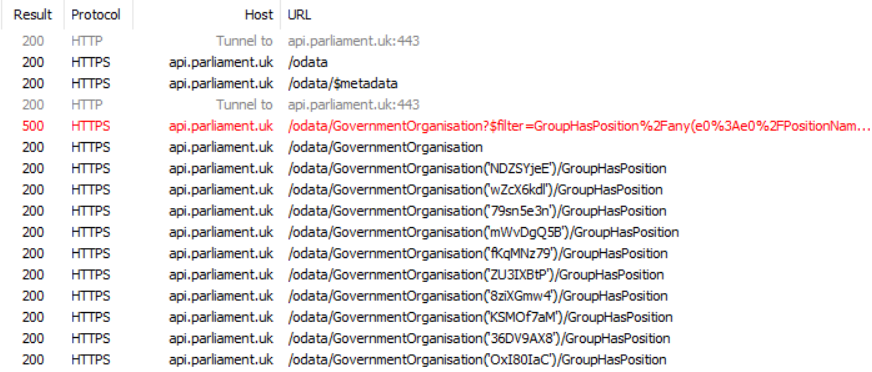
However, if you change the code above so that the OData.Feed() function uses the Implementation=”2.0” option like so:
[sourcecode language=’text’ padlinenumbers=’true’ highlight=’2,3,4,5′]
let
Source = OData.Feed(
“https://api.parliament.uk/odata”,
null,
[Implementation=”2.0″]),
GovernmentOrganisation_table =
Source{[
Name=”GovernmentOrganisation”,
Signature=”table”
]}[Data],
#”Expanded GroupHasPosition” =
Table.ExpandTableColumn(
GovernmentOrganisation_table,
“GroupHasPosition”,
{“PositionName”},
{“PositionName”}),
#”Filtered Rows” =
Table.SelectRows(
#”Expanded GroupHasPosition”,
each [PositionName] = “Chancellor of the Exchequer”)
in
#”Filtered Rows”
[/sourcecode]
…then Fiddler shows a completely different request made:

In this case it does not try to fold the filter, but it at least does the expansion in a single request. The performance of the resulting query is a lot better.
It looks like all new code generated by the Power Query Editor uses the Implementation=”2.0” option for OData.Feed() so it will get the benefits described in the post on the Power BI blog. Existing M code won’t have this option set though so you will need to update it appropriately. As always you should test thoroughly after making these changes to make sure you do indeed make your query run faster and get the same behaviour as you had before.