SQLBits X Agenda Published

The agenda for the Friday and Saturday of SQLBits X is now published, and you can see it here:
http://sqlbits.com/information/Agenda.aspx?20120330
http://sqlbits.com/information/Agenda.aspx?20120331

If you were wondering whether to come hopefully this will make up your mind – but given that almost 1000 SQL Server professionals from all round the world have already registered, so you’d better book fast if you want to be sure of a space. There are loads of SSAS-related sessions to choose from, including ones from Cathy Dumas, Marco Russo, Alberto Ferrari, John Tunnicliffe, Erika Bakse, Akshai Mirchandani, Stephan Stolze, Bob Duffy and, errr, me. Trust me, it’s going to be great!

PASS: Time to do a lot more than change the by-laws

I read the following posts by Andy Warren and Steve Jones today, and before you hear what my thoughts on the subjects they discuss you should probably read them too:
http://www.sqlandy.com/index.php/2012/01/pass-time-to-change-the-by-laws/
http://voiceofthedba.wordpress.com/2012/01/13/ethics-and-power

(In the interests of full disclosure let me state that I know James Rowland-Jones pretty well because we’re both involved in running SQLBits, but the first I knew about his being appointed to a voting position on the PASS board were the above posts. What follows are my opinions alone, written without consultation with James or anyone else).

I completely understand why Andy and Steve are upset. I have an awful lot of respect for them and their views. From their – perfectly valid – perspective, what has happened is unfair and undemocratic. However I suspect there’s a reason for what has happened, and that reason can be found elsewhere on Andy’s blog:

For too long PASS (and SQLSaturday) have been US centric.

In my opinion the big problem with PASS is that on one hand it’s a self-described international organisation (number #3 on its list of current and future strategic objectives is to “Focus on International Growth and Consolidation”) but it is, in effect a North American user group with a North American focus, run by North Americans. As far as I know the vast majority the membership of PASS is in North America and therefore it’s not surprising that North Americans dominate the board: PASS members vote for candidates they know and can relate to, and who address their concerns. And that also, to me, explains why despite its good intentions PASS has had such problems with its international role: the only way it can be successful internationally will be if it has a genuinely international element in its leadership, but that’s clearly never going to happen while membership is so skewed towards North America. It’s a vicious circle.

You could argue that as PASS, and especially SQL Saturday, expands internationally it will attract more members from outside the US then more international candidates will make it onto the board through democratic means. Indeed, Rob Farley’s success in the recent elections could be a sign that this is happening. I certainly voted for Rob not only because I know, like and respect him but because of his stance on international issues. The problem is that even if the level of participation in PASS elections everywhere in the world reached the same level as it has reached in the US today (and even an optimist would accept that we’re still a long time away from this happening) the PASS board would still be dominated by North Americans simply because it’s the biggest single market for SQL Server. Moreover some countries and territories would never have any effective representation because they would be simply too small. The world isn’t divided into the US and ‘everywhere else’ but each SQL community has its own identity and its own challenges and deserves representation. Not every community is as lucky as Australia to have someone like Rob who is a native English speaker, has an impressive technical reputation and can spend the time and yes the money (those plane tickets to the PASS conference aren’t cheap) to become sufficiently well-known in the North American community to win a PASS election.

So why should, say, the UK SQL Server community get a voice on the board that is out of proportion with its relative size? That is what I’m arguing for and it might seem fundamentally undemocratic. However the challenge of effectively representing different, geographically distributed subcommunities inside a larger community is one that all large, diverse democracies have to deal with. Why should Rhode Island have the same number of seats in the US Senate as California? The answer is that this has to happen for the larger community to gain democratic legitimacy within the smaller subcommunities. If this doesn’t happen in PASS it risks disinterest, disengagement and at worse resentment in its non-US chapters – the smaller communities will quite rightly realise they are better off on their own because their interests are not being considered. Unfortunately I’ve already encountered a certain amount of resentment towards PASS for exactly this reason over the years I’ve been involved in the SQL community in Europe and I would hate to see that grow; it’s certainly the reason for the historic weakness of PASS in the UK.

The appointment of James and Raoul Illyés as international advisers to the PASS Board of Directors was clearly an attempt to address the problems of international engagement and break the vicious circle I describe above, and I’m sure the same motives were behind James’s appointment to a voting position. I strongly believe that this move was the only way that any traction on the international issue could be gained. But as I said I can understand why Steve and Andy are upset and that’s not acceptable either. What can be done? I suggest that if PASS is serious about becoming an international organisation then wholesale constitutional reform is necessary to ensure that international chapters have a voice and a vote. To use a US-friendly analogy, PASS needs its own Connecticut Compromise: alongside the board we need another, parallel body with equal representation for each chapter in the world. I would like to see discussion on how such reforms could take place as soon as possible, otherwise there’s a risk each SQL community in each country will end up going its own separate way and that won’t be good for anyone. Whatever our nationalities and whatever our cultural differences we all have SQL Server in common and working together will bring benefits to all of us.

Aliasing Columns in DAX

Creating a copy of a column with a new name is pretty simple in DAX: you can just use the AddColumns() function. For example if we take a model with the DimProductCategory table from Adventure Works in, we could create a copy of the EnglishProductCategoryName column like so:

evaluate
addcolumns(
DimProductCategory
, "Copy of Category Name"
, DimProductCategory[EnglishProductCategoryName])

image

However, in some calculations and queries I’ve been playing around with, this isn’t enough: I’ve not only needed to create a copy of the column but also to remove the original. So for example to crossjoin the DimProductCategory table with itself and get a cartesian product of all the possible combinations of Category name you can’t just do this:

evaluate
crossjoin(
summarize(
DimProductCategory
, DimProductCategory[EnglishProductCategoryName])
,
summarize(
DimProductCategory
, DimProductCategory[EnglishProductCategoryName])
)

Because you’ll get the following error:

 Function CROSSJOIN does not allow two columns with the same name ‘DimProductCategory'[EnglishProductCategoryName].

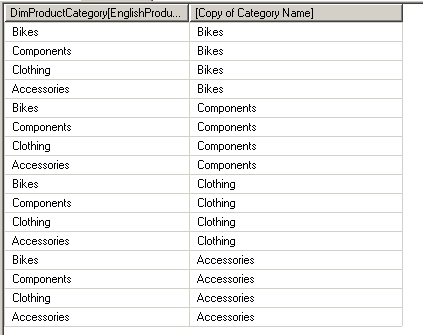
What you need to do is add the new column with AddColumns() and then use Summarize() to get a new table that only contains the values in this new column, like so:

evaluate
crossjoin(
summarize(
DimProductCategory
, DimProductCategory[EnglishProductCategoryName])
,
summarize(
addcolumns(
DimProductCategory
, "Copy of Category Name"
, DimProductCategory[EnglishProductCategoryName])
, [Copy of Category Name])
)

image

The DAX DateAdd function and missing dates

A little while ago I was working with a date column in a Tabular model and wanted to create a calculated column that returned a date 100 days after the original date. Without thinking too much about it, I started off by using the DAX DateAdd() function – after all, I wanted to add some days to a date so it seemed like the obvious function to use. You can recreate this scenario in Adventure Works by importing the DimDate table into a new model in SSDT (SQL Server Data Tools, not BIDS – don’t forget to use the new name!) and then adding a new calculated column with the following expression:

=DATEADD(DimDate[FullDateAlternateKey], 100, day)

image

What I noticed was that it only worked for some dates and not all; for example, in the screenshot above it works up to September 22nd and not afterwards. This threw me for a few minutes, and then I realised what the problem was. In fact, the reason is mentioned (though maybe not explained as well as it should be) in the documentation for the DateAdd function:

The result table includes only dates that exist in the dates column.

The reason why DateAdd was returning a value for September 22nd 2006 was that the value December 31st 2006 existed in the FullDateAlternateKey column; it was not returning anything for September 23rd 2006 because the date January 1st 2007 did not exist in FullDateAlternateKey.

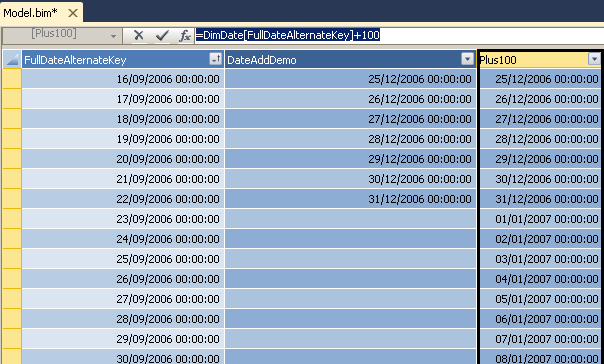
In fact there was an even easier way to do what I wanted to do, since the DAX date type is really a decimal value where the integer portion is the number of days – I could just add 100 to the date, as follows:

=DimDate[FullDateAlternateKey]+100

image

So, not a great discovery and certainly nothing that wasn’t known about before, but I thought it was worth mentioning because I’m sure other people (as here, for example) will fall into the same trap as me.

Seventh Blog Birthday

So here we are again, yet another blog birthday – the seventh anniversary of my first ever post on this blog and a chance to review 2011.

From a technical point of view this year has been dominated by learning SSAS 2012 Tabular. I’m right in the middle of writing a book about it with Marco and Alberto, and it’ll be published sometime in the first half of next year. As usual writing a book turns out to be ten times more effort than I’d originally planned but it is undoubtedly the best way of learning a new technology: however well you think you know a product, you always find gaps in your knowledge when you have to write about it. My opinion of Tabular continues to grow the more I use it and DAX so I’m feeling very positive about the future and I’m interested to see what the uptake of it will be like after RTM. I’m also very excited to see how Microsoft’s cloud-BI strategy pans out in the next year: products like Data Explorer suggest that Microsoft is serious about this area and, more importantly, coming up with innovative new solutions to its challenges rather than just producing cloud-hosted versions of the software we’ve already got. There are going to be a lot of cool blog posts to write in 2012…

Business-wise I’ve continued to spend more and more time running training courses and a few months ago launched my new training website Technitrain to market not only my SSAS and MDX courses but those run by other well-known SQL Server pros. Our first third-party course with Christian Bolton went well, and next year we’ve got several others booked in. You can see the full course catalogue here; I’d also like to point out the new, lower prices on Jeremy Kashel’s Master Data Services course and Andy Leonard’s SSIS course. Frankly £1248 for a full week of training, let alone from someone of the calibre of Andy Leonard, is a bargain… although I’d argue it only looks that way because we’re too used to the inflated prices of most traditional training companies. More course dates will be announced very soon.

As far as the SQL community goes, I’m very busy speaking at user groups and helping to run SQLBits. The two SQLBits conferences last year in Brighton and Liverpool were great successes, and I still can’t believe we had Steve Wozniak turn up to speak at Brighton; SQLBits 10, which will be running from the 29th-31st of March next year, is already looking like it will beat all previous records for attendance (we’ve got 582 registrations at the time of writing) and will be the biggest and best yet. Next month I’ll be speaking in the UK at the Southampton SQL Server User Group on January 11th, and on January 12th I’ll be speaking at the PASS BI Virtual Chapter so I hope to see some of you there.

Anyway, that’s enough of me going on – it’s time to get back to my writing. Happy New Year everyone!

BISM Normalizer

I’ve just come across a new, free utility for SSAS 2012 Tabular called BISM Normalizer:

http://visualstudiogallery.msdn.microsoft.com/5be8704f-3412-4048-bfb9-01a78f475c64

Basically it’s a tool that allows you to compare the metadata of two Tabular models and optionally copy parts of one model over to another. It’s very interesting because it addresses what I think is one of the big challenges encountered when bridging the gap between self-service and corporate BI: how can you take a bunch of independently-produced PowerPivot models and merge them into a single, coherent, Analysis Services Tabular model? Ultimately this is a problem that Microsoft is going to have to deal with itself in future versions of SSAS, along with the related problem of how parts of a ‘corporate’ Tabular model can be reused inside PowerPivot models (I’d like some form of object inheritance or ‘linked tables’, rather than have to copy data and rebuild metadata from scratch as we have to today).

Replacing Cell Security with Dimension Security

Cell security, as you probably know, is best avoided because of the impact it can have on query performance; dimension security is much easier to work with and its performance impact is much less. Luckily even when it seems as though cell security is the only option, in at least some scenarios with a bit of extra cube modelling work dimension security can still do the job. Here’s how…

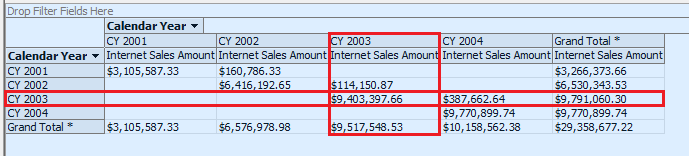
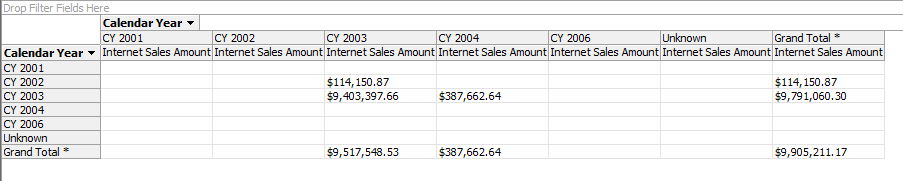
Let me give you an example that I worked on with a customer recently, translated to Adventure Works. The Internet Sales measure group in the Adventure Works cube contains three role-playing dimensions based on the Date dimension: Date (which represents the Order Date), Ship Date and Delivery Date. Let’s imagine that we want to implement dynamic security so that a user can only see data if either the Date or the Ship Date is in one particular year. For example if a user has access to the year 2003 they should be able to see data if the year on the Date dimension was 2003 or if the year on the Ship Date dimension was 2003, as shown in the cells highlighted in the following screenshot (note that the grand totals should also reflect only values from the two 2003 years as well, so on the last row below we should see a grand total of $387662.64 for the CY 2004 column):

image

How can dimension security be used to implement this? The trick is that it can’t without creating a new, hidden dimension to apply security to. To create this dimension, go to the DSV and create a new named query called DimSecurity with the following SQL:

select distinct OrderDateKey, ShipDateKey
, d.CalendarYear as OrderDateYear, s.CalendarYear as ShipDateYear
from
dbo.FactInternetSales inner join DimDate d
on OrderDateKey = d.DateKey
inner join DimDate s
on ShipDateKey = s.DateKey

This gets all the distinct combinations of order date and ship date from the fact table plus their related calendar years. Obviously this exact query might not be practical on a large fact table, but you get the idea – in order to apply dimension security to the range of cells we want, we need to create a new dimension designed so that its members can be mapped onto those cells.

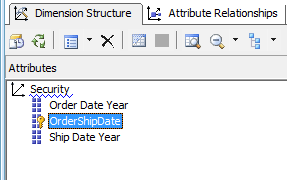
Next, create an SSAS dimension from this table as follows, with three attributes:

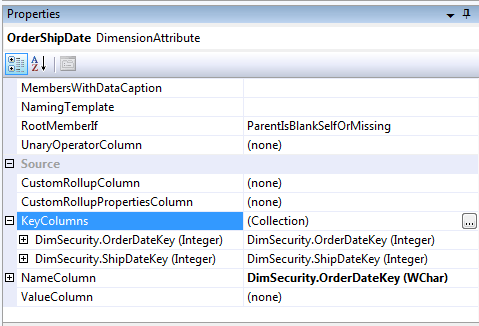
  • A key attribute called OrderShipDate that has a composite key based on the OrderDateKey and ShipDateKey columns. I used the OrderDateKey column as the name column, but that’s not too important because this dimension will be hidden anyway. This attribute represents the distinct combination of order date and ship date.

image

  • Two other attributes, Order Date Year and Ship Date Year, based on the OrderDateYear and ShipDateYear columns.

image

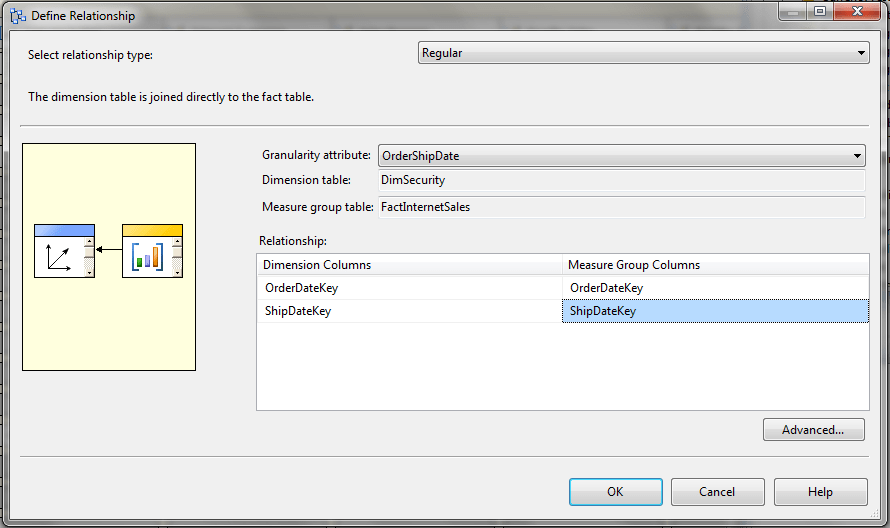
This new dimension should now be added to the Adventure Works cube and a relationship added with the Internet Sales measure group as follows:

image

You can now set this dimension’s Visible property to False in the Cube Structure tab of the Cube Editor.

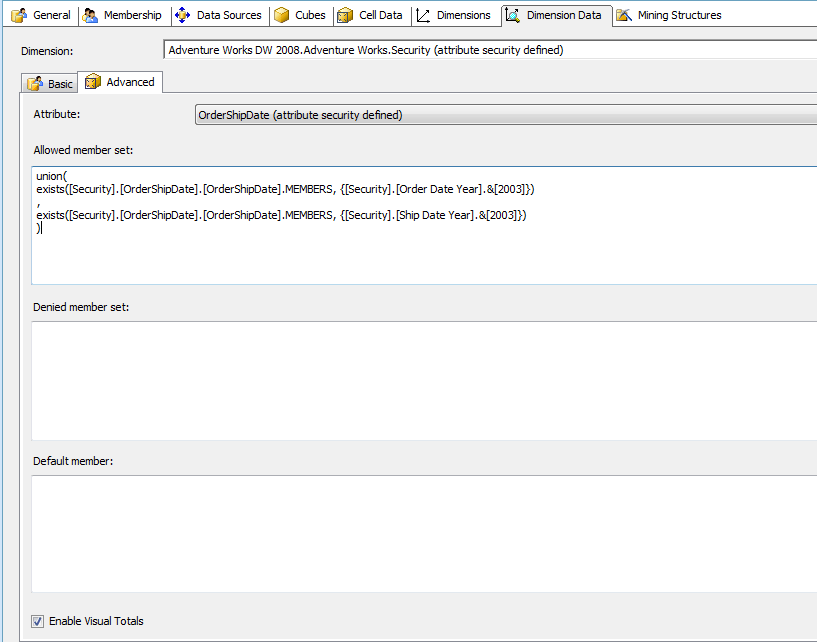
Then create a new role, grant it access to the Adventure Works cube, go to the Dimension Data tab, select the Security dimension and the OrderShipDate attribute and go to the Advanced tab. Then enter the following MDX in the Allowed Member Set box:

union(
exists([Security].[OrderShipDate].[OrderShipDate].MEMBERS, {[Security].[Order Date Year].&[2003]})
,
exists([Security].[OrderShipDate].[OrderShipDate].MEMBERS, {[Security].[Ship Date Year].&[2003]})
)

This grants access to all combinations of Order Date and Ship Date – all the members on the OrderShipDate hierarchy – that are either in the Order Date year 2003 or the Ship Date year 2003. Don’t forget to check the Enable Visual Totals box too.

image

Deploy then go to the cube browser and test the role. You should see the following results:

image

So we have the basic role working, but how can we make it dynamic? We don’t want to create a factless fact table that contains rows for every combination of Order Date and Ship Date because that could get very large very quickly; we only want to grant access at the year level.

Going back to the DSV, create a new named query called FactSecurity using the following SQL (inserting your own username as appropriate):

SELECT        ‘Mydomain\Myusername’ AS UName, 2003 AS CalendarYear

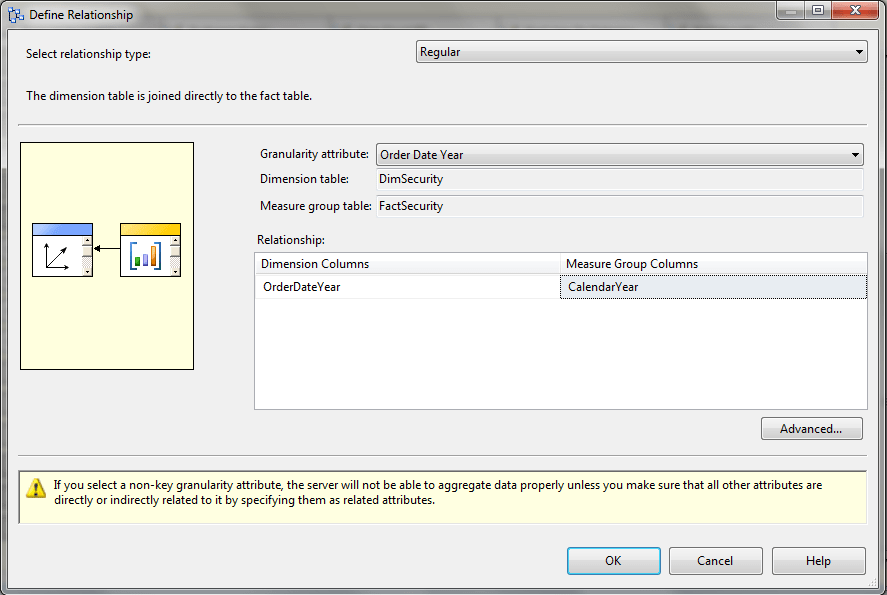
This will be our factless fact table that grants a user access to the year 2003. Then build a new dimension called User from the UName column to give you a dimension containing all your users, as you would in any normal dynamic security implementation; also build a new measure group in the Adventure Works cube from this table and give it a regular relationship with the User dimension and a regular relationship with the Security dimension at the OrderDateYear granularity:

image

Process, then go back to the role and change the MDX as follows:

union(
exists([Security].[OrderShipDate].[OrderShipDate].MEMBERS
, {nonempty([Security].[Order Date Year].[Order Date Year].MEMBERS
, (strtomember("[User].[Security User Name].&[" + Username() + "]", constrained)
, [Measures].[Fact Security Count]) )})
,
exists([Security].[OrderShipDate].[OrderShipDate].MEMBERS
, generate({nonempty([Security].[Order Date Year].[Order Date Year].MEMBERS
, (strtomember("[User].[Security User Name].&[" + Username() + "]", constrained)
, [Measures].[Fact Security Count]) )}
, {linkmember([Security].[Order Date Year].currentmember, [Security].[Ship Date Year])}
)
)
)

This is basically the same as the previous expression but it’s now dynamic and it now supports securing more than one year in the FactSecurity measure group for a single user. Let’s look at parts of this expression:

The following expression returns the set of members on the Order Date Year attribute of the Security dimension that the current user has access to:

nonempty([Security].[Order Date Year].[Order Date Year].MEMBERS
, (strtomember("[User].[Security User Name].&[" + Username() + "]", constrained)
, [Measures].[Fact Security Count]) )

We can use this directly in the first set passed into the Union function, but to find the equivalent Ship Date Years for each Order Date Year we need to use a combination of the Generate and LinkMember functions, as follows:

generate({nonempty([Security].[Order Date Year].[Order Date Year].MEMBERS
, (strtomember("[User].[Security User Name].&[" + Username() + "]", constrained)
, [Measures].[Fact Security Count]) )}
, {linkmember([Security].[Order Date Year].currentmember, [Security].[Ship Date Year])})

This takes the set returned by the previous expression and then loops over it using Generate; for each member in the set we then find the equivalent Ship Date Year by using LinkMember.

In summary, while this might seem quite complicated the MDX used for the equivalent cell security implementation would be equally bad and the performance overhead much worse, so this is a very useful technique to have in your toolkit. Thanks are due to Peter Holzner, Ramon Mueller, Beat Stuenzi, Chris Fleming and Adam Widi for working through all this with me the other week.

Bringing It All Together In The Cloud and Excel

A few things got released in the past week or so that I would normally have devoted a short blog post to; now I’ve finally made it onto Twitter I tend to just tweet about them instead, but I still think a blogging is the best way for me to get my thoughts together about what they actually mean. Let’s consider this ‘stuff’ in isolation first:

  • http://www.excelmashup.com/ went live. It’s a JavaScript API for the Excel Web App which is useful, but as Jamie Thomson notes here it’s not the API he and I have been asking for for a long time, alas.
  • The first CTP of Hadoop on Azure went live. Denny Lee’s blog post is probably the best place to start to learn about it; the video in the post is a very useful quick overview of what it does too. I noticed that it supports importing data from the Windows Azure Marketplace (what used to be called the Azure Datamarket).
  • The Azure Marketplace also got a speed upgrade, as Boyan Penev notes here. This is important because whenever I’d tried to use it in the past its appalling performance had stopped me doing anything interesting with it at all. This, plus the fact that you can now publish your own data there, turns what was something of a white elephant into what could be an integral part of the Microsoft cloud BI platform.
  • Version 2 of Google BigQuery went live, although it’s still in beta.
  • The CTP of Data Explorer got released, which of course I’ve blogged about already here and which Jamie blogged about here and here.
  • Microsoft announced Office 365 compliance with leading EU and US standards for data protection and security, which means less of those legal worries about whether you’re allowed to put all that interesting data you want to use for BI into the cloud.

From this it’s clear that Microsoft’s cloud BI platform is beginning to take shape, as are competing cloud BI platforms (if we assume that Google actually has a cloud BI strategy, and I think it has), and I think it’s fair to say Microsoft is well placed. There’s also yet more evidence, as if it was not blindingly obvious already, that Excel is at the heart of Microsoft’s BI strategy. Look at how data from Hadoop on Azure can be imported directly into Excel, and how this is flagged up as an important selling point, in the video on Denny’s blog post. However I think Microsoft needs to make even more of an effort to make everything Excel-like: now that it’s building a new BI platform from scratch it has a very rare opportunity to do this and to produce a truly coherent set of tools rather than the traditional grab-bag of technologies that make up the current Microsoft BI stack and which the cloud platform could also end up as too. Actually I’d like to go further and say that rather than have a bunch of separate cloud BI tools MS should make everything BI a feature of Excel, whether it be Excel on the desktop or Excel in the cloud. This might seem a controversial thing to say, but if MS is committed to true mass-market, self-service BI then Excel has to be the platform and MS needs to base its cloud BI strategy on it 100%.

Here are a couple of the things I’d like to see happen to achieve this:

  • Data Explorer’s expression language needs to be made consistent with Excel syntax, in the way that DAX is consistent with Excel syntax. While I like what Data Explorer can do at the moment I hate having to learn a new syntax and a new set of functions for each tool I use (think SSRS expressions, SSIS expressions, MDX and so on) and it makes me much less productive when I do. I want to use the same syntax to write formulas in my spreadsheet, calculations in DAX and calculations/transformations in Data Explorer too – after all, we want to do a lot of the same things in ETL and reporting like lookups, aggregation and pivoting.
  • Hadoop on Azure is an important tool to have, not least because Hadoop is already so widely used in the wider world so it adds some credibility to the MS BI stack, but I’d like to be able to control massively parallel calculations from inside Excel and not just consume the results of them there. I’m thinking something like DataScope or the way you can scale out Excel calculations on Windows HPC, maybe driven though a PowerPivot-like interface with calculations expressed in DAX, or Data Explorer (which links back to my last point, because if Data Explorer expressions were DAX it needn’t be an either/or choice). It could of course still be Hadoop at the back-end with a layer on top to make it consistent with Excel.
  • We desperately need a proper API for the Excel Web App (yes, here we go again…). An OData API for importing and exporting data from spreadsheets on the web is only the first step; in the long term I’d want the Excel Web App to have capabilities like Project Dirigible, so that Excel on the desktop could become a kind of client tool for a massively scalable Excel Server in the cloud (note that I didn’t say Excel Services, which is more like Excel-on-the-server than a real Excel Server in my opinion). I’d want to be able to store data in the cloud and automatically synchronise it with Excel on multiple desktops or elsewhere in the cloud. I’d also want to create Excel spreadsheets in the cloud that acted like functions (similar to Project Dirigible), where these functions could be called from other Excel spreadsheets which again could be on the desktop or be in the cloud.
  • We need Analysis Services in the cloud. We’ve known it’s been coming for a long time, but not what form it will take. Again, I’d like to see tight integration with Excel similar to how PowerPivot works on the client or tighter, where Analysis Services would not be a separate service but just be the functionality within Excel for manipulating tables of data for reporting purposes. I’d want Data Explorer to be able to create and load these tables.
  • We also need the full BI functionality of desktop Excel – pivot tables and cube formulas – in the Excel Web App. I would guess this is in the pipeline anyway since it’s a pretty obvious requirement if Microsoft’s cloud BI strategy is going to work. I also don’t see the point of Power View being a separate app – I’d like to see it become a data visualisation feature of Excel.
  • Finally, I’d like to see some way of tying all the data held in this gigantic data store together. You’d want to be able to search it, certainly, but also understand where it’s come from and what it actually represents. It sounds like maybe this is what Project Barcelona is aiming for

Coordinating the work of multiple teams at Microsoft in the way this would demand is a particularly thankless task, I know. But maybe, just maybe, someone senior (maybe a Technical Fellow like Amir…?) could pull off something this ambitious?

SQLBits X–Registration Now Open

This is just a quick post to tell you that registration for the 10th SQLBits conference, SQLBits X, is now open. It’s going to be taking place in London, UK, on March 29th-31st 2012. It’s also going to be the official launch event for SQL Server 2012 and 50% bigger than any previous SQLBits! For more details see:
http://sqlbits.com/

The agenda hasn’t been finalised (you’ll get to vote on the sessions you’d like to see first) but if you take a look at the sessions that have been submitted then you can see there’ll be a lot of famous SQL Server people presenting:
http://sqlbits.com/information/PublicSessions.aspx

I can also reveal we’re working on having several prominent members of the SSAS dev team come over too…

We’ve already had 254 registrations from people all round the UK, Europe and indeed the world in the two days since registration opened, so don’t leave your registration too late!

Using Google Docs, Data Explorer and PowerPivot for Questionnaires

You may have already seen that the labs release of Data Explorer is now publicly available; there’s a whole load of really useful resources available on the learning page too if you’re interested in finding out more about it.  I’ve been very lucky to have had early access to Data Explorer, and to test it out I put together a simple demo using the cloud service that shows off a typical use-case.

The first thing I did was to use Google Docs (just to have a cross-platform demo, not because I love Google in any way, honest…) to create a simple questionnaire using Google Forms. Before you read any further, please go and fill out the questionnaire I created here:

https://docs.google.com/spreadsheet/viewform?formkey=dDRnNi1fbkotLVd6Q0g4MmhsdFV2OGc6MQ

Don’t worry, there’s only three questions and it’s all non-personal data! For those of you reading offline, here’s a screenshot:

image

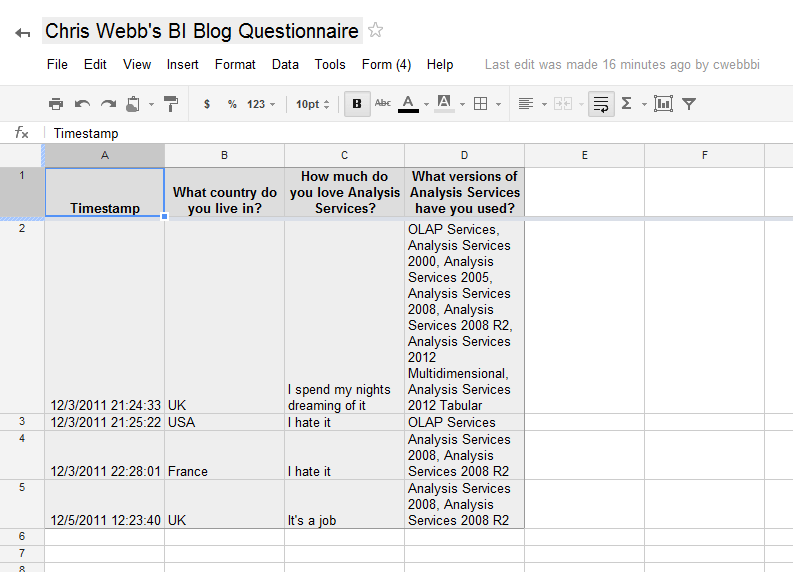
Now when you create a questionnaire like this in Google Forms, the responses get put inside a Google Docs spreadsheet. Here’s the link to the spreadsheet behind my questionnaire:

https://docs.google.com/spreadsheet/ccc?key=0Akv4XYo6s_Z2dDRnNi1fbkotLVd6Q0g4MmhsdFV2OGc

image

The good thing about Google Docs (unlike, ahem, the Excel Web App) is that it has an API. The contents of this sheet could easily be exported to a number of formats including csv, which means I could get the data into PowerPivot very easily. But there was a problem: the last question is multiple choice, and for the results of that question I got a comma-delimited list of values in a single cell in the spreadsheet (see the above screenshot) – which was not going to be very useful for analysis purposes. What I really wanted was all this data split out into separate columns, one column for each version and containing a boolean value to show if that version has been checked, so if I was going to analyse my responses by version I clearly needed to do some ETL work. I could do this with a calculated column inside PowerPivot of course, but the problem with this is that every time someone wanted to work with this data in a new PowerPivot model they’d have to repeat all this work, which is a pain, and clearly some users wouldn’t have the DAX skills to do this. The best thing to do would be to perform the ETL somewhere up in the cloud so everyone could benefit from it…

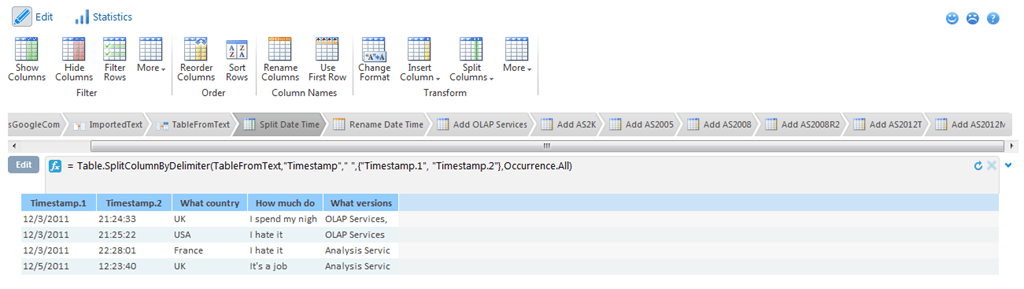
Enter Data Explorer. I created a simple mashup with the following steps:

  • Imported the data from the Google spreadsheet as a csv file
  • Cast that data as a table
  • Split the Timestamp column into two separate Date and Time columns
  • Added new columns to the table for each version of SSAS that contained the value True if that version had been checked in a particular response, False if not

image

Apart from the usual struggles that go with learning a new language, it was pretty straightforward and I was impressed with how easy it was to use. Here’s an example of an expression that adds a new column to show whether the respondent checked the “OLAP Services” box in the final question:

= Table.AddColumn(#"Rename Date Time", "Used OLAP Services", each if Text.Contains([#"What versions of Analysis Services have you used?"],"OLAP Services") then "True" else "False")

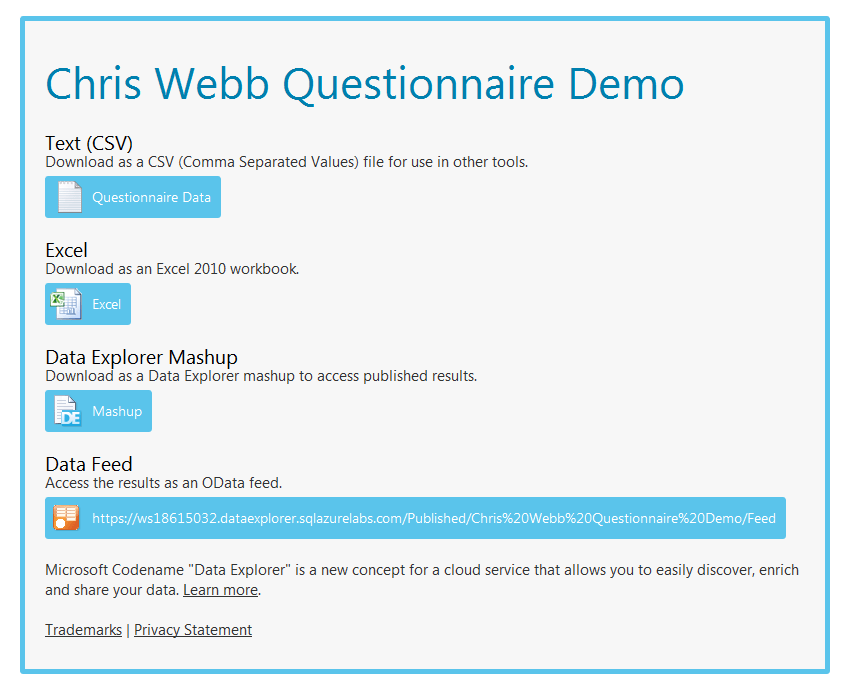
Finally, I published the output of the mashup publicly. This page contains all of the links to download the live data in various different formats:

https://ws18615032.dataexplorer.sqlazurelabs.com/Published/Chris%20Webb%20Questionnaire%20Demo

image

If you filled in the questionnaire you should be able to find your responses in there because it’s a live feed.

And you can of course import the data into PowerPivot now very easily, for example by using the OData feed from Data Explorer. First, start Excel, go into the PowerPivot window and click on the “From Data Feeds” button:

image

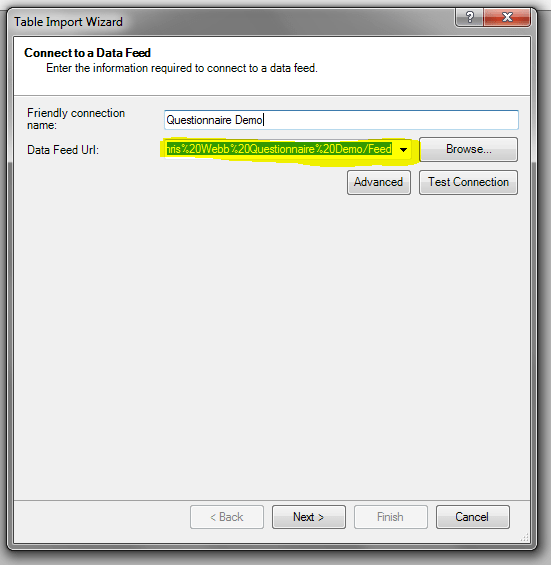
Then, in the wizard, enter the URL of the OData feed:

image

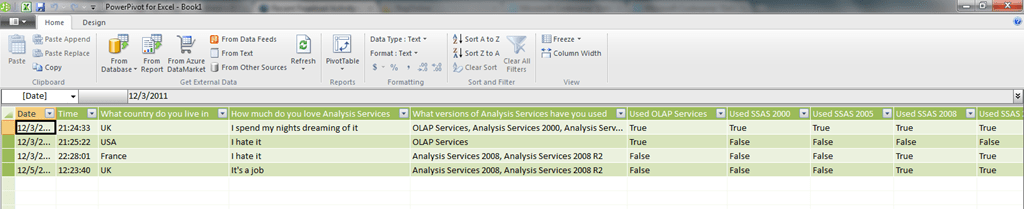
And you should then have no problems importing the data:

image

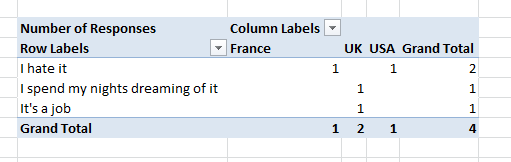
…and then analysing the responses. You will want to create a simple measure with a definition something like this to do so to count the number of responses:

=COUNTROWS(‘Questionnaire Data’)

image

I’m looking forward to seeing the data come flooding in!

This approach could easily be applied to scenarios such as analysing feedback from user group meetings or events, and what with the number of online data sources out there there must be hundreds of other potential applications as well. And given that anyone can now publish and sell data on the Windows Azure Marketplace there must be ways of making money from this too…