Why Corporate BI and Self-Service BI Are Both Necessary

I was chatting to a friend of mine a few days ago, and the conversation turned to Microsoft’s bizarre decision to make two big BI-related announcements (about Mobile BI and GeoFlow) at the Sharepoint Partner Conference and not at PASS the week before. I’d been content to write this off as an anomaly but he put it to me that it was significant: he thought it was yet more evidence that Microsoft is abandoning ‘corporate’ BI and that it is shifting its focus to self-service BI, so that BI is positioned as a feature of Office and not of SQL Server.

My first response was that this was a ridiculous idea, and that there was no way Microsoft would do something so eye-poppingly, mind-bogglingly stupid as to abandon corporate BI – after all, there’s a massive, well-established partner and customer community based around these tools. I personally don’t think it would ever happen and I don’t see any evidence of it happening. My friend then reminded me that the Proclarity acquisition was a great example of Microsoft making an eye-poppingly, mind-bogglingly stupid BI-related decision in the past and that it was perfectly capable of making another similar mistake in the future, especially when Office BI and SQL Server BI are fighting over territory. That forced me to come up with some better arguments about why Microsoft should not, and hopefully would not, ever abandon corporate, SQL Server BI in favour of an exclusively Office-BI approach. Some of these might seem blindingly obvious, and it might seem strange that I’m taking the time to even write them down, but conversations like this make me think that the time has come when corporate BI does need to justify its continued existence.

  • From a purely technical point-of-view, while most BI Pros have been convinced that the kind of self-service BI that PowerPivot and Excel 2013 enables is important, it’s never going to be a complete replacement for corporate BI. PowerPivot might be useful in scenarios where power users want to build their own models but the vast majority of users, even very sophisticated users, are not interested in or capable of doing this. This is where BI Pros and SSAS are still needed: centralised models (whether built in SSAS Tabular or Multidimensional) give users the ability to run ad hoc queries and build their own reports without needing to know how to model the data they use.
  • Even when self-service BI tools are used it’s widely accepted (even by Rob Collie) that you’ll only get good results if you have clean, well-modelled data – and that usually means some kind of data warehouse. Building a data warehouse is something that you need BI Pros for, and BI Pros need corporate BI tools like SSIS to do this. Self-service BI isn’t about power users working in isolation, it’s really about power users working more closely with BI Pros and sharing some of their workload.
  • Despite all the excitement around data visualisation and self-service, the majority of BI work is still about running scheduled, web-based or printed reports and sending them out to a large user base who don’t have the time or know-how to query an SSAS cube via a PivotTable, let alone build a PowerPivot model. Microsoft talks about bringing BI to the masses – well, this is what the masses want for their BI most of the time, however unsexy it might seem. This is of course what SSRS is great for and this is why SSRS is by far the most widely used of Microsoft’s corporate BI tools; you just can’t do the same things with Excel and Sharepoint yet.
  • Apart from the technical arguments about why corporate BI tools are still important, there’s another reason why Microsoft needs BI Pros: we’re their sales force. One of the ways in which Microsoft is completely different from most other technology companies is that it doesn’t have a large sales force of its own, and instead relies on partners to do its selling and implementation for it. To a certain extent Microsoft software sells itself and gets implemented by internal IT departments, but in a lot of cases, especially with BI, it still needs to be actively ‘sold’ to customers. The BI Partner community have, for the last ten years or so, been making a very good living out of selling and implementing Microsoft’s corporate BI tools but I don’t think they could make a similar amount of money from purely self-service BI projects. This is because selling and installing Office in general and Sharepoint in particular is something that BI partners don’t always have expertise in (there’s a whole different partner community for that), and if self-service BI is all about letting the power users do everything themselves then where is the opportunity to sell lots of consultancy and SQL Server licenses? If partners can’t make money doing this from Microsoft software they might instead turn to other BI vendors; I’ve seen some evidence of this happening recently. And then there’ll be nobody to tell the Microsoft BI story to customers, however compelling it might be.

These are just a few of the possible reasons why corporate BI is still necessary; I know there are many others and I’d be interested to hear what you have to say on the matter by leaving a comment. As I said, I think it’s important to rehearse these arguments to counter the impression that some people clearly have about Microsoft’s direction.

To be clear, I’m not saying that it should be an either/or choice between self-service/Office BI and corporate/SQL Server BI, I’m saying that both are important and necessary and both should and will get an equal share of Microsoft’s attention. Neither am I saying that I think Microsoft is abandoning corporate BI – it isn’t, in my opinion. I’m on record as being very excited about the new developments in Office 2013 and self-service but that doesn’t mean I’m anti-corporate BI, far from it – corporate BI is where I make my living, and if SSAS died I very much doubt I could make a living from PowerPivot or Excel instead. Probably the main reason I’m excited about Office 2013 is that it finally seems like we have a front-end story that’s as good as our back-end, corporate BI story, and the front-end has been the main weakness of Microsoft BI for much too long. If Microsoft went too far in the direction of self-service we would end up with the opposite problem: a great front-end and neglected corporate BI tools. I’m sure that won’t be the case though.

The PASS Business Analytics Conference is not the PASS Business Intelligence Conference!

The call for speakers for the new PASS Business Analytics Conference (to be held April 10-12 next year in Chicago) is now live here:
http://passbaconference.com/Speakers/CallForSpeakers.aspx

Since I think this conference is a Very Good Thing, and because I’ve been asked to help shape the agenda in an advisory capacity, I thought I’d do a little bit of promotion for it here.

The important thing I’d like to point out is that this is not just a SQL Server BI conference: it covers the whole SQL Server BI stack, certainly, but really it aims to cover any Microsoft technology that can be used for any kind of business analytics. Which other technologies actually get covered depends a lot of who submits sessions but there are no end of possibilities if you think about it. I’d love to see sessions on topics such as F#, Cloud Numerics, Sharepoint, NodeXL, GeoFlow and especially non-BI Excel topics such as array formulas, Solver and techniques like Monte Carlo simulation, for example.

This brings me to the point of this post. Obviously I’d like all the SQL Server BI Pros out there who read my blog to consider submitting a session (or if you can’t travel to Chicago, the call for speakers for SQLBits is open too) and to attend. However what I’d really like is if the SQL Server BI community could reach out to the wider Microsoft Business Analytics community to encourage them to submit sessions and to attend too. This is where your help is needed! Who do you think should be speaking at the PASS BA Conference? Do you know experts outside the realms of SQL Server BI who you could persuade to come? What topics do you think should be covered? If you’ve got any ideas or feedback, please leave a comment…

Excel GeoFlow

Here’s a second example of Microsoft making a big BI-related announcement at the Sharepoint Conference and not PASS, and so ensuring that no-one in the Microsoft SQL Server BI community hear about it… Excel GeoFlow. It’s an Excel addin for geospatial analysis that is closely integrated with PowerPivot and looks very similar to Layerscape, but properly integrated with Excel and PowerPivot. So far I’ve only found two sources of information on it – Jen Underwood’s blog post:
http://www.jenunderwood.com/blog.htm#PASSandSPC2012
…and, this very detailed post from Patrick Guimonet (in French), which has a lot of screenshots and several long videos shot during the Sharepoint Conference:
http://blogs.codes-sources.com/patricg/archive/2012/11/16/spc12-spc258-geoflow-for-excel-2013-a-new-way-of-exploring-geospatial-data-and-sharing-insights.aspx

If you thought maps in Power View were impressive, just check this out…

Send Your Feedback to the SSAS Dev Team!

It’s been all over Twitter today and Kasper has already blogged about it, but I thought this was worth a blog post from me all the same: the SSAS dev team are looking for feedback on features for the next version of SSAS and have put together a survey here:

http://www.instant.ly/s/Wqdj4mEAIAA

It’s not a list of features that will definitely be delivered, and doesn’t cover everything they’re thinking about, but it’s a way to help them prioritise some features over others and it should take no more than 20 minutes to complete, so why not help them out?

Storage Engine Caching, Measures and Measure Groups

I’ve been doing some performance tuning work on SSAS Multidimensional recently that has forced me to look at some behaviour I’ve observed several times but never properly understood: what happens with Storage Engine caching when you are querying multiple measures in the same measure group. Here are some of my findings (thanks, as always, to Akshai and Marius for answering my questions on this) although this post only deals with a few basic scenarios…

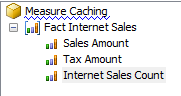
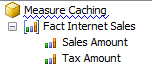
Consider the following, quite basic cube built from Adventure Works. It has one measure group and two measures, Sales Amount and Tax Amount, that both have AggregateFunction Sum:

image

And a single Date dimension with the following attribute relationships:

image

If I run a Profiler trace, clear the cache and run the following query twice:

SELECT
{[Measures].[Sales Amount]}
ON 0,
[Date].[Year].[Year].MEMBERS
ON 1
FROM
[Measure Caching]

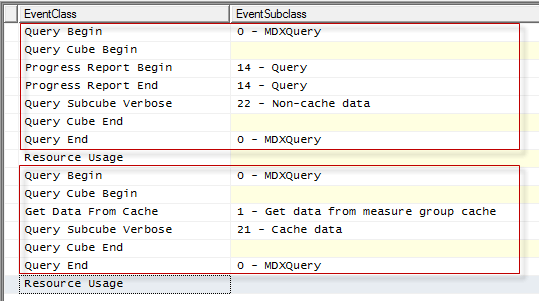
I can see that the first time the query is run it doesn’t hit cache, and the second time the query (in the second red box below) is run it does hit the Storage Engine cache:

image

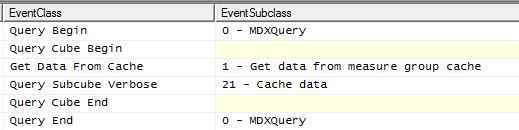
This is as you’d expect. However, now look what happens when I run a query that returns the Tax Amount measure – which was not in the original query – without clearing the cache:

SELECT
{[Measures].[Tax Amount]}
ON 0,
[Date].[Year].[Year].MEMBERS
ON 1
FROM
[Measure Caching]

image

Even though this is the first time I’ve queried for this measure since the cache was cleared, this query still hits the cache. This is because when you query for one measure, the SSAS Storage Engine will retrieve data for all other measures in the same measure group for the granularity of data requested.

This means that the AggregateFunction property of a measure is significant here. If I add a new measure to the cube with AggregateFunction set to Count instead of Sum:

image

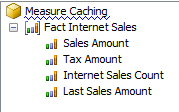
I see the same thing happening, ie queries that request data for Sales Amount or Tax Amount also warm the SE cache with values for Internet Sales Count. This is because a query for Internet Sales Count can be answered with data of the same granularity as a query for Sales Amount. However, if I add a new measure called Last Sales Amount with AggregateFunction Last Non-Empty:

image

And then clear the cache, and run the two following queries one after the other:

SELECT
{[Measures].[Sales Amount]}
ON 0,
[Date].[Year].[Year].MEMBERS
ON 1
FROM
[Measure Caching]

SELECT
{[Measures].[Last Sales Amount]}
ON 0,
[Date].[Year].[Year].MEMBERS
ON 1
FROM
[Measure Caching]

I can see that the first query does not warm the cache for the second query – both queries go to disk:

image

Why is this happening? Why isn’t the cache being used? A clue lies in the Query Subcube Verbose event for both queries. For the first query, using Sales Amount, the following granularity of data is being requested:

Dimension 0 [Date] (0 0 0 *)  [Date]:0  [Month]:0  [Quarter]:0  [Year]:*

Whereas the second query, using Last Sales Amount, requests this granularity:

Dimension 0 [Date] (* 0 0 *)  [Date]:*  [Month]:0  [Quarter]:0  [Year]:*

Both queries have Years on rows, but because Last Sales Amount is semi-additive the values returned are actually from the Year and Date granularity. So, when the semi-additive measure is requested in the second query the data needed for it is not in the Storage Engine cache: the first query requested data at the Year granularity only.

From what I understand, the logic governing this behaviour is very complex and the exact query plan that gets generated will depend on the overall design of your cube, the AggregateFunction used for the measures in each measure group (measures with measure expressions are going to work in a similar way to semi-additive measures) and the queries you’re running. However it is useful to be aware of this kind of behaviour when designing and tuning SSAS cubes. For example, it could be that if you have a large number of measures (tens or even a hundred) in the same measure group it could be worth splitting them out into separate measure groups to improve performance, especially if some measures are never queried together – you would need to test this thoroughly first though. This behaviour would also be relevant in cases where you’re designing aggregations manually.

First Screenshots of Microsoft’s Mobile BI Solution

It didn’t get much attention at the time (maybe because it was done at the Sharepoint Conference, and not at PASS… why?) but last week Microsoft gave the first public demos of its Mobile BI solution. I wasn’t there to see it but Just Blindbaek was and this morning he tweeted some pictures of what he saw. Some of you Microsoft BI enthusiasts might be interested to see them:
https://twitter.com/justblindbaek/status/270812739365130241/photo/1
https://twitter.com/justblindbaek/status/270785164689412096/photo/1

The codename seems to be ‘Project Helix’.

SQLBits XI Dates Announced

Yesterday, the SQLBits Committee (which I’m a member of) announced the dates for SQLBits XI: it will be taking place on May 2nd-4th 2013 at the East Midlands Conference Centre in Nottingham, UK. SQLBits is, of course, Europe’s biggest SQL Server conference and the second-biggest dedicated SQL Server conference in the world, and we attract attendees from all over the world. Apart from top-notch sessions from the world’s leading SQL Server experts you can also expect to have a lot of fun: at previous events attendees have had the chance to groove with the Beatles (well, ok, maybe they were just pretending to be the Beatles), play darts with professionals and hang out with Steve Wozniak (the real one). You should come! To find out more, keep an eye on http://sqlbits.com/

Analysing #SQLPASS Tweets using NodeXL

I’ve got a large backlog of serious technical blog posts to write but today, since I’m still recovering from my trip to the PASS Summit in Seattle last week, I couldn’t resist going back to my favourite data visualisation tool NodeXL and having some fun with it instead. Anyone that saw the keynotes last week will know that the future of BI is all about analysing data from Twitter – forget about that dull old sales or financial data you used to use on your BI project – and so, inspired by Sam Vanga’s blog post from today on that same topic I decided to take a look at some Twitter data myself.

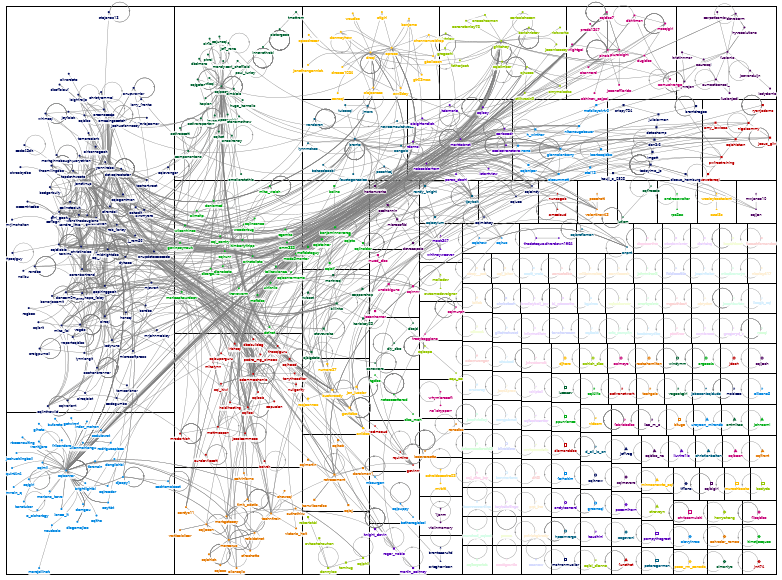
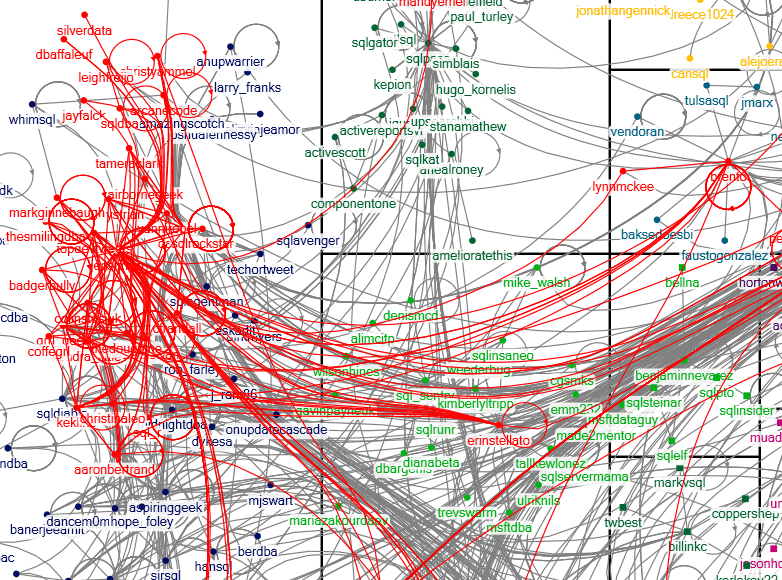
In NodeXL I imported 1757 tweets from 515 different people that included the #sqlpass hashtag from the 8th of November when Twitter activity at the conference was at its peak (I couldn’t import any more than that – I assume Twitter imposes a limit on the number of search results it returns). In basic terms, when NodeXL imports data from Twitter each Twitter handle becomes a point on a graph, and a line is drawn between two Twitter handles when they appear in a tweet together. I won’t bother going into any detail about how I built my graph because analysing the results is much more interesting, so I’ll just say that after playing around with the clustering, layout and grouping options here’s what I came up with:

image

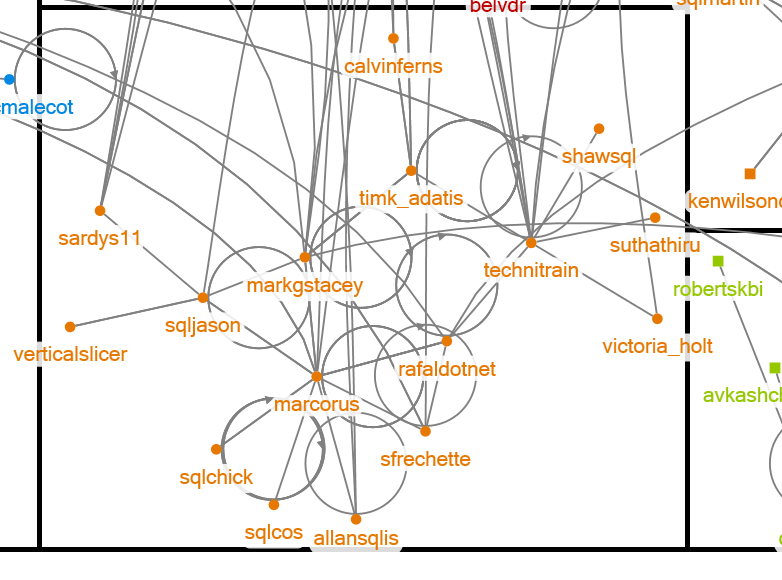
It looks very pretty from this distance but it’s not very useful if you can’t read the names, so I saved a much larger .png version of this image here for you to download and explore, and if you’ve got NodeXL you can download the original workbook here (don’t bother trying to open it in the Excel Web App). It’s fascinating to look at – even though the data comes from a very restricted time period the cliques in the SQL Server world emerge quite clearly. For example, here’s the group that the clustering algorithm has put me in  (I’m @Technitrain), which is at the bottom of the graph on the left-hand side:

image

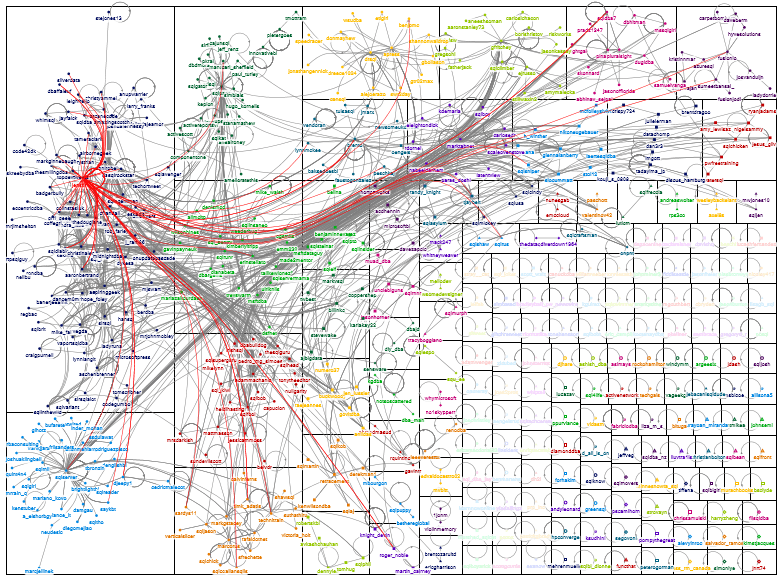
There’s a very strong UK/SQLBits presence there (@timk_adatis and @allansqlis for example), but also a strong BI presence as well with @marcorus and @markgstacey, which is pretty much what you’d expect. There are several other small groups like this, plus a large number of unconnected people in groups on their own in the bottom right-hand corner of the graph, but on the top left-hand side there’s a monster group containing a lot of well-known SQL Server personalities. Jen Stirrup (@jenstirrup) is right in the centre of it, partly because she’s one of the SQL Server Twitter royalty and partly because of her well-deserved PASSion award that day. Highlighting in red just the tweets that involved her shows at the very highest level how well-connected she is:

image

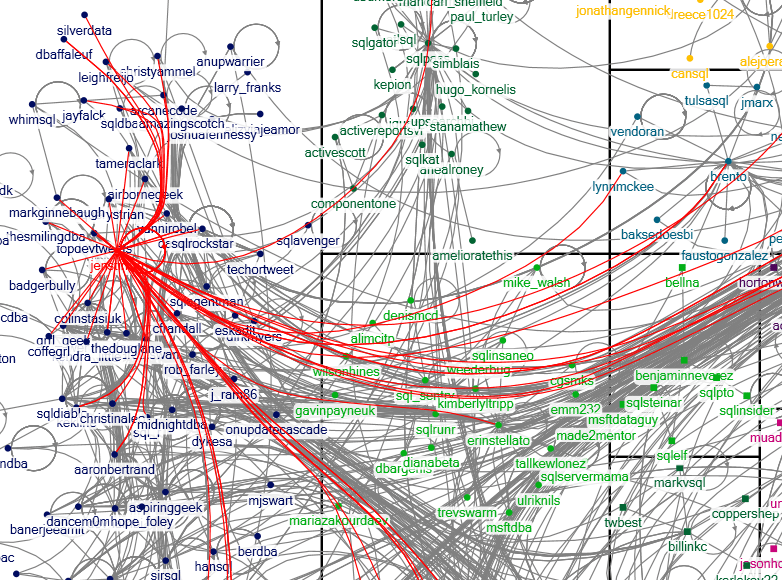
Keeping Jen selected and zooming in shows the people clustered together with Jen a bit better:

image

Selecting not only Jen’s tweets but also the tweets of the people who tweeted to her and also to each other (which is one of many useful features in NodeXL), highlights just how close the members of this group are:

image

This is clearly where the popular kids hang out…

Anyway, I hope this gives you an idea of the kind of thing that’s possible with NodeXL and Twitter data and inspires you to go and try it yourself. Hell, NodeXL is so much fun it might prove to the DBA crowd that BI doesn’t need to be boring!

Interesting Products I Saw At PASS

For my last post from the PASS Summit, I thought I’d mention briefly some of the products that caught my eye as I wandered round the exhibition hall this afternoon:

  • OData Connectors from RSSBus (http://www.rssbus.com/odata/), a series of web apps that expose OData feeds (which then of course can be consumed in PowerPivot and SSAS Tabular) from a variety of data sources including Quickbooks, Twitter and MS CRM. I’d seen the website a month or so ago, actually, but I found out today they are close to releasing OData connectors for Google, Google Docs, Facebook, Email and PowerShell as well, which open up some intriguing possibilities for PowerPivot analysis. I can imagine doing a really cool demo where I set up an email address, got the audience to email me, then hooked PowerPivot up to my inbox and analysed the emails as they came in!
  • XLCubed (http://www.xlcubed.com/) – well, ok, they aren’t exactly new to me but it was good to have a chat with the guys on the stand. It’s worth pointing out they have a good mobile BI story for SSAS users.
  • Kepion (http://www.kepion.com/) – I was quite impressed with the demos I saw of their products for building SSAS-based BI solutions, especially for (but not restricted to) financial planning; it looked pretty slick. 
  • Predixion (http://www.predixionsoftware.com/predixion/) – again, the company itself isn’t new to me but I got a demo of their new product, Predixion Enterprise Insight Developer Edition, which I’d been meaning to check out for a while. This is an immensely powerful free tool for doing data mining in Excel and it’s very closely integrated with PowerPivot too. Even if you don’t want to do complex stuff, it has some features that would be useful for regular PowerPivot users such as the ability to select a column in a PowerPivot table, analyse the data in it and then generate bandings which are then persisted in a new calculated column.

The Future of Data Explorer

You might have seen me mention Data Explorer a few times over the last year in various blog posts; it’s a self-service ETL tool that is currently available via SQL Azure labs:
http://www.microsoft.com/en-us/sqlazurelabs/labs/dataexplorer.aspx

I’ve had a lot of fun using it and so I was pleased, and quite surprised, to see the new version of it being used in the keynote here at the PASS Summit on day 2. After a few behind the scenes enquiries, I can now confirm that the ‘Data Explorer experience’ is currently being worked on by Microsoft, and a public preview of ‘the new Excel-based experiences’ (ie what was shown in the keynote) will be available pretty soon, hopefully. Which is very good news.