
Following on from my first, sold-out public MDX course earlier this year, I’ve now organised another run in London from October 26th to 28th. After feedback from the previous course I’ve now expanded it to three days to allow even more time for practical exercises; the cost is a very reasonable (I think) £749 plus VAT. For a full agenda and to register, see:
http://www.regonline.co.uk/Register/Checkin.aspx?EventID=988368&trackingcode=CWB
SQLBits 9 – Liverpool, 29th September-1st October 2011
In case you haven’t heard already, the dates and venue for the next SQLBits have been announced. SQLBits 9, “Query Across the Mersey”, will be taking place at the Adelphi Hotel in Liverpool from 29th September to 1st October. More details are, as always, available at http://www.sqlbits.com/.
Session submission is open, so if you’d like to speak (and we welcome new speakers) check out http://www.sqlbits.com/information/SessionSubmission.aspx. You can take a look at the sessions already submitted here: http://www.sqlbits.com/information/PublicSessions.aspx
Hope to see you there!
Denying access to an entire level with dimension security
Most of the time when you’re using dimension security with SSAS, you’re slicing a hierarchy vertically: for example, on a Geography dimension you only want members of a given role to see just one Country on your Country hierarchy. Occasionally, though, you may want to slice a hierarchy vertically: on a Time hierarchy, you may want to allow members of a role to drill down from Year to Month, but not see Date level data. This is also possible; a customer recently asked me how to do it so I thought I’d write up the explanation since it’s very easy to do.
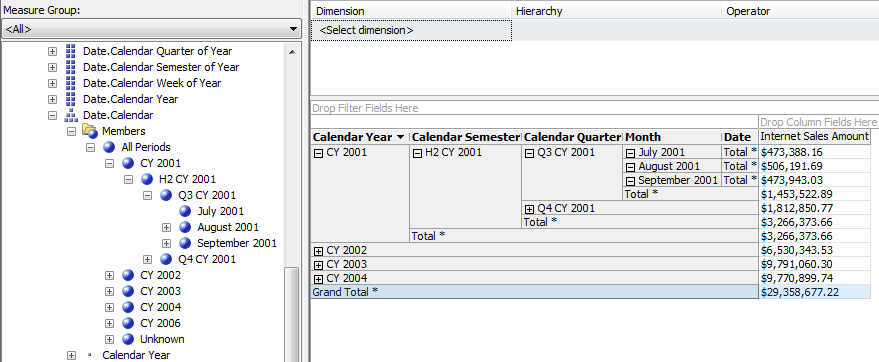
Let’s take the Calendar hierarchy on the Date dimension in Adventure Works as an example. When you browse it in the cube browser in BIDS, you’ll see a hierarchy that goes down from Year at the top to Date at the bottom:
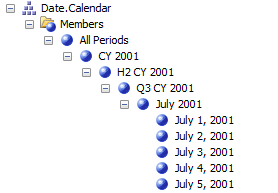
Now, let’s create a role that stops users from drilling down beyond Month. Create a new role and go to the Dimension Data tab, and select the Date dimension on the Adventure Works cube (note not the Date dimension further up the list – that’s the Database dimension, we want the Cube dimension, the instance of the Date dimension inside the cube):
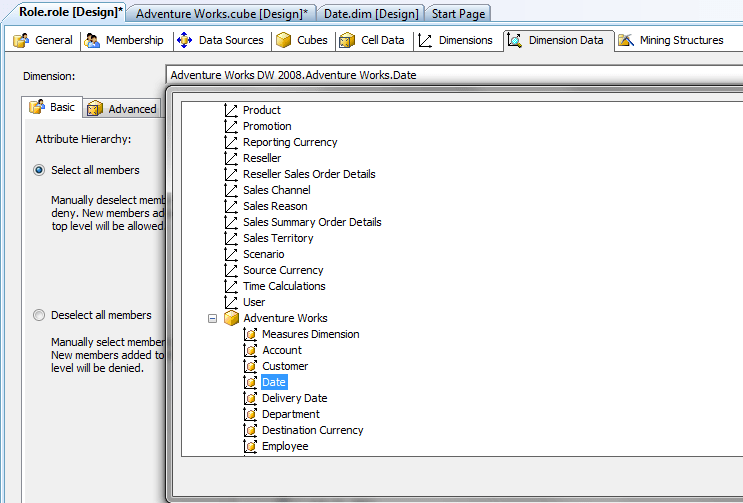
Then select the Date attribute hierarchy (the Date attribute hierarchy is used as the bottom level of the Calendar user hierarchy, so by securing it you’re also securing all user hierarchies that it appears in) and select the Deselect All Members radio button.
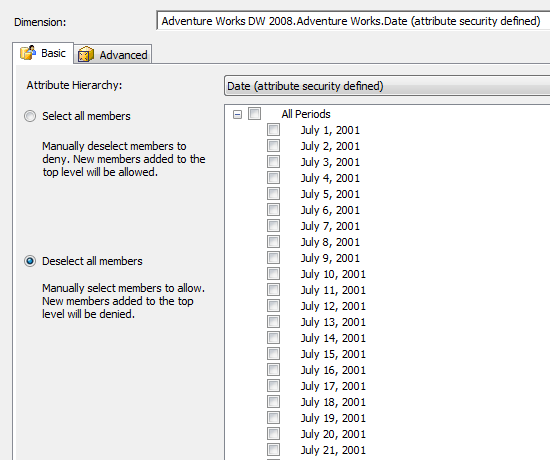
You can then deploy the project with this new role, and go to the Cube Browser tab, click the Change User button and select the new role in the Security Context dialog to test it:
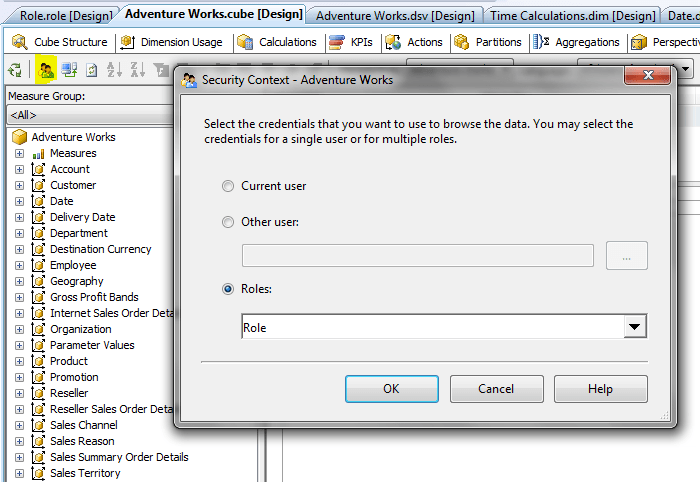
You will then be able to see that you can no longer drill down below the Month level in either the metadata pane or the pivot table:
Interactive Information Visualization
Here’s some more interesting work coming out of MS Research, this time in the area of data visualisation:
http://research.microsoft.com/en-us/news/headlines/visualizations-061511.aspx
I’d love the see this demo (why not record it and put it online somewhere…?) – iSketchVis in particular sounds cool. It’ll be interesting to see if any of this work makes it into Crescent any time in the future…
Excel DataScope
Jamie Thomson just tipped me off about something new and very interesting – one week after I had a moan about Microsoft doing nothing about Excel and the cloud, here comes Excel DataScope:
http://research.microsoft.com/en-us/projects/azure/datascope.aspx
Here’s the blurb from the site:
From the familiar interface of Microsoft Excel, Excel DataScope enables researchers to accelerate data-driven decision making. It offers data analytics, machine learning, and information visualization by using Windows Azure for data and compute-intensive tasks. Its powerful analysis techniques are applicable to any type of data, ranging from web analytics to survey, environmental, or social data.
There are yet more tantalising details in the video and the two pdfs here:
http://research.microsoft.com/apps/video/?id=149888
http://research.microsoft.com/en-us/projects/azure/exceldatascope_11_poster1.pdf
http://research.microsoft.com/en-us/projects/azure/exceldatascope_11_poster2.pdf
I’m currently trying to find out more about all this, but there’s clearly a ton of cool stuff here:
- You can use the Live Labs Pivot control for visualisation.
- It does data mining in the cloud. Is this the successor to the old data mining addin? The functionality is clearly the same.
- There’s a section on Map Reduce running on Windows Azure on one of the posters. Is this using Dryad?
Is this a first glimpse of a new cloud-based BI platform from Microsoft? Will SSAS in the cloud form part of it? Before we all get too excited (or at least I get too excited) it’s worth noting that this is coming from the eXtreme Computing Group and not the SQL Server team, it’s clearly aimed at scientific rather than business users, and is described as “an ongoing research and development project”, ie it is not a commercial product. The potential is obvious though, and I hope it becomes something significant.
BI User Group Evening–London, June 21st
It’s been ages since I’ve organised a BI evening for the UK SQL Server User Group which is bad, I know, but I’ve finally got round to setting one up. It will be at Hitachi Consulting’s offices in London on June 21st; we have one speaker confirmed, Jason Thomas, who’ll be covered the use of spatial data in SSRS, and there will be one other speaker from Hitachi but I don’t have the final details on the session yet.
To register, go to:
Hope to see you there!
The problem of power users, DAX and difficult calculations
Ever since PowerPivot got released, one of the questions I’ve heard debated over and over is whether it’s easy for non-IT users to learn and use DAX or not. The stock answer from Microsoft, and I agree with them here, is that anyone with basic Excel knowledge can do simple calculations in DAX, but the more complex calculations (for example, those which need to use the CALCULATE() function) are probably only ever going to be written and understood by BI professionals. Even then there’s plenty of evidence that even BI and Excel pros struggle to get to drips with DAX, as blog posts like this and this suggest. This is certainly good news for me professionally – my feeling is that for more complex calculations, DAX is just as difficult as MDX although conceptually very different, and I’ve made a good living out of MDX over the years – but on the other hand I can’t help but feel this represents a capitulation on the part of Microsoft. After all, isn’t the target PowerPivot user someone like an accountant, actuary or statistician, someone who is mathematically literate and capable of creating amazing complicated spreadsheets? How can self-service BI be truly self-service if certain calculations are still too difficult for anyone but IT professionals?
The problem isn’t the design of DAX as such, I think, but the fact that DAX exists as a language. I’m sure most BI professionals have seen worked examples of calculations created in Excel that we have been expected to translate into SQL/MDX/DAX/whatever tool we’re using. It’s the act of translating the calculation into an expression that’s the difficult thing: end-users understand how the calculations work, but they can’t speak the languages that BI tools use whereas IT people can. So why can’t our BI tools allow users to express calculations in a way that users can understand – as a series of spreadsheet formulas?
One example of a tool that tries to do this already is the Intelligencia OLAP control. However, what prompted these thoughts was Project Dirigible, a new web-based spreadsheet from the people who produce Resolver One. The key feature that sets it apart from regular spreadsheets-in-a-browser is that it’s designed for scenarios where users want to scale out complex calculations over a large number of CPUs in the cloud. What makes this possible is the run_worksheet() function, documented here, that allows you to write a calculation that overwrites the values in cells on another sheet, recalculates that sheet, and then retrieves values from cells in that sheet – as this blog post explains, it allows you to use a spreadsheet as a function from within another spreadsheet. I think this is a deeply cool idea.
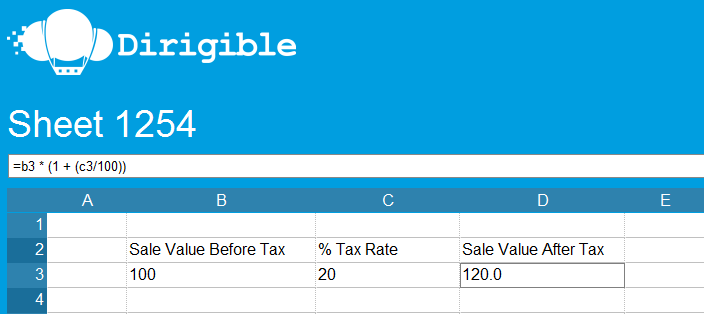
Here’s an extremely simple example of how it works. The following sheet:
http://www.projectdirigible.com/user/cwebb/sheet/1254/
Contains an example of a tax calculation, with three cells: the value before tax, the tax rate, and the value after tax.
This second sheet then contains a number of sales records and calls the first sheet to calculate the value for each of the sales after tax:
http://www.projectdirigible.com/user/cwebb/sheet/1264/
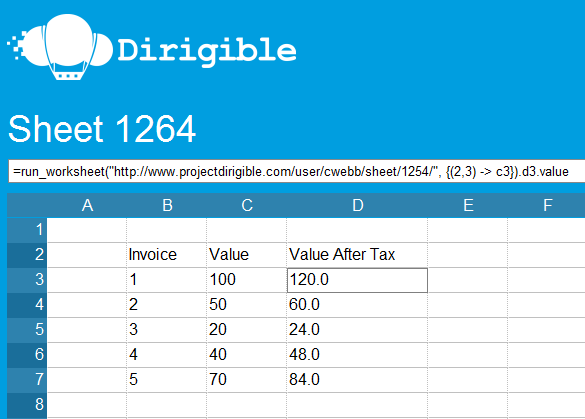
Here’s the function call I’ve used to calculate tax:
=run_worksheet("http://www.projectdirigible.com/user/cwebb/sheet/1254/", {(2,3) -> c3}).d3.value
Apart from the parallelism, there are a number of obviously good things that follow on from breaking calculations out into separate sheets like this: the ability to reuse this calculation across multiple spreadsheets; the ability to completely change how this calculation works at some later date so long as the parameters remain the same; and the fact that how it works is easily comprehensible to non-IT users because it’s expressed in a very visual way. I think this general approach could be applied to DAX: in DAX, most advanced calculations involve manipulating tables of data, filtering them and aggregating values in different columns. We have tables in Excel, these tables can be filtered, we can create calculated fields inside these tables and we can aggregate and perform other calculations on the data in these tables elsewhere in the sheet, so everything we can do in a DAX calculation can already be represented in the form of a spreadsheet. So if it was possible for the Vertipaq engine to understand calculations expressed in spreadsheet form instead of as DAX expressions then non-IT users would have far fewer limits on the kind of calculations they could write. Of course, this is a very big ‘if’ and there’s only a slim chance that something like this might happen – it would require a lot of development effort and probably that PowerPivot became a native feature of Excel.
Sadly, PowerPivot apart, I’m not sure I see much evidence of exciting new ideas in the world of Excel; indeed it seems like Excel has barely got to grips with the idea of the internet, let alone a truly cloud-based model. Why can’t all the interesting parallelisation stuff that’s possible with Windows HPC Server 2008 R2 be translated to the cloud and be made available to all Excel users? Why doesn’t the Excel Web App have any kind of API yet? I’m sure all the usual responses about lack of time and resources can be reused here, but I’d hate to see Excel become yet another IE6, neglected by MS while the competition innovates – and after all, isn’t Office one of Microsoft’s cash-cows, and so shouldn’t it be getting the kind of time and money lavished on stuff like Windows Phone and Bing…?
Analysis Services 2008 R2 Operations Guide published
Thomas Kejser has just announced the Analysis Services 2008 R2 Operations Guide has just been published, and you can get it here:
http://msdn.microsoft.com/en-us/library/hh226085.aspx
This is a must-read for anyone working with SSAS.
Session recordings from SQLBits 8 and TechEd
The recordings of the sessions from the SQLBits 8 in Brighton are just starting to come online, so if you’re bored at work you may want to take a look at them here:
http://sqlbits.com/content/
We’ve now got over 200 hours of great SQL Server video content on the site, including lots of SSAS-related sessions. It is, of course, free to view and download with no registration required…
Similarly, the session recordings for TechEd are also available, and again there’s lots of interesting BI content there too. If you’re interested in learning more about the future of SSAS and BISM, the session on “What’s new in Denali for Analysis Services and PowerPivot” is a must-see.
Pyramid Analytics, XLCubed & Panorama Necto
I’m always curious to see what’s new in the world of SSAS client tools, and quite frequently get demos of the latest client tools. Here’s a brief summary of three client tools I’ve looked at recently…
First of all, bioXL from Pyramid Analytics. It’s a very nice looking Silverlight cube browser with several very interesting features. However the main reason it’s worth looking at is that if you’re lumbered with a large Proclarity installation and no obvious way of migrating, it that it could be the answer to your prayers. It’s designed with existing Proclarity customers in mind: it’s almost completely backwards compatible with existing content stored in PAS, and equally importantly the UI follows the Proclarity look and feel very closely, so existing Proclarity users will feel very comfortable. In fact, looking at it you’d almost believe you were in a parallel universe where Microsoft hadn’t made that crazy decision to kill of Proclarity, and had instead rebuilt it in Silverlight.
Next up, XLCubed. Now I’ve blogged about them here before and Marco is also a fan, so I won’t say much, but I remain a big fan; version 6 has just been released and they’re working on mapping too. I think it’s one of the best tools on the market for the sophisticated SSAS user, both for Excel-based analysis and also for creating web dashboards.
Thirdly, Panorama Necto (see here as well), which aims to bring the benefits of social media to BI. The thinking here is that adoption of BI tools has stalled because the tools themselves are too difficult to use, and also that it’s too difficult to share and discuss the information found using these tools with a wider audience. Once you get past the fact that someone at Panorama really, really needs to read up on dashboard design (3D charts! Gauges! Arghhh, call Stephen Few!) before doing any more demos, I think they’re on to something. It’s still early days but I’ll be keeping an eye on how their functionality develops and integrates with different media.