Now() and the Formula Cache

You know, I have the nagging feeling I’ve already blogged about this before… but I can’t find the post (I have been at this for over four years now) so it’s worth mentioning again…

Anyway, a common question asked on the MSDN Forums is how to get the current date and then use it in an MDX calculation – see this thread for example. Usually this is because users want calculations that show the current day’s sales, or something similar. One answer is of course to use the Now() function, but what people don’t often realise is how this can impact the ability of Analysis Services to cache the values returned by calculated members, and therefore reduce overall query performance.

To understand why, let’s look at some examples in Adventure Works. First of all create a calculated measure on the AW cube as follows:

CREATE MEMBER CURRENTCUBE.[MEASURES].[NOWDEMO] AS NOW();

Then run the following query a few times:

SELECT {[Measures].[NOWDEMO]} ON 0
FROM [Adventure Works]

As you’d expect, every time you run this query you see the current date and time – and every time you run it, you see a different value. But, you may be thinking, doesn’t Analysis Services cache the results returned by calculated members? Well, yes it does in most cases, but for non-deterministic functions (functions that could return a different result every time they’re called) like Now() no caching takes place, because otherwise the value returned from the cache might be different from the one the function actually returns.

The next problem is that if you create any other calculated members that depend directly or indirectly on the value returned by a non-deterministic function, their values can’t be cached either. One problem I see sometimes in my consultancy work is poor query performance resulting from SSAS being unable to use the formula cache, because a large number of calculations have a dependency on a single calculation that uses the Now() function. Here’s a greatly simplified example of two calculated members, the first of which finds the current year and the second which returns a sales value for the year eight years before the current year:

CREATE MEMBER CURRENTCUBE.[MEASURES].[Current Year]
AS YEAR(vba!format(now(),"MM/dd/yyyy")),
VISIBLE = 1;

CREATE MEMBER CURRENTCUBE.[MEASURES].[SHOW SALES FOR A YEAR]
AS ([Measures].[Internet Sales Amount],
STRTOMEMBER("[Date].[Calendar Year].&[" + CSTR([MEASURES].[Current Year] – 8) + "]", CONSTRAINED));

If you run a query that references the second calculated measure on a cold cache, such as:

SELECT [MEASURES].[SHOW SALES FOR A YEAR] ON 0
FROM [Adventure Works]

The first time you run it you’ll see SSAS going to disk as you’d expect; the second time you run it though you’ll see SSAS is able to use the Storage Engine cache but not the Formula Engine cache, as this Profiler trace shows:

NowNoFE

The highlighted Get Data From Cache event shows data being retrieved from the measure group cache. This is ok and can be beneficial for query performance, but if the calculation we’re doing is very expensive then it can still mean our query takes a long time to run. We’ll only get an instant response on a warm cache if we can work out how to use the formula cache somehow.

Luckily, in most cases where Now() is used, we don’t usually want the system date and time, we just want the date. That means that we only want to return a different value when the date changes, once every 24 hours. What we can do therefore is use a named set to somehow store the value returned by Now(), for example like this rewrite of the calculation above:

CREATE MEMBER CURRENTCUBE.[MEASURES].[Current Year]
AS YEAR(vba!format(now(),"MM/dd/yyyy")),
VISIBLE = 1;

CREATE SET CURRENTCUBE.MYYEAR AS
{STRTOMEMBER("[Date].[Calendar Year].&[" + CSTR([MEASURES].[Current Year] – 8) + "]", CONSTRAINED)};

CREATE MEMBER CURRENTCUBE.[MEASURES].[SHOW SALES FOR A YEAR – CACHEABLE]
AS ([Measures].[Internet Sales Amount],
MYYEAR.ITEM(0));

What we’re doing here is finding the year we want, then finding the member for the year 8 years ago and storing that in a named set. Because a static named set is only evaluated once, when we do our final calculation we can reference the single member stored in the named set and therefore make use of the formula cache as the following Profiler trace shows:

NowWithFE

We’re now getting data from the flat cache, which is one part of the formula cache (which isn’t ideal either as it indicates the calculation is being evaluated in cell-by-cell mode, I guess because we’re referencing a named set inside it) and so warm-cache performance will be better.

The next problem is that when the date does change, we need to clear the cache. This can be accomplished easily by running an XMLA ClearCache command, perhaps direct from SQL Server agent, every night at midnight or whenever necessary.

To be honest, though, I’m not sure using the Now() function at all is a good thing – apart from the issues described here there are a lot of other risks involved, such as the time or date on your server being wrong or confusions with time zones and date formats. I think a better approach to the problem is to have an extra attribute in your Time dimension which flags up a date as ‘today’, and which changes every day. Of course this means you need to do some extra ETL and processing on your Time dimension as a result, but I think it’s a much cleaner solution than Now() and leads to much more efficient MDX calculations.

Implementing IE8 Web Slices in an SSRS Report

One of the new features that caught my eye in Internet Explorer 8 when it came out was Web Slices – the ability for a web developer to carve up a page into snippets that a user can then subscribe to. There’s a brief overview of what they are here:
http://www.microsoft.com/windows/internet-explorer/features/easier.aspx
and a really good guide to implementing them from Nick Belhomme here:
http://blog.nickbelhomme.com/web/webslice-for-ie8-tutorial_84

Being the BI geek that I am, my first thought was to see whether they could be used with Reporting Services reports. After all, wouldn’t it be cool if you could subscribe to a table in an SSRS report, or even better a cell within a table, and get notified when that value changed rather than have to keep pinging the report yourself? Of course it would! Here’s how to do it…

The challenge with implementing web slices is to get SSRS to generate the necessary html when it renders your report. I first looked at using the new rich formatting functionality that’s available in SSRS 2008 that Teo Lachev describes here, but it turns out that you can’t use this to create Web Slices because SSRS doesn’t support the necessary attributes (see here for details – at least I assume this is why, because I couldn’t get it to work). The only way I could get it to work was to render the report as XML and then use an XSLT file to give me complete control over the HTML that SSRS generates. I won’t go into too much detail about how this works; once again, Teo has an excellent explanation in his book “Applied Microsoft SQL Server 2008 Reporting Services” (reviewed here – it’s an excellent book) on pages 263-265. To be honest this isn’t a satisfying approach for me because it involves a lot more effort to get the report looking the way you want, and of course you have to have control over how the report is rendered. However, it still makes for a fun proof-of-concept 🙂

The first thing I did was create a simple SSRS report in BIDS that brought back values for Internet Sales broken down by country:

image

I then rendered the report to XML, took a look at the XML generated, and created a simple XSLT file that would generate a HTML report from that XML. I then added the XSLT file to my project and associated my report with it using the report object’s DataTransform property, so that it was always used when the report was rendered to XML. I was then able to deploy the project and, by using URL access to the report get it to render to XML and get the result treated as html, was able to see the following in IE8:

IE8Webslices

Here’s an example SSRS URL that does this:
http://myserver/reportserver?/Webslices/WebsliceDemo&rs:Command=Render
&rs:Format=XML&rc:MIMEType=text/html&rc:FileExtension=htm

Then I went back to BIDS and altered the XSLT file to add the necessary tags for a Web Slice around the main table. When I went back to IE and reopened the report after deployment I could see two new things. First, the Web Slice button appeared in the IE toolbar:

webslicetoolbar

And when I moved the mouse over the table in the report, it was highlighted with a green box as a Web Slice:

webslicehighlight

I could then click on either to subscribe to the Web Slice and have it added to my favourites. This then meant I could see the contents of the table in my Favourites bar whenever I wanted:

websliceshow

And whenever the data changes (you can control how often IE polls the original web page in the Web Slice’s properties, and also in the definition of the Web Slice itself) the text in the Favourites bar turns bold:

image

So there you are. Even with the limitations that having to render to XML imposes I can think of a few useful applications of this approach… maybe I’ll test them out in a future blog entry. Let me know if you have any ideas!

One last thing: I think it would great (and involve relatively little dev work) if SSRS supported the creation of Web Slices out of the box. If you agree, please vote:
https://connect.microsoft.com/SQLServer/feedback/ViewFeedback.aspx?FeedbackID=443857

You can download my proof-of-concept SSRS project here:

http://cid-7b84b0f2c239489a.skydrive.live.com/embedrowdetail.aspx/Public/Webslices.zip

DataWarehouse Explorer

Continuing my occasional series of SSAS client tool reviews, here’s another contender in the post-Proclarity power-user market: DataWarehouse Explorer, from Dutch company CNS International.

DWE is a standalone, ‘rich client’ application that gives you a lot more functionality than you get in Excel pivot tables and as such is competing in the same market that Proclarity Desktop Professional used to dominate and which is still pretty crowded. There’s also a web-based portal that you can publish reports to (see here for full details on the architecture) but if you want to build queries you need to do it on your desktop.

So what’s it like? I liked it: it’s not got any flashy features that mark it out particularly, but it does everything it needs to do and it does so well. Probably the best thing is the UI – a nice Office 2007 look-and-feel and most importantly very clear and easy to use. As someone who has spent plenty of time working with Analysis Services over the last ten years or so, when I start using a new client tool I expect to be able to do what I want to do very easily: I know all the basic concepts of cubes, I know the Adventure Works cube, and I know the queries I want to run, so if I can’t work out how to do something then I lay the blame on the UI design. And if I can’t do something there’s not point expecting an end user to do it. In the case of DWE I had no problems at all and in many respects it’s much easier to use than something like Proclarity or Excel. Here’s a screenshot:

DWE

The filter dialog provides a good example of how they’ve got the UI right. Filtering is something that every worthwhile client tool needs to do, but it’s easy to make it confusing for the user especially when you’re applying multiple conditions. The DWE filter dialog is uncluttered, shows all the filters you’ve already set up, makes it easy to add new ones or delete existing ones, and has a number of nice touches like the way it automatically formats any numeric conditions you enter to match the format string of the measure you’re filtering on.

DWE Filter

Other features worth mentioning include:

  • It mimics Excel 2007’s in-cell data bars and conditional formatting very closely. I like those features in Excel and things like this make DWE very easy to pick up for Excel users.
  • There’s a ‘Notes’ pane where you can add text commenting on the query you’ve built.
  • In the slicer pane, you can search for hierarchies by name – useful when you’ve got a lot of hierarchies and dimensions:
    image
  • Similarly, the slicer pane can organise the hierarchies on slice according to which ones you’ve explicitly selected something on, ones where there is an implicit selection (for example because there’s no All Member or a specific Default Member has been set), and ones where there is no selection:
    image
  • There’s a ‘Cube Dictionary’ feature that allows you to look at the metadata of objects on the server, for example to check the aggregation method that a measure uses:
    image
  • The UI can be switched between English, Dutch, Portuguese and Spanish.
  • You can hide more difficult functionality by setting the ‘User Level’ option to ‘Basic’ or ‘Intermediate’ rather than the default of ‘Advanced’. Fewer buttons and options improves ease-of-use for new or less competent users.

Overall, then, a good product and one worth evaluating if you’re looking for a desktop-based SSAS client tool.

Madison CTP

The release of the first Madison CTP was announced on the Data Platform Insider blog earlier this week:
http://blogs.technet.com/dataplatforminsider/archive/2009/08/24/microsoft-ships-the-first-technology-preview-for-project-code-named-madison.aspx

It didn’t cause much interest in the blogosphere – probably because the CTP isn’t publicly available, and even if the likes of me could download it it’s not the kind of thing I could install on a VM on my laptop…

Anyway, the question I’ve always had about Madison was whether integration with Analysis Services in ROLAP mode was going to be a priority for the first release. I now have it on good authority that it will be, and it should mean that with SSAS + ROLAP + Madison we’ll be able to create multi-terabyte (or larger!) ROLAP cubes that are super-fast. The new in-memory (IMBI) storage mode that Gemini features, and which we can assume will be appearing in the next full release of Analysis Services, will certainly increase the scalability of Analysis Services beyond the terabyte or so of data that’s currently feasible but apparently Madison will be the answer for the really large volumes. I wonder if HOLAP is an option here too? MS will certainly need to do something about the rubbish SQL that SSAS generates for its ROLAP queries before it can get the best out of Madison though.

Oh, and if anyone out there is on the Madison CTP and wants someone to help out testing it with SSAS, I’d be happy to help!

SQLBits V: Registration Open!

Registration for SQLBits V, which will be taking place on November 19th/20th/21st in Newport in Wales, is now open. As always, full details and information on how to register are on the site:
http://www.sqlbits.com

It’s a three day event this time. Thursday November 19th will be a day of pre-conference seminars, as we had in Manchester, and I would like to point out that I’ll be running my ever-popular ‘Introduction to MDX’ course once again:
http://www.sqlbits.com/information/TrainingDay.aspx?seminar=Introduction%20to%20MDX 

Alternatively, you might be interested in attending Donald Farmer’s one-day seminar on Gemini and self-service BI:
http://www.sqlbits.com/information/TrainingDay.aspx?seminar=Self%20Service%20Business%20Intelligence%20–%20making%20it%20real
or one of the other seminars that are running.

Friday the 20th is a new departure for us: a multi-track day similar to the traditional SQLBits event, but with a distinct theme of 2008 and R2, and hand-picked speakers. You’ll have to pay for this (we couldn’t afford to run two free days unfortunately) but it’s very modestly-priced (£99 if you register before the end of September) and it will have a lot of exclusive content such as more sessions from Donald Farmer. Full details are here:
http://www.sqlbits.com/information/Friday.aspx

Saturday the 21st is the regular SQLBits, free-to-attend community day. You can register here:
https://www.regonline.com/SQLBitsV 

There’s a list of sessions already submitted here:
http://www.sqlbits.com/information/PublicSessions.aspx
Session submissions are still open and we really want more abstracts. Remember, we actively encourage people with no previous speaking experience to submit and we always make a point of including new names on the agenda, so if you’re thinking of submitting a session go for it! We’d also like to hear from anyone who’s interested in sponsoring what is now the largest SQL Server-related conference in Europe:
http://www.sqlbits.com/information/Sponsorship.aspx

Interesting Gemini links

I thought I’d do a quick round-up on some of the interesting links that I’ve found concerning Gemini:

Swiss SQL Server Saturday, Zurich, September 19th

I’m doing a lot of speaking this autumn. The first event I’m going to is the first-ever Swiss SQL Saturday, which will be taking place in Zurich on September the 19th. You can find out more about it here:
http://www.sqlsaturday.ch/

It’s a free-to-attend event in the well-known SQL Saturday model and there’s a very strong line-up of speakers; credit is due to Charley Hanania for organising it. I’ll be doing a session on cache-warming strategies for SSAS 2008 – it should be a spur for me to update some of the work I did on this subject a while ago. Hopefully I’ll see some of you there!

Gemini First Thoughts

So after almost a year of hype I’ve finally got my hands on the first CTP of Gemini! I’m currently on holiday (and yes, I take my laptop on holiday, though at least my wife does too so we’re as bad as each other) but I couldn’t resist downloading it and taking a look. Here are my first impressions… and as soon as I get back home I’ll post something more detailed.

  • Installation was pretty straightforward on my Windows 7/Excel 2010 VM. Note that you do need Excel 2010 to use Gemini, as I suspected. The good thing is that it’s an addin rather than native Excel functionality so at least Gemini isn’t tied to the overall Office release cycle. I wonder how long it will be between versions?
  • When you open Excel, you see a new Gemini tab on the ribbon that looks like this:
    GeminiBar1
  • The ‘Load and Prepare Data’ button starts the fun and allows you to pull in data from various sources. You can either select entire tables or write your own SQL, and again I found it all very easy to do what I wanted; clearly a lot of what’s been learned from the SSAS cube design wizard has been applied here to make the process as smooth as possible. You can also get data from SSRS reports using the new Data Feed rendering functionality that Teo discusses here, paste data in from the clipboard, and link a Gemini table to an Excel table (this is what the Create Linked Table button in the screenshot above does).

    I can’t see much evidence yet of data preparation rather than just plain old loading, but that may well be yet to come. I’d also like to see a visual way of managing the relationships between tables, as you get with the SSAS DSV. Gemini doesn’t handle parent/child relationships yet; I’m not quite sure it handles other more complex types of relationship either but I need to play around a bit more here.

    GeminiLP

  • You can create new columns in each of the tables that you load into Gemini and define what values they display using the new Data Analysis eXpressions (DAX) language. Now MS are seemingly keen to stress that DAX isn’t an MDX replacement and I suppose that technically that’s true, but let’s be honest, it’s doing the same job as MDX but trying to be more Excel-user-friendly. I’ve not had a chance to go deep into it at all yet but it certainly looks like there’s a lot to learn here. In the meantime, from the tutorial doc I’ve got, here’s an example of a DAX calculation that returns an average of Sales per State:
    =CALCULATE(
    AVERAGE(‘Total Sales'[SalesAmount]), ALLEXCEPT(‘Total Sales’, ‘Total Sales'[State or Province])
    )
    Is this easier than MDX? Will power users be able to write this? I honestly don’t know yet.

    You can also control whether DAX calculations are updated automatically or only when you click the ‘Calculate’ button on the ribbon.

  • Once this is done it’s back to the worksheet to create a pivot table, and I’ve already blogged about what’s new here. Unlike a SSAS-bound pivot table, however, you can use any column as a measure and choose how it’s aggregated, using either a Sum, Count, Min, Max or Average (data type permitting). From playing around with it a bit more, the new Slicer functionality does really come in useful here. You can flip back and forth between the worksheet and the Gemini UI very easily.
    GeminiPT  
  • The ‘Options and Diagnostics’ button doesn’t do much except to allow you to dump the current state of the Gemini cube to a .trc trace file for further analysis. 

Overall, there aren’t actually any surprises really. As I said DAX is something I’m going to need to study in a lot more detail; I can’t really comment on the scalability and performance because I’m running on a VM and don’t have a large dataset handy; and I don’t have Sharepoint installed so I haven’t checked out the integration there (which in any case is NDA at the moment). So far I like it; it’s also less of a threat to the kind of SSAS/MDX work I do than I thought it might be – it’s a lot simpler than I’d expected and it doesn’t feel cube-like at all but much more relational.

Sets in the Where Clause and Autoexists

I don’t usually blog about bugs, but there are some cases where the dividing line between what’s a bug and what is ‘by design’ is unclear – and in these cases, a warning to the user community is always helpful. This is one of those cases…

The other day I was talking to Peder Ekstrand of DSPanel and he showed me a pair of queries running on SSAS 2008 that had him confused and to be honest, to me looked clearly buggy. I managed to repro the behaviour on Adventure Works on 2008 (friends reproed it on 2005 too) and here are my queries. The first one returns a single cell containing the value $14,477.34, the value of Internet Sales on July 1st 2001, as you’d expect:

select [Measures].[Internet Sales Amount] on 0,
[Date].[Fiscal].[All Periods] on 1
from [Adventure Works]
where([Date].[Calendar].[Date].&[20010701])

The second returns the value $29,358,677.22, the value of Internet Sales Amount across all time periods:

select [Measures].[Internet Sales Amount] on 0,
[Date].[Fiscal].[All Periods] on 1
from [Adventure Works]
where({[Date].[Calendar].[Date].&[20010701]})

…which, incidentally, is the same value you’d get if you removed the Where clause completely. To me this second result makes no sense whatsoever and is extremely confusing.

The only difference between the two queries is that in the first the Where clause contains a single member whereas in the second that member is enclosed in braces, meaning it is now a set containing a single member. The second important thing to point out is that we have members from different hierarchies on the Date dimension on Rows and in the Where clause, meaning that auto-exists is coming into play (see this section on BOL for an explanation of what auto-exists is).

The third thing to note is that it only happens in some cases. So for example when you run the following query which has a member from the Calendar Year hierarchy rather than the Date hierarchy in the set:

select [Measures].[Internet Sales Amount] on 0,
[Date].[Fiscal].[All Periods] on 1
from [Adventure Works]
where({[Date].[Calendar Year].&[2001]})

…you get the value you’d expect, ie the Internet Sales Amount for the Calendar Year 2001. This query, with a Fiscal Year on Rows, also returns the ‘correct’ result, $14,477.34:

select [Measures].[Internet Sales Amount] on 0,
[Date].[Fiscal Year].&[2002] on 1
from [Adventure Works]
where({[Date].[Calendar].[Date].&[20010701]})

Most interestingly, where the members on Rows and in the Where clause from the second query above are swapped, also returns the ‘correct’ result:

select [Measures].[Internet Sales Amount] on 0,
[Date].[Calendar].[Date].&[20010701] on 1
from [Adventure Works]
where({[Date].[Fiscal].[All Periods]})

What’s going on here? Clearly something to do with sets in the Where clause, auto-exists and probably attribute relationships, and something that could easily cause a lot of confusion for users and cube developers alike. I’ve been told that the current behaviour is ‘by design’ but the dev team are aware it’s less than ideal; it’s something to do with maintaining consistency with what happens when there are sets in the Where clause in some scenarios. But for this query:

select [Measures].[Internet Sales Amount] on 0,
[Date].[Fiscal].[All Periods] on 1
from [Adventure Works]
where({[Date].[Calendar].[Date].&[20010701], [Date].[Calendar].[Date].&[20010702]})

…I would expect to see the aggregate of Internet Sales Amount for July 1st and July 2nd 2001.

Anyway, here’s the Connect I opened about this:
https://connect.microsoft.com/SQLServer/feedback/ViewFeedback.aspx?FeedbackID=481774

The more votes it gets, the more likely it’ll get fixed!

Consuming SSRS data in Excel 2007

In a recent post I sketched out an idea I had about consuming data from SSRS data within Excel: rather than have SSRS push data to a new Excel spreadsheet by rendering a report to Excel, what I wanted to do was have an Excel spreadsheet that pulled data from an SSRS report. Why do this? Well, we all know that users always want their data in Excel rather than in any other format. If we take an SSRS report and render it to Excel, though, we have two problems:

  1. Getting an SSRS report to render to Excel in exactly the way you want, at best, involves a lot of trial-and-error. Even then when you render to Excel there’s a whole load of Excel functionality that SSRS doesn’t support – for example, you can’t get native SSRS to render a workbook containing a macro.
  2. Ever time we run the report, we are creating a new workbook. So once we’ve got the workbook there isn’t much point in doing any extra work in it, for example adding new formulas or charts, because it’s going to be superseded by a newer workbook the next time the report is run.

A tool like Softartisans Officewriter (which MS licensed a long time ago and possibly will appear with SSRS 2008 R2) will solve the first problem, because it allows you to upload an Excel workbook to SSRS which has data injected into it when the report is rendered, but not the second.

However, it is possible to pull data into Excel from SSRS and avoid these problems. Excel allows you to import data from an XML document into a worksheet; since you can get an SSRS report to render to an XML document, all you need to do is hook Excel directly up to the XML file generated by SSRS. Here’s how:

  • The key to getting this to work is URL access to SSRS reports. Excel needs to know where the XML file it’s importing is – and you can give it the URL of an SSRS report, and in that URL specify that the report should be rendered to XML. Let’s take the Sales Order Detail report from the Adventure Works sample reports as an example:
    image
    On my machine, the URL for rendering this report into XML is as follows:
    http://myserver/ReportServer?%2fAdventureWorks+2008+Sample+Reports%2fSales+Order+Detail+2008&rs:Command=Render&rs:Format=XML
    Paste this into your browser and you’ll automatically get an XML file downloaded; you can find more details on URL addressability of SSRS reports here.
  • Now, open Excel 2007, click on the big round Office button in the top left corner, click the Excel Options button and on the Popular tab check the box “Show Developer tab in the Ribbon”. This will ensure you can see the functionality within Excel we’re going to be working with.
  • Open the Developer tab and click on the Source button to open up the Source pane, then the XML Maps button in the Source pane, then Add on the XML Maps dialog, and then enter the URL of the SSRS report in the File Name box on the Select XML Source dialog and click Open.
    ExcelXML
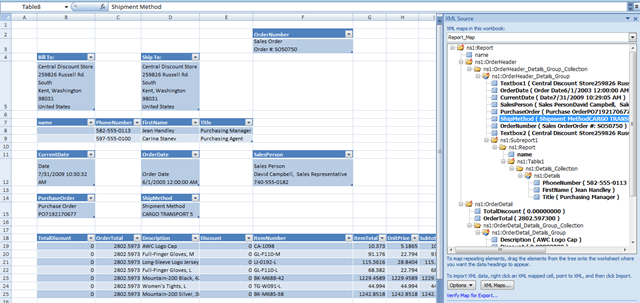
  • The XML Source dialog will now be populated. Click on a cell in the worksheet, and then right-click on a node in the XML Source pane and choose Map Element to map an element into a cell; click the Refresh Data button in the ribbon to actually bring the data into the worksheet. Here’s what the data from the report above looks like when mapped into Excel:
    image

The point is that every time you hit the Refresh Data button in Excel the report is rendered, so you’re able to build your worksheet around live data from SSRS. You can of course pull data directly from data sources like SQL Server in Excel, but the benefit of doing it this way is that you can take advantage of SSRS features like caching and snapshots, and of course as an end user you may not have direct access to the source database anyway.

There are some obvious drawbacks to this approach:

  • It’s a bit too technical to set up for end users, except perhaps for the most technical of Excel power-users.
  • There isn’t an easy way to pass parameters to reports. You can of course pass parameters through the URL, but it would be great if it could be done from a dropdown box in the worksheet. I think with a little bit of coding you could create an Excel addin that would do this though.
    UPDATE: actually, I think some of the techniques discussed in this post on the Excel blog could be useful here
  • Rendering to XML isn’t the ideal format for this task – although I’m not sure there is an ideal format (the RPL format used by Report Viewer might be a good candidate but it’s not documented). Books Online has details of how reports behave when rendered to XML; one obvious drawback is that there’s no pagination of data, so if you have a lot of data in your report spread across multiple pages, you’ll get all the data from every page in Excel.

That said, I think this this approach might be useful when you have a large number of existing Excel reports that currently have data copied-and-pasted into them manually and which can’t (for whatever reason) be turned into full SSRS reports.