Recursive Calculation Problems

If you read my blog, and you’re interested in MDX, you should be reading Jeffrey Wang’s blog too – he’s the new Mosha! Anyway, I’ve been having some performance problems with recursive calculations recently (in fact, I’ve had similar problems in the past as I say in the comments here) and Jeffrey has been helping me; he’s also written up his explanation in a blog post here:
http://mdxdax.blogspot.com/2011/04/performance-considerations-for.html
It does a great job of explaining why the performance of recursive calculations can vary so much, even if there is no good solution to these problems.

While I was wrestling with these problems, I had the idea that maybe the calculation could be rewritten in a non-recursive way using the techniques that Mosha detailed in this post, where the aggregation of values as a product can be achieved by turning it into a sum of logarithms. However the calculation was fairly complex and it was beyond my limited maths skills to do the rewrite. Luckily, I got introduced to a guy called Martin Cairns at SQLBits who is a maths whiz and very kindly helped me out, coming up with a great solution – he’s promised to write up his work in a new blog soon – but I then ran into the next problem that this approach relies on being able to find the base 10 logarithm of a number, and there’s no internal MDX function to do this. You can use the Excel Log10 function, as Mosha does, but when you do this you’re calling out to an external COM assembly which has two negative implications for performance:

  • It forces the formula engine into cell-by-cell mode
  • It also forces query scope caching, which means the formula engine can’t cache the result of the calculation for longer than the lifetime of the query

Hmm. An internal MDX version of the Log10 function would solve all these problems, so if you’d like to see one please vote on this Connect item:
https://connect.microsoft.com/SQLServer/feedback/details/666000/make-log10-an-internal-mdx-function

I don’t think it’s even possible to write a recursive calculation in DAX, but there is a DAX Log10 function so it seems like the log approach is going to be the only viable option here. I’ll explore that in a future post, perhaps…

olap4j version 1.0 released

Julian Hyde has just announced the release of version 1.0 of olap4j, the open Java API for OLAP, on his blog:
http://julianhyde.blogspot.com/2011/04/olap4j-version-10-released.html

I’ve been keeping an eye on this project not only because it allows Java developers to query Analysis Services via XMLA, but because I hope it will bring with it some good SSAS-compatible open source client tools. Out of the ones Julian mentions in his post, Saiku looks the most promising as far as I can see but when I have a spare moment I’d like to check them all out properly.

The only drawback with using olap4j with SSAS is that you need to configure http access to make it work, which is something most people don’t want to have to do. Hmm, wouldn’t it be nice if SSAS did this natively? Maybe it’s something that will come when we get SSAS in the cloud?

Excel 2010, Subselects, Named Sets and the Formula Cache

Continuing the theme of the Formula Cache, you may remember a post from a while ago where I showed how using a subselect in a query forced query scope – so that SSAS was unable to cache the results of calculations for more than the lifetime of a single query. Now this is very significant if you have calculations that take a long time to evaluate and you’re using Excel as a client tool, because Excel makes extensive use of subselects in its queries.

For example, if we take the calculation ‘ExpensiveCalc’ from that previous post and use it in an Excel pivot table as below:

image

We’ll find that every time we refresh the pivot table it’s painfully slow. This is because we’ve selected just one Year on columns and Excel has generated the following MDX query, using a subselect, as a result:

SELECT
NON EMPTY
Hierarchize({DrilldownLevel({[Date].[Calendar Year].[All Periods]},,,INCLUDE_CALC_MEMBERS)})
DIMENSION PROPERTIES PARENT_UNIQUE_NAME,HIERARCHY_UNIQUE_NAME
ON COLUMNS 
FROM (SELECT ({[Date].[Calendar Year].&[2001]}) ON COLUMNS 
FROM [Adventure Works])
WHERE ([Measures].[EXPENSIVECALC])
CELL PROPERTIES VALUE, FORMAT_STRING, LANGUAGE, BACK_COLOR, FORE_COLOR, FONT_FLAGS

Not good. Luckily, we can avoid this happening in Excel 2010 by using the new named set functionality. If you go to the Pivot Table Tools/Options tab on the ribbon, and select ‘Create Set Based On Column Items’ from the Fields, Items & Sets menu:

image

…and create a new named set:

image

You’ll find that the MDX generated by Excel changes and there’s no subselect:

SELECT
NON EMPTY
{[Year 2001]}
DIMENSION PROPERTIES PARENT_UNIQUE_NAME,HIERARCHY_UNIQUE_NAME ON COLUMNS 
FROM [Adventure Works]
WHERE ([Measures].[EXPENSIVECALC])
CELL PROPERTIES VALUE, FORMAT_STRING, LANGUAGE, BACK_COLOR, FORE_COLOR, FONT_FLAGS

This means that although the pivot table will be slow to refresh when you click OK, on subsequent refreshes you will be able to benefit from the FE cache and the refresh will be practically instant. This is a very useful trick if your users have a number of Excel pivot tables they open on a regular basis; it won’t cure all performance problems but it’ll cure some at least.

Dynamic Named Sets and the Formula Cache

Here’s another scenario where the Formula Engine is unable to cache the results of calculations longer than the lifetime of a query (thanks to Akshai Mirchandani yet again for pointing this one out): when you use dynamic named sets inside calculations. To see this happening add the following calculations to the MDX Script of the Adventure Works cube:

CREATE SET NONDYNAMICSET AS [Date].[Day Name].MEMBERS;

CREATE DYNAMIC SET DYNAMICSET AS [Date].[Day Name].MEMBERS;

CREATE MEMBER CURRENTCUBE.MEASURES.NONDYNAMICCALC AS COUNT(NONDYNAMICSET);

CREATE MEMBER CURRENTCUBE.MEASURES.DYNAMICCALC AS COUNT(DYNAMICSET);

Now, clear the cache and run the following query twice:

SELECT MEASURES.NONDYNAMICCALC ON 0
FROM [Adventure Works]

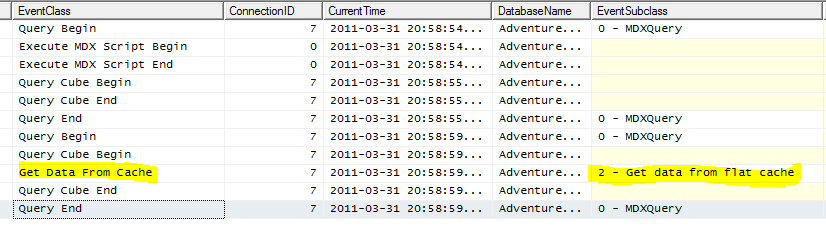
Looking in Profiler, you can see that on the second run the query was answered from the formula engine’s flat cache:

image

When you run the following query using the calculation that references the dynamic named set:

SELECT MEASURES.DYNAMICCALC ON 0
FROM [Adventure Works]

…you can see that the cache does not get hit:

image

So be careful if you ever need to use them inside your calculations! Personally I’ve never done much with dynamic named sets at all, but Mosha has of course blogged extensively about several ways they can be useful.

Last Ever Non Empty – a new, fast MDX approach

The last non empty semi-additive measure aggregation functionality in SSAS enterprise edition is very useful, but it doesn’t support one common business requirement: while it will give you the last non empty value within any given time period, it doesn’t handle the variation where you want to get the last non empty value of a measure from all preceding time periods (this is what I’m calling the ‘last ever non empty’ value). There are a number of business scenarios where you’d want to do this, for example finding the value of the last purchase a customer made, the last price you sold a product at, and the stock level of a product in a shop the last time a sales rep visited. Traditional MDX solutions to this problem have suffered from poor performance but in this blog post I’ll describe a new approach that performs much better; I think it will be very useful to a lot of people, and I’m quite proud of it!

Let’s take the following MDX query on Adventure Works as an example of the problem:

SELECT 
HEAD([Customer].[Customer].[Customer].MEMBERS, 10)
*
{[Measures].[Internet Sales Amount]} 
ON 0,
NON EMPTY
[Date].[Date].[Date].MEMBERS
ON 1
FROM [Adventure Works]

Here’s part of the results:

image

From this we can see that individual customers only bought from us once or twice. Now, for any date, let’s create a calculation that will find what the value of the last purchase by any given customer was, regardless of however long ago it was. Up until last week I’d have tackled this problem using a combination of the NonEmpty and Tail functions – for each customer and date, get the set of all preceding dates, find the dates which had values and find the value of the last date. Here’s the code:

WITH 
MEMBER MEASURES.[Last Sale Original] AS
TAIL(
NONEMPTY({NULL:[Date].[Date].CURRENTMEMBER} * [Measures].[Internet Sales Amount])
).ITEM(0)

SELECT 
HEAD([Customer].[Customer].[Customer].MEMBERS, 10)
*
{[Measures].[Internet Sales Amount],MEASURES.[Last Sale Original]} 
ON 0,
[Date].[Date].[Date].MEMBERS
ON 1
FROM [Adventure Works]

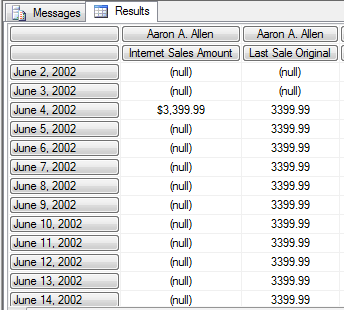
And here’s the part of the results dealing with the first customer, Aaron A. Allen:

image

On my laptop the query takes 14 seconds to run, and that’s with only 10 customers on columns (it executes in cell-by-cell mode, I think); in many real world scenarios this kind of performance isn’t acceptable and that was certainly the case with the customer I was working with last week. So I came up with the following new MDX that does the same thing much faster:

WITH 

MEMBER MEASURES.DAYSTODATE AS 
COUNT(NULL:[Date].[Date].CURRENTMEMBER)-1

MEMBER MEASURES.HADSALE AS 
IIF([Measures].[Internet Sales Amount]=0, NULL, MEASURES.DAYSTODATE)

MEMBER MEASURES.MAXDATE AS 
MAX(NULL:[Date].[Date].CURRENTMEMBER, MEASURES.HADSALE)

MEMBER MEASURES.LASTSALE AS
IIF(ISEMPTY(MEASURES.MAXDATE), NULL, 
([Measures].[Internet Sales Amount],
[Date].[Date].[Date].MEMBERS.ITEM(MEASURES.MAXDATE)))


SELECT 
HEAD([Customer].[Customer].[Customer].MEMBERS, 10)
*
{[Measures].[Internet Sales Amount]
,MEASURES.[LASTSALE]} 
ON 0,
[Date].[Date].[Date].MEMBERS
ON 1
FROM [Adventure Works]

On my laptop this query now executes in 3 seconds. Here’s what it’s doing:

  • First of all the DaysToDate measure returns the zero-based index of the current date within the set of all dates, so the first date in the time dimension would have index 0, the second 1 and so on. This could be replaced by a real measure to get slightly better performance but I left it as a calculated measure for the sake of clarity.
  • Next, the measure HadSale returns the index of the current date if it has a value and null otherwise.
  • Next, the measure MaxDate returns the maximum value of HadSale for the set of all dates from the beginning of time up to the current date. This will give us the index of the last date which had a value.
  • Finally we can take this index and, using the Item function, get the value of Internet Sales Amount for the last date that had a value.

If we want to take this approach and apply it to a server-based calculation, and make it work at all levels on the Date dimension, we need a slight variation. Again using the Adventure Works cube to illustrate, here’s what you need to do…

First of all, you need to create a new column in your fact table that contains only null values and use this as the basis of a new real (ie not calculated) measure, which should be called MaxDate. This should have the aggregation function Max.

image

You then need to add the following code to the MDX Script of the cube:

CREATE MEMBER CURRENTCUBE.MEASURES.DAYSTODATE AS 
COUNT(NULL:[Date].[Date].CURRENTMEMBER)-1
, VISIBLE=FALSE;

CREATE MEMBER CURRENTCUBE.MEASURES.HADSALE AS 
IIF([Measures].[Internet Sales Amount]=0, NULL, MEASURES.DAYSTODATE)
, VISIBLE=FALSE;

SCOPE(MEASURES.MAXDATE, [Date].[Date].[Date].MEMBERS); 
    THIS = MAX(NULL:[Date].[Date].CURRENTMEMBER, MEASURES.HADSALE);
END SCOPE;

CREATE MEMBER CURRENTCUBE.MEASURES.LASTSALE AS
IIF(ISEMPTY(MEASURES.MAXDATE), NULL, 
([Measures].[Internet Sales Amount],
[Date].[Date].[Date].MEMBERS.ITEM(MEASURES.MAXDATE)));

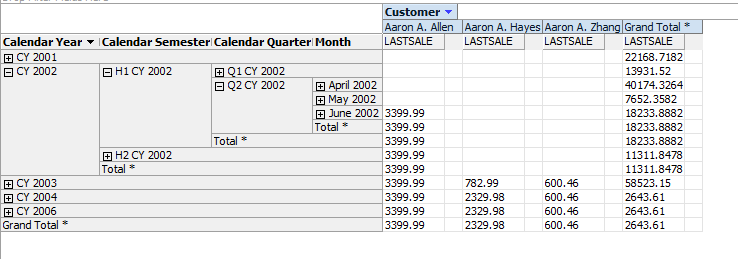
This does basically the same as the previous example only now MaxDate is a real measure instead of a calculated measure, and we’re using a scoped assignment to overwrite its value at the Date level. Above the Date level the default aggregation method of the MaxDate measure kicks in and we see the Max value of MaxDate for all dates in the current time period – which means at the month, quarter and year level we once again get the index of the last non empty date. Here’s what the result looks like in the cube browser:

image

Referencing Named Sets in Calculations

I was recently involved in an interesting discussion about the negative performance impact of referencing named sets inside calculated members. It’s an issue that’s dealt with in this topic in BOL, along with lots of other useful tips for things to avoid when writing MDX calculations:
http://msdn.microsoft.com/en-us/library/bb934106.aspx

Since I see lots of people making this mistake, though, I thought it was nonetheless worth a blog post; it’s certainly very easy to reproduce in Adventure Works. Take the following set of calculations:

CREATE SET ALLCUSTS AS [Customer].[Customer].[Customer].MEMBERS;

CREATE MEMBER CURRENTCUBE.MEASURES.TEST1 AS 
COUNT(
NONEMPTY(
[Customer].[Customer].[Customer].MEMBERS
, [Measures].[Internet Sales Amount])
);

CREATE MEMBER CURRENTCUBE.MEASURES.TEST2 AS 
COUNT(
NONEMPTY(
ALLCUSTS
, [Measures].[Internet Sales Amount])
);

CREATE MEMBER CURRENTCUBE.MEASURES.TEST3 AS 
SUM(
[Customer].[Customer].[Customer].MEMBERS
, [Measures].[Internet Sales Amount]);

CREATE MEMBER CURRENTCUBE.MEASURES.TEST4 AS 
SUM(
ALLCUSTS
, [Measures].[Internet Sales Amount]);


You’ll notice that TEST1 and TEST2 are essentially the same calculation, as are TEST3 and TEST4; the only difference between them is that the set expressions in TEST1 and TEST3 have been replaced by references to the named set ALLCUSTS in TEST2 and TEST4.

Now run the following query four times on a cold cache, each time putting a different calculated measure from the list above in the WHERE clause:

SELECT [Date].[Calendar Year].MEMBERS ON 0,
[Product].[Product].MEMBERS ON 1
FROM [Adventure Works]
WHERE(MEASURES.TEST1)
 

On my machine the query with TEST1 took 874ms to run; the query with TEST2 took 6302ms; the query with TEST3 took 234ms; and the query with TEST4 I ended up killing after a few minutes.

So, clearly, as the article says referencing a named set inside one of the MDX aggregation functions in a calculation is a Very Bad Thing for performance and something to be avoided at all costs. While it might seem an appealing thing to do for readability, the downsides are significant.

icCube 1.1 is now free

Late last year I blogged about icCube, a new OLAP server that supports MDX. I’ve just heard they’ve released version 1.1 and decided to give it away free (see here) – an interesting development for anyone looking at low-cost or open source OLAP tools, although I suspect it represents competition more for Mondrian than it does for SSAS. 

Kognitio Pablo

I see on Amyn Rajan’s blog there’s another platform supporting MDX: Kognitio WX2 with its new Pablo (a pun on ‘Picasso’, which was an old code name for SSAS?) product. More details here:

http://blogs.simba.com/simba_technologies_ceo_co/2011/02/kognitio-pablo-olap-without-an-actual-cube-mdx-query-language-access-from-excel-pivot-tables.html

It’s interesting that tight integration with Excel, which in theory should be Microsoft BI’s trump card, is being so widely copied by its competitors. After all this product, which sounds similar to what Teradata released last year and what’s possible with Oracle Exadata – all possible through the efforts of Simba – is what SSAS in ROLAP mode delivers on top of PDW and what BISM in passthrough mode will also deliver on PDW. Looking at it from another angle, however, it’s beneficial for Microsoft because all of these solutions provide more reasons for users to stick with Excel instead of moving to web-based or open source competitors, and they help cement Excel’s position as the BI client tool of choice; I suspect this is the more important consideration for Microsoft.

I wonder if other companies will be allowed to implement DAX as a query interface for their products, or be interested in doing so if it is possible?

Solving the ‘Events in Progress’ problem in MDX, Part 2–Role Playing Measure Groups

In my last post I described a simple solution to the ‘events in progress’ problem in SSAS and MDX, which nonetheless had one drawback: it involved loading all the data from the same fact table into two different measure groups in the same cube, which of course potentially doubles the amount of time taken to process the cube and its size on disk. I used the same technique in my recent post on improving the performance of currency conversion, and indeed it’s a technique that I have used in the past with several customers successfully; but it seems rather inelegant, so is there a way we can avoid doing it and only have one measure group? It doesn’t seem to be possible at first glance and I actually opened a Connect a while ago asking for this functionality (‘role playing measure groups’) to be implemented. I was having a good week last week, though, and at the same time as solving the ‘events in progress’ problem I also came up with a solution to this problem too…

Here’s what I did, using the ‘events in progress’ problem as an illustration:

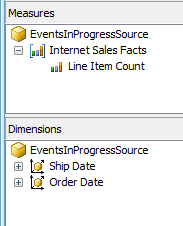
First of all, I created and processed a simple cube called ‘EventsInProgressSource’ with a single measure group, a single Count measure, and two dimensions, Order Date and Ship Date having regular relationships joining on the OrderDateKey and ShipDateKey columns on the fact table:

image

image

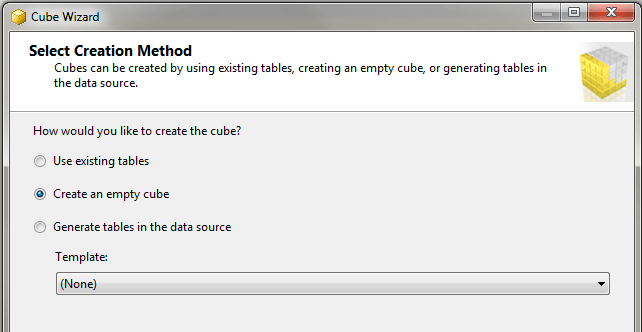
I then created a second cube, ‘EventsInProgress2’, using the ‘Create Empty Cube’ option in the Cube Wizard.

image

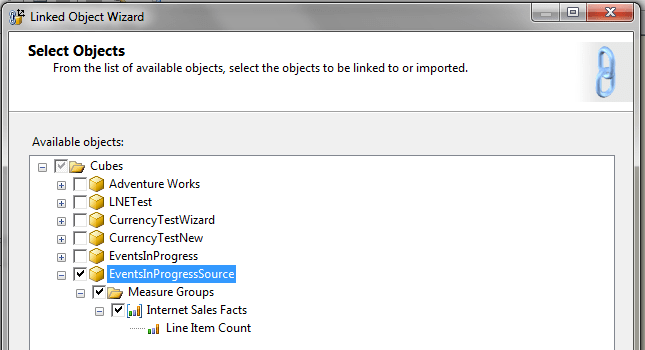
I then started the New Linked Object wizard and copied everything from the ‘EventsInProgressSource’ cube to the EventsInProgress2 cube:

image

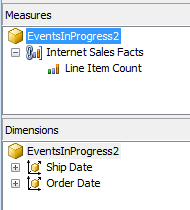
This resulted in a cube with one linked measure group and two linked dimensions:

image

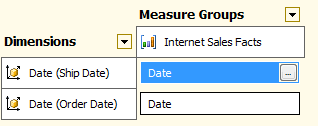
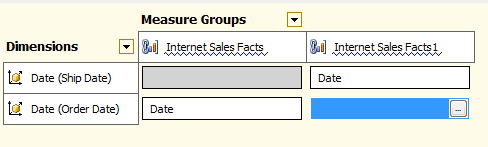
Now here’s the fun bit. I then deployed and processed the cube, closed BIDS and went to SQL Management Studio. There I scripted the Internet Sales Facts linked measure group in ‘EventsInProgress2’ to an XMLA Create statement, then manually updated the XMLA by adding a 1 to the end of the name and ID of the object itself and the Line Item Count measure, then executed the script against the ‘EventsInProgess2’ cube. This created a second, identical linked measure group – something that again BIDS doesn’t let you do. I then reopened BIDS and connected direct to the cube in online mode (I could also have reimported the project back into BIDS) and went to the Dimension Usage tab, then deleted the relationship between Ship Date and the first linked measure group and Order Date and the second linked measure group, leaving the relationships like this:

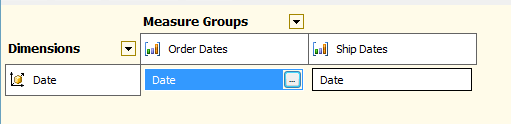
image

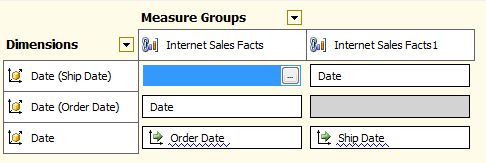
I then added another Date dimension and set up referenced relationships (which had to be non-materialised) with each measure group via the Date attributes of the Ship Date and Order Date dimensions:

image

With this done we have achieved out goal: we have the same fact table appearing twice in the same cube as two different measure groups with different dimensionality, but we are only processing the data once. The last step to solve the ‘events in progress’ problem is to add what is essentially the same MDX as last time to the cube:

CREATE MEMBER CURRENTCUBE.MEASURES.OrderedToDate AS
    SUM(NULL: [Date].[Calendar].CURRENTMEMBER,
        ([Measures].[Line Item Count]));

CREATE MEMBER CURRENTCUBE.MEASURES.ShippedToPrevDate AS
    SUM(NULL: [Date].[Calendar].CURRENTMEMBER.PREVMEMBER,
        ([Measures].[Line Item Count1]));

CREATE MEMBER CURRENTCUBE.MEASURES.OrderedNotShipped AS
MEASURES.OrderedToDate – MEASURES.ShippedToPrevDate;

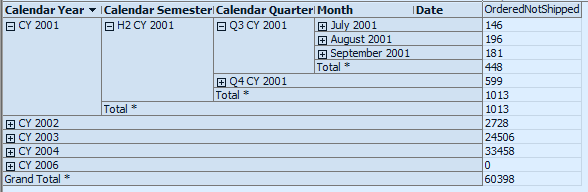
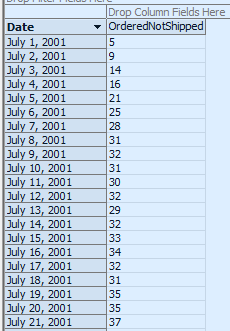
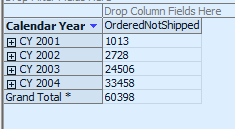
And we get the results we want out of the cube:

image

Now I haven’t tested this with anything other than the Adventure Works data, and there are some areas where I’d like to do more testing:

  • Non-materialised reference relationships don’t always perform that well. Materialised reference relationships aren’t allowed with linked measure groups though, so possibly using a m2m relationship to join the Date and Order Date/Ship Date dimensions might be an alternative
  • There are various ways of calculating a total-to-date in MDX and I’ve not spent any time working out if the version I’ve shown above is the most efficient.
  • There is going to be an overhead from querying a linked measure group rather than a regular measure group, and also probably an overhead from trying to query the same source measure group twice rather than two different measure groups, but I don’t know how significant it is.

If anyone out there does decide to try this at scale with their own data, please leave a comment and tell me about your experiences.

Solving the ‘Events in Progress’ problem in MDX, Part 1

I wouldn’t admit to this in public (at least to an audience of normal people, rather than the Microsoft BI geeks reading here), but over the last few years I’ve been obsessed with solving the ‘events in progress’ problem in SSAS and MDX. I’ve tackled it successfully in PowerPivot and DAX (see here and here) but I always thought there was no good solution in SSAS, and certainly other people such as Richard Tkachuk who have written about the same issue have come to a similar conclusion. But… last week I found one! So in this blog post I’ll outline the basic approach, and in my next post I’ll detail an even better, if more complex to implement, solution.

The two blog posts linked to above describe the problem in detail, but here’s a quick overview. In the Internet Sales fact table in Adventure Works each row represents a line item on an invoice, and each line item has an Order Date (ie the date the order was received) and a Ship Date (ie the date the order was shipped to the customer). We would like to know, on any given date, how many invoice line items are part of orders that have been received but not yet shipped and so have an Order Date before that date and a Ship Date after that date.

The key to being able to solve this problem in SSAS and MDX is how you model the data – my previous difficulties were down to the fact that I had the obvious way of modelling it, with one measure group having regular relationships with an Order Date and a Ship Date dimension, fixed in my head. However if you take a completely different approach the problem becomes easy, and here’s my worked solution using the Adventure Works data:

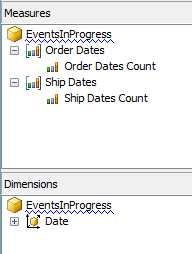
First of all I created my cube with one Date dimension and two measure groups, both based on the Internet Sales fact table:

image

image

Since BIDS won’t let you build two measure groups from the same table in the DSV, I created a named query that duplicated the Internet Sales fact table and used that as the basis of the Ship Dates measure group. Both the Order Dates Count and Ship Dates Count have AggregateFunction set to Count, and the Date dimension joins to Order Dates on OrderDateKey and Ship Dates on ShipDateKey.

I then created the following calculated measures:

CREATE MEMBER CURRENTCUBE.MEASURES.OrderedToDate AS
    SUM(NULL: [Date].[Calendar].CURRENTMEMBER,
        ([Measures].[Order Dates Count]));

CREATE MEMBER CURRENTCUBE.MEASURES.ShippedToPrevDate AS
    SUM(NULL: [Date].[Calendar].CURRENTMEMBER.PREVMEMBER,
        ([Measures].[Ship Dates Count]));

CREATE MEMBER CURRENTCUBE.MEASURES.OrderedNotShipped AS
MEASURES.OrderedToDate – MEASURES.ShippedToPrevDate;

The first, OrderedToDate, gives the total number of line items ordered from the beginning of time up to the current date. The second, ShippedToPrevDate, gives the number of line items shipped from the beginning of time up to the date before the current date. If we subtract the second value from the first, as we do in the OrderedNotShipped measure, we can therefore find the number of line items have been ordered but not yet shipped on any given date:

image

image

And it’s pretty fast, too – certainly much faster than any other solution I’ve tried before in SSAS. There’s one obvious catch here though, and that is that you have to load the data from your fact table into your cube twice. What if you have a really large fact table, and doubling your processing time and storage in this way is not an option? Well, stay tuned for part two when I’ll show you a trick to avoid doing this and only use one measure group.