
Often, when calling web services from Power BI or Power Query, you’ll need to generate some JSON inside your query to send to these web services. The M language makes this relatively easy to do with the Json.FromValue() function but there’s only one example of how to use it in the help so I though it might be useful to provide some worked examples of M data types and how Json.FromValue() turns them into JSON.
First, here’s a function – that I’ve called GetJson() for the examples here – that takes a parameter of any data type, passes it to Json.FromValue() and returns the JSON representation of the input as text:
(InputData) =>

let

JsonOutput = Json.FromValue(InputData),

OutputText = Text.FromBinary(JsonOutput)

in

OutputText
Now, let’s see what this returns for a variety of different data types.
Tables
Take the following table on an Excel worksheet, called “Sales”:
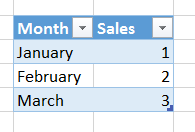
The following query loads the data from this table and calls the GetJson() function defined above:
let

Source = Excel.CurrentWorkbook(){[Name="Sales"]}[Content],

#"Changed Type" = Table.TransformColumnTypes(

Source,

{{"Month", type text}, {"Sales", Int64.Type}}),

Output = GetJson(#"Changed Type")

in

Output
It returns the following JSON, an array of objects:
[

{"Month":"January","Sales":1},

{"Month":"February","Sales":2},

{"Month":"March","Sales":3}

]
Lists
M language lists are represented as JSON arrays, so the following query:
GetJson({"Apples", "Oranges", "Pears"})…returns
["Apples","Oranges","Pears"]And
GetJson({{1,"Apples"}, {2,"Oranges"}, {3,"Pears"}})…returns
[[1,"Apples"],[2,"Oranges"],[3,"Pears"]]Records
M language records are represented as JSON objects, so:
GetJson([month="January", product="Apples", sales=1])…returns
{"month":"January","product":"Apples","sales":1}Nested Data
Finally, in M it’s possible to have nested data structures: lists of tables, records containing lists and so on. These can be converted to JSON too, so in the following example of a record containing a text value, a list and a table (created using #table):
GetJson(

[

product="Apples",

colours={"Red","Green"},

sales=

#table({"Month", "Sales"},

{

{"January", 1},

{"February", 2}

}

)

]

)
…the JSON output is:
{

"product":"Apples",

"colours":[

"Red",

"Green"

],

"sales":[

{

"Month":"January",

"Sales":1

},

{

"Month":"February",

"Sales":2

}

]

}
You can download the sample Excel 2016 workbook with these examples in here.
Hello, thanks a lot for the post.
I have issue with Russian characters. They are displayed as “\u041a\u043e\u0448\u043a\u0430”. I tried different encodings in both FromValue and FromBinary functions.
Screenshot:
https://yadi.sk/i/H90FkIlOmsG3KQ
Do you know what can help?
how to get JSON file from power bi..any updates in this
You can’t get JSON *from* Power BI
Hi Chris
I received this documentation a secret and a token from a software vendor. I not succeed in getting data through Power BI Desktop. Do you have a hint?
https://apidoc.onoffice.de/
Hello, Do you have a solution to be able to automatically export a power Bi table in a sharePoint list with Json?
No, sorry
For reference for others w/ same need: You can export PBI table to json file (local) using R script. A little tweaking and you can export directly to sharepoint. Example below and helpful references:
library(readr)
library(jsonlite)
x<-toJSON(dataset)
cat(x)
write_lines(x,"C:/temp/jsonTest6.json")
https://learn.microsoft.com/en-us/power-bi/connect-data/desktop-r-in-query-editor
https://community.fabric.microsoft.com/t5/Desktop/Export-data-in-JSON-format/m-p/176041#M76942
Hi Chris, thanks for your great input.
I am struggling where I’d like to ask if you may help me out.
I’m trying to build a nested JSON structure.
Specifically a list of objects, where the objects are different.
{
“field1”: “value1”,
“listContact”: [
{ “class:” : “telephone”,
“telephoneNumber:” “+44111222333”},
{ “class:” : “address”,
“city:” “Paddington”
“street:” “Elmstreet”
“houseNumber:” “13”}
]
}
how could I achieve this ?
Best regards and thanks in advance
Martin
Hi.
Interesting.
However i was trying to obtain something slightly différent. Instead of having all the data of the three lines in one cell, i want to have a cell for each line. Is there a way to do it? thanks
Hi Chris – Thanks very much for this awesome piece of code. This allows simple tables to be converted into JSON automatically. Power Query continues to amaze, but this code is especially good as JSON is the lingua franca of passing data around.